
CRE-240 · Lesson 8 of 12 · 25 min
Editing podcasts
Editing turns raw recordings into an episode that respects listeners' time. A light edit removes technical problems and the worst stumbles; a full edit reshapes conversations, tightens pacing and builds structure; a narrative edit constructs a story from hours of tape. The right level depends on the format, the audience and the time available. This lesson covers editing software and workflows, organizing sessions and tracks, the editing passes, content editing and pacing, removing filler without making speech unnatural, room tone and seamless edits, repairing problems with noise reduction and other tools, text-based editing and AI tools, adding music and sound with licensing in mind, and quality control before mixing.
Editing software
Podcast editors use digital audio workstations (DAWs) and dedicated podcast tools. Popular options include Audacity, free and open source; Reaper, inexpensive and highly customizable; Adobe Audition; Apple Logic Pro and GarageBand; Avid Pro Tools, the professional standard in many studios; Hindenburg, designed for radio and podcast storytelling; and text-based editors such as Descript and editing features in remote recording platforms, which let you edit audio by editing a transcript. Choose a tool that supports multitrack editing, non-destructive edits, clip gain, fades, effects plug-ins and loudness metering, and learn its keyboard shortcuts, which dramatically speed up editing.
Organizing the session
Before editing, organize the material: name files and tracks clearly (host, guest, music, ads), import each microphone onto its own track, align tracks from double-enders by matching a clap or a distinctive word, and save a template session with your usual tracks, routing, music and effects. Back up the raw recordings before you start. For long interviews, a quick listen at faster speed or a read of an automatic transcript, noting timestamps of strong moments and problem areas, helps plan the edit.
Editing passes
Experienced editors work in passes, from large decisions to small details:
- Structural pass: decide what stays and what goes. Cut tangents, repetition, weak sections and pre-recording chatter; move segments if the structure benefits; identify the cold open.
- Content pass: tighten answers and transitions within each section, remove false starts and restarts, and shorten long pauses.
- Detail pass: remove distracting filler, breaths, mouth noises and crosstalk where needed, and smooth every edit.
- Sound pass: clean up noise, balance levels, add music and effects.
- Review pass: listen to the whole episode from start to finish, ideally after a break, as a listener would.
Working in this order avoids wasting time polishing sections that are later cut.
Content editing and pacing
The most valuable editing decisions are about content. Ask of every section: does this serve the listener? Common cuts include long warm-up chat before the real conversation begins, repeated explanations, tangents that do not pay off, inside references, and segments where energy sags. Tighten long questions and answers while preserving meaning (Lesson 6). Pacing in audio depends on rhythm: a mix of faster exchanges and slower, reflective moments keeps listeners engaged, while uniform pacing becomes monotonous. Many interview shows cut 20 to 40 % of the raw recording; heavily produced shows cut more. A useful benchmark is to keep an edited episode at the length the content deserves, not the length of the recording.
Worked problem
Planning cuts to a target length
A raw interview runs 78 minutes. The target episode is 50 to 55 minutes, including a 1-minute intro, a 2-minute midroll and a 1-minute outro. How much of the raw conversation must be cut?
Show solution
- Conversation allowed: 52.5 − (1 + 2 + 1) = 48.5 minutes, taking the middle of the target range.
- Cut needed: 78 − 48.5 = 29.5 minutes, about 38 % of the raw recording.
- Start with structural cuts (warm-up, tangents, repetition) before tightening details.
Answer: About 29.5 minutes, roughly 38 % of the raw conversation, mostly through structural cuts.
Filler, breaths and naturalness
Speech naturally contains filler words such as "um", "uh", "like" and "you know", false starts and breaths. Removing every one can make speakers sound robotic and rushed, and listeners perceive over-edited speech as unnatural. A balanced approach removes filler that distracts or clusters, keeps enough natural rhythm and breath for speech to sound human, shortens rather than removes breaths, and leaves the occasional hesitation that conveys thought or emotion. Pauses can be shortened, but not so much that answers run together. Some shows deliberately keep a light touch to preserve authenticity; others, such as educational shows, edit more tightly. Ask guests whether they mind light editing of filler, and be consistent across speakers so that one person does not sound more polished than another.
Room tone and seamless edits
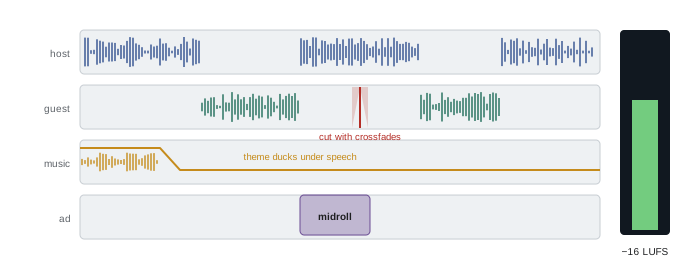
Every edit risks a click, a sudden change in background sound or an unnatural jump in tone. Seamless editing techniques include cutting at zero crossings or applying very short fades of a few milliseconds at each edit to prevent clicks; crossfading between clips; cutting on consonants or breaths rather than in the middle of vowels; matching the pitch and energy of the speech before and after the cut; and filling gaps with room tone, a recording of the room's background sound with no one speaking, so that the background does not drop out to silence. Recording 20 to 30 seconds of room tone at each session (Lesson 5) makes this possible. Listen back to each edit in context, not just in isolation.
Repairing problems
Audio repair tools can rescue imperfect recordings, though they cannot fully fix poor recording practice:
- Noise reduction removes steady background noise by learning a noise profile from a section of silence; use moderate settings, since aggressive reduction creates watery, metallic artifacts.
- De-clickers and mouth de-click tools remove lip smacks and clicks.
- De-essers reduce harsh "s" and "sh" sounds.
- De-reverb tools reduce room echo, with limits.
- Hum removal filters remove electrical hum at 60 Hz in North America (50 Hz elsewhere) and its harmonics.
- Spectral editors show audio as a frequency picture, allowing removal of isolated sounds such as a cough, a phone buzz or a chair squeak.
- AI voice enhancement tools can isolate voices and transform poor recordings dramatically, but may change the character of a voice or introduce artifacts; compare carefully and avoid applying them to only one speaker in a conversation if it makes voices mismatch.
| Problem | Tool | Caution |
|---|---|---|
| Steady hiss or fan noise | Noise reduction | Watery artifacts if too strong |
| Electrical hum | Notch filters at 60 Hz and harmonics | Use 50 Hz outside North America |
| Lip smacks | Mouth de-click | Can dull consonants |
| Harsh sibilance | De-esser | Lisping effect if overused |
| Room echo | De-reverb | Limited; prevent at source |
| Isolated cough or buzz | Spectral repair | Time-consuming |
Text-based editing and AI tools
Text-based editing tools transcribe recordings and let you edit the audio by deleting or moving words in the transcript, which is fast for content editing and particularly useful for people who think in words rather than waveforms. Many tools also detect filler words, shorten pauses automatically, generate summaries and show notes, and create clips. Some offer synthetic voice features that generate new words in a speaker's voice to fix mistakes. These features save time but need care: automatic filler removal can produce choppy speech; transcripts contain errors, especially with names and technical terms; and generating words a person did not say, even to fix a slip, raises serious ethical issues and should only be done with the speaker's explicit consent, if at all. Always listen to the final audio rather than trusting the transcript view.
Music, sound and licensing
Music and sound effects add identity and polish, but they must be licensed. Using commercial songs without permission can lead to takedowns from platforms, claims and legal liability, and podcast use is not covered by the licenses that let people play music in a café or on the radio.
In the United States, using recorded music in a podcast generally requires permission for both the composition and the sound recording, rights held by publishers and record labels; performing rights organizations such as ASCAP and BMI and the collective SoundExchange administer certain rights but do not license typical podcast use of commercial music. Fair use may allow short excerpts for commentary, criticism or news reporting, judged case by case on four factors, but rarely covers theme or background music.
Safe options include royalty-free and subscription music libraries whose licenses explicitly cover podcasts and their video versions; music commissioned from a composer with a written license; Creative Commons music with licenses that permit your use, with attribution as required; and music you create. Keep records of every license. The same applies to sound effects and archival clips.
Quality control
Before mixing and mastering (Lesson 9), check the edit: listen to the whole episode at normal speed on headphones; confirm that no edits are audible, no sections were accidentally duplicated or deleted, and no off-limits content remains; check names, facts and pronunciations; confirm that music and ads are in the right places; and check the beginning and end for stray sounds. A written checklist used for every episode prevents repeated mistakes.
Editing workflow templates
Templates save hours across a season. An editing template can include named tracks for each host, guest, music, effects and ads; routing and effects chains already set for each voice; the show's intro and outro music positioned and ducked; markers for ad positions; and a loudness meter on the master. Starting each episode from the template ensures consistency and leaves more time for creative decisions. Update the template when the show's sound evolves, and keep previous versions in case you need to revisit older episodes.
Editing for different formats
Different formats need different edits. Interview shows focus on structure, tightening answers and removing tangents. Co-hosted shows need careful handling of crosstalk and pacing, and often benefit from cutting entire segments that did not work. Solo shows may be assembled from several takes, requiring consistent tone between them. Narrative shows are built rather than cut, assembling tape and narration according to a script. Live or minimally edited shows, which some audiences prefer for authenticity, may only need a top and tail, removing the start and end, and level correction.
Working with an editor
Many podcasters hire freelance editors or producers. A good working relationship depends on clear briefs: the show bible, a style guide describing how much filler to remove and which sections are optional, the target length, music and ad positions, notes with timestamps of anything to cut or keep, and deadlines. Share raw files in an organized way, review the first edit carefully, and give specific feedback. Agree on rates, turnaround times, revision rounds and file ownership in writing. A trusted editor who knows the show can save creators many hours each week.
Timeline and versioning
Keep versions of edits, such as a rough cut, a fine cut and a final mix, so that you can return to an earlier version if a change does not work. Name files with version numbers and dates rather than words like "final" and "final2". Store edit sessions with their media so that they can be reopened years later; many editors use a project folder that includes copies of all media rather than links to files scattered across drives. Archiving the final session along with the master audio allows clips, re-edits and compilations later.
Accessibility in editing
Accessible podcasts provide accurate transcripts and sometimes chapters with descriptive titles. Editors can make transcripts more useful by correcting names and terms, identifying speakers and noting important non-speech sounds, such as laughter or music, where they carry meaning. Avoiding very quiet sections and sudden loud effects also helps listeners with hearing loss and those listening in noisy places.
Preserving the speaker's voice
Every speaker has a natural rhythm. Good editors learn to hear it and preserve it, so that edited speech still sounds like the person, rather than a uniformly tightened version that sounds the same for everyone.
Common mistakes
MistakePolishing details before structural cuts.
InsteadEdit in passes from structure to detail.
MistakeRemoving every filler and breath.
InsteadKeep natural rhythm while removing distractions.
MistakeLeaving silence in gaps.
InsteadFill gaps with room tone.
MistakeAggressive noise reduction.
InsteadUse moderate settings and fix problems at the source.
MistakeUsing commercial songs without licenses.
InsteadUse licensed library, commissioned or original music.
Summary and key terms
- Choose a multitrack editor and learn its shortcuts.
- Organize tracks, align double-enders and back up raw files.
- Edit in passes: structure, content, detail, sound, review.
- Content and pacing decisions matter most.
- Remove distracting filler while keeping speech natural.
- Use fades, crossfades and room tone for seamless edits; repair carefully.
- License all music and sound, and run a quality check.
- DAW
- Digital audio workstation for recording and editing.
- Non-destructive editing
- Edits that leave original files unchanged.
- Structural pass
- Edit deciding what stays and in what order.
- Filler words
- Words such as um and uh with no content.
- Zero crossing
- Point where a waveform crosses zero amplitude.
- Crossfade
- Overlapping fade between two clips.
- Room tone
- Background sound of a space without speech.
- Noise reduction
- Processing that removes steady background noise.
- Spectral editing
- Editing audio as a frequency display.
- Text-based editing
- Editing audio through its transcript.
Practice problems
Work each problem on paper first, then reveal the answer to check.
Name three podcast editing tools.
Show answer
Audacity, Reaper, Audition, Pro Tools, Hindenburg, Descript.
How do you align double-ender tracks?
Show answer
Match a clap or distinctive word.
List the editing passes.
Show answer
Structure, content, detail, sound, review.
Typical share of raw interview cut?
Show answer
About 20–40 %.
Cut needed from 64 min to 45 min?
Show answer
19 minutes, about 30 %.
Why not remove every filler word?
Show answer
Speech sounds robotic and unnatural.
How do you prevent edit clicks?
Show answer
Cut at zero crossings or use short fades.
Hum frequency in North America?
Show answer
60 Hz.
What ethical issue arises with synthetic voice fixes?
Show answer
Creating words a person did not say.
Name a safe source of podcast music.
Show answer
Licensed library, commissioned, Creative Commons, original.
Lesson quiz · 5 questions
Score 60% or more to complete this lesson.
Create a free account to save your progress, take quizzes and earn a certificate.