
CRE-240 · Lesson 10 of 12 · 25 min
Video podcasts
Podcasting was born as audio, but video has become central. Many people now discover and consume podcasts on YouTube, watch video episodes on Spotify, and see clips on short-form platforms, and Apple Podcasts has been expanding its video support. A video podcast lets audiences see the hosts' expressions and chemistry, opens the show to video discovery and advertising, and produces clips that promote the show widely. It also adds cameras, lighting, sets, editing time, storage and new decisions about whether the show is primarily audio, primarily video, or truly both. CRE-211 covers YouTube long-form craft; this lesson focuses on the specific demands of video podcasts: deciding on video, designing for audio-first and video-first audiences, multicamera setups, sets and lighting, recording workflows and sync, editing video podcasts efficiently, clips, platform distribution and the trade-offs of video.
Why video, and why not
Video brings several benefits. YouTube is a major discovery engine and reported in 2025 that more than a billion people a month watch podcasts there; video clips on short-form platforms can introduce a show to new audiences; seeing hosts and guests builds connection; video inventory can attract advertisers and sponsors who pay for visual integrations; and platforms such as Spotify have programs that pay some video podcasters. But video also costs: equipment, studio space, lighting, much larger files, longer editing, and more pressure on appearance and sets. Some formats, such as narrative and sound-designed shows, are fundamentally audio experiences that video adds little to. Before adding video, ask whether the show's audience and goals benefit, and whether you can sustain the workload.
| Consideration | Audio only | Video podcast |
|---|---|---|
| Discovery | Podcast apps, word of mouth | Adds YouTube and clip-driven discovery |
| Production time | Lower | Higher: cameras, lighting, video edit |
| Storage | Small | Large |
| Intimacy | Voice in the ear | Faces and expressions |
| Suits | Narrative, sound-designed, audio-first habits | Conversation, personality, visual topics |
| Monetization | Audio ads and sponsors | Adds video ads, visual integrations, platform programs |
Audio-first and video-first
Video podcasts are consumed in two ways at once: some people watch closely, while others listen with the screen off or in another app. A show must work for both. Audio-first design treats video as a window into an audio show: no visual references that audio listeners will miss ("as you can see here"), descriptions of anything shown, and a complete audio experience. Video-first design treats the show as video that can also be heard, with visual elements such as demonstrations, graphics, reactions and set pieces. Most shows sit between these, and the key is consciousness: if you show something, also say what it is. Platforms increasingly allow a single feed with both audio and video versions, so listeners can switch formats; at the time of writing, Apple Podcasts' newer video support uses HTTP Live Streaming (HLS) to offer audio and video in one show feed.
Multicamera setups
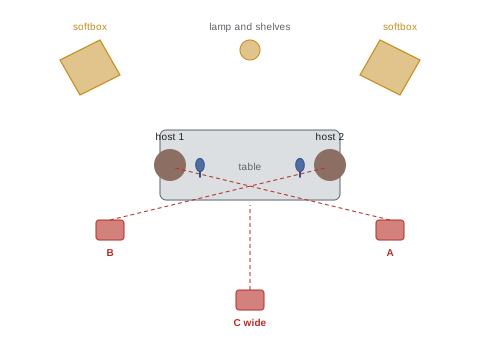
Conversation podcasts usually use one camera per person plus a wide shot. A typical two-person setup has three cameras: a wide shot showing both hosts, and a close shot of each, placed roughly on the eyeline across the table so that each person appears to look toward the other. More people need more cameras or wider framing. Cameras should record at the same frame rate, typically 30 fps in North America for podcasts (or 24 or 25 fps for other looks or regions), and similar settings for color and exposure so that shots match. Mirrorless cameras, webcams and dedicated streaming cameras are all used; key requirements are the ability to record continuously for the length of the episode without overheating or stopping at time limits, clean HDMI output for live switching, and reliable power. Some shows use a video switcher to cut between cameras live, producing a finished edit immediately, while recording each camera separately as backup or for later re-editing.
Sets and lighting
The set is part of the show's identity. Simple, consistent sets work best: a background with depth, such as shelves, plants, artwork or a branded element; practical lamps for warmth; furniture that keeps hosts comfortable for long recordings; and microphones positioned to suit both sound and picture. Large dynamic microphones on boom arms have become part of the podcast look, but they should not block faces. Lighting follows the principles in CRE-130 and CINE-220: soft key lights from about 45 degrees, fill or bounce, background accents and separation, and consistent color temperature, using flicker-free LED lights that do not hum, since noisy fans and ballasts are picked up by sensitive microphones. Check for reflections in glasses and on screens. A set that can be left in place, or rebuilt identically from marked positions, saves hours each week.
Recording workflow and sync
Video podcasts multiply the files to manage: several camera files, separate audio tracks from the interface or recorder, and sometimes screen recordings. Good practice includes recording audio on a dedicated audio recorder or interface as the primary sound, with camera audio as a sync reference; starting all devices and then clapping once in view of all cameras at the start, or using timecode, so that files can be aligned; monitoring that every camera is recording, which is easy to forget with several devices; checking that cameras will not stop at a time limit or overheat during long sessions; using large, fast memory cards and external power; and copying all files to backup storage immediately after recording. Remote video podcasts use recording platforms that capture each participant's camera and audio locally at high resolution (Lesson 5).
Worked problem
Storage for a weekly video podcast
A two-host show records a 70-minute session with three cameras at 4K, each producing about 170 MB per minute, plus audio. How much storage does each session need, and about how much per year for 48 episodes?
Show solution
- Per camera: 70 × 170 MB = 11,900 MB ≈ 11.9 GB.
- Three cameras: about 35.7 GB, plus about 1 GB of audio and project files: roughly 37 GB.
- Per year: 48 × 37 GB ≈ 1.8 TB, before backup copies.
Answer: About 37 GB per session and about 1.8 TB a year, so plan for 4–6 TB including backups.
Editing video podcasts efficiently
Editing multicamera conversations can take many hours unless workflows are efficient. Multicam editing features in video editors let you sync all cameras and switch angles as the episode plays, much like a live switcher. Many shows edit the audio first, or edit the conversation once and apply the same cuts to video, then choose angles. Automated tools can switch to the camera of whoever is speaking, based on audio levels, giving a quick first pass to refine manually. Jump cuts from removed sections can be hidden by changing angles. Keep the visual style simple: consistent framing, lower-third titles for guests, occasional on-screen graphics where they help, and an end screen. Export a high-quality master for YouTube and other video platforms, and a separate audio-only file mastered for podcast apps (Lesson 9), since video platforms and podcast apps may treat loudness differently.
Clips and short-form promotion
Clips extracted from video podcasts are one of the most effective promotion tools. A good clip is self-contained, with a strong first line and a satisfying point or payoff in 30 to 90 seconds; is reframed to vertical 9:16 with faces centered and captions within safe zones (CRE-130, CRE-210); and links back to the full episode. Plan clips during recording by noting timestamps of strong moments, and choose a few per episode rather than flooding feeds. AI tools can suggest clips and reframe automatically but often choose weak moments or cut mid-thought; review and adjust. Audiograms, static artwork with an animated waveform and captions, offer a simpler option for audio-only shows.
Distribution of video podcasts
Video podcast distribution differs by platform at the time of writing. On YouTube, full episodes are uploaded as videos, added to a playlist designated as a podcast, and supported by chapters, titles and thumbnails (CRE-211); some hosts also let audio shows be ingested into YouTube through RSS in supported regions. On Spotify, video episodes can be uploaded through Spotify's own tools or supported hosting providers. Apple Podcasts has historically supported video files in RSS feeds and has been adding HLS video with features such as dynamic video advertising through participating hosting providers and ad networks. Other apps vary. Because platform features and programs change frequently, check each platform's current creator documentation when planning distribution. Many shows publish audio to all podcast apps through RSS, full video on YouTube and Spotify, and clips on short-form platforms.
Trade-offs and sustainability
Adding video often doubles the time a show takes to produce, and creators who add video without adjusting their workflow frequently burn out. Options to manage the load include simpler setups (one wide camera plus a close-up per person, locked off), live switching to avoid multicam editing, batching recordings, outsourcing video editing, publishing full episodes with minimal video editing while investing effort in clips, or video-only seasons for special events. Measure whether video is achieving its goals, for example new listeners from YouTube and clips, or sponsorship revenue, using the analytics methods in CRE-202, and adjust.
Framing and composition for conversation
Video podcast framing follows conventions that make conversations easy to watch. Close shots usually frame each person from about mid-chest up, with eyes around the upper third of the frame and some lead room in the direction they face. Each host should appear to look toward the other side of the frame, consistent with the 180-degree principle, so that cuts between them feel like a conversation. Microphones should be positioned below or beside the mouth so they do not cover faces. Wide shots establish the space and relationship. Consistent framing from episode to episode helps the show's visual identity; marking camera and chair positions makes this easy.
Live streaming podcasts
Some shows stream recordings live on YouTube, Twitch or other platforms, inviting real-time comments and questions, then publish an edited version later. Live streaming adds energy and community but requires a reliable internet connection, a switcher or streaming software, a moderator for the chat, and comfort with mistakes being seen live. Audio for streams should come from the same microphones and mixer as the recording, with a separate mix for the stream if needed. Plan how live chat will be included, such as reading questions in a dedicated segment, and how the edited podcast version will handle references to the live audience.
Graphics and on-screen elements
On-screen graphics in video podcasts should support the conversation without cluttering it: lower-third titles introducing guests, simple topic titles for chapters, occasional images or charts that illustrate a point, and an end screen. Use the show's brand colors and fonts consistently (CRE-230), keep text large enough to read on phones, and remember to describe any important visual in words for audio listeners. Avoid flashing effects and fast-moving graphics during conversations, which distract and can affect viewers with photosensitive conditions.
Thumbnails and titles for video episodes
On YouTube, video podcast episodes compete with all other videos for clicks, so titles and thumbnails matter more than in podcast apps (CRE-211). Effective podcast thumbnails often feature the guest's face with a clear expression, a few words of text that state the most interesting idea, and consistent branding that identifies the show. Titles should lead with the most compelling idea or question rather than only the guest's name and episode number, while staying accurate to the content. Testing different thumbnails and titles, where platforms allow, helps find what works for the show's audience.
Remote video podcasts
Remote video podcasts depend on each participant's camera, lighting and connection. Send guests guidance on camera position at eye level, facing a window or a soft light, choosing a simple background, and using a wired connection, in addition to the audio guidance in Lesson 5. Recording platforms that capture each participant locally at high resolution avoid the low quality of recorded video calls. Editors can arrange remote participants side by side or switch between them, and consistent layouts across episodes give remote shows a recognizable look.
Common mistakes
MistakeAdding video without a reason or a workflow.
InsteadDecide on goals and plan the extra work.
Mistake"As you can see…" with no description.
InsteadDescribe what you show for audio listeners.
MistakeCameras stopping mid-recording.
InsteadCheck time limits, heat, power and cards.
MistakeRelying on camera audio.
InsteadRecord audio separately and sync with a clap or timecode.
MistakePublishing clips that cut mid-thought.
InsteadChoose self-contained moments with strong first lines.
Summary and key terms
- Video adds discovery, connection and revenue but costs time and storage.
- Shows must work for watchers and listeners; describe visual references.
- Typical setups use a wide camera and a close-up per person.
- Simple consistent sets and soft, flicker-free lighting suit video podcasts.
- Record audio separately, sync files and back up immediately.
- Multicam editing, auto-switching and clips make video efficient.
- Distribute audio via RSS, video on YouTube and Spotify, and clips everywhere.
- Video podcast
- Podcast published with video.
- Audio-first
- Designed to work fully for listeners.
- Video-first
- Designed primarily for viewers.
- Multicam
- Recording and editing with several cameras.
- Switcher
- Device for cutting between cameras live.
- Timecode
- Time reference used to sync recordings.
- Clip
- Short excerpt used for promotion.
- Audiogram
- Static image with waveform and captions.
- HLS
- HTTP Live Streaming, a video delivery format.
- Locked-off camera
- Camera fixed in position without operation.
Practice problems
Work each problem on paper first, then reveal the answer to check.
Name two benefits of video podcasts.
Show answer
Discovery, connection, clips, video revenue.
Name two costs.
Show answer
Equipment, editing time, storage, pressure on sets.
Which formats gain least from video?
Show answer
Narrative and sound-designed shows.
What is audio-first design?
Show answer
Video as a window into a complete audio show.
Typical cameras for two people?
Show answer
Three: a wide and two close-ups.
Why flicker-free, quiet LED lights?
Show answer
No banding and no fan or hum noise in microphones.
How do you sync cameras and audio?
Show answer
A clap in view of all cameras or timecode.
Storage for 60 min, 2 cameras at 170 MB/min?
Show answer
About 20 GB.
What makes a good clip?
Show answer
Self-contained, strong first line, payoff, vertical, captions.
How can video workload be reduced?
Show answer
Locked-off cameras, live switching, batching, outsourcing.
Lesson quiz · 5 questions
Score 60% or more to complete this lesson.
Create a free account to save your progress, take quizzes and earn a certificate.