
CON-210 · Lesson 12 of 12 · 33 min
Scheduling software, 4D BIM and capstone: a CPM schedule for a small building
This final lesson brings the course together. It begins with the tools schedulers use today, from enterprise CPM software to cloud-based look-ahead planners and 4D models that link the schedule to the building information model. It then works through a capstone: building, calculating and analyzing a critical path schedule for a small single-story commercial building, from the work breakdown to the critical path, float, a resource check, a risk view and a recovery decision.
Scheduling software
Almost every construction schedule today is built in software. At the time of writing, the tools fall into a few broad groups, and most organizations use more than one.
- Enterprise CPM tools, such as Oracle Primavera P6, used on large and complex projects and often required by owners' specifications. They handle thousands of activities, multiple projects, resource and cost loading, baselines and detailed reporting.
- Desktop and cloud project tools, such as Microsoft Project and a number of web-based alternatives, common on small and medium projects and in design firms.
- Construction-focused planning tools, including location-based scheduling software that draws flowline charts, and short-interval or pull-planning applications used for look-aheads and the Last Planner System.
- Schedule analysis and risk tools, which check schedule quality against metrics such as the DCMA 14 points, run Monte Carlo risk analysis, or compare updates.
The principles in this course apply to all of them. Each tool has its own settings that change results, and schedulers must understand them: how calendars are applied to lags, whether progress override or retained logic is used for out-of-sequence progress, how float is calculated with multiple calendars, which leveling priorities are used, and how constraints behave. Two schedulers using the same software with different settings can produce different critical paths from the same data.
| Setting | Options | Why it matters |
|---|---|---|
| Out-of-sequence progress | Retained logic or progress override | Retained logic keeps remaining work tied to unfinished predecessors; progress override ignores them |
| Lag calendar | Predecessor, successor or project calendar | A 7-day cure lag counted on a 5-day calendar becomes 9 or 10 calendar days |
| Total float calculation | Start float, finish float or smallest | Gives different float on activities with different calendars or constraints |
| Critical path definition | Float below a threshold or longest path | With constraints or multiple calendars, the two definitions can disagree |
| Leveling priorities | Float, late start, activity code and others | Different priorities give different leveled schedules |
4D BIM
A building information model, or BIM, is a three-dimensional digital model of the building with information attached to its components. Linking model elements to schedule activities adds the fourth dimension, time, and produces a 4D model: an animation or interactive view that shows the building being assembled day by day. Adding cost produces what is often called 5D.
4D models help in several ways. They let the team see the sequence, so errors such as a wall scheduled before the slab beneath it are obvious. They support site logistics planning: crane positions, laydown areas, access routes and temporary works over time. They help communicate the plan to owners, neighbors, trades and authorities. And they can reveal space conflicts, where two trades are scheduled in the same area at once. Their limits are real too: a 4D model takes effort to build and maintain, depends on the model and schedule being organized compatibly, and is only as good as the schedule logic behind it.
Many US public owners, such as the General Services Administration and the US Army Corps of Engineers, have long-standing BIM requirements, and the National BIM Standard-United States and the ISO 19650 series provide guidance on information management. 4D simulation is increasingly requested on complex urban, healthcare and campus projects, especially for logistics and phasing.
Capstone: the project
The capstone project is a single-story commercial building of about the size of a small medical office or retail unit, with a structural steel frame on spread footings, a slab on grade, a steel roof deck with membrane roofing, exterior walls with windows, and a modest mechanical and electrical fit-out. The owner requires completion as soon as possible; the contract allows 80 working days. Steel fabrication is the main long-lead item.
The project team has prepared the following activity list, at roughly level 2 to 3 detail to keep the capstone manageable. Durations are in working days on a 5-day calendar; logic is finish-to-start unless stated.
| ID | Activity | Duration | Predecessors |
|---|---|---|---|
| A | Permits and mobilization | 5 | — |
| B | Site clearing and layout | 3 | A |
| C | Excavation | 4 | B |
| D | Footings | 5 | C |
| E | Underground plumbing | 4 | D |
| F | Slab on grade | 4 | E |
| G | Steel shop drawings, fabrication and delivery | 25 | A |
| H | Erect steel and roof deck | 8 | F, G |
| I | Roofing | 6 | H |
| J | Exterior walls and windows | 12 | H |
| K | MEP rough-in | 15 | I |
| L | Interior framing and drywall | 12 | K (SS + 5) |
| M | Finishes | 10 | J, L |
| N | Commissioning and closeout | 5 | K, M |
Before calculating, it is worth checking the list against the lessons. The work breakdown covers site, substructure, structure, envelope, interiors, services and closeout. Steel procurement is shown as its own activity, starting right after mobilization. MEP rough-in waits for the roof so that services are installed in a dry building. Interior framing overlaps rough-in with a start-to-start lag, because framing on the first part of the floor can begin once rough-in is under way. Commissioning needs both the finished interiors and the completed services.
Capstone: forward and backward passes
Worked problem
Forward pass
Calculate the early start and early finish of each capstone activity and the project duration.
Show solution
- A: 0–5. B: 5–8. C: 8–12. D: 12–17. E: 17–21. F: 21–25.
- G: starts after A, 5–30.
- H: predecessors F (EF 25) and G (EF 30): ES 30, EF 38.
- I: 38–44. J: 38–50.
- K: 44–59.
- L: SS + 5 from K: ES = 44 + 5 = 49, EF 61.
- M: predecessors J (EF 50) and L (EF 61): ES 61, EF 71.
- N: predecessors K (EF 59) and M (EF 71): ES 71, EF 76.
Answer: The project takes 76 working days, within the 80 allowed.
Worked problem
Backward pass and float
Using a project finish of 76, calculate late dates and total float, and identify the critical path.
Show solution
- N: LF 76, LS 71. M: LF 71, LS 61.
- L: LF 61, LS 49. K: from N, LF ≤ 71; from L (SS + 5), LS ≤ 49 − 5 = 44, so LS 44, LF 59.
- J: LF 61, LS 49. I: LF = LS of K = 44, LS 38.
- H: successors I (LS 38) and J (LS 49): LF 38, LS 30.
- G: LF 30, LS 5. F: LF 30, LS 26. E: LF 26, LS 22. D: LF 22, LS 17. C: LF 17, LS 13. B: LF 13, LS 10.
- A: successors B (LS 10) and G (LS 5): LF 5, LS 0.
- Total float: A, G, H, I, K, L, M, N = 0; B, C, D, E, F = 5; J = 11.
Answer: Critical path: A–G–H–I–K–L–M–N. The substructure chain B–F shares 5 days of float; exterior walls have 11 days.
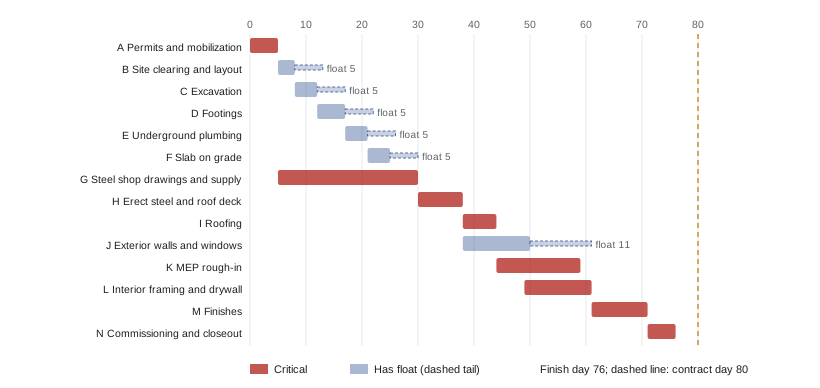
The result is instructive. The critical path does not run through the visible site work at all for the first month: excavation, footings and the slab all have float. It runs through the steel shop drawings, fabrication and delivery. A superintendent who pushed hard to get the slab poured early would gain nothing; a project manager who chased steel approvals daily would gain a great deal. The substructure chain shares its 5 days of float: if footings run 3 days late, the slab still has only 2 days left. This is exactly the kind of insight a CPM schedule is meant to provide.
Capstone: resources and risk
Worked problem
Checking a resource conflict
The general contractor's own carpenter crew forms the footings (activity D, days 12 to 17) and is also needed for wood blocking and backing during interior framing (activity L, days 49 to 61). A second carpenter crew is not available. Is there a conflict, and does the crew affect the critical path?
Show solution
- D runs days 12 to 17 and L runs days 49 to 61; they do not overlap.
- No conflict exists, and the crew is free between day 17 and day 49 for other work, such as temporary protection or another project.
- If footings slipped by more than their 5 days of float, the delay would affect the project through the slab and steel erection, not through the carpenter crew.
- The resource check confirms that the early-start schedule is feasible for this crew.
Answer: No conflict; the carpenter crew is idle between day 17 and day 49 and can be planned elsewhere.
Worked problem
A risk view of steel procurement
The team gives steel procurement (G) a three-point estimate of 22, 25 and 37 working days. Treating G as the dominant uncertainty, estimate the PERT mean of G and the chance of the project finishing within the 80-day contract time, assuming the other critical activities are fixed.
Show solution
- PERT mean of G: (22 + 4 × 25 + 37) ÷ 6 = 159 ÷ 6 = 26.5 days; σ = (37 − 22) ÷ 6 = 2.5 days.
- Expected project duration: 76 + (26.5 − 25) = 77.5 days.
- z = (80 − 77.5) ÷ 2.5 = 1.0, so the probability of finishing within 80 days is about 84 %.
- If the owner wants higher confidence, steel procurement is the place to act: early mill orders, early shop drawing workshops, or a fabricator with spare capacity.
Answer: About an 84 % chance of meeting 80 days; steel procurement is the key risk to manage.
Capstone: an update and a recovery decision
Worked problem
Responding to a late delivery
At the data date of day 28, the fabricator reports that steel will arrive on day 36 instead of day 30, a 6-day delay to activity G. The remaining activities are unchanged. What is the new forecast completion, and what recovery options exist?
Show solution
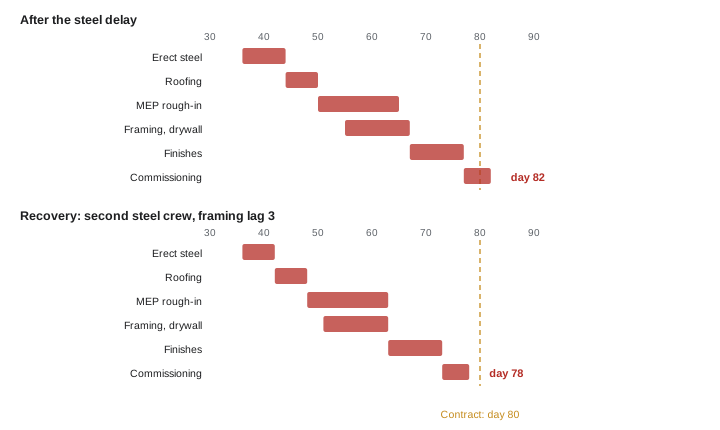
- G now finishes on day 36, so H runs 36–44, I 44–50, K 50–65, L 55–67, M 67–77 and N 77–82.
- Forecast completion: day 82, two days beyond the 80-day contract time.
- Options: (1) erect steel with a second ironworker crew, cutting H from 8 to 6 days; (2) start interior framing earlier, changing the SS lag from 5 to 3 days; (3) work a 6-day week during finishes.
- Option 1 alone saves 2 days and brings completion back to day 80, with no float. Combining options 1 and 2 saves 4 days, finishing on day 78 with 2 days of margin, at the cost of a second crew and closer coordination between framing and rough-in.
Answer: Forecast slips to day 82. A second steel crew recovers 2 days; adding an earlier framing start gives a 2-day margin.
What the capstone teaches
The capstone shows the whole scheduling process in miniature: breaking the work down, estimating durations, choosing logic, calculating dates and float, finding a critical path that may not be where intuition expects, checking resources, weighing risk, updating and recovering. On a real project the schedule would have several hundred activities, the logic would be more detailed, and the software would do the arithmetic. But the questions are the same, and the scheduler who understands them, rather than the one who knows the most software commands, is the one whose schedules the superintendent believes and the owner trusts.
The next courses in the program build on this foundation: cost control and earned value in CON-310, construction contracts and law in CON-220, short-interval planning and trade coordination in CON-335, lean construction and takt planning in CON-410, and changes, claims and delay disputes in CON-420.
Common mistakes
MistakeTrusting software output without knowing its settings.
InsteadCheck scheduling options such as retained logic, lag calendars and float calculation.
MistakeAssuming the visible site work is critical.
InsteadCalculate the critical path; procurement often controls early dates.
MistakeBuilding a 4D model on weak schedule logic.
InsteadFix the logic first; a 4D model only shows what the schedule says.
MistakeAccepting a recovery plan that saves days on one path only.
InsteadCheck every path that may become critical as the critical path shortens.
MistakeForgetting that shared float on a chain is used by the first activity that slips.
InsteadTrack the float on chains, not just on single activities.
Summary and key terms
- Enterprise, desktop, construction-specific and analysis tools all apply the same CPM principles.
- Software settings such as retained logic, lag calendars and float definitions change results.
- 4D BIM links model elements to activities to show sequence, logistics and conflicts.
- In the capstone, steel procurement drives the critical path, and site work carries float.
- Chains of activities share float; the first slip uses it for all.
- Resource and risk checks confirm feasibility and show where to act.
- Updates and recovery decisions must consider all paths that may become critical.
- Enterprise scheduling software
- CPM software designed for large, complex or multi-project schedules.
- Retained logic
- A setting that keeps the remaining work of an out-of-sequence activity tied to unfinished predecessors.
- Progress override
- A setting that lets out-of-sequence work continue as if its predecessors were complete.
- Building information model
- A digital three-dimensional model of a building with information attached to its components.
- 4D model
- A building information model linked to the schedule to show construction over time.
- 5D
- A model linked to both schedule and cost.
- Long-lead item
- Material or equipment whose procurement takes a long time and can control the schedule.
- Capstone
- A final project that brings the course methods together.
- Shared float
- Float common to a chain of activities, used by whichever slips first.
- Recovery option
- A specific measure to recover lost time, such as an extra crew or overlapping work.
Practice problems
Work each problem on paper first, then reveal the answer to check.
Name two groups of scheduling software.
Show answer
Any two of: enterprise CPM tools, desktop or cloud project tools, construction-focused planning tools, schedule analysis and risk tools.
What is the difference between retained logic and progress override?
Show answer
Retained logic keeps remaining work tied to unfinished predecessors; progress override ignores them.
What does the fourth dimension in 4D BIM represent?
Show answer
Time, through links to the schedule.
In the capstone, why does steel procurement drive the critical path?
Show answer
It takes 25 days from day 5, finishing day 30, later than the slab on day 25, so steel erection waits for it.
What is the total float of the slab (F) in the capstone?
Show answer
5 days.
If footings slip 3 days, how much float does the slab have left?
Show answer
2 days.
What is the total float of exterior walls (J)?
Show answer
11 days.
Steel arrives 6 days late. What is the new completion before recovery?
Show answer
Day 82.
Name one recovery option for the steel delay.
Show answer
A second ironworker crew, an earlier framing start or a 6-day week during finishes.
Why should a scheduler understand CPM even with software?
Show answer
To check results, explain them, and see why changes do or do not move the finish.
Lesson quiz · 5 questions
Score 60% or more to complete this lesson.
Create a free account to save your progress, take quizzes and earn a certificate.