
CMPUT-174 · Lesson 7 of 12 · 27 min
Functions and decomposition
A function is a named, reusable piece of code that takes inputs, does a job and usually returns a result. You have already used many built-in functions, such as print, len, round and max, and you have seen small functions such as gcd and letter_grade. This lesson explains how to define functions properly: parameters and arguments, return values, the difference between returning and printing, where names are visible (scope), default and keyword arguments, and docstrings. It then introduces recursion, a function that calls itself, and shows how to use functions to decompose a larger problem into parts that are each easy to write, test and understand. Functions are the main tool of abstraction in everyday programming.
Defining and calling functions
A function definition starts with def, then the function's name, a list of parameters in parentheses and a colon. The indented body runs each time the function is called. A return statement ends the function and sends a value back to the caller; the call expression then has that value. Parameters are the names in the definition; arguments are the actual values supplied in a call. When a function is called, each parameter becomes a name for the corresponding argument for the duration of that call.
def bmi(mass_kg, height_m):
    """Return body mass index: mass (kg) divided by the square of height (m)."""
    return mass_kg / height_m ** 2

result = bmi(70, 1.75)                 # 70 and 1.75 are arguments
print(round(result, 1))
print(round(bmi(height_m=1.6, mass_kg=55), 1)) # keyword arguments, any order22.9 21.5
Arguments can be passed by position, matched to parameters in order, or by keyword, written name=value, which makes calls self-explanatory and lets you give them in any order. Keyword arguments are particularly helpful when a function has several parameters of the same type, where it is easy to swap two by mistake: bmi(1.75, 70) would silently compute nonsense, while bmi(mass_kg=70, height_m=1.75) cannot be misread.
Why define functions at all, when you could just write the code where it is needed? There are four strong reasons. Reuse: write the logic once and call it many times, so a fix or improvement happens in one place. Abstraction: callers need to know what a function does, not how, as lesson 1 described. Testing: a function with clear inputs and outputs can be tested on its own, as lesson 11 shows. Readability: a well-named function call such as convert_to_celsius(reading) explains itself, where the raw formula needs a comment.
Return versus print
Beginners often confuse returning a value with printing it. Printing displays text to a person and gives nothing back to the program. Returning hands a value back to the code that called the function, which can then store it, compare it, pass it to another function or print it. A function that prints its answer instead of returning it cannot be reused in a calculation. A function with no return statement, or with a bare return, returns the special value None.
def area_print(w, h):
    print(w * h)          # shows the answer, returns None

def area_return(w, h):
    return w * h          # hands the answer back

a = area_print(3, 4)      # prints 12
b = area_return(3, 4)     # prints nothing
print("a is", a, "  b is", b)
print("total area:", area_return(3, 4) + area_return(5, 2))
try:
    print(area_print(3, 4) + 1)
except TypeError as e:
print("cannot use a printed result in arithmetic:", e)12 a is None b is 12 total area: 22 12 cannot use a printed result in arithmetic: unsupported operand type(s) for +: 'NoneType' and 'int'
A good rule is that functions which compute something should return it, and only the outermost part of a program, sometimes a function called main, should print. Separating computation from input and output in this way makes functions easier to test and to reuse in different settings, such as a web page or a robot controller, where there may be no screen to print to at all.
Scope: where names are visible
Names created inside a function, including its parameters, are local: they exist only while the function runs and are invisible outside it. Names created at the top level of a file are global and can be read inside functions. Each call gets its own fresh set of local names, which is what lets the same function be called many times, and even call itself, without the calls interfering with one another.
rate = 0.05                       # global name

def interest(balance):
    earned = balance * rate       # reads the global rate; earned is local
    return earned

print(interest(1000))
try:
    print(earned)                 # earned does not exist outside the function
except NameError as e:
    print("NameError:", e)

def shadow():
    rate = 0.10                   # a NEW local name; the global is unchanged
    return rate

print(shadow(), rate)50.0 NameError: name 'earned' is not defined 0.1 0.05
The shadow example shows a subtle rule: assigning to a name inside a function makes it local to that function, even if a global with the same name exists. Python has a global statement to override this, but changing global variables from inside functions makes programs hard to understand and test, because any function might change any global at any time. The better design is to pass values in as parameters and get results out with return.
Default arguments and docstrings
A parameter can have a default value, used when the caller does not supply that argument. Defaults are useful for options that usually take the same value. Parameters with defaults must come after those without. One famous trap: the default value is created once, when the function is defined, not each time it is called. Using a mutable default such as an empty list means every call shares the same list, so items pile up across calls. The standard fix is to use None as the default and create the list inside the function.
def greet(name, greeting="Hello", punctuation="!"):
    return f"{greeting}, {name}{punctuation}"

print(greet("Ada"))
print(greet("Alan", "Welcome"))
print(greet("Grace", punctuation="."))

def add_item_buggy(item, basket=[]):       # one list shared by every call
    basket.append(item)
    return basket

def add_item(item, basket=None):           # a new list each call unless one is given
    if basket is None:
        basket = []
    basket.append(item)
    return basket

print(add_item_buggy("apple"), add_item_buggy("pear"))
print(add_item("apple"), add_item("pear"))Hello, Ada! Welcome, Alan! Hello, Grace. ['apple', 'pear'] ['apple', 'pear'] ['apple'] ['pear']
A docstring is a string literal written as the first statement of a function, describing what it does, its parameters, its return value and any errors it raises. Python stores it with the function, and the built-in help function displays it. Writing the docstring before the body is an excellent habit: if you cannot say clearly what a function should do, you are not ready to write it. A widely used convention is a one-line summary, a blank line, then details.
def clamp(value, low, high):
    """Return value limited to the range low to high.

    If value is below low, return low; if above high, return high;
    otherwise return value unchanged. Raises ValueError if low > high.
    """
    if low > high:
        raise ValueError("low must not exceed high")
    return max(low, min(value, high))

print(clamp(150, 0, 100), clamp(-5, 0, 100), clamp(42, 0, 100))
print(clamp.__doc__.splitlines()[0])100 0 42 Return value limited to the range low to high.
Decomposition: designing with functions
Decomposition, introduced in lesson 1, becomes concrete with functions. Faced with a problem, write the top-level steps as calls to functions that do not exist yet, with good names. Then write each function, decomposing again if it is still too big. This top-down approach keeps every piece small enough to understand and test. A common guideline is that a function should do one thing and fit on one screen; if you struggle to name it without the word "and", it may be doing two things.
Worked problem
Decomposing a report program
A teacher has a list of (name, mark) pairs and wants a report showing each student's letter grade, the class average and the number of students at each grade. Decompose the problem into functions.
Show solution
- Top level: report(records) builds the report from smaller pieces.
- letter_grade(mark) converts one mark to a letter, from lesson 5.
- class_average(records) returns the mean mark, guarding against an empty class.
- grade_counts(records) returns how many students got each letter.
- format_report(records) assembles the text; only the top level prints it.
Answer: Five small functions, each testable alone, combined by the top-level report function.
def letter_grade(mark):
    for cutoff, letter in [(80, "A"), (70, "B"), (60, "C"), (50, "D")]:
        if mark >= cutoff:
            return letter
    return "F"

def class_average(records):
    if not records:
        raise ValueError("no students")
    return sum(mark for _, mark in records) / len(records)

def grade_counts(records):
    counts = {letter: 0 for letter in "ABCDF"}
    for _, mark in records:
        counts[letter_grade(mark)] += 1
    return counts

def format_report(records):
    lines = [f"{name:<8} {mark:>3}  {letter_grade(mark)}" for name, mark in records]
    lines.append(f"average  {class_average(records):.1f}")
    lines.append("counts   " + "  ".join(f"{k}:{v}" for k, v in grade_counts(records).items()))
    return "\n".join(lines)

records = [("Aiyana", 91), ("Ben", 67), ("Chen", 78), ("Dara", 49), ("Elif", 83)]
print(format_report(records))Aiyana 91 A Ben 67 C Chen 78 B Dara 49 F Elif 83 A average 73.6 counts A:2 B:1 C:1 D:0 F:1
Each function here can be tested separately, and each could change without affecting the others: if the grading scale changes, only letter_grade needs editing. This version of letter_grade uses a list of cutoffs instead of an if-elif chain, a small example of turning logic into data, which often makes code shorter and easier to change.
Recursion
A recursive function is one that calls itself. Recursion fits problems that can be defined in terms of smaller versions of themselves. The factorial of n, written n!, is the product 1 times 2 times ... times n, and it can be defined recursively: 0! is 1, and n! is n times (n minus 1)! for n greater than 0. Every recursive function needs a base case, which is answered directly without recursion, and a recursive case, which reduces the problem toward the base case. Without a reachable base case, recursion never stops.
def factorial(n, depth=0):
    """Return n! recursively, printing the calls to show how recursion unfolds."""
    indent = "  " * depth
    print(f"{indent}factorial({n}) called")
    if n == 0:                                  # base case
        result = 1
    else:                                       # recursive case: a smaller problem
        result = n * factorial(n - 1, depth + 1)
    print(f"{indent}factorial({n}) returns {result}")
    return result

factorial(4)factorial(4) called
factorial(3) called
factorial(2) called
factorial(1) called
factorial(0) called
factorial(0) returns 1
factorial(1) returns 1
factorial(2) returns 2
factorial(3) returns 6
factorial(4) returns 24Each call waits for the call below it to return. Python keeps track of the waiting calls on the call stack, a region of memory where each active call has a frame holding its own local names, including its own n. When factorial(0) returns 1, its frame is removed and factorial(1) resumes, multiplies and returns, and so on back up. This is why local variables are essential: each call's n is separate.
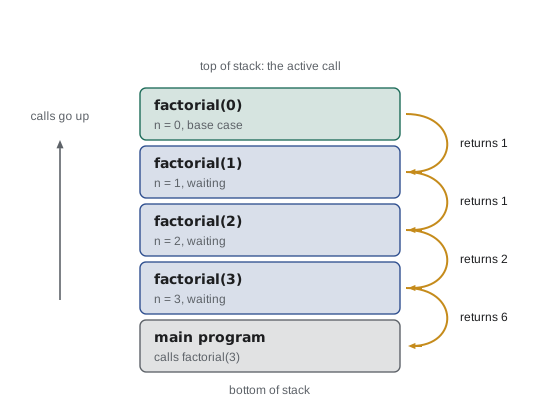
The stack has a limited size. Python allows about a thousand nested calls by default and raises RecursionError beyond that, which protects the computer from runaway recursion. For problems such as factorial, a loop is simpler and has no depth limit; recursion shines for problems with a naturally recursive structure, such as folders containing folders, family trees, mathematical expressions and many algorithms in CMPUT-204, including fast sorting. Here are two more small recursive functions, with a loop version for comparison.
def digit_sum(n):
    """Sum of the decimal digits of a non-negative integer, recursively."""
    if n < 10:
        return n                       # base case: one digit
    return n % 10 + digit_sum(n // 10)  # last digit plus the sum of the rest

def digit_sum_loop(n):
    total = 0
    while n > 0:
        total += n % 10
        n //= 10
    return total

def count_down(n):
    if n == 0:
        print("liftoff")
        return
    print(n, end=" ")
    count_down(n - 1)

print(digit_sum(4072), digit_sum_loop(4072))
count_down(5)

import sys
print("default recursion limit:", sys.getrecursionlimit())
try:
    digit_sum(int("9" * 1500))
except RecursionError as e:
print("RecursionError:", e)13 13 5 4 3 2 1 liftoff default recursion limit: 1000 RecursionError: maximum recursion depth exceeded
| Question | Loop | Recursion |
|---|---|---|
| How is repetition expressed? | The loop statement repeats a block | The function calls itself on a smaller problem |
| How does it stop? | The loop condition becomes false | A base case returns without calling itself |
| Where is state kept? | Variables updated each pass | Parameters and locals in each stack frame |
| Limits in Python | None beyond time and memory | About 1,000 nested calls by default |
| Best for | Counting, scanning sequences | Nested or self-similar structures: trees, folders, divide and conquer |
Common mistakes
MistakePrinting a result inside a function instead of returning it.
InsteadReturn computed values; print only at the top level of the program.
MistakeExpecting a variable created inside a function to exist outside it.
InsteadReturn the value and assign it to a name in the caller.
MistakeChanging global variables from inside functions.
InsteadPass values in as parameters and return results.
MistakeUsing a mutable default argument such as basket=[].
InsteadUse basket=None and create a new list inside the function.
MistakeWriting a recursive function without a reachable base case.
InsteadDefine the base case first and make sure each recursive call moves toward it.
MistakeWriting long functions that do several unrelated jobs.
InsteadGive each function one job, a clear name and a docstring.
Summary and key terms
- A function is a named, reusable block defined with def; parameters receive the arguments of each call.
- Arguments can be positional or keyword; keyword arguments make calls clearer and safer.
- return hands a value back to the caller; print only displays text, and a function without return gives None.
- Names assigned inside a function are local to each call; avoid modifying globals.
- Defaults are evaluated once, so never use a mutable default; docstrings document behavior.
- Top-down decomposition breaks a problem into small, testable functions.
- Recursion solves a problem through smaller instances of itself, needs a base case and is limited by the call stack.
- Function
- A named block of code that takes inputs and usually returns a result.
- Parameter
- A name in a function definition that receives an argument.
- Argument
- A value supplied to a function when it is called.
- Return value
- The value a function sends back to its caller.
- Scope
- The region of a program in which a name is visible.
- Local variable
- A name created inside a function, existing only during a call.
- Docstring
- A string at the start of a function that documents what it does.
- Recursion
- A technique in which a function calls itself on a smaller problem.
- Base case
- The case a recursive function answers directly, without recursion.
- Call stack
- The memory structure holding a frame for each active function call.
Practice problems
Work each problem on paper first, then reveal the answer to check.
Write a function celsius_to_fahrenheit(c) that returns the converted value.
Show answer
def celsius_to_fahrenheit(c): return c * 9 / 5 + 32
What does a function with no return statement return?
Show answer
None.
Why is bmi(mass_kg=70, height_m=1.75) safer than bmi(70, 1.75)?
Show answer
Keyword arguments cannot be swapped by mistake and make the call self-explanatory.
After def f(): x = 5, then f(), what happens when the top level runs print(x) with no global x?
Show answer
NameError, because x was local to f.
Explain why add_item_buggy("pear") returned ["apple", "pear"].
Show answer
The default list was created once and shared by both calls, so the second call added to the same list.
Write a recursive function power(b, n) for whole n >= 0.
Show answer
if n == 0: return 1; else: return b * power(b, n - 1)
Trace factorial(3): what calls are made and what does each return?
Show answer
factorial(3) calls factorial(2), which calls factorial(1), which calls factorial(0); they return 1, 1, 2 and 6.
Why does digit_sum on a 1,500-digit number raise RecursionError?
Show answer
It needs about 1,500 nested calls, more than Python's default limit of about 1,000.
Decompose "print a monthly bank statement" into four functions.
Show answer
For example: load_transactions, compute_balance, summarize_by_category and format_statement.
What should a docstring say?
Show answer
What the function does, its parameters, what it returns and any errors it raises.
Lesson quiz · 5 questions
Score 60% or more to complete this lesson.
Create a free account to save your progress, take quizzes and earn a certificate.