
CMPUT-174 · Lesson 12 of 12 · 29 min
Capstone: a complete program, computing ethics and next steps
This final lesson brings the course together. First you will follow the design and construction of a complete small program, a study-time analyzer, from problem statement to tested code, using every major idea from the term: problem solving, data representation, conditionals, loops, functions, strings, collections, files, exceptions and testing. A second, smaller option, a text adventure game, is outlined for those who prefer to build something interactive. Then the lesson turns to responsibility: academic integrity and AI coding assistants, privacy and the law, fairness and accessibility, and the wider effects of software. It ends with a map of where the Computing Science program goes next.
The capstone problem
A student wants to understand how they actually spend their study time. For several weeks they log each study session in a CSV file with the date, the course code, the number of minutes and a focus rating from 1 to 5. They want a program that reads the log, rejects bad lines with reasons, and reports total hours per course, average focus per course, the best day of the week for focused study, a weekly total, and any course that is falling behind a target number of hours. The program should save the report to a text file and a JSON summary, so that a later program could chart the results.
Following lesson 3's process, the first step is to understand the problem with examples. Questions to settle include: what counts as a bad line (a missing course, minutes that are not a positive whole number, focus outside 1 to 5, a date that does not exist); how a week is defined (the program will use ISO weeks, which start on Monday); and what the targets are (here, an illustrative 2.5 hours per week per course, stored as a named constant so it can change). A few lines worked by hand become the first tests.
Design
Lesson 7's top-down decomposition and lesson 10's pipeline give the structure. The top-level function reads the log, cleans it, computes the statistics and formats the report. Each stage is a function with one job, and only the outermost function deals with files. That separation means every calculation can be tested with a small list of records, without creating files at all.
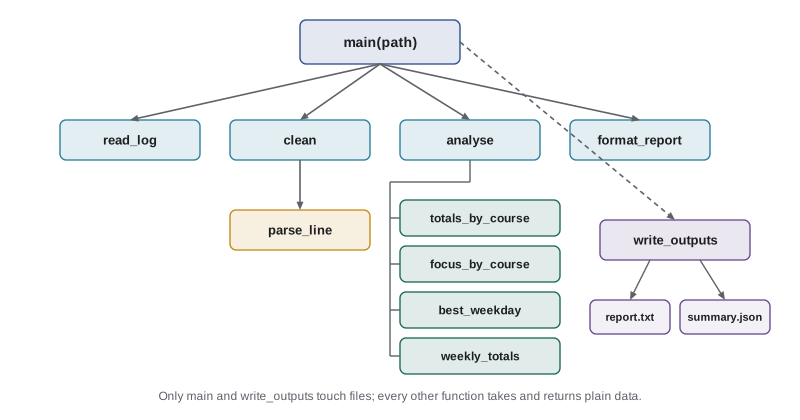
| Function | Input | Output | Lessons used |
|---|---|---|---|
| parse_line(row) | One CSV row as a dictionary | A tuple (date, course, minutes, focus) or ValueError | 4, 8, 10 |
| clean(rows) | All rows | Good records and a list of (line, reason) | 6, 9, 10 |
| totals_by_course(records) | Good records | Dictionary of course to hours | 6, 9 |
| focus_by_course(records) | Good records | Dictionary of course to time-weighted mean focus | 6, 9 |
| best_weekday(records) | Good records | The weekday with the highest mean focus | 4, 9 |
| weekly_totals(records) | Good records | Dictionary of ISO week to hours | 9 |
| format_report(...) | All results | Report text | 8 |
| main(path) | Path to the log file | Writes the outputs; returns the summary | 10 |
Implementation
Here is the complete program. It embeds a short sample log so the example runs anywhere; to use your own log, call main with a real path. Read it from the bottom up, starting with main, to see the pipeline, then look at each function. Every function is short, has a docstring, and could be tested on its own.
import csv, io, json, tempfile
from datetime import date
from pathlib import Path

WEEKLY_TARGET_HOURS = 2.5
WEEKDAYS = ["Monday", "Tuesday", "Wednesday", "Thursday", "Friday", "Saturday", "Sunday"]

SAMPLE_LOG = """date,course,minutes,focus
2026-09-07,CMPUT-174,90,4
2026-09-07,MATH-101,60,3
2026-09-08,CMPUT-174,45,5
2026-09-09,PHYS-130,120,2
2026-09-10,CMPUT-174,ninety,4
2026-09-10,MATH-101,75,4
2026-09-11,CMPUT-174,60,6
2026-09-12,PHYS-130,50,3
2026-09-14,CMPUT-174,120,5
2026-09-15,MATH-101,90,2
2026-02-30,MATH-101,30,3
2026-09-16,,40,3
2026-09-17,PHYS-130,80,4
2026-09-18,CMPUT-174,100,4
"""

def parse_line(row):
    """Return (date, course, minutes, focus) from a CSV row, or raise ValueError."""
    day = date.fromisoformat(row["date"])            # rejects 2026-02-30
    course = row["course"].strip().upper()
    if not course:
        raise ValueError("missing course")
    minutes = int(row["minutes"])
    if minutes <= 0:
        raise ValueError("minutes must be positive")
    focus = int(row["focus"])
    if not 1 <= focus <= 5:
        raise ValueError(f"focus {focus} outside 1 to 5")
    return day, course, minutes, focus

def clean(rows):
    """Split rows into good records and (line number, reason) rejections."""
    good, rejected = [], []
    for line, row in enumerate(rows, start=2):
        try:
            good.append(parse_line(row))
        except ValueError as e:
            rejected.append((line, str(e)))
    return good, rejected

def totals_by_course(records):
    totals = {}
    for _, course, minutes, _ in records:
        totals[course] = totals.get(course, 0) + minutes
    return {c: round(m / 60, 2) for c, m in sorted(totals.items())}

def focus_by_course(records):
    """Mean focus per course, weighted by minutes studied."""
    weighted, minutes = {}, {}
    for _, course, mins, focus in records:
        weighted[course] = weighted.get(course, 0) + focus * mins
        minutes[course] = minutes.get(course, 0) + mins
    return {c: round(weighted[c] / minutes[c], 2) for c in sorted(minutes)}

def best_weekday(records):
    scores = {}
    for day, _, _, focus in records:
        scores.setdefault(WEEKDAYS[day.weekday()], []).append(focus)
    return max(scores, key=lambda d: sum(scores[d]) / len(scores[d]))

def weekly_totals(records):
    weeks = {}
    for day, _, minutes, _ in records:
        key = f"{day.isocalendar().year}-W{day.isocalendar().week:02d}"
        weeks[key] = weeks.get(key, 0) + minutes
    return {w: round(m / 60, 2) for w, m in sorted(weeks.items())}

def format_report(hours, focus, best, weeks, rejected):
    n_weeks = len(weeks)
    lines = [f"{'Course':<11}{'Hours':>7}{'Focus':>7}  Status"]
    for course in hours:
        behind = hours[course] < WEEKLY_TARGET_HOURS * n_weeks
        status = "behind target" if behind else "on track"
        lines.append(f"{course:<11}{hours[course]:>7.2f}{focus[course]:>7.2f}  {status}")
    lines.append(f"Best day for focused study: {best}")
    lines.append("Weekly hours: " + ", ".join(f"{w} {h:.2f}" for w, h in weeks.items()))
    lines += [f"Rejected line {n}: {why}" for n, why in rejected]
    return "\n".join(lines)

def main(path=None):
    text = Path(path).read_text(encoding="utf-8") if path else SAMPLE_LOG
    records, rejected = clean(csv.DictReader(io.StringIO(text)))
    hours, focus = totals_by_course(records), focus_by_course(records)
    weeks, best = weekly_totals(records), best_weekday(records)
    report = format_report(hours, focus, best, weeks, rejected)
    out = Path(tempfile.mkdtemp())
    (out / "report.txt").write_text(report + "\n", encoding="utf-8")
    summary = {"hours": hours, "focus": focus, "best_day": best, "weeks": weeks,
               "rejected": len(rejected)}
    (out / "summary.json").write_text(json.dumps(summary, indent=1), encoding="utf-8")
    print(report)
    return summary

summary = main()Course Hours Focus Status CMPUT-174 5.92 4.46 on track MATH-101 3.75 2.93 behind target PHYS-130 4.17 2.84 behind target Best day for focused study: Monday Weekly hours: 2026-W37 7.33, 2026-W38 6.50 Rejected line 6: invalid literal for int() with base 10: 'ninety' Rejected line 8: focus 6 outside 1 to 5 Rejected line 12: day is out of range for month Rejected line 13: missing course
The rejected lines show the validation working: "ninety" is not a whole number, a focus of 6 is out of range, 2026-02-30 is not a real date (the datetime module's fromisoformat rejects it), and one line has no course. The focus average is weighted by minutes, a design choice worth stating in the report, because a two-hour session at focus 2 should count for more than a ten-minute one at focus 5. The "behind target" rule compares each course's total with the weekly target multiplied by the number of weeks in the log, so CMPUT-174 is on track while the other two courses are behind; deciding rules and thresholds like this with the user, and keeping them in named constants, is part of good design.
Testing the capstone
Because each function is separate from the files, testing is straightforward: construct a few records by hand, work out the answers by hand, and assert them. Note the boundary tests on focus and the test that invalid dates are rejected. In a real project these tests would sit in a test file and run with unittest, as in lesson 11, every time the code changed.
from datetime import date

def parse_line(row):
    day = date.fromisoformat(row["date"])
    course = row["course"].strip().upper()
    if not course:
        raise ValueError("missing course")
    minutes = int(row["minutes"])
    if minutes <= 0:
        raise ValueError("minutes must be positive")
    focus = int(row["focus"])
    if not 1 <= focus <= 5:
        raise ValueError(f"focus {focus} outside 1 to 5")
    return day, course, minutes, focus

def focus_by_course(records):
    weighted, minutes = {}, {}
    for _, course, mins, focus in records:
        weighted[course] = weighted.get(course, 0) + focus * mins
        minutes[course] = minutes.get(course, 0) + mins
    return {c: round(weighted[c] / minutes[c], 2) for c in sorted(minutes)}

def rejects(row):
    try:
        parse_line(row)
        return False
    except ValueError:
        return True

ok = {"date": "2026-09-07", "course": " cmput-174 ", "minutes": "90", "focus": "4"}
assert parse_line(ok) == (date(2026, 9, 7), "CMPUT-174", 90, 4)       # trims and capitalizes
assert not rejects({**ok, "focus": "1"}) and not rejects({**ok, "focus": "5"})   # boundaries
assert rejects({**ok, "focus": "0"}) and rejects({**ok, "focus": "6"})
assert rejects({**ok, "minutes": "0"}) and rejects({**ok, "minutes": "-5"})
assert rejects({**ok, "date": "2026-02-30"}) and rejects({**ok, "course": "  "})

records = [(date(2026, 9, 7), "A", 120, 2), (date(2026, 9, 8), "A", 30, 5)]
assert focus_by_course(records) == {"A": 2.6}    # (120*2 + 30*5) / 150 = 2.6
print("all capstone tests passed")all capstone tests passed
Possible extensions make good independent projects: add a command-line option for the log file using the argparse module; draw a bar chart of hours per course as text, with one # per half hour; detect study streaks of consecutive days; or let the target differ by course using a dictionary loaded from a JSON settings file. Each extension should come with its own tests.
Option: a text adventure
If you prefer something interactive, a small text adventure exercises the same skills in a different shape. The world is data: a dictionary mapping each room name to its description, its exits (another dictionary from direction to room name) and the items in it. The game loop reads a command, interprets it with the match statement from lesson 5, updates the game state and prints the result. The example below simulates the player's commands with a list so that its output is repeatable; in a real game you would read them with input.
ROOMS = {
    "hall":    {"text": "A quiet hall.",          "exits": {"north": "library", "east": "lab"}, "items": ["map"]},
    "library": {"text": "Shelves of old books.",  "exits": {"south": "hall"},                   "items": ["key"]},
    "lab":     {"text": "A locked lab door.",     "exits": {"west": "hall"},                    "items": []},
}

def play(commands):
    room, inventory = "hall", []
    print(ROOMS[room]["text"])
    for command in commands:
        print(f"> {command}")
        match command.split():
            case ["go", direction] if direction in ROOMS[room]["exits"]:
                room = ROOMS[room]["exits"][direction]
                print(ROOMS[room]["text"])
            case ["go", _]:
                print("You cannot go that way.")
            case ["take", item] if item in ROOMS[room]["items"]:
                ROOMS[room]["items"].remove(item)
                inventory.append(item)
                print(f"Taken: {item}.")
            case ["unlock"] if room == "lab" and "key" in inventory:
                print("The door opens. You win!")
                return True
            case ["inventory"]:
                print("You carry:", ", ".join(inventory) or "nothing")
            case _:
                print("Nothing happens.")
    return False

play(["take map", "go east", "unlock", "go west", "go north", "take key",
"inventory", "go south", "go east", "unlock"])A quiet hall. > take map Taken: map. > go east A locked lab door. > unlock Nothing happens. > go west A quiet hall. > go north Shelves of old books. > take key Taken: key. > inventory You carry: map, key > go south A quiet hall. > go east A locked lab door. > unlock The door opens. You win!
Because the world is data, adding rooms needs no new code, and the whole map could be loaded from a JSON file, as in lesson 10. Natural extensions include a score, a turn limit, locked exits that need particular items, and saving and loading the game state as JSON. Test the game by writing command lists that should win, lose or hit every message, and asserting the outcome.
Academic integrity and AI coding assistants
Programming assignments are where you build the skills this course is about, and they only work if the work is yours. Copying code from a classmate or a website, or submitting code you do not understand, defeats the purpose and breaches academic integrity policies, which treat code like any other writing. Collaboration is valuable when it is allowed and acknowledged: discussing approaches, explaining concepts and helping someone find a bug in their own code are usually fine, while sharing solutions is not. When you use an idea or code from a source, cite it, just as you would in an essay.
AI coding assistants, which can generate, explain and fix code from a plain-language request, are now common in industry and education. Policies differ between institutions, courses and even assignments: some forbid them, some allow them with acknowledgment, and some build them into the work. Always check and follow the policy for each assessment. Whatever the policy, remember what assistants cannot do for you. They can produce code that looks right and is subtly wrong, they can invent functions that do not exist, and they cannot give you the understanding you need to judge their output, pass an exam, or debug a system at work. Use them, where permitted, the way you would use a knowledgeable tutor: to explain, to suggest, to review, not to do the thinking. Every line you submit, you should be able to explain.
Privacy, fairness and responsibility
Software increasingly decides who gets a loan, which job applicants are interviewed, what news people see and how public services are delivered. The people who build it carry real responsibility. Professional codes of ethics, such as the ACM Code of Ethics and Professional Conduct, ask computing professionals to contribute to society and human well-being, avoid harm, be honest, respect privacy and honor confidentiality. These principles become concrete in everyday decisions: what data a program collects, how long it keeps it, who can see it and how it handles mistakes.
Privacy law applies even to small programs. The United States has no single comprehensive federal privacy law; instead, sector-specific laws cover particular kinds of data, such as FERPA for student education records, HIPAA for health information and COPPA for data about children under 13, while a growing number of states, led by California, have passed comprehensive consumer privacy laws. The Federal Trade Commission acts against companies that mislead people about how their data is used. The practical lessons for a programmer are the same everywhere: collect only the data you need, protect it, tell people how it is used and delete it when it is no longer needed.
Fairness is another responsibility. Programs that learn from historical data can reproduce historical discrimination, and even simple rules can affect groups unequally; a form that rejects names with apostrophes or accents, or a date field that assumes one calendar, quietly excludes people. Accessibility matters too: software should work with screen readers, keyboard navigation and captions, so that people with disabilities can use it. AI-101 lesson 3, CMPUT-421 on human-computer interaction and CMPUT-331 on security develop these themes. The habit to start now is simple: when you design a program, ask who will use it, who it might fail, and what happens when it is wrong.
| Question to ask | Example in the capstone |
|---|---|
| What personal data does the program collect, and is it all needed? | Only dates, courses, minutes and focus; no names |
| Where is the data stored, and who can see it? | In the student's own files; nothing is uploaded |
| What happens when the input is wrong? | Bad lines are rejected with reasons, not silently guessed |
| Could the output mislead? | The report states that focus is weighted by minutes and lists rejected lines |
| Who might the program fail? | Students whose week starts on Sunday may read ISO weeks differently; state the definition |
Where to go next
This course is the first step in the Computing Science program. CMPUT-201 moves to C on Unix to show how memory and the machine really work; CMPUT-272 builds the logic and proof skills needed to reason about algorithms; CMPUT-229 explores how processors execute programs, extending lesson 2; and CMPUT-204 and CMPUT-304 make the step counting of lessons 6 and 9 precise. From there the program branches into databases, software engineering, networks, security, artificial intelligence and machine learning, graphics, human-computer interaction and a capstone software project in CMPUT-499. The Robotics program builds on this course too, starting with ROB-110, which applies Python to robots running ROS 2.
Whatever comes next, keep programming outside assignments. Automate something tedious in your own life, analyze data you care about, contribute to an open-source project, or build a small game. The skills in this course, breaking problems down, writing clear and tested code, and reasoning about correctness and cost, grow with use, and they are the foundation of everything else in computing.
Worked problem
Reviewing your own capstone before submission
You have finished the study-time analyzer. What should you check before submitting it?
Show solution
- Run every test and the program itself on the sample log and on at least one log you wrote with deliberate errors.
- Check that each function has a docstring, descriptive names and no unexplained numbers; constants such as WEEKLY_TARGET_HOURS are named.
- Confirm that every line of code is yours or cited, and that any use of an AI assistant follows the course policy and is acknowledged.
- Reread the report text as a user: is it clear what the numbers mean and which lines were rejected?
Answer: Tests pass, code is readable, sources and assistance are acknowledged, and the output is honest and clear.
Common mistakes
MistakeStarting the capstone by writing code for the whole program at once.
InsteadDesign the functions first, then build and test them one at a time.
MistakeMixing file reading and printing into the calculation functions.
InsteadKeep input and output in main so calculations can be tested directly.
MistakeSilently skipping or guessing bad data.
InsteadReject bad lines with reasons and report them with the results.
MistakeSubmitting code you cannot explain, including AI-generated code.
InsteadFollow each course's policy on assistants, acknowledge help, and understand every line.
MistakeCollecting more personal data than the program needs.
InsteadCollect only what is necessary, protect it and say how it is used.
MistakeTreating ethics as someone else's job.
InsteadAsk who the program serves, who it might fail and what happens when it is wrong.
Summary and key terms
- A complete program follows the same process as a small one: understand, design, implement, test and reflect.
- Top-down decomposition and a read, clean, compute, write pipeline keep each function small and testable.
- Validation with clear rejection reasons, and stated design choices such as weighting, make results trustworthy.
- Data-driven designs, such as a text adventure's room dictionary, make programs easy to extend.
- Academic integrity applies to code; follow each course's policy on AI assistants and understand every line you submit.
- Privacy law, fairness and accessibility shape what responsible software collects, decides and displays.
- The program continues with C and systems, logic, algorithms and many specializations, including robotics.
- Capstone
- A project that brings together the skills of a course or program.
- Structure chart
- A diagram showing how a program's functions call one another.
- Validation
- Checking that input data meets the rules before it is used.
- Weighted average
- An average in which some values count more than others, such as by minutes studied.
- ISO week
- A week numbering system in which weeks start on Monday, defined by an international standard.
- Data-driven design
- Designing a program so behavior is controlled by data rather than hard-coded logic.
- Academic integrity
- Honesty in academic work, including doing and acknowledging your own work.
- AI coding assistant
- A tool that generates or explains code from plain-language requests.
- Personal information
- Information about an identifiable individual, protected by privacy laws.
- Accessibility
- Designing software so that people with disabilities can use it.
Practice problems
Work each problem on paper first, then reveal the answer to check.
Why is the capstone's focus average weighted by minutes?
Show answer
So longer sessions count more than short ones; a simple average would let a ten-minute session count as much as two hours.
Which capstone functions can be tested without creating any files, and why?
Show answer
All except main, because they take and return Python data rather than reading or writing files.
Write a test showing that parse_line rejects a negative number of minutes.
Show answer
Check that parse_line with minutes "-5" raises ValueError, for example with the rejects helper.
Add a feature: report the longest single session. Which function would you add?
Show answer
longest_session(records) returning the record with the largest minutes, using max with a key.
How would you let each course have its own weekly target?
Show answer
Store a dictionary of course to target, perhaps loaded from JSON, and look each course up with get and a default.
In the text adventure, how would you add a new room?
Show answer
Add an entry to ROOMS with its text, exits and items, and add an exit to it from an existing room.
A classmate offers you their working solution to compare with yours. What should you do?
Show answer
Decline to look at solution code unless the course allows it; discuss ideas instead and follow the integrity policy.
Give two risks of submitting AI-generated code without understanding it.
Show answer
It may be subtly wrong or use functions that do not exist, and it may breach the course policy; you also will not learn the skill.
List three privacy questions to ask when designing a program that stores data about people.
Show answer
What data is needed, where it is stored and who can see it, and how long it is kept.
Which course comes next if you want to understand how memory and the machine work?
Show answer
CMPUT-201, followed by CMPUT-229.
Lesson quiz · 5 questions
Score 60% or more to complete this lesson.
Create a free account to save your progress, take quizzes and earn a certificate.