
CMPUT-174 · Lesson 10 of 12 · 28 min
Files, exceptions and data
So far every program has started with its data written into the code and has ended with its results printed to the screen. Real programs read data from files, save results for later, exchange data with other programs and cope gracefully when things go wrong: a file is missing, a line is malformed, a number is not a number. This lesson covers reading and writing text files safely, handling exceptions with try and except, raising your own exceptions, and working with two of the most common data formats, CSV and JSON. It ends with a complete small data pipeline: read messy data, clean it, analyze it and write a report.
Reading and writing text files
Python's built-in open function opens a file and returns a file object. The second argument is the mode: "r" to read (the default), "w" to write, which creates the file or erases an existing one, and "a" to append to the end. Always state the encoding, almost always encoding="utf-8", for the reasons in lesson 2. The safest way to open a file is with a with statement, which closes the file automatically when the block ends, even if an error occurs inside it. Closing matters: until a written file is closed, some of its data may still be waiting in memory rather than saved.
import tempfile, os

folder = tempfile.mkdtemp()                    # a scratch folder for this example
path = os.path.join(folder, "notes.txt")

with open(path, "w", encoding="utf-8") as f:   # write, creating the file
    f.write("first line\n")
    f.write("second line with an accent: café\n")
    print("third line", file=f)                # print can write to a file too

with open(path, "a", encoding="utf-8") as f:   # append
    f.write("fourth line\n")

with open(path, encoding="utf-8") as f:        # read line by line
    for number, line in enumerate(f, start=1):
        print(number, line.rstrip("\n"))

with open(path, encoding="utf-8") as f:
    text = f.read()                            # or read everything at once
print(len(text.splitlines()), "lines,", len(text), "characters")1 first line 2 second line with an accent: café 3 third line 4 fourth line 4 lines, 67 characters
Looping over a file object gives one line at a time, including the newline character at its end, which is why the example strips it with rstrip. Reading line by line uses little memory even for files of many gigabytes, while read loads the whole file at once, which is convenient for small files. The example writes into a temporary folder made by the tempfile module so that it can run anywhere without cluttering your disk; in your own programs you will use real file names.
File paths differ between operating systems: Windows uses backslashes and drive letters, while macOS and Linux use forward slashes. The standard library's pathlib module represents paths as objects that work everywhere, and it has handy methods for reading and writing whole files. A relative path such as "data/marks.csv" is interpreted relative to the current working directory, which is usually the folder you ran the program from, a frequent source of "file not found" puzzles.
from pathlib import Path
import tempfile

folder = Path(tempfile.mkdtemp())
data_file = folder / "data" / "marks.txt"      # the / operator joins path parts
data_file.parent.mkdir(parents=True, exist_ok=True)
data_file.write_text("72\n88\n91\n", encoding="utf-8")

print(data_file.name, data_file.suffix, data_file.exists())
numbers = [int(line) for line in data_file.read_text(encoding="utf-8").split()]
print(numbers, sum(numbers) / len(numbers))marks.txt .txt True [72, 88, 91] 83.66666666666667
Handling exceptions
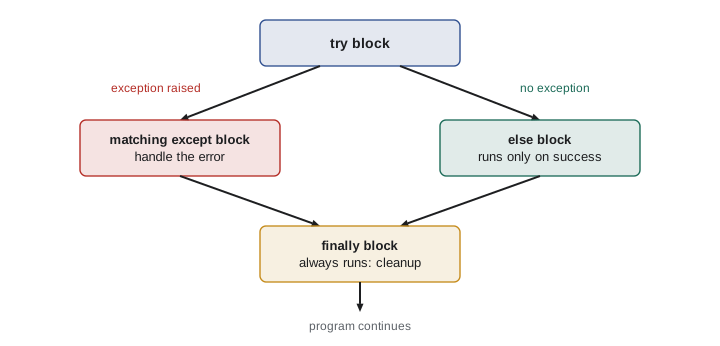
Lesson 3 showed that runtime errors raise exceptions, which stop the program with a traceback. Often you can anticipate an exception and handle it: if a file is missing, ask for another name or use defaults; if one line of a data file is malformed, skip it and keep a count. A try statement runs a block; if an exception of a listed type occurs, the matching except block runs instead of the program crashing. An optional else block runs only if no exception happened, and an optional finally block always runs, which is useful for cleanup.
def parse_mark(text):
    """Convert text to a mark from 0 to 100, raising ValueError if impossible."""
    mark = float(text)                      # may raise ValueError
    if not 0 <= mark <= 100:
        raise ValueError(f"mark out of range: {mark}")
    return mark

for raw in ["87", " 92.5 ", "eighty", "105", ""]:
    try:
        m = parse_mark(raw)
    except ValueError as e:
        print(f"{raw!r:10} rejected ({e})")
    else:
        print(f"{raw!r:10} accepted: {m}")
    finally:
pass # cleanup would go here'87' accepted: 87.0 ' 92.5 ' accepted: 92.5 'eighty' rejected (could not convert string to float: 'eighty') '105' rejected (mark out of range: 105.0) '' rejected (could not convert string to float: '')
Two rules make exception handling helpful rather than harmful. First, catch specific exception types, such as ValueError or FileNotFoundError, not every possible exception. A bare except: or except Exception: that silently continues will also hide genuine bugs, such as a misspelled variable name, making them very hard to find. Second, handle an exception only where you can do something sensible about it. If a low-level function cannot fix the problem, let the exception travel up to code that can, perhaps adding context. Raising an exception with a clear message, as parse_mark does, is how a function says "I was given something I cannot work with".
| Exception | Typical cause | Sensible response |
|---|---|---|
| FileNotFoundError | The path is wrong or the file does not exist | Report the path clearly; offer a default or ask again |
| PermissionError | No permission to read or write the file | Report it; do not retry blindly |
| ValueError | Right type, wrong value, such as int("abc") | Reject or skip the item and record why |
| KeyError | A missing dictionary key | Use get with a default, or check with in first |
| IndexError | Position beyond the end of a sequence | Usually a bug: fix the loop or the data check |
| TypeError | An operation on the wrong type, such as "a" + 1 | Usually a bug: convert values or fix the logic |
| ZeroDivisionError | Dividing by zero, such as an average of nothing | Guard against empty input before dividing |
from pathlib import Path

def read_numbers(path):
    try:
        text = Path(path).read_text(encoding="utf-8")
    except FileNotFoundError:
        print(f"No file at {path!r}; using an empty list.")
        return []
    numbers, bad = [], 0
    for line in text.split():
        try:
            numbers.append(float(line))
        except ValueError:
            bad += 1                       # skip the bad line but count it
    if bad:
        print(f"Skipped {bad} line(s) that were not numbers.")
    return numbers

print(read_numbers("no_such_folder/readings.txt"))No file at 'no_such_folder/readings.txt'; using an empty list. []
CSV files
Comma-separated values, or CSV, is the most common format for tabular data: spreadsheets export it, governments publish open data in it and instruments log to it. Each line is a row and commas separate the fields; the first line usually holds column names. The format looks simple enough to split on commas yourself, but fields can contain commas inside quotation marks, as in "Smith, Jane", so use Python's csv module, which handles these cases correctly. csv.DictReader turns each row into a dictionary keyed by the column names, which makes code readable.
import csv, io

# In a real program this would be: open("weather.csv", newline="", encoding="utf-8")
data = io.StringIO("""date,station,high_c,low_c,precip_mm
2026-01-05,"Edmonton, AB",-12.5,-24.1,0.4
2026-01-06,"Edmonton, AB",-8.0,-19.6,2.1
2026-01-07,"Edmonton, AB",,-15.0,0.0
2026-01-08,"Edmonton, AB",-2.5,-11.2,
2026-01-09,"Edmonton, AB",1.0,-6.8,3.6
""")

highs, precip, missing = [], [], 0
for row in csv.DictReader(data):
    if row["high_c"]:
        highs.append(float(row["high_c"]))
    else:
        missing += 1
    precip.append(float(row["precip_mm"]) if row["precip_mm"] else 0.0)
    station = row["station"]

print(f"station: {station}")
print(f"mean high {sum(highs) / len(highs):.1f} C from {len(highs)} days ({missing} missing)")
print(f"warmest {max(highs)} C, total precipitation {sum(precip):.1f} mm")station: Edmonton, AB mean high -5.5 C from 4 days (1 missing) warmest 1.0 C, total precipitation 6.1 mm
The io.StringIO object behaves like an open file but reads from a string, which lets this example carry its own data. Look at how the program deals with missing values. A missing high temperature is skipped and counted, because inventing a value would distort the mean; a missing precipitation value is treated as zero, which is a judgment call that a real analysis would need to justify and report. Decisions like these are where data analysis can go quietly wrong, so make them explicit in code and in your write-up. AI-110 covers data cleaning in depth with the pandas library.
Writing CSV is just as easy with csv.writer or csv.DictWriter. Open the output file with newline="" as the csv module documentation recommends, so that line endings are handled correctly on every operating system.
import csv, io

summary = [
    {"course": "CMPUT-174", "students": 182, "mean": 74.3},
    {"course": "MATH-101", "students": 240, "mean": 69.8},
]
out = io.StringIO()          # in practice: open("summary.csv", "w", newline="", encoding="utf-8")
writer = csv.DictWriter(out, fieldnames=["course", "students", "mean"])
writer.writeheader()
writer.writerows(summary)
print(out.getvalue(), end="")course,students,mean CMPUT-174,182,74.3 MATH-101,240,69.8
JSON
JSON, JavaScript Object Notation, is the most common format for exchanging structured data between programs, especially over the web. It looks almost exactly like Python literals: objects in braces map to dictionaries, arrays in square brackets map to lists, and strings, numbers, true, false and null map to str, int or float, True, False and None. Python's json module converts in both directions: json.dumps turns Python data into JSON text and json.loads turns JSON text back into Python data, while json.dump and json.load work with files.
import json

course = {
    "code": "CMPUT-174",
    "title": "Introduction to Computing Science",
    "lessons": 12,
    "prerequisites": [],
    "topics": ["algorithms", "data representation", "Python"],
    "online": True,
    "capacity": None,
}
text = json.dumps(course, indent=2)
print(text)

back = json.loads(text)
print(back == course, type(back["topics"]).__name__, back["capacity"])

api_reply = '{"temperature": -7.5, "conditions": "light snow", "alerts": []}'
weather = json.loads(api_reply)
print(f"{weather['temperature']} C, {weather['conditions']}, {len(weather['alerts'])} alerts"){
"code": "CMPUT-174",
"title": "Introduction to Computing Science",
"lessons": 12,
"prerequisites": [],
"topics": [
"algorithms",
"data representation",
"Python"
],
"online": true,
"capacity": null
}
True list None
-7.5 C, light snow, 0 alertsJSON is stricter than Python in a few ways: keys must be strings in double quotation marks, there are no tuples or sets, and there is no trailing comma after the last item. When a program saves its settings, high scores or progress between runs, JSON is usually the simplest good choice. For large, frequently queried data, a database is better; CMPUT-291 covers relational databases and SQL.
| Format | Best for | Python tool | Watch out for |
|---|---|---|---|
| Plain text | Logs, notes, one value per line | open, pathlib | Encoding; trailing newlines |
| CSV | Tables of rows and columns | csv module | Quoted commas; missing values; header names |
| JSON | Nested structured data, settings, web APIs | json module | Only str keys; no tuples or sets |
| Database | Large data queried in many ways | sqlite3 module (CMPUT-291) | Designing tables well |
A complete data pipeline
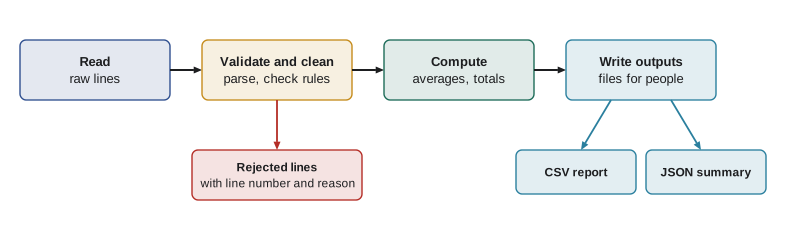
Most data tasks follow the same pipeline: read the raw data, validate and clean it, compute results, and write the output. Keeping each stage in its own function makes the program easy to test and to change. Here is a complete small pipeline that processes a file of quiz submissions, rejects malformed lines with reasons, computes per-student averages and writes both a CSV report and a JSON summary.
import csv, io, json, tempfile
from pathlib import Path

RAW = """student,quiz,score
s01,1,8
s02,1,9.5
s01,2,7
s03,1,ten
s02,2,10
s01,3,11
s03,2,6
,3,7
s02,3,8.5
"""

def read_rows(text):
    return list(csv.DictReader(io.StringIO(text)))

def clean(rows, max_score=10):
    good, rejected = [], []
    for n, row in enumerate(rows, start=2):        # line 1 is the header
        try:
            if not row["student"]:
                raise ValueError("missing student ID")
            score = float(row["score"])
            if not 0 <= score <= max_score:
                raise ValueError(f"score {score} outside 0 to {max_score}")
            good.append((row["student"], int(row["quiz"]), score))
        except ValueError as e:
            rejected.append((n, str(e)))
    return good, rejected

def averages(records):
    totals = {}
    for student, _, score in records:
        totals.setdefault(student, []).append(score)
    return {s: round(sum(v) / len(v), 2) for s, v in sorted(totals.items())}

def write_outputs(folder, avgs, rejected):
    with open(folder / "averages.csv", "w", newline="", encoding="utf-8") as f:
        w = csv.writer(f)
        w.writerow(["student", "average"])
        w.writerows(avgs.items())
    summary = {"students": len(avgs), "rejected": len(rejected),
               "class_average": round(sum(avgs.values()) / len(avgs), 2)}
    (folder / "summary.json").write_text(json.dumps(summary), encoding="utf-8")
    return summary

good, rejected = clean(read_rows(RAW))
avgs = averages(good)
out = Path(tempfile.mkdtemp())
print(write_outputs(out, avgs, rejected))
for line, reason in rejected:
    print(f"rejected line {line}: {reason}")
print((out / "averages.csv").read_text(encoding="utf-8"), end=""){'students': 3, 'rejected': 3, 'class_average': 7.61}
rejected line 5: could not convert string to float: 'ten'
rejected line 7: score 11.0 outside 0 to 10
rejected line 9: missing student ID
student,average
s01,7.5
s02,9.33
s03,6.0Every rejected line is reported with its line number and reason, so a person can fix the source data rather than wonder why a student's average looks wrong. That transparency is as important as the arithmetic. The dictionary method setdefault, used in averages, returns the existing list for a key or inserts and returns a new empty one, a compact way to group items by key.
Worked problem
Deciding how to handle bad data
A sensor CSV has 10,000 rows. 37 rows have an empty temperature, 4 rows have the text ERR, and 2 rows show 999.9, which the manual says means "sensor offline". How should a cleaning function treat each case, and what should it report?
Show solution
- Empty values: skip them for averages, and count them as missing.
- ERR: float("ERR") raises ValueError; catch it, skip the row and count it as unreadable.
- 999.9: it parses as a number, so a type check will not catch it; test for the documented sentinel explicitly and treat it as missing.
- Report all three counts with the results, so readers know the averages are based on 9,957 of 10,000 rows.
Answer: Skip all 43 problem rows for calculations, handling 999.9 by an explicit check, and report the counts by category.
Common mistakes
MistakeOpening files without with, and forgetting to close them.
InsteadUse with open(...) as f: so files are closed automatically.
MistakeLeaving out the encoding when opening text files.
InsteadPass encoding="utf-8" (or the file's actual encoding) every time.
MistakeSplitting CSV lines on commas by hand.
InsteadUse the csv module, which handles quoted fields containing commas.
MistakeCatching every exception with a bare except and carrying on silently.
InsteadCatch specific exceptions and report what was skipped and why.
MistakeReplacing missing values with zero without thinking.
InsteadDecide deliberately whether to skip, fill or flag missing data, and report the choice.
MistakeAssuming a relative path is relative to the script's folder.
InsteadRelative paths are relative to the current working directory; use pathlib and check paths.
Summary and key terms
- open with a with statement reads and writes files safely; state the mode and the encoding.
- Loop over a file to read it line by line; pathlib handles paths portably.
- try, except, else and finally handle exceptions; catch specific types and raise clear errors of your own.
- Use the csv module for tabular data, including quoted commas and missing values.
- The json module converts between Python dictionaries and lists and JSON text.
- A data pipeline separates reading, cleaning, computing and writing into testable functions.
- Report rejected or missing data explicitly so results can be trusted.
- File object
- The object returned by open, used to read or write a file.
- Mode
- The way a file is opened: read, write or append.
- with statement
- A block that automatically closes a file or releases a resource when it ends.
- Working directory
- The folder relative paths are measured from when a program runs.
- try statement
- A statement that runs code and handles specified exceptions if they occur.
- raise
- A statement that signals an exception.
- CSV
- Comma-separated values, a plain-text format for tables.
- JSON
- JavaScript Object Notation, a text format for nested structured data.
- Sentinel value
- A special value, such as 999.9, used in data to mean missing or invalid.
- Data pipeline
- A sequence of stages that read, clean, process and output data.
Practice problems
Work each problem on paper first, then reveal the answer to check.
Write code that counts the lines in a UTF-8 text file called log.txt.
Show answer
with open("log.txt", encoding="utf-8") as f: count = sum(1 for _ in f)
What is the difference between modes "w" and "a"?
Show answer
"w" creates the file or erases an existing one; "a" adds to the end of an existing file.
Why should with be used to open files?
Show answer
It closes the file automatically, even if an exception occurs, so data is saved and resources are released.
Write a try statement that converts text to an int and prints "not a number" on failure.
Show answer
try: n = int(text) / except ValueError: print("not a number")
Why is except: pass dangerous?
Show answer
It hides every error, including genuine bugs, so the program continues with wrong results and no clue why.
Why not split CSV lines with line.split(",")?
Show answer
Quoted fields can contain commas, such as "Edmonton, AB"; the csv module handles them.
What Python type does the JSON value null become?
Show answer
None.
Convert {"name": "Ada", "marks": [90, 95]} to JSON text and back.
Show answer
text = json.dumps(d); d2 = json.loads(text); d2 == d is True.
A cleaning step rejects 12 of 500 rows. What should the report say?
Show answer
That results are based on 488 rows, with 12 rejected and the reasons for each.
Name the four stages of a typical data pipeline.
Show answer
Read, validate and clean, compute, and write the output.
Lesson quiz · 5 questions
Score 60% or more to complete this lesson.
Create a free account to save your progress, take quizzes and earn a certificate.