
CINE-201 · Lesson 6 of 12 · 24 min
Frame rates and temporal sampling
Motion pictures create the illusion of movement by showing a rapid sequence of still images. The rate at which frames are captured, and the rate at which they are played back, shape how motion looks: smooth or juddery, dreamy or hyper-real, slowed down or sped up. Frame rate also affects exposure, data volume, sensor heat, lighting flicker and compatibility with broadcast, streaming and cinema delivery standards. This lesson explains how frame rates became standardized, the odd-looking fractional rates used in North America, capture versus playback frame rates and their creative uses, high frame rate cinema, frame rate conversion, and the practical consequences of frame rate choices on set.
Persistence of vision and the perception of motion
The human visual system integrates light over a short period and interprets a sequence of slightly different images as continuous motion, a phenomenon traditionally called persistence of vision, though modern explanations emphasize the brain's motion-detection mechanisms (the phi phenomenon and beta movement). Smoothness depends on how far objects move between frames. Slow movements look smooth at low frame rates; fast pans and rapidly moving objects can appear to stutter, or judder, when the displacement between frames is large. Motion blur within each frame, set by the shutter (Lesson 7), smooths the transition between frames and is an essential part of the familiar "cinematic" look.
How 24 frames per second became standard
Silent films were shot and projected at varying speeds, often around 16 to 20 frames per second, with projectionists adjusting speed by hand. When synchronized sound arrived in the late 1920s, a fixed speed was needed so that the optical soundtrack would play at the correct pitch, and 24 frames per second became the standard, fast enough for intelligible sound and acceptable motion at a reasonable film cost. Projectors flashed each frame two or three times with a multi-blade shutter, raising the flicker rate to 48 or 72 Hz so that the image did not appear to flicker. Nearly a century later, 24 fps remains the standard for cinema and much scripted television and streaming content, and audiences associate its particular motion rendering with "film".
Television frame rates and the fractional rates
Television frame rates were tied to mains electricity frequencies to avoid visible interference: 60 Hz in North America, parts of South America, Korea and parts of Japan, giving 30 frames (60 interlaced fields) per second; and 50 Hz in Europe and much of the rest of the world, giving 25 frames (50 fields) per second. When color was added to North American television under the NTSC standard in 1953, the frame rate was reduced by a factor of 1000/1001, to about 29.97 frames per second, to avoid interference between the new color subcarrier and the sound carrier while remaining compatible with black-and-white sets. That small change persists in digital standards. In Canada and the United States, broadcast and most video work therefore uses 29.97 and 59.94 fps, and film-style content uses 23.976 fps, which is 24 × 1000/1001, so that it fits cleanly into the 29.97 system.
| Rate (nominal) | Exact rate | Typical use |
|---|---|---|
| 23.976 (23.98) | 24000/1001 | Film-style drama, streaming and television in North America |
| 24 | 24 | Theatrical feature films, digital cinema |
| 25 | 25 | Broadcast and drama in 50 Hz regions |
| 29.97 | 30000/1001 | North American broadcast, news, documentary |
| 50 | 50 | Sports and high-motion content in 50 Hz regions |
| 59.94 | 60000/1001 | North American sports, live events, some online content |
| 48, 96, 120 and higher | Integer or fractional | High frame rate projects, slow motion capture |
Mixing 23.976 and true 24 fps, or 29.97 and 30 fps, within a production causes audio drift: over an hour, the 0.1 % difference amounts to 3.6 seconds, more than enough to put sound visibly out of sync. Camera, sound recorder, timecode and editing settings must all agree on the exact rate, and production documents should specify it, for example "23.976 fps, non-drop-frame timecode".
Timecode and drop frame
Timecode labels each frame with hours, minutes, seconds and frames, as standardized in SMPTE ST 12. At 29.97 fps, counting 30 frames per second would make timecode drift from real clock time by 3.6 seconds per hour, so drop-frame timecode skips two frame numbers at the start of each minute, except every tenth minute, keeping timecode aligned with clock time for broadcast scheduling. No frames are actually dropped; only labels are skipped. Drop-frame timecode is written with a semicolon or full stop before the frame number, such as 01:00:00;00. Film-style productions at 23.976 fps use non-drop-frame timecode, accepting the small drift from clock time.
Capture rate and playback rate
Capture rate and playback rate need not be the same, and the relationship between them controls the apparent speed of motion:
Capturing faster than playback, called overcranking from the hand-cranked cameras of early cinema, produces slow motion: capturing at 96 fps for 24 fps playback slows motion to one quarter of real speed. Capturing slower than playback, undercranking, speeds motion up, used for comic effect, to make car chases feel faster or for time-lapse photography, which may capture one frame every few seconds or minutes. Many cameras offer variable frame rate recording, in which the camera captures at the chosen high or low rate but writes files flagged for normal playback, so the slow or fast motion appears directly in editing.
Worked problem
Planning a slow-motion shot
A director wants a 2-second action, a glass shattering, to last 10 seconds on screen in a 23.976 fps project. What capture frame rate is needed, and how much light is lost compared with normal-speed capture at a 180° shutter?
Show solution
- Slow-down factor: 10 s / 2 s = 5.
- Capture rate: 5 × 23.976 ≈ 120 fps.
- At a 180° shutter, exposure time is 1/(2 × fps): 1/48 s at 24 fps and 1/240 s at 120 fps.
- Light ratio: (1/48) / (1/240) = 5, which is \(\log_2 5 \approx 2.3\) stops.
Answer: About 120 fps, requiring about 2.3 stops more light (or ISO, or a wider aperture) to keep the same exposure at the same shutter angle.
High-speed capture and its demands
High frame rates place heavy demands on cameras and crews. The sensor must read out quickly, which on many cameras requires a smaller sensor window or a lower resolution at the highest rates, changing the field of view. Data rates rise in proportion to frame rate, so recording media fill quickly. Sensors and processors generate more heat. The short exposure times require much more light, and lights that are flicker-free at normal rates may flicker at high frame rates (Lesson 7). Specialized high-speed cameras, such as the Phantom range, capture thousands of frames per second into internal memory for a few seconds, then offload; they are used for commercials, sports, science and visual effects. Sound cannot be recorded in sync during high-speed capture, so sound for slow-motion scenes is created in post-production.
High frame rate cinema
Some filmmakers have experimented with high frame rate (HFR) projection to reduce judder and blur and increase realism. Peter Jackson's The Hobbit: An Unexpected Journey (2012) was shot and shown in selected theaters at 48 fps; Ang Lee's Billy Lynn's Long Halftime Walk (2016) and Gemini Man (2019) used 120 fps, 4K and stereoscopic 3D. Audience reactions were mixed: many viewers found the images unusually clear and smooth, while others felt they looked like video or theater rather than cinema, an effect sometimes called the "soap opera effect", also produced by motion smoothing on televisions. Some recent releases have used variable frame rates, increasing the frame rate only for certain scenes, and some theatrical systems can apply frame rate interpolation selectively. Sports and live events, by contrast, have long favored 50 or 60 fps for clarity in fast action.
Frame rate conversion
Content often needs to be converted between frame rates for delivery in other regions or formats. Simple methods include speed change, such as playing 24 fps content at 25 fps for 50 Hz regions, which speeds it up by 4 % and raises audio pitch unless corrected; pulldown, which repeats fields in a pattern, most famously the 3:2 pulldown that fits 24 frames into 60 fields; and frame duplication or dropping. More sophisticated motion-compensated conversion estimates motion between frames and synthesizes new ones, giving smoother results but risking artifacts around complex motion. Choosing a capture rate that matches the primary delivery standard avoids most conversion problems.
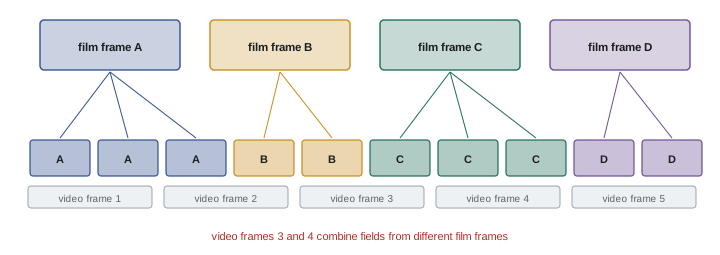
Choosing a frame rate
For most narrative projects in Canada and the United States, the practical choice is 23.976 fps for streaming and television delivery, or 24 fps for projects aimed primarily at theatrical release, with high-speed capture for specific slow-motion shots. Documentary, news and event work often uses 29.97 or 59.94 fps for its smoother motion. Projects for international broadcast may choose 25 fps. Whatever the choice, it should be confirmed with post-production and the distributor before shooting, written into camera and sound reports, and set identically on every camera and recorder.
Frame rates and lighting at high speed
High frame rates interact with lighting in two ways. First, each frame receives less light, as the slow-motion example showed, so high-speed shots often need large lighting units or bright daylight. Second, lights that flicker invisibly can produce strong flicker at high frame rates, because the exposure time becomes shorter than the light's pulse cycle (Lesson 7). High-speed cinematographers therefore use flicker-free lighting, such as high-quality LED fixtures with high-frequency drivers or tungsten lamps, whose filaments stay hot between pulses, and test every source at the planned frame rate.
Variable frame rate in the edit
Footage recorded at high frame rates in normal mode, rather than flagged for slow-motion playback, can be slowed in editing by interpreting it at the project frame rate, or used at normal speed by dropping frames. Some productions record key action at a moderately high frame rate, such as 48 or 60 fps, to give editors the option of slight slow motion. This flexibility must be weighed against the extra data and light required, and against the effect of the shutter angle on motion blur when footage is later played back at normal speed.
Undercranking and time-lapse
Undercranking, capturing below the playback rate, makes motion faster on screen. Mild undercranking, such as 20 fps for 24 fps playback, makes fight scenes and car chases feel more energetic without obvious speeding. Time-lapse captures one frame every few seconds or minutes to compress hours into seconds, showing clouds moving, cities glowing and flowers opening. Time-lapse often uses intervalometers, long exposures to add motion blur, and motion control rigs that move the camera slowly between frames. Exposure changes during sunsets and sunrises require gradual adjustments, sometimes automated, to avoid flicker between frames.
Frame rate and the viewer's display
How motion looks also depends on the display. Televisions refresh at 60 or 120 Hz and must convert 24 fps content, either with pulldown, which introduces slight judder, or with motion smoothing, which interpolates frames and can make films look like video. Many filmmakers encourage viewers to turn off motion smoothing for films, and some televisions offer a filmmaker mode that does so automatically.
Common mistakes
MistakeMixing 23.976 and 24 fps in one project.
InsteadAgree the exact rate and set every device to it.
MistakeForgetting the light loss at high frame rates.
InsteadPlan extra light or sensitivity for slow motion.
MistakeAssuming high-speed modes use the full sensor.
InsteadCheck the sensor window and field of view at each rate.
MistakeUsing drop-frame timecode for film-style projects by habit.
InsteadUse non-drop-frame at 23.976 unless broadcast requires otherwise.
MistakeLeaving frame rate conversion to chance.
InsteadCapture at the primary delivery rate.
Summary and key terms
- Frame rate shapes motion rendering, exposure, data and compatibility.
- 24 fps became standard with synchronized sound in the late 1920s.
- North American video uses fractional rates: 23.976, 29.97 and 59.94 fps.
- Drop-frame timecode keeps 29.97 timecode aligned with clock time.
- Capture faster than playback for slow motion, slower for fast motion.
- High frame rates need more light, data and readout speed.
- Choose a capture rate matching the primary delivery standard.
- Frame rate
- Frames captured or shown per second.
- Judder
- Stuttering appearance of fast motion.
- 23.976 fps
- 24 × 1000/1001 frames per second.
- NTSC
- North American color television standard.
- Timecode
- Frame-accurate time label (SMPTE ST 12).
- Drop-frame timecode
- Timecode skipping frame numbers to match clock time.
- Overcranking
- Capturing faster than playback for slow motion.
- Undercranking
- Capturing slower than playback for fast motion.
- High frame rate
- Projection above 24 fps, such as 48 or 120.
- Pulldown
- Repeating fields to convert 24 fps to 60 Hz video.
Practice problems
Work each problem on paper first, then reveal the answer to check.
Why did 24 fps become standard?
Show answer
Synchronized sound needed a fixed speed; 24 fps was sufficient.
Exact value of 29.97 fps?
Show answer
30000/1001.
Why was the NTSC rate reduced?
Show answer
To avoid interference between the color subcarrier and sound carrier.
Drift per hour between 24 and 23.976 fps?
Show answer
About 3.6 seconds.
Slow-down factor for 72 fps played at 24 fps?
Show answer
Three times slower.
Exposure time at 60 fps with a 180° shutter?
Show answer
1/120 s.
Light loss going from 24 to 96 fps at the same shutter angle?
Show answer
Two stops.
What does drop-frame timecode skip?
Show answer
Frame numbers, not actual frames.
Name a high frame rate feature film.
Show answer
The Hobbit (48 fps), Gemini Man or Billy Lynn (120 fps).
What does 3:2 pulldown do?
Show answer
Maps 24 fps frames onto 60 Hz fields.
Lesson quiz · 5 questions
Score 60% or more to complete this lesson.
Create a free account to save your progress, take quizzes and earn a certificate.