
CINE-201 · Lesson 11 of 12 · 25 min
Lens mounts, monitoring, timecode, audio and power
A camera body becomes a working production tool only when it is connected to lenses, monitors, wireless video, timecode, audio and power. These connections are where many on-set problems arise: a lens that will not mount, a monitor showing the wrong LUT, timecode drifting between cameras, audio recorded at the wrong level, or a battery that dies in the middle of a take. Understanding the interfaces and their limits lets a camera team build reliable packages and solve problems quickly. This lesson covers lens mounts and adapters, video outputs and monitoring, viewfinders and on-set displays, timecode and genlock, in-camera audio, power systems and batteries, and remote control.
Lens mounts and flange focal distance
The lens mount holds the lens at the precise distance from the sensor for which it was designed, the flange focal distance. If the distance is wrong by even a few hundredths of a millimeter, focus marks will be inaccurate and lenses may not reach infinity focus. Cinema cameras use robust locking mounts, while mirrorless cameras use shorter, lighter bayonet mounts. A mount with a short flange distance can accept lenses designed for longer flange distances through adapters that fill the gap, which is why mirrorless cameras can use almost any lens; the reverse is generally impossible without optical correction.
| Mount | Flange focal distance | Typical use |
|---|---|---|
| ARRI PL | 52.00 mm | Industry-standard cinema mount for Super 35 lenses |
| ARRI LPL | 44.00 mm | Large-format cinema lenses, ALEXA LF and 35 |
| Canon EF | 44.00 mm | Still lenses widely adapted for video |
| Canon RF | 20.00 mm | Canon mirrorless and cinema cameras |
| Sony E | 18.00 mm | Sony mirrorless and cinema cameras |
| L-Mount | 20.00 mm | Leica, Panasonic and Sigma cameras |
| Micro Four Thirds | 19.25 mm | Panasonic and some Blackmagic cameras |
Back focus, the actual distance from mount to sensor, is checked with collimators or by careful focus tests and adjusted with shims when necessary, especially after a camera has been knocked or when switching between mounts. Modern cinema lenses also carry electronic contacts, such as ARRI's LDS and the Cooke /i protocol, which report focal length, focus distance and iris to the camera for display and for recording in metadata, valuable for visual effects and focus pulling.
Video outputs
Cameras send live images to monitors and other equipment through video outputs. Serial digital interface (SDI) is the professional standard: robust BNC connectors with locking bayonets, long cable runs over coaxial cable, and bandwidths of 3G-SDI for 1080p at up to 60 fps and 12G-SDI for UHD at up to 60 fps. HDMI, common on mirrorless and consumer equipment, carries high resolutions but uses fragile connectors that disconnect easily and supports only short cable runs. Outputs can carry camera metadata, timecode and a record flag that tells external recorders when to start, and many cameras can send a clean feed without on-screen information to one output and a feed with overlays, frame lines and exposure tools to another.
Monitoring and LUTs
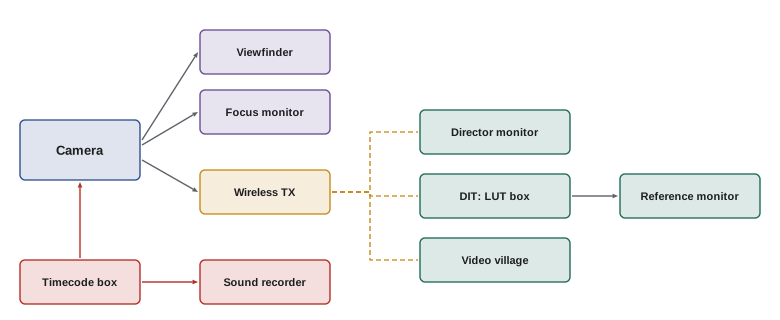
Everyone on set judges the image through monitors: the operator through the viewfinder, the focus puller on a small monitor, the DP and director at a larger monitor, and the DIT at a calibrated reference monitor. If those images differ, decisions become inconsistent. Good monitoring practice includes applying the same LUT to all monitors so that everyone sees the intended look; calibrating critical monitors; using exposure tools such as waveforms, false color and zebras rather than judging brightness by eye; keeping monitors shaded from ambient light; and knowing which outputs carry log, LUT-applied or HDR signals. A common mistake is exposing by eye on a monitor that is set too bright or displaying log without a LUT, leading to systematically wrong exposure.
Wireless video
Wireless video systems transmit the camera's image to monitors away from the camera, letting the director, focus puller, DIT and clients watch without cables, which is essential for handheld, Steadicam, vehicle and crane work. Systems differ in range, latency and image quality. Low latency, ideally under a few milliseconds, matters for focus pullers and remote operators, who must react in real time; directors and clients can tolerate more delay. Wireless systems share radio spectrum with other equipment, so frequency coordination and spectrum regulations apply.
Timecode and synchronization
When several cameras and sound recorders capture the same scene, their recordings must be synchronized in editing. Timecode, recorded with every clip (Lesson 6), provides a common reference if all devices share the same time. Devices drift apart over hours, so productions use timecode generators, small sync boxes that hold accurate time, attached to each camera and recorder and "jammed" from a master clock at the start of the day and after battery changes. Genlock goes further, synchronizing the exact moment each camera captures each frame, which is required for multi-camera live production, 3D rigs, LED wall virtual production and some visual effects work. The traditional clapperboard, or slate, remains in use as a visual and audible sync point and a record of scene, take and camera information.
Audio in camera
Most cinema productions record sound separately on a dedicated recorder operated by the sound team, a method called double-system sound, because dedicated recorders offer better preamplifiers, more tracks and closer attention. Cameras still record audio, either a scratch track from an on-board microphone to help synchronization, or a feed from the sound mixer through wireless links or cables. Documentary, news and small productions often record primary audio directly into the camera through XLR inputs with phantom power for professional microphones. Camera audio settings, levels and track assignments must be checked every day, and audio should be monitored with headphones, not only meters.
Power systems
Cinema cameras and their accessories draw substantial power, and power failures stop production. Cameras typically run from rechargeable lithium-ion batteries using standard mounts, principally V-mount and Gold Mount (Anton/Bauer three-stud), with nominal voltages of about 14.4 V; newer high-voltage systems such as the B-mount standard provide 24 V or more for power-hungry cameras and accessories. Large batteries, power distribution boxes and AC adapters power cameras on long setups, and studio work may use block batteries or mains power through power supplies. Battery capacity is measured in watt-hours (Wh), the product of voltage and ampere-hours:
Worked problem
How long will the battery last?
A camera draws 65 W, and the accessories on it, a wireless video transmitter, a monitor and a lens motor, add 45 W. A 98 Wh V-mount battery delivers about 90 % of its rating in practice. How long will it run? How many batteries are needed for a 12-hour day if the camera is powered for about 9 hours?
Show solution
- Total load: 65 + 45 = 110 W.
- Usable energy: 98 × 0.9 ≈ 88 Wh.
- Run time: 88 / 110 ≈ 0.8 h, about 48 minutes.
- Batteries needed for 9 hours: 9 / 0.8 ≈ 11.3, so about 12 battery cycles, for example 6 batteries each charged twice, with chargers running all day.
Answer: About 48 minutes per battery; plan roughly a dozen battery cycles per camera per day, or use larger batteries or block power on long setups.
Batteries must be handled safely. Lithium-ion cells can overheat and catch fire if damaged, short-circuited, overcharged or exposed to high heat, and air transport regulations restrict them.
In the United States, FAA and PHMSA rules, following the international ICAO standards, generally allow spare lithium-ion batteries of up to 100 Wh in carry-on baggage, batteries of 100 to 160 Wh in carry-on with airline approval and a limit of two spares per person, and prohibit batteries over 160 Wh on passenger aircraft except as dangerous goods cargo. Spare batteries must not go in checked baggage, and terminals must be protected against short circuits.
This is why many camera batteries are rated just under 100 Wh. Productions shipping larger batteries must use proper dangerous goods procedures.
Remote control and camera accessories
Camera settings can be changed from the body, from side-mounted control panels for the assistant, from wireless controllers, from mobile apps, or from remote control panels in multi-camera and live setups. Wireless lens control systems drive motors on the focus, iris and zoom rings, letting focus pullers work from a distance with hand units marked for each lens. Other common accessories include matte boxes and filter trays, follow focus units, top handles and shoulder rigs, cages for mirrorless cameras that provide mounting points and protect connectors, external recorders that add codecs or longer recording times, and cooling accessories for hot environments. Each accessory adds weight, power draw and potential points of failure, so packages should be built deliberately rather than accumulated.
Cabling and connectors on set
Reliable cabling prevents many problems. Use cables of the right type and length, such as 12G-rated coaxial cable for UHD SDI signals, and keep spares. Strain-relieve connectors so that cables pulling on them do not damage the camera's ports. Route cables so that they do not snag on moving equipment or create trip hazards. Label both ends of each cable. For mirrorless cameras with small HDMI and USB connectors, cages with cable clamps are essential. Power cables should be kept away from video and audio cables where possible to reduce interference.
Firmware and settings management
Cameras store settings in user files or presets that can be saved to cards and loaded on other cameras, ensuring identical configuration. Before production, the camera team creates and tests a settings file covering sensor mode, frame rate, shutter, recording format, LUTs, monitoring overlays and timecode, then loads it onto every camera. Firmware versions should match across cameras and be frozen for the production. Keeping a record of settings and firmware helps post-production and simplifies troubleshooting when something behaves unexpectedly.
Working in extreme conditions
Cameras face heat, cold, rain, dust, salt spray and humidity. In heat, shade the camera, use cooling fans and white covers, and monitor sensor temperature. In cold, batteries lose capacity quickly and should be kept warm, and condensation forms when cold equipment enters a warm room, so let it warm up slowly in a sealed bag. In rain and spray, use rain covers and protect lenses and connectors. In dust and sand, seal openings and clean carefully. Manufacturers publish operating temperature ranges, and rental houses can supply weather protection.
Monitoring HDR on set
Productions delivering HDR may monitor in HDR on set, using monitors capable of high brightness and wide color, with LUTs that convert camera log to PQ or HLG. HDR monitoring reveals highlights and colors that a standard monitor clips, helping the cinematographer judge practical lights, windows and skies. Because HDR monitors are expensive and demanding, many productions monitor in standard dynamic range on set and check HDR at the DIT station or in dailies, relying on log recording to preserve the range for the HDR grade.
Sound considerations for the camera team
Camera equipment can produce noise that interferes with sound recording: fans, lens motors, wireless transmitters and the camera body itself. Many cinema cameras offer fan modes that slow or stop the fan during recording, at the cost of higher temperature between takes. Camera teams coordinate with the sound department on noise, on placement of wireless transmitters to avoid radio interference, and on timecode and slating. A good working relationship between camera and sound departments prevents many problems that would otherwise need expensive fixes in post-production.
Common mistakes
MistakeAdapting lenses without checking flange distance and back focus.
InsteadUse proper adapters and verify focus marks.
MistakeRelying on HDMI connections on a busy set.
InsteadUse SDI or secure HDMI with locking clamps.
MistakeExposing by eye on uncalibrated monitors.
InsteadUse calibrated monitors and exposure tools.
MistakeJamming timecode once and never again.
InsteadRe-jam after battery changes and periodically.
MistakePacking spare lithium batteries in checked bags.
InsteadCarry spares in the cabin within the Wh limits.
Summary and key terms
- Lens mounts set the flange focal distance; short mounts adapt to longer ones.
- Lens data protocols report focus, iris and focal length to the camera.
- SDI is the robust professional video interface; HDMI is fragile.
- Consistent LUTs, calibrated monitors and exposure tools keep decisions aligned.
- Timecode sync boxes and genlock keep cameras and recorders together.
- Battery run time ≈ usable Wh / load W; plan cycles and chargers.
- Lithium battery transport is limited to 100 Wh freely and 160 Wh with approval.
- Lens mount
- Interface holding a lens to the camera.
- Flange focal distance
- Distance from mount face to sensor.
- Back focus
- Actual mount-to-sensor distance, checked and shimmed.
- SDI
- Serial digital interface for professional video.
- Wireless video
- Radio transmission of the camera image.
- Latency
- Delay between capture and display.
- Jam sync
- Setting timecode devices to a master clock.
- Genlock
- Synchronizing frame capture across devices.
- Double-system sound
- Recording sound on a separate recorder.
- Watt-hour
- Unit of battery energy capacity.
Practice problems
Work each problem on paper first, then reveal the answer to check.
Flange focal distance of the PL mount?
Show answer
52.00 mm.
Can a PL lens be adapted to Sony E?
Show answer
Yes; E has a shorter flange distance.
Why does back focus matter?
Show answer
Wrong distance makes focus marks inaccurate.
Which SDI standard carries UHD at 60 fps?
Show answer
12G-SDI.
Why apply the same LUT to all monitors?
Show answer
So everyone sees the intended look consistently.
Who most needs low wireless latency?
Show answer
Focus pullers and remote operators.
What does genlock synchronize?
Show answer
The moment each frame is captured.
Watt-hours of a 14.4 V, 6.6 Ah battery?
Show answer
About 95 Wh.
Run time of a 150 Wh battery (90 % usable) at 90 W?
Show answer
1.5 hours.
Largest spare battery allowed in carry-on without approval?
Show answer
100 Wh.
Lesson quiz · 5 questions
Score 60% or more to complete this lesson.
Create a free account to save your progress, take quizzes and earn a certificate.