
CINE-201 · Lesson 5 of 12 · 27 min
Resolution, detail and sharpness
Resolution is the most marketed and most misunderstood camera specification. Camera names advertise 4K, 6K, 8K and beyond, but the detail a viewer actually sees depends on the sensor's photosite count and its debayering, the lens, focus accuracy, the optical low-pass filter, motion blur, compression, the delivery format and the viewing distance and screen. A higher number on a specification sheet does not guarantee a sharper picture, and sharpness is not the only quality that matters. This lesson explains standard resolutions and containers, the difference between pixel count and resolved detail, the modulation transfer function, oversampling and downscaling, sharpening, the relationship between resolution and viewing conditions, and the costs of higher resolution in data and workflow.
Standard resolutions and containers
Resolution is usually described as the number of pixels across and down the frame. Two families of standards coexist: television standards defined by the ITU and SMPTE, and digital cinema standards defined by the Digital Cinema Initiatives (DCI) consortium.
| Name | Pixels (width × height) | Aspect ratio | Typical use |
|---|---|---|---|
| HD (1080) | 1920 × 1080 | 16:9 (1.78:1) | Broadcast, streaming, proxies |
| DCI 2K | 2048 × 1080 | 1.90:1 | Digital cinema mastering and projection |
| UHD (4K UHD) | 3840 × 2160 | 16:9 | Television, streaming |
| DCI 4K | 4096 × 2160 | 1.90:1 | Digital cinema mastering and projection |
| 8K UHD | 7680 × 4320 | 16:9 | Some broadcast and high-end streaming |
Within a DCI container, films are mastered in a flat (1.85:1, 3996 × 2160 at 4K) or scope (2.39:1, 4096 × 1716 at 4K) frame. Camera resolutions such as 4.6K, 5.7K, 6K or 8.6K refer to the number of photosites across the sensor in a particular mode and are not delivery standards; footage is scaled to the delivery format in post-production. Many streaming platforms require original productions to be captured with cameras that record at least UHD resolution with specified codecs, which is one reason higher-resolution cameras became standard for television drama.
Pixel count versus resolved detail
Pixel count is the number of samples; resolved detail is how much fine structure is actually distinguishable in the image. They differ because every stage of the imaging chain blurs the image a little. The lens has finite sharpness, especially at its widest and smallest apertures and toward the edges; diffraction softens images at small apertures; the optical low-pass filter blurs deliberately; debayering recovers only part of the full resolution (Lesson 3); focus is never perfect, especially with shallow depth of field and moving subjects; motion blur at normal shutter angles softens anything moving; and compression discards fine detail. A 4K image from a fast-moving handheld shot with a vintage lens wide open may resolve far less detail than a carefully focused HD image of a static scene.
The modulation transfer function
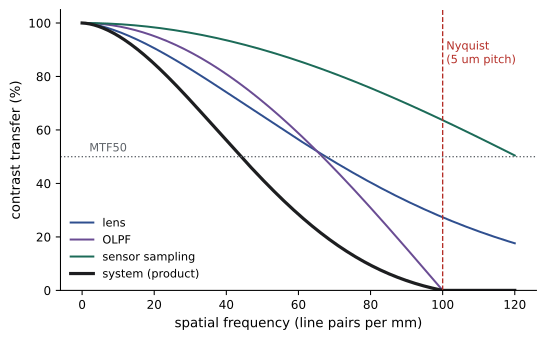
The most complete way to describe sharpness is the modulation transfer function (MTF), which shows how much of the contrast of a pattern of fine lines survives the imaging system, as a function of how fine the lines are. At coarse detail, contrast transfer is near 100 %; as detail becomes finer, contrast falls until the lines can no longer be distinguished. Each component of the system has its own MTF, and the system MTF is approximately their product:
Because the values multiply, the weakest component dominates: a superb sensor behind a soft lens produces a soft image. Single-number summaries such as MTF50, the spatial frequency at which contrast falls to 50 %, are useful for comparisons. Perceived sharpness depends heavily on contrast at moderate spatial frequencies, not only on the finest resolvable detail, which is why a lens with high contrast and moderate resolution can look sharper than one with extreme resolution but lower contrast.
Worked problem
Combining MTFs
At a spatial frequency of 40 line pairs per mm, a lens transfers 70 % contrast, the OLPF 85 % and the sensor sampling 80 %. What is the approximate system MTF at that frequency? What if the lens is stopped down to f/22 and diffraction reduces its MTF there to 40 %?
Show solution
- System MTF: 0.70 × 0.85 × 0.80 = 0.476, about 48 %.
- With diffraction: 0.40 × 0.85 × 0.80 = 0.272, about 27 %.
- Contrast of fine detail drops by almost half.
Answer: About 48 % at the lens's good aperture, falling to about 27 % at f/22. Diffraction at small apertures can undo the benefit of a high-resolution sensor.
Diffraction
Light passing through an aperture spreads slightly, forming a blur pattern called the Airy disc, whose diameter grows with the f-number. At wide apertures it is tiny compared with the photosites; at small apertures it can span several photosites, softening the image regardless of the lens's quality. A rule of thumb is that the Airy disc diameter is about 1.34 times the f-number in micrometers for green light (about 2.44 × wavelength × N), so at f/16 it is about 21 µm, roughly four photosites on a sensor with 5 µm photosites. Smaller photosites reach this limit at wider apertures. Cinematographers therefore usually avoid the smallest apertures for critical sharpness, using ND filters to control exposure instead.
Oversampling and downscaling
Many cinema cameras capture more photosites than the delivery format needs and scale down. Oversampling recovers the resolution lost to debayering, reduces aliasing and false color, averages noise across more photosites, and leaves room for reframing, stabilization and digital zooms in post-production. A common pattern is capturing around 6K and delivering 4K, or capturing 4.6K and delivering UHD or 2K. Some cameras oversample internally, reading a higher-resolution sensor and recording a downscaled image, which brings the image quality benefits without the data cost. Downscaling quality depends on the filter used: good resampling filters preserve detail and avoid both blur and aliasing.
Sharpening
Most cameras apply sharpening, also called detail enhancement, to compressed recordings, increasing contrast at edges to make images look crisper. Excessive sharpening produces halos around edges, emphasizes noise and gives a harsh "video" look. Cinema cameras recording log or raw usually apply little or no sharpening, leaving it to post-production, where it can be controlled precisely, and many cinematographers deliberately reduce sharpness with vintage lenses, diffusion filters or grading to soften the clinical look of high-resolution digital images. Resolution is a resource that gives freedom in post-production; it is not an aesthetic goal in itself.
Resolution and viewing conditions
Whether extra resolution is visible depends on the screen size and viewing distance. Human visual acuity is often taken as about one minute of arc for people with normal vision, meaning that detail finer than about 1/60 of a degree cannot be resolved. On a typical living-room television viewed from several meters, the difference between HD and UHD is subtle for many viewers, while on a large cinema screen viewed from the front rows, or on a large television viewed from close up, it is clear. Other factors, such as dynamic range, color, frame rate and compression quality, often contribute more to perceived image quality than resolution beyond 4K.
Worked problem
When is 4K visible?
A viewer sits 8.2 ft (2.5 m) from a television 56 in (1.43 m) wide (a 65-inch 16:9 screen). Assuming acuity of one minute of arc, what is the finest resolvable detail size on the screen, and does UHD pixel spacing exceed that acuity?
Show solution
- One minute of arc = 1/60° = 0.000291 rad.
- Resolvable detail at 2.5 m: 2.5 × 0.000291 = 0.73 mm.
- UHD pixel pitch: 1,430 mm / 3,840 = 0.37 mm; HD pixel pitch: 1,430 / 1,920 = 0.74 mm.
- HD pixels are about at the acuity limit; UHD pixels are finer than the eye can resolve at this distance.
Answer: Detail of about 0.73 mm is resolvable; HD pixels (0.74 mm) are near that limit, so UHD offers only a modest visible improvement at this distance, though more when sitting closer.
The costs of resolution
Higher resolution has real costs. Data rates and storage grow roughly in proportion to pixel count: 8K has four times the pixels of UHD. Processing, debayering, visual effects rendering and grading become slower and need more powerful hardware. Focus pulling becomes more demanding, because small focus errors become visible on large, sharp monitors. Make-up, costumes and sets face more scrutiny. Smaller photosites on sensors of the same size may reduce per-photosite dynamic range. On the other hand, higher resolution gives flexibility for reframing, stabilization, visual effects work such as tracking and keying, and future-proofing. Each production should weigh these factors rather than choosing the highest resolution by default.
| Capture resolution | Relative pixels (UHD = 1) | Main benefits | Main costs |
|---|---|---|---|
| HD | 0.25 | Small files, fast workflow | Little room for reframing; below many platform requirements |
| UHD or 4K | 1 | Meets most delivery specifications | Moderate data volumes |
| 6K | About 2.4 | Oversampling for 4K, reframing | Larger files, more processing |
| 8K | 4 | Maximum reframing and VFX flexibility | Very large files, demanding workflow |
Measuring resolution
Resolution is measured with test charts photographed under controlled conditions. Traditional charts use converging lines or bars of increasing frequency, and the point at which lines can no longer be distinguished gives a limiting resolution. Modern methods use slanted-edge targets: software analyses how a slightly tilted sharp edge is blurred and calculates the MTF across all frequencies. Zone plates, patterns of concentric rings with increasing frequency, reveal aliasing as false patterns. Camera tests often include a resolution chart, a zone plate and real-world subjects with fine detail, such as foliage, hair and fabrics.
Resolution in motion
Most resolution measurements are of still images, but motion reduces resolution dramatically. At a 180-degree shutter, a subject moving across the frame at moderate speed may blur by many pixels in each frame, so its effective resolution falls far below the sensor's. This is one reason why high resolution matters most for static or slow-moving images, such as landscapes, architecture and visual effects plates, and less for fast action. Higher frame rates and narrower shutters reduce motion blur and preserve more detail in motion, at the cost of the look and light.
Resolution and visual effects
Visual effects work benefits from high resolution and clean images. Tracking software follows fine features to calculate camera motion, keying separates subjects from green or blue screens using color and edge detail, and compositors may reframe or stabilize shots. Capturing at higher resolution than delivery gives room for these operations and keeps final images sharp. For this reason, productions with heavy visual effects often choose high-resolution raw capture, even when the final delivery is UHD or 2K.
Lens sharpness across the frame
Lenses are usually sharpest in the center of the frame and softer toward the edges and corners, especially at wide apertures. Field curvature means that the plane of sharpest focus may curve, so that corners come into focus at a slightly different distance from the center. Lens tests on the actual camera, at the apertures that will be used, reveal how sharp each lens is across the frame and whether the edges are acceptable for the compositions planned. On large formats, edge performance is especially demanding because lenses must cover a larger image circle.
Choosing delivery resolution
Delivery resolution is set by the distributor or platform. Theatrical releases are commonly mastered at 2K or 4K in DCI containers; many visual effects-heavy films still finish at 2K for cost reasons and are upscaled for 4K release. Streaming platforms usually require UHD delivery for original productions, often with HDR versions. Broadcast television delivers HD or UHD depending on the network. Capture resolution should exceed the delivery resolution enough to allow reframing and to deliver full detail after debayering, but not so much that data and processing become unmanageable.
Upscaling
When footage must be delivered at a higher resolution than it was captured, it can be upscaled. Simple interpolation adds pixels without adding detail; modern machine-learning upscalers can synthesize plausible detail, sometimes very convincingly, but can also invent texture that was never there. Upscaling is common for archival material and for visual effects shots rendered at lower resolution, but it is no substitute for capturing adequate resolution where it matters.
Common mistakes
MistakeEquating pixel count with sharpness.
InsteadConsider lens, focus, debayering, motion and compression.
MistakeStopping down to f/16 or beyond for maximum sharpness.
InsteadDiffraction softens images at small apertures.
MistakeApplying heavy in-camera sharpening.
InsteadKeep sharpening low; control it in post.
MistakeChoosing 8K by default.
InsteadWeigh data, workflow and focus demands against benefits.
MistakeJudging focus on small monitors.
InsteadUse large, high-resolution monitors and magnification.
Summary and key terms
- HD, UHD, DCI 2K and DCI 4K are the main delivery resolutions.
- Camera resolutions such as 4.6K or 6K describe sensor modes, not delivery formats.
- Resolved detail is reduced by lens, OLPF, debayering, focus, motion and compression.
- System MTF is the product of component MTFs; the weakest link dominates.
- Diffraction softens images at small apertures.
- Oversampling and good downscaling improve detail and reduce artifacts.
- Visible resolution depends on screen size and viewing distance.
- Resolution
- Number of pixels or resolvable detail.
- UHD
- 3840 × 2160 television format.
- DCI 4K
- 4096 × 2160 cinema container.
- MTF
- Modulation transfer function: contrast versus detail.
- MTF50
- Spatial frequency at 50 % contrast.
- Line pairs per mm
- Measure of spatial frequency.
- Diffraction
- Spreading of light at an aperture.
- Airy disc
- Blur pattern from diffraction.
- Oversampling
- Capturing more resolution than delivered.
- Sharpening
- Edge contrast enhancement.
Practice problems
Work each problem on paper first, then reveal the answer to check.
Pixel dimensions of UHD?
Show answer
3840 × 2160.
Pixel dimensions of DCI 4K?
Show answer
4096 × 2160.
How many times more pixels has 8K UHD than UHD?
Show answer
Four.
System MTF for 0.6, 0.9 and 0.8?
Show answer
0.432, about 43 %.
Approximate Airy disc diameter at f/11?
Show answer
About 15 µm.
Why oversample?
Show answer
To recover debayering losses, reduce aliasing and noise, and allow reframing.
What does excessive sharpening cause?
Show answer
Halos, emphasized noise and a harsh look.
Resolvable detail at 3 m for one-minute acuity?
Show answer
About 0.87 mm.
Name two costs of higher resolution.
Show answer
Data volume, processing, focus demands, scrutiny of sets.
Scope frame size in a DCI 4K container?
Show answer
4096 × 1716.
Lesson quiz · 5 questions
Score 60% or more to complete this lesson.
Create a free account to save your progress, take quizzes and earn a certificate.