
BAS-430 · Lesson 9 of 12 · 20 min
Backups and recovery
▶ Video coming soon A video version of this lesson is on the way.
BAS-320 had covered Quillon's backup routine in detail: a backup at every change and on a fixed schedule, a rotation of 14 daily, 8 weekly and 12 monthly copies, the 3-2-1 rule, the fields recorded with every controller backup, and restore tests every quarter for front ends and every month for a bench controller. So when Callie reached the backup tab in Margit's binder, she expected to skim it. The first page stopped her. It was a printed news story about a ransomware attack on a property management company in another city, with one sentence underlined in red: the attackers had deleted the backups before they encrypted the servers.
"That's the page that made me buy the safe," Margit said. "Everything Sophie taught you about backups is right. This lesson is about the backups still being there when somebody is trying to make sure they aren't."
What a backup must survive
Backups in BAS-320 were mostly about ordinary failures: a dead hard drive, a controller replaced, a bad download, a mistake. Those still happen far more often than attacks. But security adds a harder requirement. Ransomware groups know that a victim with good backups will not pay, so they look for backups and destroy them first. Any backup that can be reached from the network, with credentials that the attacker can steal, is at risk.
A backup that has to survive an attack must be:
- Offline or immutable: at least one copy disconnected from every network, or stored in a way that cannot be changed or deleted for a set period, even by an administrator.
- Separately protected: the storage for backups uses its own accounts, not the same administrator accounts as the front-end server or the office network.
- Complete enough to rebuild from: not just the program files, but everything needed to put a system back together on new hardware.
- Proven: restored and checked regularly, so that a failure is found during a test, not during an emergency.
- Protected itself: backups contain configurations, network addresses and sometimes credentials, so they are encrypted and handled as carefully as the system they copy.
Extending the 3-2-1 rule
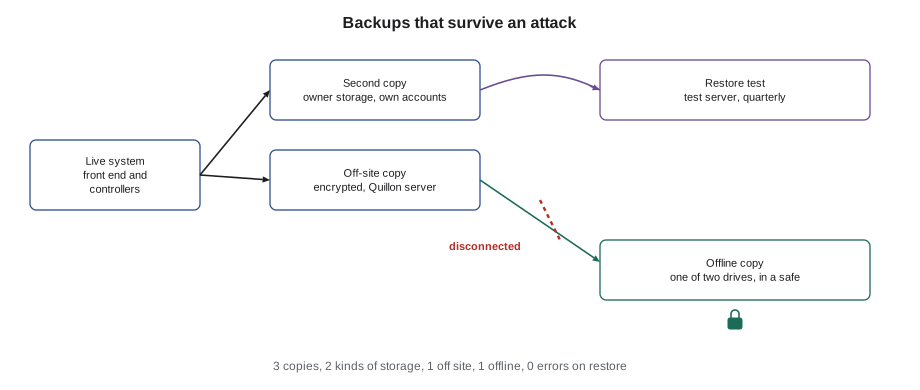
The 3-2-1 rule from BAS-320 says three copies of the data, on two different kinds of storage, with one copy away from the site. Some organizations extend it to 3-2-1-1-0: one of the copies is offline or immutable, and restore tests show zero errors. For Quillon's clients, the arrangement looks like this.
| Copy | Where | Protects against |
|---|---|---|
| Live system | Front-end server and controllers | Nothing by itself; it is what is being protected |
| Second copy | Owner's network storage on site, with its own accounts | Hardware failure, mistakes, a bad download |
| Off-site copy | Quillon's backup server, encrypted, reached only by Quillon's backup service account | Loss of the site's systems, fire or flood |
| Offline copy | Encrypted drive in Quillon's office safe, refreshed monthly and then disconnected | Ransomware or an attacker who reaches both online copies |
| Proof | Quarterly front-end and monthly controller restore tests | Backups that look fine but do not work |
Margit's offline copy started in 2025. On the first working day of each month, the service desk copies the latest monthly backup of every client site onto one of two encrypted drives, checks that the copy can be read, and puts the drive in the office safe. The two drives alternate, so one is always in the safe. Neither is ever connected to anything but the one office computer used to write it, and that computer is disconnected from the network while it does. It is unglamorous and it takes about an hour a month.
What to back up
A building system is more than its programs. To rebuild after a serious incident, a site needs:
- Front-end configuration and database: graphics, point database, alarms, schedules, user roles, and trend history if the owner wants it kept.
- Controller programs and configurations, each with its firmware version, as BAS-210 requires.
- Supervisory controller and router settings, including BBMD tables and device instances.
- Network device configurations and firewall rules, usually held by the owner's IT provider, which should confirm it backs them up.
- For BACnet/SC sites, the certificate authority and its private key, protected and backed up separately, because losing it means reissuing every device's certificate.
- Software installation files and license keys for the versions in use, because the maker's download site may only offer newer ones.
- Documentation: inventory, network drawing, sequences, points lists and the incident response plan, on paper or offline as well as online, because an incident may make the online copies unreachable.
The password manager is not backed up by Quillon's routine; its maker keeps it, and Quillon keeps a sealed paper copy of the emergency access codes in the safe with the offline drives.
Recovery objectives
Two numbers make a recovery plan concrete. The recovery point objective (RPO) is how much recent work the owner is willing to lose: if backups are taken nightly, up to a day's changes could be lost. The recovery time objective (RTO) is how long the owner is willing to be without the system. Both are the owner's decision, made with the contractor's advice, and both decide how much the backup arrangement costs.
Worked problem
Recovering Harcastle's front end
In Harcastle's most recent quarterly restore test, Sophie restored the front end onto Quillon's test server from the off-site copy. Building a clean server from installation media took 70 minutes, restoring the configuration and database (about 1.6 GB) took 45 minutes, reconnecting to the controllers and checking discovery took 30 minutes, and checking graphics, alarms, trends and schedules took 45 minutes. Gus's recovery time objective for the front end is 8 hours. Does the tested time meet it, and what is the recovery point if the last backup before an incident was taken at 2:00 and the incident was found at 15:30?
Show solution
- Restore time: 70 + 45 + 30 + 45 = 190 minutes = 3 h 10 min.
- 3 h 10 min is well inside the 8-hour objective, leaving time to get hardware and to work through a checklist carefully.
- Recovery point: changes made between 2:00 and 15:30 would be lost, which is 13.5 hours of changes, unless they can be re-entered from the change log or the audit trail.
Answer: The test meets the objective with room to spare. The 13.5 hours of possible lost changes is why Quillon also takes a backup at every engineering change, so the change log can be replayed.
Ransomware recovery is usually slower than a test restore, because the cause must be understood before anything is reconnected, new hardware may be needed, and every credential that could have been stolen must be changed. Owners who plan for a test-restore time are usually disappointed. Quillon advises clients to plan for days, not hours, for a full rebuild after an attack, and to make sure the building can run safely for that long without its front end.
Running the building without the front end
Here building systems have a real advantage over office IT. A front end is a window onto the controllers, not the controllers themselves. If the front-end server is encrypted or switched off, well-designed controllers keep running their programs: air handlers follow their sequences, boxes control their zones, plants keep their supply temperatures. What is lost is visibility and coordination: alarms no longer reach operators, schedules held only in the front end stop, trends stop being collected, and nobody can change a setpoint from a desk.
A recovery plan therefore includes how to run the building blind for a while.
- Know which schedules and functions live in the front end rather than in controllers, and move critical ones into the controllers where possible. BAS-320 noted that schedules usually run in the controllers rather than the front end; keeping them there is a resilience measure as well as good practice.
- Know how to read and adjust controllers locally, with a local display or a laptop on a clean, approved connection.
- Plan operator rounds for plants and critical areas, such as Ninefield's server rooms and Tilden's laboratory exhaust, at set intervals.
- Know where the hand-off-auto switches and local overrides are, and who may use them.
- Check that hardwired safeties do not depend on the network: freezestats, high static switches, fire alarm shutdowns.
- Test it. National cybersecurity agencies advise testing manual operation and having a plan that lets operational technology keep running if it must be disconnected from other networks.
Nell already ran Harcastle's central plant from local panels during a front-end server replacement in 2023, and her notes from that day are in the binder. Ninefield has never tried it. A two-hour exercise, with the front end deliberately disconnected on a mild spring morning and Ilona's building operator doing rounds, is on the list for the spring.
Restoring safely after an incident
Restoring after an attack has a trap that restoring after a hardware failure does not: the backup may contain the problem. If an attacker changed a program or added an account weeks before being noticed, every backup since then has the change in it. Restoring the most recent one restores the attacker's work too.
- Find out, as far as possible, when the problem began, from logs, the audit trail and monitoring (lesson 7).
- Restore from a backup taken before that time, and re-enter later legitimate changes from the change log.
- Rebuild servers from clean installation media rather than trying to clean an infected one.
- Compare restored controller programs with the reference copies kept with the job file. Quillon's habit of keeping a reference copy of every program with the job file, alongside its backups, makes this possible.
- Change every password, key and certificate that could have been exposed, before reconnecting.
- Reconnect in stages, watching the monitoring, rather than all at once.
Protecting the backups themselves
A backup of a building system is a detailed map of it: every device, address, point, schedule and often the accounts. In the wrong hands it is as useful to an attacker as a site visit. Quillon encrypts every backup before it leaves the site, keeps the encryption keys in the password manager rather than beside the backups, and limits who can read the off-site copies to the service desk and the technicians assigned to each client. Backups sent by email or left on a technician's laptop after a job are exactly the kind of convenience lesson 12 warns about.
The backup routine also needs its own monitoring. A backup job that has been failing quietly for months is common in every industry, and it is only found when the backup is needed. Quillon's backup server sends the service desk a daily summary of every site's jobs, with failures at the top, and the weekly security check in lesson 7 includes a line for it. The quarterly restore test catches anything the summary misses.
A recovery checklist for a building
Margit's binder ends its backup tab with a one-page checklist for a front-end rebuild after an incident, written to be followed at 4:00 by a tired technician.
FRONT-END REBUILD AFTER AN INCIDENT: checklist (Quillon)
[ ] Incident lead agrees rebuild may start; building confirmed safe on local control
[ ] Clean replacement server or virtual machine; built from installation media
[ ] Operating system and front-end software at the approved versions;
    current security updates applied before connecting to anything
[ ] Backup chosen: dated before the problem began (from the incident record)
[ ] Backup checked: readable, from the offline or off-site copy, checksum matches
[ ] Configuration and database restored; license re-applied
[ ] All front-end passwords, service account credentials and keys changed
[ ] Connected to the controls network only; remote access still disabled
[ ] Devices online; sample graphics, trends, alarms and schedules checked
[ ] Changes since the backup re-entered from the change log; second person checks
[ ] Monitoring watched for 24 hours before remote access is re-enabled
[ ] Record completed; lessons learned added to the plan
The order matters. Remote access stays off until the rebuilt system has been watched for a day, because an intruder who still has a stolen credential would otherwise walk straight back in. The checklist is printed and kept with the offline drives, because the online copy may be on the system being rebuilt.
Common mistakes
MistakeKeeping every backup on storage the front-end server's administrator account can reach.
InsteadKeep at least one copy offline or immutable, with separate credentials for backup storage.
MistakeBacking up only controller programs.
InsteadBack up front-end configuration, router and BBMD settings, network configurations, certificates, installation media, licenses and documentation as well.
MistakeRestoring the newest backup after an attack.
InsteadRestore from a backup taken before the problem began, and change credentials before reconnecting.
MistakeAssuming the building stops when the front end does.
InsteadPlan and practice running on the controllers alone, with local access, rounds and hardwired safeties.
Summary and key terms
- Security adds a harder requirement to backups: they must survive someone trying to destroy them.
- Keep at least one copy offline or immutable, protect backup storage with separate accounts, encrypt backups and prove them with restore tests (3-2-1-1-0).
- Back up everything needed to rebuild: front end, controllers with firmware versions, routers and BBMDs, network and firewall configurations, certificates, installation media, licenses and documentation.
- Recovery point and recovery time objectives make the plan concrete; recovery after an attack takes longer than a test restore.
- Controllers keep running without the front end; plan, document and practice manual operation.
- After an attack, restore from a backup taken before the problem began, rebuild servers cleanly, change every exposed credential and reconnect in stages.
- Offline backup
- A backup copy disconnected from every network, so that nothing on the network can change or delete it.
- Immutable backup
- A backup that cannot be changed or deleted for a set period, even by an administrator.
- Recovery point objective (RPO)
- The most recent data an owner is willing to lose, set by how often backups are taken.
- Recovery time objective (RTO)
- How long an owner is willing to be without a system before it is restored.
- Restore test
- A planned restoration of a backup to a test system to prove that it works.
- Manual operation
- Running equipment from local controls and controllers when the supervisory system is unavailable.
Practice problems
Work each problem on paper first, then reveal the answer to check.
Why do ransomware groups look for backups first?
Show answer
A victim with working backups can recover without paying, so destroying the backups gives the attacker leverage.
Backups run nightly at 1:00. An incident is found at 18:00. What is the worst-case recovery point?
Show answer
Up to 17 hours of changes could be lost, unless they are re-entered from the change log or audit trail.
Why might the newest backup be the wrong one to restore after an attack?
Show answer
It may contain the attacker's changes, made before the problem was noticed.
What does a building lose when its front end is unavailable but its controllers keep running?
Show answer
Alarm notification, schedules held only in the front end, trend collection and remote adjustment.
Lesson quiz · 5 questions
Score 60% or more to complete this lesson.
Create a free account to save your progress, take quizzes and earn a certificate.