
BAS-430 · Lesson 7 of 12 · 20 min
Monitoring and logging
▶ Video coming soon A video version of this lesson is on the way.
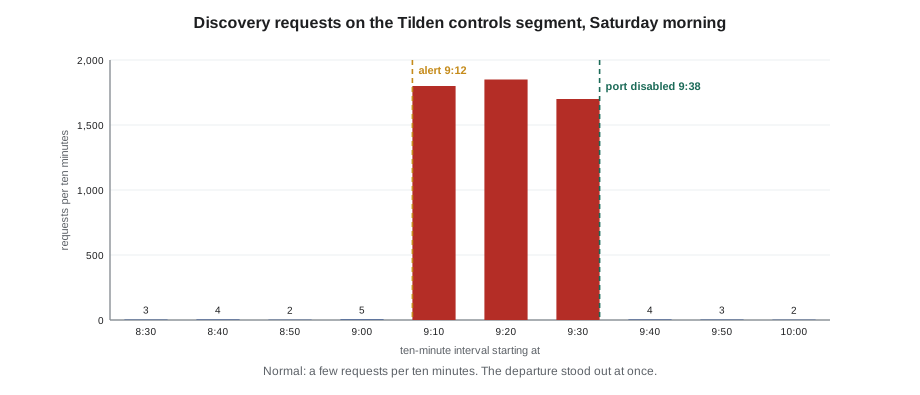
At 9:12 on Saturday, June 13, 2026, a network monitoring sensor on Harcastle's controls network raised an alert that nobody had seen before. A device that had never appeared on the Tilden Hall controls segment had started sending BACnet discovery requests every few seconds and reading object lists from one controller after another. The alert went to the college's IT security on-call phone. Jarrah Pelletier, Harcastle's network manager, read it, saw the word Tilden and called Nell Nakagawa, who called Quillon's on-call technician, Prakash.
Lesson 10 follows what they did next. This lesson is about how they knew at all. "The college put that sensor in during the 2024 segmentation project and nobody thought much about it," Margit told Callie. "Without it, the first sign of trouble would have been whatever the device did after it finished looking around. With it, we knew in about four minutes."
Why monitoring matters
Lessons 2 to 6 were about preventing problems. Prevention is never perfect: a password leaks, a contractor plugs in somewhere unexpected, a vulnerability is found before the patch arrives. Monitoring is how a site notices that a protection has failed, ideally before any harm is done. The Target breach in lesson 1 is the classic warning: the retailer's tools raised alerts that nobody acted on. Monitoring is only useful if someone reads it and knows what to do.
Monitoring in a building system works at two levels. The network and computer level asks who connected to what, who logged in, what changed. The process level asks whether the building is behaving the way it should: setpoints, schedules, overrides, devices online. Both matter, and the second is something controls people already do well.
What to log
Every part of a building system can keep a record of events. The useful ones for security are these.
| Source | Useful events | Usually owned by |
|---|---|---|
| Front end | Logins and failed logins, commands, setpoint and schedule changes, overrides, account and role changes, program downloads | Controls contractor and owner |
| Front-end server and jump host | Operating system logins, software installs, service restarts, security software alerts | Owner IT or controls contractor |
| Firewalls | Allowed and denied connections across zone boundaries | Owner IT |
| VPN and remote access gateway | Who connected, from where, when, for how long, and failed attempts | Owner IT |
| Network switches | Ports going up or down, new devices on a port | Owner IT |
| Controllers | Restarts, program downloads, configuration changes, where the controller supports logging | Controls contractor |
| Edge and vendor gateways | Connections made, data sent, configuration changes | Gateway owner |
BAS-320 described the front end's audit trail, which records the account, the time, the point and the old and new values for every change. That trail is the most valuable security log a building has, because it records what happened to the building, not just to the network. It is only as good as the accounts behind it, which is why lesson 4 removed shared accounts: a change recorded under "tenant7" tells you which door was used but not who walked through it.
Logs also need accurate time. If the firewall, the front end and the controllers disagree about the time, events cannot be put in order. BAS-320 showed how a controller that is never synchronized can drift more than an hour in three years. Every device that can use a time server should, and the time servers themselves belong on the conduit list from lesson 3.
Collecting logs in one place
Logs that stay on each device are hard to read together and easy to lose: a controller's log may hold only a few hundred events, and someone who has taken over a device can often erase its log. The usual answer is to send copies of logs, as they happen, to a central collector on a separate system.
The most common way to send them is syslog, a long-established standard format and protocol for event messages. Firewalls, switches, VPN appliances, servers and many gateways can send syslog; some front ends can too, or can export their audit trail on a schedule. The collector may be a simple log server or a security information and event management (SIEM) system, which also correlates events from different sources and raises alerts.
- Send logs from every boundary device: firewalls, VPN, remote access gateways, jump host and edge gateway.
- Send the front end's audit trail and server logs as well, if the products allow it.
- Keep the collector in a separate zone, with its own accounts, so that someone who takes over the building system cannot quietly delete the evidence.
- Keep logs long enough to investigate events found late. Twelve months is a common target (a typical value; owners and laws may set others).
- Protect logs that contain personal information, such as names and access times, as carefully as the data itself (lesson 10).
Worked problem
How much storage do the logs need?
Ninefield's IT provider estimates that the controls boundary firewall, the VPN and the jump host will together produce about 20,000 log lines a day, at about 300 bytes a line. The building wants twelve months of logs. How much storage is that?
Show solution
- Per day: 20,000 × 300 = 6,000,000 bytes, about 6 MB.
- Per year: 6 MB × 365 = 2,190 MB, about 2.2 GB.
- Allowing double for busy periods and growth: about 4.4 GB.
Answer: A few gigabytes a year. Log storage for a building is cheap; the real cost is someone's time to review it, which is why alerts matter more than volume.
Passive monitoring of the controls network
A central log collector records what devices say about themselves. A passive network monitoring sensor records what devices actually do. The sensor connects to a mirror port, often called a SPAN port, on a switch in the controls network. The switch sends the sensor a copy of the traffic passing through it. The sensor only listens: it sends nothing onto the controls network, so it cannot upset fragile devices.
That last point matters. Active scanning tools, which send probes to every address to see what answers, are common in office IT, but older building controllers can slow down, lose their programs or restart when probed in unexpected ways. Any active testing on a live controls network needs the owner's approval, a test plan, the controls contractor's agreement and an agreed time, and much of what it would find can be learned safely by listening instead.
Passive OT monitoring products understand building protocols such as BACnet and Modbus. Over a few weeks, they build up:
- An inventory of every device seen on the network, its addresses, often its make and firmware, and when it was first seen.
- A map of conversations: which devices talk to which, using which protocols and services, and how often.
- A baseline: what normal looks like on this network.
Once the baseline exists, the sensor raises alerts when something departs from it.
- A new device appears, or a known device appears at a new address.
- A device starts a conversation it has never had before, such as a box controller talking to an address outside the building.
- Discovery traffic far above normal, such as thousands of Who-Is requests where there are usually a few.
- Unusual BACnet services: writes from a host that normally only reads, a device being told to restart, a program download outside a maintenance window.
- Traffic at times when there normally is none, or protocols that do not belong on a controls network.
Baselines in a building
Building networks are good candidates for baseline monitoring, because they are regular. The front end polls or subscribes to the same points on the same schedule every day. Supervisory controllers exchange the same values with their field controllers. Schedules start and stop equipment at the same times each weekday. New devices appear only during projects. Compared with an office network full of laptops, phones and web browsing, a controls network has very little that is genuinely new, which makes the new things easy to see.
The flip side is that projects change the baseline. When Quillon installs RTU-2 to RTU-4 at Ninefield in December, a passive sensor would see new devices, new conversations and program downloads, all of them expected. Good practice is to tell the people who run the monitoring before a project starts, so they can mark the work as planned, and to review the new baseline afterwards. Margit added a line to Quillon's job start checklist: "Monitoring owner told: yes / no / no monitoring on site."
The building system as a sensor
Controls technicians already watch for things going wrong; they just call it alarm handling. Many of the signs that something is wrong with a building system's security show up as ordinary building data first.
- A setpoint, schedule or limit changed by an account that does not usually change it, or at an odd time.
- Points overridden at high priority with no work order. Callie's override report on November 14 found 14 points still held at priority 8 at Tilden; none of them was malicious, but the report is exactly how a malicious override would be found.
- Controllers going offline and coming back, or restarting, with no maintenance planned.
- Many failed logins on the front end, or logins from an unexpected place or time.
- Equipment running when its schedule says it should be off, the kind of thing Declan's night walk at Ninefield found in October for ordinary reasons.
Quillon's proposal for weekly remote reviews of client trends, from BAS-330, includes a short security section built on these signs: failed logins, account changes, new overrides, offline devices and any firewall or monitoring alerts the owner's IT shares. Most weeks it takes five minutes and finds nothing. That is the point.
WEEKLY SECURITY CHECK: building system (Quillon remote review, draft)
[ ] Front end: failed logins this week ......... count, any account > 5?
[ ] Front end: new or changed accounts/roles ... each one matched to a request?
[ ] Front end: overrides at priority 8 or above  each one matched to a work order?
[ ] Front end: program downloads ............... each one matched to a change record?
[ ] Devices offline or restarted ............... explained?
[ ] Remote access sessions (VPN/gateway log) ... all named users, expected times?
[ ] Firewall / monitoring alerts from owner IT . reviewed, closed or escalated?
[ ] Anything unexplained ....................... raised with site contact today
Alerts people will act on
BAS-320 spent a lesson on alarm floods: too many alarms and operators stop reading them. Security alerts have the same problem, and the same cure. Alerts should be few, specific and actionable; each should say what was seen, where and what to do; and each should go to someone who will act on it at the hour it arrives. Harcastle's sensor raised about one alert a month in its first year, most of them for planned work that nobody had mentioned. Because there were few, the June 13 alert was read within minutes.
Responsibility needs writing down. At Harcastle, the college's IT security team owns the monitoring sensor and the firewalls, reads their alerts and calls facilities when something touches a building system; facilities calls Quillon when the building system itself needs looking at. At Ninefield, nobody yet monitors anything except the front end's own alarms, and the case study in lesson 12 proposes a start.
Starting small
Not every building can justify a monitoring sensor and a log collector at once, and Margit's advice to owners is to start with what they already have. Most firewalls and VPN appliances can already send syslog, and most owners' IT providers already run somewhere to collect it. The front end's audit trail already exists. The first steps are to switch on the logs that are off, point them at one place, set the clocks, and agree who reads the few alerts that matter: failed remote logins, new remote users, denied connections from the controls subnet to the internet, and program downloads. A passive sensor can come later, when the inventory and the conduit list are good enough for its alerts to make sense.
Common mistakes
MistakeCollecting logs that nobody reviews.
InsteadDecide who reads which alerts and when, keep alerts few and specific, and review the rest on a schedule.
MistakeRunning an active scanning tool on a live controls network to build an inventory.
InsteadListen passively first. Any active testing needs the owner's approval, a plan and an agreed time.
MistakeKeeping logs only on the devices that create them.
InsteadSend copies to a central collector in a separate zone, with accurate time on every device.
MistakeStarting a project without telling the monitoring owner.
InsteadTell them before work starts so planned changes are not mistaken for an incident, then review the new baseline.
Summary and key terms
- Monitoring finds failures of prevention; it is only useful if someone reads it and acts.
- Useful logs come from the front end's audit trail, servers, firewalls, VPNs, switches, controllers and gateways, all with synchronized time.
- Send logs by syslog or export to a central collector in a separate zone, and keep them long enough to investigate.
- Passive OT monitoring listens on a mirror port, builds an inventory and a baseline of conversations, and alerts on departures; it sends nothing onto the network.
- Building networks are regular, so new devices, conversations and services stand out.
- Building data is a security signal too: unexpected changes, overrides, restarts and logins.
- Keep alerts few and actionable, and write down who owns each kind.
- Audit trail
- A front end's record of who changed what, when, with old and new values.
- Syslog
- A standard format and protocol for sending event messages from devices to a log collector.
- SIEM
- Security information and event management: a system that collects and correlates logs and raises alerts.
- Mirror port
- A switch port that receives a copy of traffic from other ports, used by monitoring sensors; also called a SPAN port.
- Passive monitoring
- Monitoring that only listens to network traffic and sends nothing onto the network.
- Baseline
- A record of normal behavior, against which departures can be detected.
Practice problems
Work each problem on paper first, then reveal the answer to check.
Why is passive monitoring preferred on a live controls network?
Show answer
It only listens, so it cannot upset fragile controllers the way active probes sometimes do.
Name three departures from a baseline that a BACnet-aware sensor might alert on.
Show answer
A new device; a device talking to a host it never talked to before; discovery traffic far above normal; writes from a host that usually only reads; a restart or download outside a window.
Why must every logging device use the same time source?
Show answer
Events from different devices can only be put in order if their clocks agree.
How is Callie's November 14 override report a security control?
Show answer
It finds points held at high priority without a work order, which is how a malicious override would show up.
Lesson quiz · 5 questions
Score 60% or more to complete this lesson.
Create a free account to save your progress, take quizzes and earn a certificate.