
AWS-113 · Lesson 7 of 12 · 19 min
Agents and tool use
▶ Video coming soon A video version of this lesson is on the way.
Andre Leclerc, the operations manager for the eleven clinics, came to the seventh AI hour with a request. "Front Desk Helper tells my staff the waitlist rule," he said. "Fine. But then they still have to open BookVet, find the client, check the waitlist and offer a slot. Can the assistant just do that part?"
Noor wrote two words on the whiteboard: ANSWER and ACT. "Everything we have built so far answers," she said. "What Andre wants acts. A model that can decide which actions to take, take them through tools, look at the results and keep going until the job is done is called an agent. Agents are useful. They also deserve more care than anything else in this course, because now the model's mistakes can change real things."
This lesson defines AI agents, explains how tool use works, describes the AWS services for building agents, and covers their business applications and the controls that keep them safe.
What an AI agent is
An AI agent is a system in which a foundation model works toward a goal by planning steps, choosing and calling tools, observing the results and deciding what to do next, often over several rounds. A tool is any function the application makes available, such as "look up a client's upcoming appointments", "search the waitlist" or "retrieve SOP passages". The model does not run the tool itself. It produces a structured request, such as a function name and arguments, and the application decides whether to run it, runs it and passes back the result.
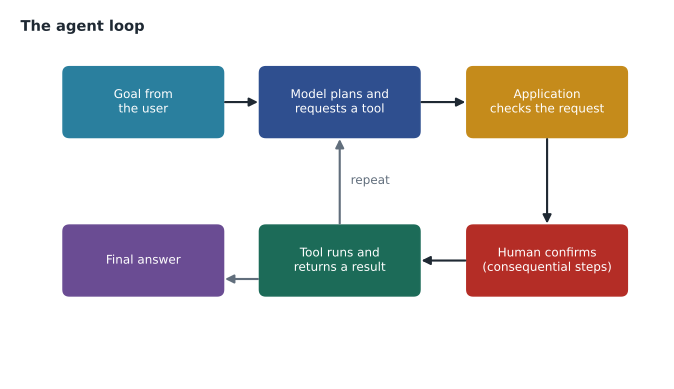
Compared with the applications in earlier lessons, an agent adds three things:
- Planning: breaking a goal such as "offer the waitlist slot to the right client" into steps.
- Tool use: calling functions or APIs to read information or perform actions.
- Memory and state: keeping track of what has been done in the current task, and sometimes remembering useful facts across sessions.
The exam guide calls this agentic AI and asks you to define the role of agents and describe their business applications. You do not need to build one for the exam, but you should recognize when an agent fits and what controls it needs.
How tool use works
Tool use, also called function calling, starts with descriptions. The application tells the model which tools exist, what each does and what arguments it takes, usually as a short schema. When the model decides a tool would help, it replies with a tool request instead of a final answer. The application validates the request, runs the tool and sends the result back. The model then continues, perhaps calling another tool or giving its answer.
The code below simulates one round of that exchange for Andre's waitlist idea. A real model would produce the tool request; here it is hard-coded so the checks are easy to see.
# Tools the application exposes, with the permission level each needs.
TOOLS = {
    "find_waitlist":   {"access": "read",  "args": {"clinic", "service"}},
    "offer_slot":      {"access": "write", "args": {"clinic", "client_id", "slot"}},
}

def handle(request, user_confirms):
    name, args = request["tool"], request["args"]
    if name not in TOOLS:
        return "rejected: unknown tool"
    if set(args) != TOOLS[name]["args"]:
        return "rejected: wrong arguments"
    if TOOLS[name]["access"] == "write" and not user_confirms:
        return "paused: waiting for staff confirmation"
    return f"ran {name} with {args}"

print(handle({"tool": "find_waitlist", "args": {"clinic": "Lethbridge", "service": "dental"}}, False))
print(handle({"tool": "offer_slot", "args": {"clinic": "Lethbridge", "client_id": "C-2291", "slot": "Thu 10:30"}}, False))
print(handle({"tool": "offer_slot", "args": {"clinic": "Lethbridge", "client_id": "C-2291", "slot": "Thu 10:30"}}, True))
print(handle({"tool": "delete_client", "args": {"client_id": "C-2291"}}, True))ran find_waitlist with {'clinic': 'Lethbridge', 'service': 'dental'}
paused: waiting for staff confirmation
ran offer_slot with {'clinic': 'Lethbridge', 'client_id': 'C-2291', 'slot': 'Thu 10:30'}
rejected: unknown toolWhat this code does
The application lists the tools an AI assistant may call, which arguments each one needs, and whether it only reads or also changes data. Every request is checked: unknown tools and wrong arguments are rejected, and tools that change data wait for a staff member to confirm. The four sample requests show a read going through, a change pausing, the same change running once confirmed, and an unknown delete request being refused.
Three controls appear in those few lines. Only tools on the list can run, so a request for anything else, including one planted by injected text, is rejected. Arguments are checked against what each tool expects. And actions that change something, such as offering a slot to a client, pause until a member of staff confirms. These controls live in the application and in IAM permissions, not in the prompt, so the model cannot talk its way past them.
AWS services for agents
AWS offers several ways to build agents, from fully managed to framework-based.
- Amazon Bedrock AgentCore provides managed building blocks for running agents: a runtime to host agents securely, a gateway that turns existing APIs and Lambda functions into tools, memory, identity controls for what an agent may access on whose behalf, and observability to trace each step. It offers two starting points. A managed agent harness lets builders declare the agent's model, tools and instructions as configuration, with little code. Code-defined agents suit teams that need custom orchestration, multi-agent collaboration or a supervisor pattern, written with the framework of their choice.
- Amazon Bedrock Agents, the earlier managed agent feature, let builders attach action groups of tools, usually backed by AWS Lambda, and knowledge bases to an agent, with options to ask the user to confirm an action or to return control to the application. In 2026 AWS renamed it Amazon Bedrock Agents Classic, closed it to new customers from July 30, 2026 and recommended AgentCore for new work. Existing agents keep running. You may still meet the older name in study materials, and its ideas, such as action groups and user confirmation, carry over.
- Ready-made assistants, such as Amazon Quick for business users, include agent features for common tasks, so some agentic work needs no custom build at all.
Agents can also reach tools through standard protocols such as the Model Context Protocol (MCP), which defines a common way for applications to describe tools to models. Whichever route a team takes, the same principles apply: clear tool descriptions, least-privilege access and human confirmation for consequential actions.
| Option | You provide | Good fit when |
|---|---|---|
| AgentCore managed agent harness | Model, tools and instructions as configuration | You want a managed agent with little code |
| AgentCore code-defined agents | Your own agent code and framework | You need custom orchestration or several cooperating agents |
| A ready-made assistant (for example Amazon Quick) | Configuration and permissions | An existing assistant already covers the task |
Business applications of agents
Agents earn their extra complexity when a task needs several steps across systems and the steps vary from case to case. Common business uses include:
- Customer service that looks up an order or booking, checks a policy and drafts a response for an employee to approve.
- Internal operations, such as gathering information from several systems to prepare a report or a ticket.
- Software development, where coding assistants read code, run tests and propose changes for a developer to review.
- Research and analysis, where an agent searches documents, runs calculations and assembles findings with sources.
For Cascade Ridge, Noor and Andre sketched a Waitlist Assistant: when a client cancels, the agent finds waitlisted clients who match the service and clinic, ranks them by the waitlist rules in the SOP, drafts a message, and shows the receptionist a proposed offer. The receptionist clicks to confirm before any message is sent. They wrote it down as a design for after the Front Desk Helper pilot, not something to build now. "Answer first," Noor said. "Act later, once we trust the answers."
Risks and controls
Agents inherit every risk from lesson 3 and add new ones, because they can take actions and can run for many steps.
- Wrong or unexpected actions. A model might call the right tool with the wrong client, or loop through steps that make no progress. Limit the number of steps, validate arguments and require confirmation for actions that matter.
- Excess permissions. Give the agent's role only the tools and data it needs, scoped as tightly as possible. The Waitlist Assistant could read the waitlist and draft messages, but sending needed a human click and a separate permission.
- Injected instructions. Text in a document, email or web page that the agent reads might try to redirect it. Treat tool results as data, keep the tool list fixed, and use guardrails.
- Cost and latency. Every step is another model call. An agent that takes eight steps costs roughly eight times as much as a single answer, and takes longer.
- Accountability. Log every step, tool call and result, so a reviewer can see why the agent did what it did. AgentCore observability and invocation logs support this.
Clinical decisions stayed off the table entirely. No agent would book, cancel or prioritize appointments based on a pet's symptoms. That rule came from Dr. Kaur in AWS-111 and was written into every design.
Common mistakes
MistakeLetting the model execute tools directly.
InsteadThe application executes tools after validating each request; the model only requests them.
MistakeGiving an agent broad permissions to save effort.
InsteadGrant only the tools and data the task needs, and scope write access tightly.
MistakeLetting agents take consequential actions without review.
InsteadRequire human confirmation for actions such as sending messages or changing records.
MistakeChoosing an agent when one retrieval answer would do.
InsteadUse agents for multi-step tasks across systems; simpler designs are cheaper and easier to trust.
Describing tools well
A model chooses tools from their descriptions, so the descriptions are part of the prompt and deserve the same care. Each tool needs a clear name, a one-sentence description of what it does and when to use it, and precise argument definitions, including allowed values. "find_waitlist: returns waitlisted clients for one clinic and one service type; use when an appointment slot becomes free" works far better than "waitlist tool". Vague or overlapping descriptions lead to the wrong tool being called. Fewer, well-separated tools are easier for a model to use correctly than many similar ones.
Tool results also need care. They should be short, structured and free of anything the model does not need. If the waitlist tool returned clients' full records, every one of those details would enter the conversation and could appear in a drafted message. Returning only a client identifier, first name, preferred contact method and waitlist date kept the data to the minimum.
Memory
Agents often need two kinds of memory. Short-term memory holds the current task: the goal, the steps taken and the tool results so far. Long-term memory keeps useful facts across sessions, such as a receptionist's preference for drafts in a particular tone. Long-term memory raises privacy questions, because anything remembered can resurface later. Hannah's rule for any future agent was that it could remember preferences about how staff like to work, never details about clients, and that staff could see and clear what it remembered.
Agents also need limits on how long they run. A maximum number of steps, a time limit and a budget per task stop an agent that is stuck in a loop from calling the same tool over and over. When a limit is reached, the agent should stop and hand the task to a person with a summary of what it tried.
Worked problem
Deciding whether a request needs an agent
Three requests arrive: (1) "Answer staff questions about the kennel cleaning SOP." (2) "When a surgery is canceled, find a waitlisted client and draft an offer for staff to send." (3) "Summarize each after-hours call note for the vet." Which need an agent?
Show solution
- Request 1 is question answering over documents: RAG with a knowledge base is enough.
- Request 2 needs several steps across systems: read the cancellation, search the waitlist, apply the SOP rules and draft a message. That is an agent, with staff confirmation before sending.
- Request 3 is a single transformation of one input: a prompt template, as in Night Notes, is enough.
Answer: Only request 2 needs an agent. Requests 1 and 3 are better served by simpler designs.
Summary and key terms
- An AI agent uses a foundation model to work toward a goal by planning, calling tools, observing results and repeating, with memory of the task.
- In tool use, the model requests a tool by name and arguments, and the application validates and runs it.
- On AWS, Amazon Bedrock AgentCore provides runtime, gateway, memory, identity and observability, with a managed agent harness for configuration-based agents and support for code-defined agents in any framework; the earlier Amazon Bedrock Agents, with action groups and user confirmation, became Bedrock Agents Classic and closed to new customers in July 2026; ready-made assistants such as Amazon Quick include agent features.
- Agents suit multi-step tasks across systems such as customer service, operations, software development and research.
- Controls include an allow-list of tools, argument validation, least-privilege permissions, step limits, guardrails, human confirmation for consequential actions and full logging.
- AI agent
- A system in which a model plans, calls tools and acts toward a goal over several steps.
- Agentic AI
- AI systems that take actions toward goals rather than only producing answers.
- Tool use
- A model requesting functions or APIs by name and arguments for the application to run.
- Action group
- In Bedrock Agents Classic, a set of actions the agent can call, usually backed by Lambda or an API.
- Amazon Bedrock AgentCore
- Managed services for hosting, connecting, securing and observing agents, including a configuration-based agent harness.
- Managed agent harness
- An AgentCore starting point where the model, tools and instructions are declared as configuration.
- Human confirmation
- Requiring a person to approve an action before the agent performs it.
Practice problems
Work each problem on paper first, then reveal the answer to check.
Who executes a tool call in an agent: the model or the application?
Show answer
The application, after validating the request.
Name two controls that limit what an agent can do.
Show answer
Any two of: an allow-list of tools, argument validation, least-privilege permissions, step limits, human confirmation, guardrails.
When is an agent the wrong choice?
Show answer
When a single answer or transformation, such as RAG or a template, would do the job.
Lesson quiz · 5 questions
Score 60% or more to complete this lesson.
Create a free account to save your progress, take quizzes and earn a certificate.