
AWS-113 · Lesson 2 of 12 · 19 min
Prompt engineering techniques
▶ Video coming soon A video version of this lesson is on the way.
Jonah's first attempt at Night Notes was one line long. He pasted a real-looking but invented call note into the Bedrock playground in the team's sandbox account and typed: "Summarize this." The model produced a pleasant paragraph that began "The caller expressed concern about her beloved dog" and buried the fact that the dog had eaten a packet of sugar-free gum, the single most important detail for the veterinarian.
Noor read it over his shoulder. "The model did exactly what you asked," she said. "You asked for a summary. You did not say who reads it, what matters, what format, or what to leave out. That is prompt engineering: telling the model the job as clearly as you would tell a new employee."
Prompt engineering is the practice of designing the input to a foundation model so that it produces useful, reliable output. It is usually the cheapest and fastest way to improve results, because it needs no training and no new infrastructure. This lesson covers the parts of a prompt, the main techniques the exam names, and the habits that make prompts better over time. Lesson 3 covers templates and the risks of prompt misuse.
The parts of a prompt
A well-built prompt usually has several parts. Not every prompt needs all of them, but knowing the parts makes it easier to see what is missing.
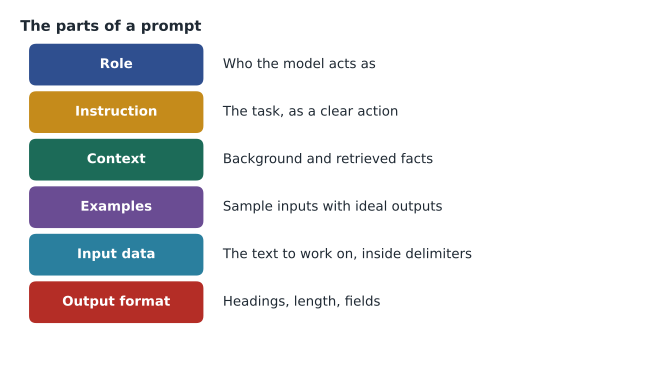
- Role or persona: who the model should act as, such as "You prepare call summaries for an emergency veterinarian." A role sets tone and focus.
- Instruction: the task itself, stated as a clear action. "Summarize the call note using the headings below" is clearer than "Summarize this."
- Context: background the model needs, such as who reads the output and why. In Front Desk Helper, retrieved SOP passages are context.
- Examples: sample inputs with ideal outputs, which show rather than tell. These are the "shots" in the techniques below.
- Input data: the specific text to work on, such as one call note, clearly separated from the instructions.
- Output format: the exact shape of the answer, such as headings, a bullet list, a word limit or JSON fields.
Two further constructs appear on the exam. A negative prompt tells the model what not to do or not to include, such as "Do not suggest a diagnosis or treatment" or, for image models, a list of things that should not appear in the picture. Delimiters are markers, such as tags or lines of dashes, that separate instructions from data so the model can tell which is which.
Jonah's second attempt used all six parts.
Role: You prepare call summaries for the on-call emergency veterinarian.
Instruction: Summarize the call note below for a vet reading on a phone.
Rules: Use only facts in the note. Do not suggest a diagnosis, treatment
or urgency level. If something is unclear, write "unclear" instead of guessing.
Keep the caller's own hedges ("may have eaten") and list every medication named.
Output format, using exactly these headings:
  Patient: species, breed, age, weight if given
  Concern: what the owner is worried about, including any toxin or object and amount
  Timing: when it happened, relative to the call
  Actions taken by owner: what the owner has already done
  Advice given: what the call handler told the owner
<note>
{call_note}
</note>
This time the summary began "Concern: ate one packet of sugar-free gum", with "Timing: about 30 minutes before the call" on the next line. The vet would see both in the first two seconds. The headings were the ones Dr. Kaur had chosen during the review in AWS-112, and the rules about hedges and medications came from the two serious errors she had marked in red there.
Zero-shot, single-shot and few-shot prompting
The exam uses the word shot to mean an example included in the prompt.
- Zero-shot prompting gives instructions and no examples. It works well for common tasks the model already understands, such as "Translate this sentence into Spanish."
- Single-shot (one-shot) prompting includes one example of an input and the desired output. It shows the format and tone.
- Few-shot prompting includes several examples, usually two to five. It helps when the format is unusual or when the model needs to see how to handle variety, such as notes with and without a toxin.
Examples are powerful because models imitate patterns. That cuts both ways: if every example is about a dog, the model may assume every call is about a dog; if every example summary is very short, it may drop useful detail. Good examples are varied, correct and representative of real inputs. They also add tokens to every request, which adds cost, so the team keeps only the examples that measurably help.
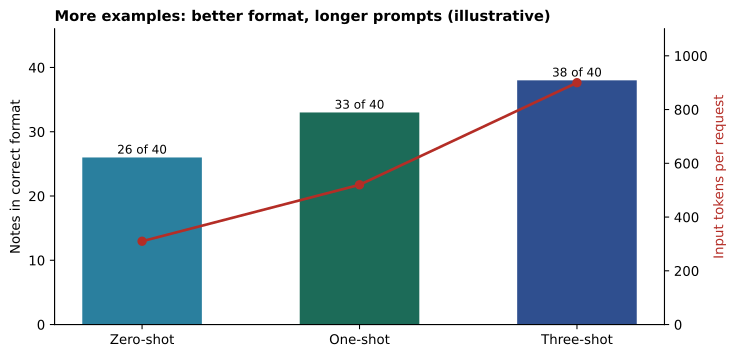
Jonah measured the effect on 40 invented test notes, counting how many summaries followed the required headings exactly.
# Night Notes trial (illustrative): notes in the correct format out of 40,
# and the average input tokens each prompt style adds per request.
trial = {"zero-shot": (26, 310), "one-shot": (33, 520), "three-shot": (38, 900)}
for style, (ok, tokens) in trial.items():
    rate = ok / 40
    print(f"{style:10} correct format: {ok}/40 = {rate:.2f}   input tokens: {tokens}")
gain = trial["three-shot"][0] - trial["zero-shot"][0]
extra = trial["three-shot"][1] - trial["zero-shot"][1]
print("Extra correct notes per extra 100 tokens:", round(gain / extra * 100, 2))zero-shot correct format: 26/40 = 0.65 input tokens: 310 one-shot correct format: 33/40 = 0.82 input tokens: 520 three-shot correct format: 38/40 = 0.95 input tokens: 900 Extra correct notes per extra 100 tokens: 2.03
What this code does
It records illustrative trial results for three prompt styles: no examples (zero-shot), one example and three examples, giving how many of 40 notes came out in the right format and how many input tokens each style adds. It prints each style's success rate and token count. It then works out how many extra correct notes each extra 100 tokens buys, which helps decide whether the longer prompt is worth its cost.
Three examples brought the format right in 38 of 40 notes, but nearly tripled the input tokens. Noor asked whether a clearer format instruction could get most of the gain more cheaply. It could: adding "Use exactly these five headings, in this order, even if a section is empty" lifted the zero-shot result to 35 of 40. The final prompt used that instruction plus a single short example. Measuring rather than guessing is the habit that matters most.
Chain-of-thought prompting
Chain-of-thought prompting asks the model to work through a problem step by step before giving the final answer, for example "Think through each step, then give your answer." It tends to help with tasks that need reasoning, such as multi-step arithmetic, checking several rules in order, or comparing options. Some newer models reason internally without being asked; with those, an explicit request still helps make the steps visible for review.
Front Desk Helper had a good use for it. A common question was whether a late cancellation fee applied. The policy had three conditions: how much notice the client gave, whether the appointment was a surgery, and whether the client had canceled late before in the past year. A prompt that asked the model to check each condition in order, then state the result, made fewer mistakes than one that asked for the answer directly, and it showed staff the reasoning they could repeat to the client.
Chain-of-thought has costs. The reasoning adds output tokens, and longer outputs cost more and take longer. For simple tasks, such as reformatting a note, it adds little. Teams also decide whether to show the reasoning to users or keep it internal and show only the result.
| Technique | What it adds to the prompt | Good for |
|---|---|---|
| Zero-shot | Instructions only | Common, well-defined tasks |
| Single-shot | One example | Showing a format or tone |
| Few-shot | Several varied examples | Unusual formats and varied inputs |
| Chain-of-thought | A request to reason step by step | Multi-step reasoning and rule checks |
| Prompt template | Fixed text with placeholders | Repeating the same task consistently at scale |
Best practices
The exam guide lists several benefits and best practices of prompt engineering. Noor's version, with one example each from Cascade Ridge:
- Be specific and concise. "Summarize in at most five lines for a vet on a phone" beats "Make it short." Remove words that do not change the result; they cost tokens and can distract the model.
- Experiment. Change one thing at a time and test on the same set of inputs, as Jonah did with his 40 notes. A prompt is a design to be tested, not a sentence to be admired.
- Use guardrails. Put rules in the prompt, such as "Do not suggest a diagnosis", and back them with Amazon Bedrock Guardrails, which check inputs and outputs independently of the prompt. Lesson 3 explains why prompt rules alone are not enough.
- Discovery. Ask the model what it needs or what is ambiguous. Noor sometimes ran "Before answering, list any information missing from the note" during design, which revealed that handlers often omitted the pet's weight, a fact vets always want for toxin cases. The fix was a reminder in the call handlers' form, not a change to the model.
- Give the model a way out. Tell it what to do when it does not know, such as "Write unclear" or "Say the policy does not cover this." Without that, models tend to guess.
- Put instructions and data in clear places. Use delimiters so the model can tell the call note from the instructions. This also reduces the risk that text inside the data is mistaken for an instruction.
- Ask for structure. A fixed format or JSON output is easier to check automatically and to display in another system.
The guide also mentions using multiple comments, meaning a prompt can be built from several clearly separated instructions or rounds of feedback rather than one long paragraph. In a chat interface, refining the result over several turns ("Shorter", "Put the toxin first") is a quick way to discover what a final prompt should say; the lessons learned then go into the template so every user gets them automatically.
Common mistakes
MistakeWriting one vague sentence and blaming the model for vague output.
InsteadState the role, task, context, rules and output format explicitly.
MistakeAdding examples that are all alike.
InsteadUse a few varied, correct, representative examples, and measure whether each one helps.
MistakeAsking for chain-of-thought on every task.
InsteadUse it where reasoning helps; it adds output tokens and latency.
MistakeChanging several parts of a prompt at once.
InsteadChange one thing, test on the same inputs, and keep the change only if results improve.
Prompts for different model types
The same habits apply beyond text summaries, with small differences. For an image generation model, the prompt describes the subject, style, composition and lighting, and a negative prompt lists what should not appear, such as text, extra animals or a cluttered background. Andre's team tried this for a poster about dental health month: "A friendly cartoon of a smiling dog having its teeth checked, bright clinic colors, plain background" with the negative prompt "no text, no needles, no blood". For a multimodal model that reads images, the prompt says what to look for and how to report it. For an embeddings model there is no instruction at all; the input is simply the text to be represented, which is why consistent cleaning of that text matters.
Whatever the model type, Noor kept a single test folder for each prompt: the inputs, the expected results and the scores from each version. When someone asked why a prompt looked the way it did, the folder answered.
Worked problem
Improving a Front Desk Helper prompt
A staff member asks: "Can a client pay for a dental procedure over three months?" The current prompt is "Answer the question using the documents." Answers are sometimes long and occasionally mention payment terms that are not in the policy. Suggest four changes.
Show solution
- Add a role and audience: "You answer questions from reception staff at a veterinary clinic."
- Add a rule and a way out: "Answer only from the policy passages provided. If they do not answer the question, say so and suggest asking the clinic manager."
- Add an output format: "Answer in at most three sentences, then list the document name and section you used."
- Separate the data with delimiters: put the retrieved passages inside <policy> tags and the question inside <question> tags.
Answer: Role and audience, a grounding rule with a way out, a short format with sources, and clear delimiters. Then test the new prompt on the same set of questions to confirm it helps.
Jonah's prompt for Night Notes was now twelve lines long, and it worked on 39 of the 40 test notes. The fortieth was a call in which the owner had read out a long list of houseplants the cat might have chewed; the summary listed only three. Noor added the note to the test set. "Good," she said. "Now we have a hard case to keep checking."
Summary and key terms
- Prompt engineering designs the input to a foundation model to get useful, reliable output, usually more cheaply than any training.
- A prompt can include a role, instruction, context, examples, input data and an output format; negative prompts say what to avoid, and delimiters separate instructions from data.
- Zero-shot prompts give instructions only, single-shot prompts add one example, and few-shot prompts add several varied examples.
- Chain-of-thought prompting asks the model to reason step by step, which helps multi-step tasks but adds tokens.
- Best practices include specificity and concision, experimentation on fixed test inputs, guardrails, discovery of missing information, a way for the model to say it does not know, clear structure, and iterating through several rounds of feedback.
- Prompt engineering
- Designing model inputs to produce useful, reliable outputs.
- Zero-shot prompting
- Giving instructions without any examples.
- Single-shot prompting
- Including one example of input and desired output.
- Few-shot prompting
- Including several examples in the prompt.
- Chain-of-thought prompting
- Asking the model to reason step by step before answering.
- Negative prompt
- An instruction about what the model should not do or include.
- Delimiter
- A marker that separates instructions from data in a prompt.
- Context
- Background information the model needs to do the task.
Practice problems
Work each problem on paper first, then reveal the answer to check.
What is the difference between zero-shot and few-shot prompting?
Show answer
Zero-shot gives instructions only; few-shot also includes several examples.
When is chain-of-thought prompting worth its cost?
Show answer
For tasks that need multi-step reasoning, such as checking several rules in order.
Why give the model a way out?
Show answer
So it says it does not know instead of guessing.
Lesson quiz · 5 questions
Score 60% or more to complete this lesson.
Create a free account to save your progress, take quizzes and earn a certificate.