
AWS-113 · Lesson 4 of 12 · 18 min
Inference parameters
▶ Video coming soon A video version of this lesson is on the way.
Dr. Simone Kaur tried Night Notes for the first time on a quiet Tuesday evening, reading test summaries on her phone in the emergency hospital break room. She sent Jonah two comments the next morning. The first: "Run the same note twice and I get two different wordings. I don't want creativity, I want the same facts in the same place." The second: "One summary just stopped in the middle of a medication name."
Neither problem was in the prompt. Both came from inference parameters, the settings sent with each request that control how the model generates its answer. The exam guide expects you to describe how these parameters affect responses, especially temperature and input and output length. This lesson explains the common parameters, what each one does, and how Cascade Ridge set them for each application.
How a model chooses its next word
AWS-112 described how a language model generates text one token at a time. At each step it calculates a score for every possible next token and turns those scores into probabilities. If the summary so far is "Concern: ate one packet of sugar-free", the model might give "gum" a very high probability, "candy" a lower one, and thousands of other tokens tiny ones. The model then picks a token, adds it to the text, and repeats.
How it picks is where the inference parameters come in. The model could always take the single most likely token, which gives predictable text. Or it could sample, choosing tokens at random in proportion to their probabilities, which gives more variety. The parameters set how much randomness is allowed and when to stop.
Temperature
Temperature controls how sharply the probabilities are concentrated before sampling. A low temperature, close to 0, makes the most likely tokens even more likely, so output becomes focused and repeatable. A high temperature flattens the probabilities, so less likely tokens get picked more often and output becomes more varied and creative, and also more likely to wander off course.
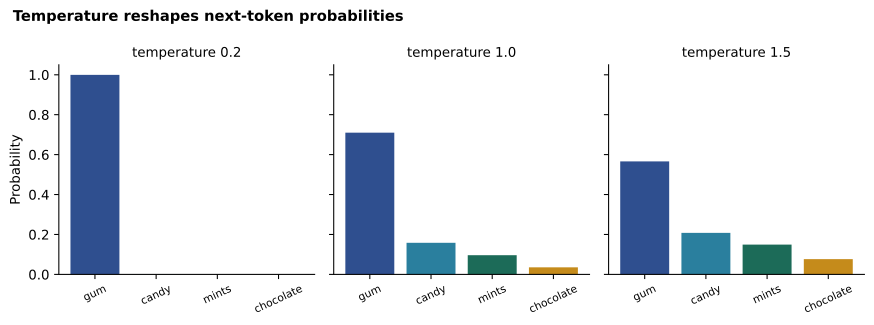
The effect is easy to see with a small calculation. The code below takes four candidate tokens with made-up model scores and shows their probabilities at three temperatures.
import math

scores = {"gum": 4.0, "candy": 2.5, "mints": 2.0, "chocolate": 1.0}  # illustrative model scores

def probabilities(scores, temperature):
    scaled = {t: s / temperature for t, s in scores.items()}
    top = max(scaled.values())
    exps = {t: math.exp(v - top) for t, v in scaled.items()}
    total = sum(exps.values())
    return {t: round(e / total, 3) for t, e in exps.items()}

for temp in (0.2, 1.0, 1.5):
print(f"temperature {temp}:", probabilities(scores, temp))temperature 0.2: {'gum': 0.999, 'candy': 0.001, 'mints': 0.0, 'chocolate': 0.0}
temperature 1.0: {'gum': 0.71, 'candy': 0.158, 'mints': 0.096, 'chocolate': 0.035}
temperature 1.5: {'gum': 0.566, 'candy': 0.208, 'mints': 0.149, 'chocolate': 0.077}What this code does
It turns illustrative model scores for four possible next words into probabilities with the softmax formula, dividing the scores by a temperature first. It prints the probabilities at three temperatures. At 0.2 nearly all the probability goes to "gum", while higher temperatures spread it across the other words, which is why low temperature gives more predictable output.
At temperature 0.2, "gum" takes almost all of the probability; at 1.5, "candy" and "mints" become real possibilities. For Night Notes, where the facts must never change between runs, the team set a low temperature. For a different task, such as suggesting three friendly subject lines for a newsletter, a higher temperature would give useful variety.
Low temperature makes output more consistent, but it does not make it correct. A model can be confidently and repeatably wrong. Temperature controls variety, not truth; accuracy comes from good prompts, good context and evaluation.
Top-p and top-k
Two other parameters limit which tokens are even considered. Different models support different combinations, so the Bedrock documentation for each model lists what it accepts.
- Top-p, also called nucleus sampling, keeps the smallest set of most likely tokens whose probabilities add up to at least p, and samples only from that set. With top-p of 0.9, the model ignores the long tail of unlikely tokens that make up the last tenth of the probability.
- Top-k keeps only the k most likely tokens. With top-k of 50, the model chooses among the 50 best candidates at each step.
Both cut off unlikely choices; temperature changes how evenly the remaining choices are weighted. A common practice is to adjust temperature or top-p, not both at once, so it is clear which change caused a difference.
probs = {"gum": 0.62, "candy": 0.18, "mints": 0.11, "chocolate": 0.06, "pencil": 0.03}

def top_p(probs, p):
    kept, running = [], 0.0
    for token, pr in sorted(probs.items(), key=lambda kv: kv[1], reverse=True):
        kept.append(token); running += pr
        if running >= p:
            break
    return kept

def top_k(probs, k):
    return [t for t, _ in sorted(probs.items(), key=lambda kv: kv[1], reverse=True)[:k]]

print("top-p 0.9 keeps:", top_p(probs, 0.9))
print("top-p 0.5 keeps:", top_p(probs, 0.5))
print("top-k 2 keeps: ", top_k(probs, 2))top-p 0.9 keeps: ['gum', 'candy', 'mints'] top-p 0.5 keeps: ['gum'] top-k 2 keeps: ['gum', 'candy']
What this code does
It shows two ways of limiting which words a model may pick next. Top-p keeps the most likely words until their probabilities add up to a chosen total, so 0.9 keeps three words and 0.5 keeps only one. Top-k simply keeps a fixed number of the most likely words, here two, and both methods cut off unlikely choices such as "pencil".
Length parameters
Dr. Kaur's second complaint, the summary that stopped mid-word, came from the maximum output length, often called max tokens. This parameter caps how many tokens the model may generate. When the cap is reached, the model stops, even in the middle of a sentence. Jonah had set it to 80 tokens to keep summaries short, but a few notes with long lists of symptoms needed more.
The fix had two parts. The cap went up to 250 tokens, enough for the longest summary in the test set with room to spare. And the instruction in the prompt said "at most eight lines", because the prompt, not the cap, is the right place to ask for brevity. The cap is a safety limit on cost and runaway output; it should rarely be the thing that ends a good answer. Most Bedrock model responses also report why generation stopped, so the application can detect a response cut off by the length limit and handle it, for example by retrying with a higher limit or flagging the summary.
Input length matters too. Every model has a context window, the maximum number of tokens it can consider at once, counting both the prompt and the response. Long inputs cost more, because input tokens are billed, and they take longer to process. They can also dilute the model's attention: an answer buried in the middle of a very long prompt may be missed more often than one near the start or end. For Front Desk Helper this was a strong argument for retrieval, sending the model the three or four most relevant SOP passages rather than all 140 documents.
| Parameter | What it controls | Night Notes | Newsletter ideas |
|---|---|---|---|
| Temperature | How varied the choices are | Low (for example 0.1) | Higher (for example 0.8) |
| Top-p | Share of probability kept for sampling | Default or lower | Default |
| Maximum output length | Hard cap on response tokens | 250 tokens | 400 tokens |
| Stop sequences | Text that ends generation | A closing tag | None |
Stop sequences and other settings
A stop sequence is a string that tells the model to stop generating as soon as it produces it. Night Notes asked the model to finish each summary with a closing tag, and the closing tag was set as a stop sequence, so the model never ran on into extra commentary. Stop sequences are also useful in structured formats, for example stopping at the end of a JSON object.
Some models offer further settings, such as penalties that discourage repeating the same words, or a fixed random seed for more reproducible sampling. The exam focuses on temperature and length, but knowing that models differ is useful: always check the parameters a specific model supports in the Bedrock documentation.
Inference settings are not only about quality. They affect cost and latency. Output tokens usually cost more than input tokens, and they are generated one at a time, so a response twice as long takes roughly twice as long to generate. A lower maximum length and a prompt that asks for concise answers save money and time on every request. Streaming responses, in which the application shows tokens as they arrive rather than waiting for the whole answer, make the wait feel shorter for users even when total time is the same. Front Desk Helper streamed its answers; Night Notes, which saved a complete summary into the call record, did not need to.
Common mistakes
MistakeUsing a high temperature for a factual extraction task.
InsteadUse a low temperature when consistency matters; save higher temperatures for creative tasks.
MistakeBelieving a low temperature makes answers correct.
InsteadLow temperature makes answers consistent; accuracy comes from prompts, context and evaluation.
MistakeUsing the maximum output length to make answers short.
InsteadAsk for brevity in the prompt and set the cap as a safety limit with room to spare.
MistakeChanging temperature and top-p at the same time.
InsteadAdjust one at a time so you can tell which change made the difference.
Choosing settings by task
Noor gave Jonah a rule of thumb that he later found matched what most model providers recommend. For extraction, classification, summarizing to a template and answering from documents, use a low temperature, because there is one right answer and variety only adds risk. For drafting text a person will edit, such as a first draft of a newsletter paragraph, a moderate temperature gives more natural writing. For brainstorming, such as ten possible names for a pet-care plan, a higher temperature produces more diverse ideas, and a person picks the good ones.
Settings should be part of the tested design, not something changed casually. In Amazon Bedrock Prompt Management, the inference settings are saved with each prompt version, so the temperature and length cap that passed testing are the ones production uses. When Jonah later tried raising Night Notes' temperature to 0.5 "to make the wording less robotic", the test set showed two summaries out of 150 that reordered facts in a confusing way. The setting went back to 0.1, and the version history showed why.
Determinism and reproducibility
Even at a temperature of 0, some models can produce slightly different outputs for the same input, because of how calculations are spread across hardware. For most business uses this does not matter, but it does matter for testing: an evaluation should run each test case under the same settings and, for important comparisons, more than once, so that a small random difference is not mistaken for a real improvement. Where a model supports a fixed seed, using one makes test runs easier to compare.
Jonah also learned that defaults differ. One model's default temperature might be 1.0 and another's 0.7, and some models ignore top-k entirely. Copying settings from one model to another without checking the documentation was a common source of surprise, so the team's release checklist included a line for confirming every parameter against the chosen model's documented ranges. When the model changed, the settings were reviewed and re-tested with it, as a pair.
Worked problem
Diagnosing two inference problems
Front Desk Helper sometimes gives slightly different answers to the same policy question, and answers to long questions occasionally end mid-sentence. The current settings are temperature 0.9 and maximum output length 60 tokens. What would you change?
Show solution
- Different answers to the same question suggest too much randomness for a factual task: lower the temperature, for example to 0.1 or 0.2.
- Answers ending mid-sentence suggest the length cap is being reached: raise the maximum output length, for example to 300 tokens.
- Move the request for brevity into the prompt: "Answer in at most three sentences, then list your source."
- Have the application check the stop reason reported with each response and flag any that ended because of the length limit.
Answer: Lower the temperature for consistency, raise the length cap, ask for brevity in the prompt, and detect truncated responses.
Dr. Kaur tried again the following Tuesday. Two runs of the same note gave the same headings, the same facts and nearly the same words. The longest summary in the batch, a cat with seven symptoms, ended where it should. Her only comment this time was a thumbs-up.
Summary and key terms
- Inference parameters control how a model generates each response.
- Temperature reshapes token probabilities: low values give focused, repeatable output; high values give varied, creative output.
- Top-p keeps the smallest set of likely tokens whose probabilities reach p, and top-k keeps the k most likely tokens.
- The maximum output length caps response tokens and can cut answers off, so ask for brevity in the prompt and use the cap as a safety limit.
- Input length is limited by the context window and affects cost and latency, which is one reason to retrieve only relevant passages.
- Stop sequences end generation at a chosen string.
- Settings also affect cost and latency, and streaming makes responses feel faster.
- Low temperature improves consistency, not correctness.
- Inference parameter
- A setting sent with a request that controls how the model generates its response.
- Temperature
- A setting that makes output more focused when low and more varied when high.
- Top-p
- Sampling only from the most likely tokens whose probabilities add up to p.
- Top-k
- Sampling only from the k most likely tokens.
- Maximum output length
- The cap on how many tokens a response may contain.
- Stop sequence
- A string that ends generation when the model produces it.
- Streaming
- Sending tokens to the user as they are generated.
Practice problems
Work each problem on paper first, then reveal the answer to check.
Which parameter would you lower to make answers more repeatable?
Show answer
Temperature.
What happens when a response reaches the maximum output length?
Show answer
Generation stops, possibly mid-sentence.
Why might a long input reduce answer quality?
Show answer
Relevant details can be missed in a very long prompt, and it costs more and takes longer.
Lesson quiz · 5 questions
Score 60% or more to complete this lesson.
Create a free account to save your progress, take quizzes and earn a certificate.