
AWS-111 · Lesson 9 of 12 · 18 min
Amazon SageMaker AI at a glance
▶ Video coming soon A video version of this lesson is on the way.
On November 3, Noor opened the AWS console and showed Jonah where the no-show model actually lived. "Everything we have discussed has a home in one service," she said, scrolling through a long menu. "The trick is not to memorize every feature, but to know which one answers which question."
Amazon SageMaker AI is AWS's fully managed service for building, training and deploying machine learning models. It was called Amazon SageMaker until late 2024, when AWS renamed it SageMaker AI and reused the name Amazon SageMaker for a broader platform that brings data, analytics and AI tools together in SageMaker Unified Studio. For the exam, SageMaker AI is the ML service, and this lesson tours its main capabilities by lifecycle stage.
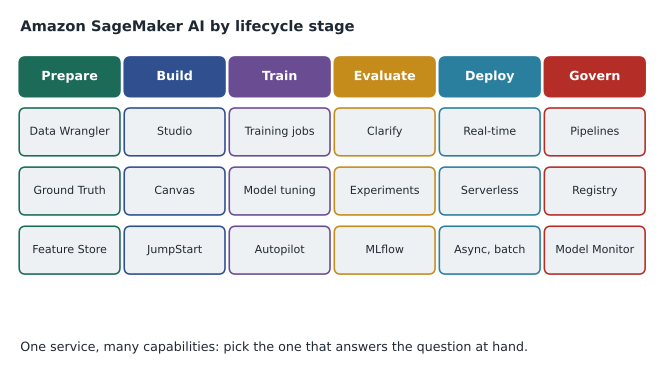
Places to work
- SageMaker Studio is a web-based development environment for ML. Data scientists open notebooks, run experiments, start training jobs and manage models from one place. Noor did most of her work there.
- SageMaker Canvas is a no-code, point-and-click interface for business analysts. You import data, choose a target column, and Canvas prepares the data, trains and compares models, and explains predictions, without writing code. Jonah built his own copy of the no-show model in Canvas in an afternoon, and its recall was within 0.03 of Noor's. Canvas also gives access to ready-made models and foundation models for tasks such as text and image analysis.
Preparing data
- SageMaker Data Wrangler provides visual data preparation: importing from Amazon S3 and other sources, profiling data quality, and applying hundreds of built-in transformations. It is available inside Canvas and Studio.
- SageMaker Ground Truth manages data labeling, by your own staff, by vendors or by a public workforce, with tools to check label quality. Ground Truth Plus is a managed option in which AWS runs the labeling workforce for you. For the future radiograph-quality idea, Dr. Kaur's technicians would label images through Ground Truth.
- SageMaker Feature Store stores engineered features, such as past miss count, so that the same values are used in training and at inference time and can be shared between models.
Building and training
- Training jobs run training code on managed instances that start when the job begins and stop when it ends. SageMaker AI provides built-in algorithms, such as XGBoost for tabular data and others for images and text, and supports popular frameworks such as PyTorch, TensorFlow and scikit-learn in your own code.
- Automatic model tuning searches hyperparameter combinations for you, running many training jobs and keeping the best by a metric you choose.
- SageMaker Autopilot is SageMaker AI's automated machine learning (AutoML) capability: given a table and a target column, it tries algorithms and settings and ranks the resulting models. Its capabilities are now offered mainly through Canvas.
- SageMaker JumpStart is a hub of pre-trained models, including many open foundation models, and ready-made solutions that you can deploy or fine-tune in your own account.
- SageMaker HyperPod provides resilient clusters for training very large models over long periods, mainly relevant to organizations training foundation models themselves.
Evaluating and explaining
- SageMaker Clarify detects potential bias in data and models, for example whether recall differs between clinics or groups, and explains predictions by showing which features influenced them most. Hannah used its report to confirm that the no-show model's top features were past misses, days booked ahead and reminder confirmation. AWS-114 covers Clarify further.
- SageMaker Experiments and the managed MLflow capability in SageMaker AI track runs, parameters and metrics for comparison.
Deploying
SageMaker AI supports the four inference types from lesson 4.
- Real-time endpoints: always-on hosting for low-latency requests, with automatic scaling.
- Serverless inference: capacity on demand that scales to zero when idle, paid per use, with a possible delay on the first request after a quiet period.
- Asynchronous inference: queued requests for large payloads or long processing, results written to Amazon S3.
- Batch transform: scoring a whole data set stored in S3, with no endpoint left running.
Governing and operating
- SageMaker Pipelines automates ML workflows as repeatable steps, as lesson 8 described.
- SageMaker Model Registry catalogs model versions with their metrics and approval status.
- SageMaker Model Monitor watches deployed models for data drift and quality problems.
- SageMaker Model Cards document a model's intended use, training data, evaluation and risks in a standard form, and SageMaker Role Manager helps create least-privilege IAM roles for ML work.
| Question | SageMaker AI capability |
|---|---|
| Can an analyst build a model without code? | SageMaker Canvas |
| Who labels the training images? | SageMaker Ground Truth (or Ground Truth Plus) |
| Is there a pre-trained model to start from? | SageMaker JumpStart |
| Which hyperparameters work best? | Automatic model tuning |
| Is the model biased, and why did it predict that? | SageMaker Clarify |
| Which version is approved for production? | SageMaker Model Registry |
| Has the input data drifted? | SageMaker Model Monitor |
| How do we score a whole file overnight? | Batch transform |
Starting a batch scoring job from code looks like this. It is shown as an outline only; real jobs are usually started by the pipeline.
# Illustrative only: start a batch transform job with the AWS SDK for Python (boto3).
import boto3
sm = boto3.client("sagemaker", region_name="ca-central-1")
sm.create_transform_job(
    TransformJobName="noshow-score-2026-11-03",
    ModelName="noshow-model-v3",
    TransformInput={"DataSource": {"S3DataSource": {"S3DataType": "S3Prefix",
                    "S3Uri": "s3://crvp-ml-input/tomorrow/"}}, "ContentType": "text/csv"},
    TransformOutput={"S3OutputPath": "s3://crvp-ml-output/scores/"},
    TransformResources={"InstanceType": "ml.m5.large", "InstanceCount": 1},
)# Why batch suits the nightly list: illustrative hourly prices, not real quotes.
endpoint_hourly = 0.12 # dollars per hour for a small always-on endpoint
batch_hourly = 0.12 # same instance size, billed only while the job runs
batch_minutes_per_night = 10
endpoint_month = endpoint_hourly * 24 * 30
batch_month = batch_hourly * batch_minutes_per_night / 60 * 30
print("always-on endpoint per month:", round(endpoint_month, 2), "dollars")
print("nightly batch job per month:", round(batch_month, 2), "dollars")always-on endpoint per month: 86.4 dollars nightly batch job per month: 0.6 dollars
What this code does
It compares, with illustrative prices, keeping a small prediction endpoint running all month with running the same size of machine only for a 10-minute batch job each night. It multiplies the hourly price by the hours used in each case. The nightly batch costs well under a dollar a month while the always-on endpoint costs much more, which is why batch prediction suits a once-a-night list.
Even with made-up prices, the shape of the answer is reliable: an endpoint bills every hour it exists, while a batch job bills only for the minutes it runs. That is why the inference type should follow from how the predictions are used.
Common mistakes
MistakeAssuming SageMaker AI is only for expert data scientists.
InsteadSageMaker Canvas lets analysts build and use models without code.
MistakeLeaving a real-time endpoint running for a once-a-day job.
InsteadUse batch transform; it runs only when needed.
MistakeConfusing SageMaker AI with Amazon Bedrock.
InsteadSageMaker AI builds, trains and hosts your own models; Bedrock gives API access to foundation models.
MistakeThinking Clarify is only for fairness.
InsteadClarify also explains which features drove each prediction.
Security and cost habits for SageMaker AI
Because SageMaker AI touches sensitive training data, the security practices from AWS-102 apply directly. Each Studio user and each training job runs with an IAM role that can reach only the buckets it needs; Noor's role could read the prepared appointment data but not the raw practice-system exports. Training data, model artifacts and notebook storage are encrypted with AWS KMS keys. Studio can be configured to run inside the company's VPC with no direct internet access, so data does not leave the private network. Every API call is recorded in AWS CloudTrail, which lets Hannah see who started which job.
Cost habits matter too, because ML resources are easy to leave running. Studio notebooks and real-time endpoints bill while they exist, whether or not anyone is using them. Mateo set an AWS Budgets alert for the ML account, tagged every SageMaker resource with project and owner, and asked Noor to shut down idle notebook instances at the end of each day. Training jobs and batch transform jobs stop by themselves when finished, which is one more reason they suited the no-show pilot. AWS-104 covers these billing tools in detail.
Built-in algorithms worth recognizing
SageMaker AI provides optimized built-in algorithms so that teams do not need to write training code for common problems. Several appear in study materials. XGBoost is a gradient-boosted tree algorithm widely used for tabular classification and regression, and it was Noor's choice for the no-show model. Linear Learner handles linear regression and classification. K-means clusters unlabeled data, and PCA reduces dimensions. Random Cut Forest detects anomalies, DeepAR forecasts time series, BlazingText classifies text and learns word representations, and image classification and object detection algorithms handle vision tasks. Teams can also bring their own code in popular frameworks or their own containers.
From notebook to production in SageMaker AI
For the no-show model, the path through SageMaker AI looked like this. Jonah's Canvas prototype showed the idea was promising. Noor reproduced it in a Studio notebook, then turned the steps into a training job using the built-in XGBoost algorithm, reading data from S3 and writing the model artifact back to S3. Automatic model tuning compared 40 combinations of tree depth and learning rate on the validation data. Clarify produced a bias and explanation report. The best model was registered in the Model Registry with its metrics, and Andre and Dr. Kaur approved it there. Batch transform then scored the test set as a dress rehearsal for the nightly job, and Model Monitor captured a baseline of the input data for later drift checks. Every step ran in the ML account under its own IAM role, and the pipeline definition was committed to source control so the whole sequence can be rerun with one command.
SageMaker AI and the rest of AWS
SageMaker AI does not work alone. Data comes from Amazon S3, often prepared with AWS Glue or queried with Amazon Athena. Permissions come from IAM roles. Encryption uses AWS KMS. Logs and metrics go to Amazon CloudWatch, and API activity to AWS CloudTrail. Scheduled jobs can be started by Amazon EventBridge, and notifications sent with Amazon SNS. Foundation models are reached through Amazon Bedrock, which AWS-112 introduces, and JumpStart offers a way to host some open models inside SageMaker AI instead. Recognizing these connections helps on exam questions that describe a whole solution and ask which service fills one gap. For Jonah, the most useful takeaway was that every SageMaker AI feature he had learned sits inside the same account structure, security model and billing that the Cloud Practitioner courses had already explained.
A note on names
AWS renames and reorganizes ML features more often than most services, and study materials lag behind. Data Wrangler and Autopilot features now appear mainly inside Canvas; the classic Studio interface has been replaced by a newer one; experiment tracking is increasingly offered through managed MLflow; and the broader Amazon SageMaker platform brings SageMaker AI together with analytics tools in SageMaker Unified Studio. The exam guide uses the name Amazon SageMaker AI for the ML service. When a question mentions a feature, focus on what it does, such as labeling, no-code building, tuning, explaining, registering or monitoring, rather than on where it appears in the console this year. Jonah made a habit of checking the current SageMaker AI documentation for each feature name before his practice sessions, so that he learned the names the exam is likely to use.
Worked problem
Choosing capabilities for the radiograph idea
Dr. Kaur would like to explore flagging radiographs that are blurry or badly positioned, so a retake can happen before the patient leaves. The hospital has 38 TB of images but none are labeled for quality. Which SageMaker AI capabilities would a first experiment use?
Show solution
- Labels are needed first: use SageMaker Ground Truth so technicians mark a sample of images as acceptable or needing a retake.
- Rather than training an image model from scratch, start from a pre-trained vision model in SageMaker JumpStart and fine-tune it with training jobs.
- Evaluate it with held-out labeled images and check with Clarify whether performance differs by species or body region.
- Register the version in the Model Registry and, since technicians want an answer within seconds of taking the image, consider a real-time or serverless endpoint.
- The model only flags image quality; the diagnosis stays with the vet.
Answer: Ground Truth, JumpStart and training jobs, Clarify, Model Registry, and a real-time or serverless endpoint.
Summary and key terms
- Amazon SageMaker AI is AWS's managed service for building, training and deploying ML models; the broader Amazon SageMaker platform and SageMaker Unified Studio bring data, analytics and AI together.
- Studio is the development environment and Canvas the no-code interface.
- Data Wrangler prepares data, Ground Truth manages labeling and Feature Store keeps features consistent.
- Training jobs, built-in algorithms, automatic model tuning, Autopilot and JumpStart cover building and training; HyperPod serves very large training.
- Clarify detects bias and explains predictions.
- Deployment options are real-time, serverless, asynchronous and batch transform.
- Pipelines, Model Registry, Model Monitor, Model Cards and Role Manager support governance and operations.
- Amazon SageMaker AI
- AWS's managed service for building, training and deploying ML models.
- SageMaker Canvas
- A no-code interface for building models and using ready-made AI.
- SageMaker Ground Truth
- A capability for managing data labeling and label quality.
- SageMaker JumpStart
- A hub of pre-trained models and solutions to deploy or fine-tune.
- Automatic model tuning
- An automated search for the best hyperparameters.
- SageMaker Clarify
- A capability that detects bias and explains model predictions.
- Batch transform
- Scoring a whole data set stored in S3 without a running endpoint.
- SageMaker Model Cards
- Standard documentation of a model's purpose, data, evaluation and risks.
Practice problems
Work each problem on paper first, then reveal the answer to check.
Which SageMaker AI capability lets an analyst build a model without code?
Show answer
SageMaker Canvas.
Which capability explains which features drove a prediction?
Show answer
SageMaker Clarify.
Which deployment option scales to zero when idle?
Show answer
Serverless inference.
Lesson quiz · 5 questions
Score 60% or more to complete this lesson.
Create a free account to save your progress, take quizzes and earn a certificate.