
VIS-120 · Lesson 8 of 12 · 25 min
Metadata, cataloguing and digital asset management
A collection of images is only as valuable as your ability to find, identify and license what is in it. Ten years from now, will you be able to find every photograph of a particular client, every clip shot at a specific location, or the image a magazine wants to license, with its model release? Metadata, information about the images stored with them, and catalogue or digital asset management (DAM) software make this possible. This lesson covers the main metadata standards, what metadata to add and when, keywording strategies, catalogue software and how it differs from file browsing, AI tagging, copyright and rights information, and the emerging content provenance standards that help prove where an image came from.
Types of metadata
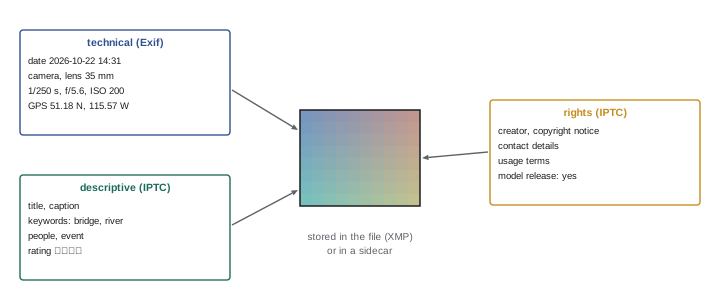
Image metadata falls into three broad groups:
- Technical metadata, recorded automatically by the camera: date and time, camera and lens model, serial numbers, exposure settings, focal length, GPS location if enabled, and orientation. This is stored mainly in Exif (Exchangeable Image File Format) fields.
- Descriptive metadata, added by people or software: titles, captions, keywords, people, locations, events and ratings.
- Administrative and rights metadata: creator, copyright notice, contact details, usage terms, licensing information, release status and job identifiers.
The IPTC Photo Metadata Standard, created by the International Press Telecommunications Council, defines the descriptive and rights fields used across the news, stock and publishing industries, such as Creator, Copyright Notice, Credit Line, Headline, Description (caption), Keywords, Location fields, Rights Usage Terms, and Model Release Status. XMP (Extensible Metadata Platform), developed by Adobe and now an ISO standard, is the container that stores IPTC and other metadata inside files or in separate sidecar files. Video files carry metadata too, in container-specific formats and in camera-generated sidecar XML files, and professional video workflows add reel names, scene and take numbers, and timecode.
| Standard | What it stores | Typical examples |
|---|---|---|
| Exif | Technical capture data | Date, camera, lens, shutter speed, GPS |
| IPTC Core and Extension | Descriptive and rights data | Caption, keywords, creator, copyright, location |
| XMP | Container for metadata, including edits | Embedded or .xmp sidecar files |
| C2PA Content Credentials | Signed provenance history | Capture device, edits, AI generation |
Adding metadata during ingest
The most efficient time to add metadata is during ingest, using templates that apply the same information to every file in a shoot: creator name, copyright notice, contact information, usage terms, and job or client identifiers. Location, event and general keywords can be added for the whole batch too. Later, during culling and editing, more specific captions and keywords are added to selected images. Building a habit of applying a copyright template to every import ensures that every file leaving your computer carries ownership information. Camera settings can embed the creator and copyright fields at capture, adding a further layer.
Captions and keywords
A good caption answers who, what, where, when and why in a sentence or two, using full names and accurate spellings; news organizations have strict captioning rules because captions are part of the journalistic record. Keywords make images searchable. An effective keywording strategy uses a controlled vocabulary, a consistent list of terms organized into a hierarchy, such as Places > Canada > Alberta > Banff, or Subjects > Architecture > Bridges, so that the same concept is always tagged the same way and a search for a broader term finds everything beneath it. Include concrete terms (subjects, objects, places, people), conceptual terms for stock and editorial use (teamwork, sustainability, solitude), and technical or production terms useful to your business (aerial, black and white, vertical, copy space). Avoid inconsistent spellings, plurals mixed with singulars, and private abbreviations nobody else understands.
Worked problem
Keywording a stock image
A photograph shows two engineers in hard hats reviewing plans on a tablet at a wind farm in southern Alberta at sunset. Write a caption and a set of keywords suitable for a stock agency.
Show solution
- Caption: "Two engineers in hard hats review plans on a tablet at a wind farm near Pincher Creek, Alberta, Canada, at sunset."
- Concrete keywords: engineers, hard hat, tablet, wind turbine, wind farm, plans, sunset.
- Place keywords (hierarchical): Canada > Alberta > Pincher Creek.
- Conceptual keywords: renewable energy, teamwork, sustainability, technology, planning, clean energy.
- Production keywords: two people, outdoors, horizontal, copy space, model released (if releases are held).
Answer: A precise caption plus concrete, place, conceptual and production keywords using consistent terms.
Catalogue software
Catalogue applications, such as Adobe Lightroom Classic, Capture One, Photo Mechanic and digiKam, maintain a database of information about images: their locations on disk, metadata, ratings, labels, collections, and in raw editors, the editing instructions. Searching the database is far faster than searching folders, and images can belong to many collections without being duplicated. Some important consequences follow:
- The catalogue is separate from the images. Moving or renaming files outside the catalogue software breaks the links, leaving "missing" images; files should be moved within the application.
- The catalogue file itself is valuable and must be backed up, because it contains all edits and organization work. Most applications create catalogue backups automatically, which should be stored with other backups.
- Metadata and edits can be written to files or XMP sidecars as well, so that other applications and future software can read them even without the catalogue. Enabling automatic writing of metadata to files is a good safeguard.
- Large collections may use several catalogues, for example one per year or per client, or a single master catalogue; each approach has trade-offs in speed and simplicity.
Cloud-based services such as Lightroom (cloud version), Google Photos and Apple Photos sync images and edits across devices, offering convenience and remote access but making the service an essential part of the workflow and raising questions about cost, privacy and long-term access.
Digital asset management systems
Organizations with large shared collections, such as publishers, agencies, brands, museums and broadcasters, use digital asset management (DAM) systems. A DAM stores assets centrally, controls who can view, download or edit them, manages metadata schemas and controlled vocabularies, tracks rights and expiry dates for licensed content, generates renditions in different sizes and formats automatically, records usage, and integrates with content management systems and design tools. Media asset management (MAM) systems serve similar roles for video, with proxy generation, timecode-based logging and integration with editing systems. Good metadata practices in individual workflows make it much easier to move work into such systems later.
AI tagging and search
Machine learning now generates keywords automatically, recognizing objects, scenes, colours, text and, where permitted, faces. Catalogue and DAM software can tag thousands of images in minutes, and natural language search lets users find "red bicycle on a rainy street" without anyone having typed those keywords. AI tagging is a powerful aid but needs review: it produces errors, generic terms and occasionally inappropriate labels, and it cannot know names, events, client details or the rights status of an image. Face recognition raises privacy and legal issues, including consent requirements under some privacy laws, so it should be used thoughtfully, especially with images of clients and the public.
Copyright and rights information
In most countries, copyright in a photograph or video belongs to its creator from the moment it is made, unless an employment relationship or written agreement assigns it to someone else. Embedding a copyright notice and contact information does not create copyright, but it helps people identify and contact the owner and, in some jurisdictions, supports claims if the information is removed. Rights metadata should also record licences granted to clients, model and property release status, and any restrictions, so that images are not reused in ways that breach agreements.
In Canada, under the Copyright Act, the author of a photograph owns copyright for the author's life plus 70 years, and registration with the Canadian Intellectual Property Office is optional but provides evidence of ownership; removing or altering rights management information such as embedded copyright metadata can give rise to remedies under the Act.
Content provenance and Content Credentials
As generative AI makes convincing synthetic images easy to create, proving that an image is authentic has become important. The Coalition for Content Provenance and Authenticity (C2PA) standard, known to users as Content Credentials, attaches a cryptographically signed record to a file describing its origin and history: which device captured it, what edits were made in which software, and whether generative AI was used. Some cameras now sign images at capture, editing software can add each step to the record, and websites and social platforms can display the credentials. Content Credentials do not prevent manipulation, and the record can be stripped by platforms that do not support it, but where present they provide verifiable evidence that news organizations, agencies and audiences can check.
Ratings, labels and collections
Beyond keywords, catalogue tools offer ratings, colour labels, flags and collections, which work best when they have consistent meanings. A common scheme uses one star for images that survive the first cull, two or three stars for good images, four stars for the best of a shoot and five for portfolio-level work. Colour labels might indicate workflow status, such as red for "needs retouching", yellow for "sent to client" and green for "approved". Collections group images from many folders for a purpose, such as a portfolio, a book project or a client delivery, without moving or duplicating files, and smart collections update automatically based on rules, for example all five-star images of architecture from the last two years. Documenting the meanings, especially when several people share a catalogue, prevents confusion.
Metadata for video
Video metadata is just as valuable and often neglected. Useful fields include scene and take numbers, camera and lens information, shooting location, people appearing, transcripts, and logging notes describing what happens in each clip and its usable moments. Editing applications let assistants and editors log clips with keywords, markers and notes, and automatic transcription now makes spoken content searchable across hours of interviews. For documentary and news work, logs and transcripts are essential: an editor searching for every moment a subject mentions a particular topic can find them in seconds instead of watching hours of footage. Archived video projects should include these logs, so that footage can be reused years later.
Privacy and metadata
Metadata can reveal more than intended. GPS coordinates embedded by phones and cameras show exactly where an image was taken, which can expose the location of a person's home, a sensitive site or wildlife nesting areas. Camera serial numbers can link images to a particular photographer. Before publishing, review which fields are exported: most export dialogs offer options to remove location data and personal information while keeping copyright and contact details. Conversely, for archives, research collections and journalism, accurate location and time metadata are valuable, so they should be kept in masters and removed only from public copies where appropriate.
Metadata for licensing and stock
Photographers who license images through stock agencies or their own websites depend on accurate metadata. Agencies require titles, descriptions and keywords in specific formats, release information for people and property, and sometimes categories and editorial or commercial status. Embedded metadata also travels with licensed images to clients, carrying credit lines and usage terms. The PLUS (Picture Licensing Universal System) coalition and IPTC have defined fields for licence information, allowing a licence identifier to be embedded so that anyone finding the image can identify its licence and owner.
Metadata standards continue to evolve, with new fields for accessibility descriptions, AI generation disclosure and data mining reservations, which let creators state whether their images may be used to train AI models. Keeping software current ensures these fields can be read and written.
Common mistakes
MistakeAdding no copyright or contact metadata.
InsteadApply a metadata template at every import.
MistakeMoving files outside the catalogue application.
InsteadMove and rename within the catalogue to keep links.
MistakeNot backing up the catalogue file.
InsteadBack up catalogues with the images.
MistakeInconsistent, ad hoc keywords.
InsteadUse a controlled, hierarchical vocabulary.
MistakeTrusting AI tags without review.
InsteadCheck AI keywords and add names, events and rights.
Summary and key terms
- Metadata is technical (Exif), descriptive and rights information (IPTC).
- XMP stores metadata in files or sidecars.
- Metadata templates at ingest add creator and copyright to every file.
- Good captions answer who, what, where, when and why.
- Controlled vocabularies make keywords consistent and searchable.
- Catalogues are databases separate from the image files.
- Content Credentials record signed provenance for authenticity.
- Metadata
- Information about an image stored with it.
- Exif
- Standard for technical capture metadata.
- IPTC
- Standard for descriptive and rights metadata.
- XMP
- Extensible Metadata Platform container.
- Sidecar file
- Separate file storing metadata or edits.
- Controlled vocabulary
- An agreed list of keywords.
- Catalogue
- Database tracking images, metadata and edits.
- DAM
- Digital asset management system.
- Model release
- Permission from a person to use their likeness.
- Content Credentials
- C2PA signed provenance record.
Practice problems
Work each problem on paper first, then reveal the answer to check.
Which standard records shutter speed and lens?
Show answer
Exif.
Which standard defines caption and copyright fields?
Show answer
IPTC.
What is XMP?
Show answer
A container format for metadata.
When is the best time to add copyright metadata?
Show answer
During ingest, with a template.
What questions should a caption answer?
Show answer
Who, what, where, when, why.
Give an example of a hierarchical keyword.
Show answer
Places > Canada > Alberta > Banff.
Why must files be moved inside the catalogue software?
Show answer
Otherwise the catalogue loses track of them.
Name two limitations of AI tagging.
Show answer
Errors and no knowledge of names, events or rights.
Does embedding a copyright notice create copyright?
Show answer
No; copyright arises on creation.
What do Content Credentials record?
Show answer
Signed origin and edit history.
Lesson quiz · 5 questions
Score 60% or more to complete this lesson.
Create a free account to save your progress, take quizzes and earn a certificate.