
SLS-140 · Lesson 1 of 12 · 22 min
The sales technology stack
▶ Video coming soon A video version of this lesson is on the way.
On her first morning at Ridgeline Workplace Solutions in August 2026, Maya Chen was handed a laptop, a headset and a list of eleven logins. There was the CRM, the email and calendar system, a video-meeting tool, a scheduling link, an e-signature service, a quoting tool for printer contracts, a product catalogue, a shared drive of proposal templates, a sales engagement platform for email sequences, a mobile app for visits and the company chat. Grace Liu, Ridgeline's sales operations analyst, walked her through each one. Maya had used a point-of-sale terminal and a clienteling app during three years on the floor at Juniper & Pine Home, but this was different. 'It looks like a lot,' Grace said. 'It is a lot. But almost everything here exists to do one of four jobs: find the customer, talk to the customer, keep track of the customer, or get the paperwork done. Once you see which job a tool does, you know where it fits.'
This course is about those tools. It is not a course in any one software product. Sales software changes quickly, vendors rename products every year or two, and the screens Maya learns in 2026 will look different in 2028. What changes much more slowly is what the tools are for, the habits that make them useful and the rules that govern customer data. This first lesson maps the whole set of tools, which sales teams call the sales technology stack, and explains how the pieces fit together. Later lessons take each piece in turn.
What a sales technology stack is
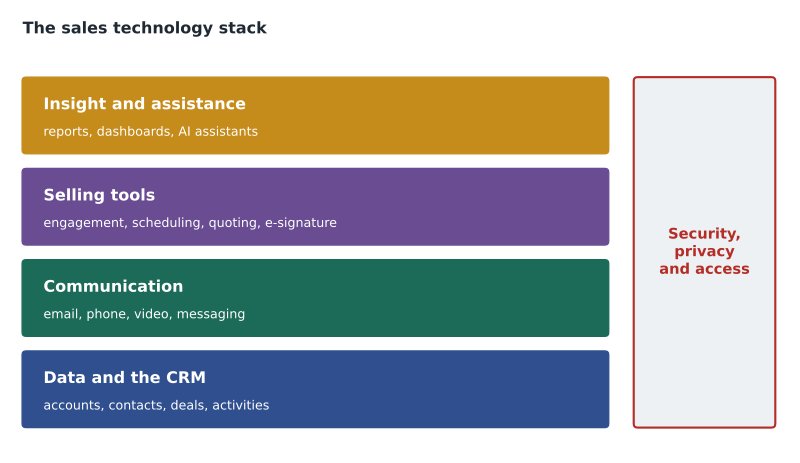
A sales technology stack is the set of software tools a sales team uses to find, win and keep customers, together with the connections between them. The word stack comes from software engineering, where it describes layers of technology built on top of each other. In sales the layers are not quite that tidy, but the idea holds: some tools are foundations that everything else depends on, and others sit on top and do specialized jobs.
At the foundation of almost every modern sales stack is the customer relationship management system, or CRM. The CRM is the shared database of customers, prospects, conversations and deals. Around it sit communication tools (email, phone, video and messaging), productivity tools (calendars, documents and spreadsheets) and specialized sales tools: engagement platforms that run outreach sequences, data providers that supply contact details, configure-price-quote tools that build accurate quotes, e-signature services, analytics and, increasingly, AI assistants. In retail, the foundation is often the point-of-sale system and the customer profiles attached to it, with clienteling apps, e-commerce platforms and messaging tools around it.
The four jobs
Grace's four jobs are a useful way to sort the stack. Every tool helps a seller do at least one of them, and some tools do several.
| Job | What it means | Typical tools | Covered in |
|---|---|---|---|
| Find the customer | Identify and research the right prospects | CRM lists, data providers, professional networking sites, lead forms on the website | Lessons 2, 3 and 7; SLS-210 |
| Talk to the customer | Reach out, hold conversations and follow up | Email, phone, video, messaging, engagement platforms, scheduling links | Lessons 7 and 8 |
| Keep track of the customer | Record who the customer is, what was said and where the deal stands | CRM records, activities, notes, pipelines, clienteling apps | Lessons 3 to 6 |
| Get the paperwork done | Produce accurate quotes, proposals and signed agreements | Quoting tools, document templates, e-signature | Lesson 8; SLS-212 |
A fifth job sits over the top of the other four: understanding what is happening. Managers and sellers use reports, dashboards and forecasts to see which deals are moving, which are stuck and where effort is going. Lesson 9 introduces reports and dashboards; the deeper numbers of sales analytics and forecasting are the subject of SLS-214.
Why companies invest in sales technology
Sales software is not cheap. A business CRM with sales features is usually priced per user per month, and prices vary widely, from free starter plans for very small teams to several hundred dollars per user per month for enterprise editions with AI features included. Add an engagement platform, a data provider, e-signature and a quoting tool, and a mid-sized team can spend thousands of dollars a month. Companies make that investment for a few reasons.
The first is memory. A sales team without a shared system relies on what is in each seller's head, inbox and notebook. When a seller is sick, on vacation or leaves the company, that knowledge goes with them. Rob Kowalski, Ridgeline's vice-president of sales, likes to tell new hires about the account executive who left in 2023 and took three years of customer history with him in a spiral notebook. 'We spent a year rebuilding relationships we already had,' he says.
The second is coordination. In business sales, several people often touch one customer: an inside rep books the first meeting, an account executive runs the sale, a sales engineer or product specialist helps with the demonstration, an account manager looks after the customer afterward, and a service team installs and supports the equipment. A shared system lets each person see what the others have done and promised.
The third is time. Sellers spend a large part of their week on work that is not selling: writing emails, updating records, building quotes, searching for documents and preparing for meetings. Surveys of sellers by CRM vendors have repeatedly reported that sellers spend well under half of their working time actually selling. Those figures come from vendors with an interest in the answer, and should be read as rough, but the direction is consistent: good tools and good habits give time back.
The fourth is insight. When activities, deals and outcomes are recorded consistently, managers can see patterns that no single seller would notice: which kinds of customers buy fastest, which products are often bought together, where deals stall and which follow-up habits lead to more wins.
What technology cannot do
None of these benefits arrives automatically. A CRM full of missing and out-of-date records is worse than useless, because people make decisions from it. An engagement platform that sends hundreds of generic emails can damage a company's reputation and break anti-spam law. An AI assistant that drafts a confident summary of a meeting it misunderstood can mislead a manager. Throughout this course the same theme returns: technology amplifies the habits of the people who use it. A careful seller with good tools becomes more effective. A careless seller with powerful tools makes mistakes faster and at a larger scale.
Technology also cannot replace the human skills covered in SLS-120: listening, asking good questions and building trust. Grace's advice to Maya on her first day was to treat the CRM as a notebook that the whole team can read, not as a form to be filled in for the manager. 'If you write things down so that someone else could pick up this customer tomorrow and not embarrass us,' she said, 'you are using it right.'
Common tools by category
The market for sales software is crowded and changes quickly. The table below lists categories with some well-known examples as of late 2026. The examples are illustrations, not recommendations; most categories have dozens of competitors, and the right choice depends on the size of the team, what it sells, the other software the company already uses and the budget.
| Category | What it does | Examples |
|---|---|---|
| CRM | Shared records of customers, contacts, deals and activities | Salesforce (sales products now marketed as Agentforce Sales), HubSpot Sales Hub, Microsoft Dynamics 365 Sales, Zoho CRM, Pipedrive |
| Sales engagement | Sequences of emails, calls and tasks; tracking replies | Outreach, Salesloft, sequence features inside most CRMs |
| Contact and company data | Supplies and updates contact details and company facts | ZoomInfo, Apollo, LinkedIn Sales Navigator, data features inside CRMs |
| Scheduling | Lets buyers book a time from the seller's calendar | Calendly, Microsoft Bookings, scheduling links in CRMs |
| Video meetings | Online meetings, screen sharing and recording | Microsoft Teams, Zoom, Google Meet |
| Conversation intelligence | Records, transcribes and analyzes sales calls | Gong and similar tools, plus features inside CRMs and meeting tools |
| Quoting (CPQ) | Builds accurate quotes from price lists and rules | CPQ modules of major CRMs and specialist tools |
| E-signature | Collects legally effective electronic signatures | DocuSign, Adobe Acrobat Sign, Dropbox Sign |
| Retail clienteling and POS | Customer profiles, purchase history and follow-up for store associates | POS systems with customer profiles, clienteling apps linked to the store's system |
| AI assistants | Summarize, draft, research and update records | Agentforce in Salesforce, Microsoft 365 Copilot and its Sales Agent, HubSpot Breeze Assistant and Agent Hub, Zia in Zoho |
Prices and product names in this market change often. In September 2026, for example, Salesforce announced new Core, Advanced and Max editions for its Agentforce Sales product, with AI features, Slack and analytics included in every tier. Before relying on any specific product detail from this course, check the vendor's current documentation.
Integration: making the tools talk to each other
A stack is only as useful as the connections between its parts. If the engagement platform does not record emails in the CRM, a manager looking at an account sees no outreach. If the e-signature tool does not update the deal when the contract is signed, the pipeline shows a deal as still open when it is won. Integration means connecting tools so that data flows between them automatically. Most sales tools offer ready-made connectors to the major CRMs, and larger companies also build custom connections through the tools' programming interfaces.
Integration has a cost as well as a benefit. Every connection is a place where data can be duplicated, overwritten or exposed. Grace keeps a one-page diagram of how Ridgeline's tools connect, which system is the source of truth for each kind of data, and who owns each connection. The CRM is the source of truth for accounts, contacts and deals; the finance system is the source of truth for invoices and payments; the email system holds the original messages. When two systems disagree, the source of truth wins.
Worked problem
Counting what a stack costs
Ridgeline's 14-person sales team uses a CRM at an illustrative 165 dollars per user per month, an engagement platform used by the 4 inside reps at 110 dollars per user per month, and an e-signature plan at 45 dollars per user per month for the 6 account executives and 2 account managers. What is the monthly cost of these three tools, and the cost per seller?
Show solution
- CRM: 14 users times 165 dollars.
- \[14 \times 165 = 2310\]
- Engagement platform: 4 users times 110 dollars.
- \[4 \times 110 = 440\]
- E-signature: 8 users times 45 dollars.
- \[8 \times 45 = 360\]
- Total per month.
- \[2310 + 440 + 360 = 3110\]
- Cost per seller: 3,110 divided by 14.
- \[3110 \div 14 \approx 222\]
Answer: The three tools cost about 3,110 dollars a month, or about 222 dollars per seller per month. The prices are illustrative; real prices depend on the vendor, the edition and the contract.
Numbers like these explain why sales managers ask whether every tool is used. A licence that nobody logs into still costs money, and Grace checks usage each quarter. In the first half of 2026 she found that two of Ridgeline's four data-provider licences had been used fewer than five times each in six months, and the company dropped them at renewal.
The retail stack at Juniper & Pine
Aiden Laroque's tools at Juniper & Pine Home look different from Maya's but do the same four jobs. The foundation is the store's point-of-sale system, which records every sale and, when the customer agrees, links it to a customer profile with contact details, purchase history, delivery dates and any protection plans. Associates use a clienteling app on store tablets that reads those profiles, so Aiden can see that the customer looking at sofas bought a dining set eighteen months ago and had the delivery rescheduled twice. The website and its buy online, pick up in store service feed orders into the same system. A texting tool lets associates send follow-up messages to customers who have agreed to receive them, and a scheduling page lets customers book virtual or in-store consultations.
Bev Halvorsen, the store manager, uses a dashboard that shows sales by associate and department, average ticket, protection plan attach rate and the number of customer profiles created each day. For Bev, the most important number is the last one. 'A sale without a profile is a sale we can't follow up,' she tells new associates. 'The profile is how we earn the second sale.'
Choosing and adopting tools
Most sellers do not choose their company's tools, but they live with the results of the choice, and they are often asked for input. A good evaluation starts with the jobs to be done and the problems the team actually has, not with a vendor's feature list. It considers how well a tool connects to the systems already in place, how easy it is to use on a busy day, what it costs in total (including training and setup), where the vendor stores data and how it protects it, and whether the team will actually use it.
That last point matters most. Studies of CRM projects, mostly published by consultancies and vendors, have long reported that many fail to deliver what was expected, and the most common reason given is poor adoption: people do not use the system, or use it inconsistently. Adoption improves when the tool saves the seller time rather than adding work, when managers use the system themselves in meetings and coaching, when training is practical, and when the data in the system is good enough to trust. Lesson 6 returns to data quality, and the lab in lesson 12 practises the daily habits that make adoption work.
Common mistakes
MistakeThe CRM is the manager's tool for checking up on sellers.
InsteadThe CRM is the team's shared memory; sellers benefit most from complete, accurate records.
MistakeMore tools always mean more productivity.
InsteadEach tool adds cost, training and integration risk; tools should match real jobs and be used.
MistakeIf a vendor offers a feature, the team should switch it on.
InsteadStart from the problem to be solved and the rules that apply, then choose features.
MistakeIntegration happens automatically once tools are bought.
InsteadConnections must be set up, tested and owned, and each system needs a clear source of truth.
MistakeProduct names and prices learned once stay current.
InsteadSales software changes quickly; check current vendor documentation before relying on details.
Summary and key terms
- A sales technology stack is the set of tools a sales team uses to find, win and keep customers, plus the connections between them.
- The CRM, or in retail the point-of-sale system with customer profiles, is the foundation that other tools read from and write to.
- Most tools serve one of four jobs: find the customer, talk to the customer, keep track of the customer and get the paperwork done; reports and dashboards help everyone understand what is happening.
- Companies invest in sales technology for shared memory, coordination, time savings and insight.
- Technology amplifies habits: good records and careful use make it valuable, poor habits make it harmful.
- Integration needs a clear source of truth for each kind of data, and adoption depends on tools that save sellers time.
- Sales technology stack
- The set of software tools a sales team uses, and the connections between them.
- CRM
- Customer relationship management system: the shared database of customers, contacts, deals and activities.
- Integration
- Connecting software tools so data flows between them automatically.
- Source of truth
- The system whose record wins when two systems disagree about the same data.
- Adoption
- The extent to which people actually use a tool as intended.
- Clienteling
- Retail selling that uses customer profiles and purchase history to give personal service and follow-up.
Practice problems
Work each problem on paper first, then reveal the answer to check.
Name the four jobs of sales technology described in this lesson.
Show answer
Find the customer, talk to the customer, keep track of the customer, and get the paperwork done.
Why does Grace keep a diagram of which system is the source of truth for each kind of data?
Show answer
So that when two systems disagree, everyone knows which record wins, and so each connection has an owner.
A team of 9 sellers pays 120 dollars per user per month for a CRM. What is the annual cost?
Show answer
9 times 120 is 1,080 dollars a month; times 12 is 12,960 dollars a year.
Why does Bev care so much about the number of customer profiles created each day?
Show answer
A profile lets the store follow up and earn a second sale; a sale without one cannot be followed up.
Lesson quiz · 5 questions
Score 60% or more to complete this lesson.
Create a free account to save your progress, take quizzes and earn a certificate.