
ROB-110 · Lesson 5 of 12 · 29 min
ROS 2 concepts: the graph, nodes, topics and messages
A robot's software is too large to write as one program. A mobile robot needs a driver for each sensor and motor, a program that estimates where the robot is, another that builds a map, another that plans paths, a user interface and much more. These pieces are written by different people, run at different rates and may run on different computers. The Robot Operating System, ROS, is a framework for building robot software out of many small programs that exchange data in a standard way. Despite its name it is not an operating system: it is a set of libraries, communication middleware, tools and thousands of shared packages that run on top of Linux. This lesson introduces the central idea of ROS 2, the computation graph of nodes communicating over topics with typed messages, and the command-line tools you use to explore it.
From ROS 1 to ROS 2
ROS began in 2007 at Stanford University and the robotics company Willow Garage, and quickly became the common language of robotics research. Its first generation, now called ROS 1, made sharing code between labs easy, but it was designed for a single robot on a reliable network, with a central master process that every node depended on and no support for real-time control or security. ROS 2 is a redesign that keeps the ideas but replaces the communication layer. It has no central master; nodes discover each other directly. It runs on Linux, Windows and macOS, supports real-time systems and microcontrollers, works across unreliable wireless links, and can encrypt and authenticate traffic. The last ROS 1 release reached end of life in May 2025, so new projects use ROS 2.
ROS 2 is developed in the open by a community of companies, universities and individuals, coordinated by Open Robotics. Its code is free and open source, mostly under the Apache 2.0 licence. A distribution, as you saw in lesson 1, is a tested set of core packages released together, and the wider ecosystem includes packages for navigation (Nav2), manipulation (MoveIt 2), simulation (Gazebo), visualization (RViz) and hardware control (ros2_control), all of which build on the same concepts.
The computation graph
A running ROS 2 system is described as a graph. The nodes of the graph are ROS 2 nodes: processes, or parts of processes, that each do one job, such as driving the wheels, reading the laser scanner or deciding when to stop. Nodes communicate mainly through topics, named channels that carry a stream of messages. A node that sends messages on a topic is a publisher; a node that receives them is a subscriber. Publishers and subscribers do not know about each other. A laser driver simply publishes scans on the topic /scan, and any number of other nodes, a mapping node, an obstacle detector, a data recorder, can subscribe without the driver being changed at all.
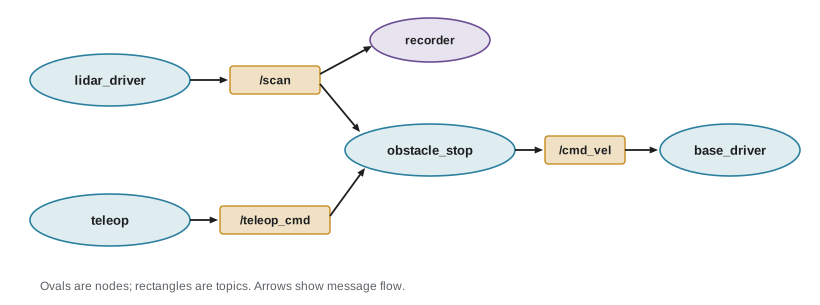
This loose coupling is the main strength of ROS. You can replace the real laser driver with a simulator or with a recording of yesterday's data, and the rest of the system cannot tell the difference. You can add a debugging tool that subscribes to every topic without disturbing anything. And you can reuse a node written by someone else for a different robot, as long as the topic names and message types match. Topics are one-way streams, ideal for continuous data such as sensor readings and velocity commands. Lesson 7 introduces services and actions for request-and-response interactions and long-running tasks.
Messages and interfaces
Every topic carries messages of a single type, defined in a simple interface description language. A message type is named by its package and name, such as geometry_msgs/msg/Twist, and lists fields with types. Fields can be primitive types, such as float64, int32, bool and string, arrays of them, or other message types. Using shared, standard types is what lets nodes from different authors work together: every mobile base in the ROS world accepts velocity commands as a Twist and every 2-D laser scanner publishes a LaserScan.
$ ros2 interface show geometry_msgs/msg/Twist
# This expresses velocity in free space broken into
# its linear and angular parts.
Vector3  linear
        float64 x
        float64 y
        float64 z
Vector3  angular
        float64 x
        float64 y
        float64 z
For a ground robot, linear.x is the forward speed in metres per second and angular.z is the turning rate in radians per second, counter-clockwise positive; the other fields are zero. Many messages begin with a header holding a timestamp and the name of the coordinate frame the data is expressed in, which lesson 10 explains. ROS 2 also has firm conventions that all packages follow: quantities are in SI units (metres, seconds, radians, kilograms), and a robot's own frame has x pointing forward, y to the left and z up. These conventions are written down in documents called REPs, ROS Enhancement Proposals, and following them is what makes a node reusable.
| Message type | Typical topic | Contents |
|---|---|---|
| std_msgs/msg/String | chatter | A single text string (mainly for examples) |
| geometry_msgs/msg/Twist | cmd_vel | Linear and angular velocity commands |
| sensor_msgs/msg/LaserScan | scan | Ranges from a planar laser scanner and the angles they were measured at |
| sensor_msgs/msg/Image | camera/image_raw | Image size, encoding and pixel data |
| sensor_msgs/msg/Imu | imu/data | Orientation, angular velocity and linear acceleration |
| nav_msgs/msg/Odometry | odom | Estimated pose and velocity with uncertainty |
| sensor_msgs/msg/BatteryState | battery_state | Voltage, current, charge and health |
Names follow conventions too. Topic names are lowercase with underscores, and they can be grouped under namespaces such as /robot1/scan and /robot2/scan, which lets two identical robots run the same software side by side. A name without a leading slash is relative and is placed inside the node's namespace, which, as lesson 9 shows, lets you launch the same nodes for several robots without changing their code.
Exploring a running system
The ros2 command-line tool lets you inspect and interact with any running ROS 2 system. A classic way to learn it is turtlesim, a tiny simulator in which a turtle drives around a window. Start turtlesim_node in one terminal and turtle_teleop_key in another, and you have a two-node system: the teleoperation node publishes Twist messages on /turtle1/cmd_vel when you press arrow keys, and the simulator subscribes to them and moves the turtle, publishing its position on /turtle1/pose.
ros2 run turtlesim turtlesim_node
ros2 run turtlesim turtle_teleop_key   # second terminal
# explore (third terminal)
ros2 node list
ros2 topic list -t
ros2 topic info /turtle1/cmd_vel --verbose
ros2 topic echo /turtle1/pose
ros2 topic hz /turtle1/pose
# publish commands yourself at 1 Hz
ros2 topic pub --rate 1 /turtle1/cmd_vel geometry_msgs/msg/Twist \
  '{linear: {x: 2.0}, angular: {z: 1.8}}'
ros2 node list shows the running nodes and ros2 topic list -t the topics with their types. ros2 topic info --verbose lists each topic's publishers and subscribers and their quality-of-service settings. ros2 topic echo prints messages as they arrive, ros2 topic hz measures the publishing rate and ros2 topic bw measures bandwidth. ros2 topic pub publishes messages from the command line, which is invaluable for testing a node without writing a publisher. The graphical tool rqt_graph draws the graph itself. These commands are the first thing to reach for whenever a robot does not respond: very often the answer is that a topic name is misspelled, a node is not running, or the message types do not match.
Quality of service
Networks are imperfect. Wi-Fi drops packets, subscribers fall behind and nodes start in different orders. ROS 2 lets each publisher and subscriber choose quality-of-service settings, known as QoS, that say how to handle these situations. The three most important policies are reliability, durability and history. Reliability can be reliable, where lost messages are re-sent until they arrive, or best effort, where lost messages are simply skipped. Durability can be volatile, where late-joining subscribers receive only new messages, or transient local, where the publisher keeps recent messages and delivers them to subscribers that join later. History sets how many messages are queued: keep last with a depth such as 10, or keep all.
| Policy | Options | Good choice for |
|---|---|---|
| Reliability | Reliable / Best effort | Reliable for commands and maps; best effort for high-rate sensor data |
| Durability | Volatile / Transient local | Transient local for data published once, such as a map or robot description |
| History and depth | Keep last N / Keep all | Small depths for control and sensors so stale data is dropped |
| Deadline | Maximum period between messages | Detecting a sensor that has stopped publishing |
| Lifespan | Maximum age of a message | Discarding commands that arrive too late to be useful |
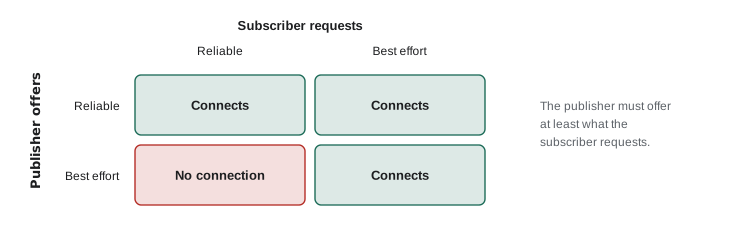
A publisher and subscriber connect only if their QoS settings are compatible. The rule is that the publisher must offer at least what the subscriber requests. A reliable publisher can serve a best-effort subscriber, but a best-effort publisher cannot serve a subscriber that demands reliability; similarly, a transient-local publisher can serve a volatile subscriber but not the reverse. When settings are incompatible, the nodes silently fail to exchange messages, and ros2 topic info --verbose or a warning in the log is the only clue. Many sensor drivers publish with best effort, so a subscriber that uses the default reliable setting receives nothing. ROS 2 provides a ready-made sensor data profile, best effort with a small queue, for exactly this case.
Worked problem
Queue depth and data age
A camera publishes at 10 Hz with keep-last depth 10. A slow subscriber has fallen behind and its queue is full. How old is the oldest image waiting to be processed, and what depth would keep the delay under 0.2 s?
Show solution
- Messages arrive every \( 1/10 = 0.1 \) s.
- A full queue of 10 holds images spanning about \( 10 \times 0.1 = 1.0 \) s, so the oldest is about 1 s old.
- To keep the oldest under 0.2 s, the queue may hold at most \( 0.2 / 0.1 = 2 \) messages.
- A depth of 1 or 2 means the subscriber always works on recent data; older images are discarded.
Answer: About 1 s old. A depth of 1 or 2 keeps processing within 0.2 s of real time.
Deep queues feel safe because nothing is lost, but for control they are dangerous: a robot reacting to obstacle data that is a second old may already have hit the obstacle. For sensor streams and commands, prefer shallow queues and process the newest data. Use deeper queues or keep all only when every message matters, such as a log of events.
Bandwidth: how much data moves through the graph
Every topic consumes processor time to serialize and copy messages and network capacity if the subscriber is on another computer. It is worth estimating the data rate of a robot's topics: the size of each message multiplied by its rate. The program below estimates payload rates, ignoring headers and protocol overhead, for four topics on a typical mobile robot.
# Approximate payload sizes of common topics (bytes per message)
FLOAT32, FLOAT64 = 4, 8

topics = {
    # name: (bytes per message, rate in Hz)
    "cmd_vel (Twist)": (6 * FLOAT64, 20),
    "odom (Odometry)": (13 * FLOAT64 + 72 * FLOAT64, 50),
    "scan (1081 beams)": (2 * 1081 * FLOAT32, 40),
    "image 640x480 rgb8": (640 * 480 * 3, 30),
}

total = 0.0
for name, (size, hz) in topics.items():
    mbit = size * hz * 8 / 1e6
    total += mbit
    print(f"{name:20s} {size:8d} B  {hz:3d} Hz  {mbit:8.2f} Mbit/s")
print(f"{'total':20s} {'':21s} {total:8.2f} Mbit/s")cmd_vel (Twist) 48 B 20 Hz 0.01 Mbit/s odom (Odometry) 680 B 50 Hz 0.27 Mbit/s scan (1081 beams) 8648 B 40 Hz 2.77 Mbit/s image 640x480 rgb8 921600 B 30 Hz 221.18 Mbit/s total 224.23 Mbit/s
Velocity commands, odometry and even a high-resolution laser scanner are tiny compared with a single uncompressed camera. That is why camera drivers usually offer compressed image topics, why heavy processing such as image recognition is often done on the robot itself rather than on a remote computer, and why the ros2 topic bw command is worth running whenever a robot's network seems sluggish.
Worked problem
Bandwidth of a laser scan
A laser scanner publishes 1081 ranges and 1081 intensities per scan, each a 4-byte float32, at 40 Hz. Estimate its data rate in Mbit/s, ignoring headers.
Show solution
- Bytes per scan: \( 2 \times 1081 \times 4 = 8648 \) bytes.
- Bytes per second: \( 8648 \times 40 = 345\,920 \) bytes, about 0.35 MB/s.
- Bits per second: \( 345\,920 \times 8 \approx 2.77 \times 10^6 \), about 2.8 Mbit/s.
Answer: About 2.8 Mbit/s, which any wired or wireless network handles easily.
Common mistakes
MistakeAssuming ROS 2 is an operating system that replaces Linux.
InsteadROS 2 is middleware, libraries and tools that run on top of an operating system such as Ubuntu.
MistakeSubscribing to a best-effort sensor topic with the default reliable QoS and receiving nothing.
InsteadMatch QoS to the publisher, for example with the sensor data profile, and check with ros2 topic info --verbose.
MistakeUsing deep queues for control data.
InsteadUse small depths so the robot acts on recent data; stale commands and scans should be dropped.
MistakeInventing custom message types for data that a standard type already represents.
InsteadUse standard types such as Twist, LaserScan and Odometry so nodes from others can interoperate.
MistakePublishing distances in centimetres or angles in degrees.
InsteadFollow the ROS conventions: SI units, radians, and x forward, y left, z up.
Summary and key terms
- ROS 2 is a framework of middleware, libraries, tools and shared packages for building robot software from many small programs.
- The computation graph consists of nodes that publish and subscribe to named topics; publishers and subscribers are decoupled.
- Each topic carries one message type; standard types and REP conventions (SI units, x forward, y left, z up) make nodes reusable.
- The ros2 command-line tool lists nodes and topics, echoes and publishes messages and measures rate and bandwidth.
- QoS policies such as reliability, durability and history control delivery; publishers must offer at least what subscribers request.
- Shallow queues keep control and sensor data fresh; the oldest queued message is roughly depth divided by rate old.
- Bandwidth is message size times rate; uncompressed images dominate a robot's data budget.
- Node
- A participant in the ROS 2 graph that performs one job and communicates with other nodes.
- Topic
- A named channel carrying a stream of messages of one type from publishers to subscribers.
- Publisher
- An entity in a node that sends messages on a topic.
- Subscriber
- An entity in a node that receives messages from a topic.
- Message type
- A named data structure, such as geometry_msgs/msg/Twist, defined in an interface file.
- Namespace
- A prefix that groups names, such as /robot1, so identical systems can coexist.
- QoS
- Quality-of-service settings that control reliability, durability, history and timing of communication.
- Best effort
- A reliability setting in which lost messages are not re-sent.
- Transient local
- A durability setting in which recent messages are delivered to late-joining subscribers.
- REP
- A ROS Enhancement Proposal, a document that records conventions and design decisions.
Practice problems
Work each problem on paper first, then reveal the answer to check.
A node publishes on scan and two nodes subscribe. Does the publisher need to know about the subscribers?
Show answer
No. Publishers and subscribers are decoupled; the middleware delivers messages to every matching subscriber.
Which Twist fields does a differential-drive robot use, and in what units?
Show answer
linear.x in m/s and angular.z in rad/s.
Write the command that shows the publishing rate of /odom.
Show answer
ros2 topic hz /odom
A best-effort publisher and a reliable subscriber share a topic. What happens?
Show answer
They are incompatible and no messages are delivered.
Which durability setting would you use for a map published once at start-up?
Show answer
Transient local, so subscribers that start later still receive it.
A sensor publishes at 20 Hz with depth 5. How old can the oldest queued message be?
Show answer
About 5 × 0.05 = 0.25 s.
Estimate the data rate of a 320 × 240 colour image at 15 Hz (3 bytes per pixel).
Show answer
320 × 240 × 3 × 15 ≈ 3.46 MB/s ≈ 27.6 Mbit/s.
Why should two identical robots use namespaces?
Show answer
So their topics, such as /robot1/cmd_vel and /robot2/cmd_vel, do not collide.
Name two things ros2 topic info --verbose shows that help diagnose a silent topic.
Show answer
The publishers and subscribers, and their QoS settings.
Why did ROS 2 drop the central master of ROS 1?
Show answer
So there is no single point of failure; nodes discover each other directly, which also suits multi-robot and wireless systems.
Lesson quiz · 5 questions
Score 60% or more to complete this lesson.
Create a free account to save your progress, take quizzes and earn a certificate.