
RAC-230 · Lesson 9 of 12 · 17 min
Building automation fundamentals
After the sensor splice in lesson 2 and the walk-in controllers in lesson 6, Wes asked Northfield to look at the seniors' residence's building automation system as a whole. The residence's utility bills had crept up, the night staff complained about noisy fans at 2 a.m., and the system's screens were full of alarms that nobody understood. Raj spent a morning in the maintenance office with Theo, clicking through graphics and schedules. "Building automation looks complicated because there's so much of it," he said, "but every piece is something you already know: a sensor, a controller, a setpoint and a device. There are just a few hundred of them talking to each other."
A building automation system, also called a BAS, building management system or energy management system, monitors and controls a building's mechanical and often electrical equipment from one network of controllers. HVAC-R technicians increasingly work alongside, or inside, these systems: reading trends, checking points, changing setpoints and diagnosing equipment through the BAS before climbing to the roof. This lesson covers the structure of a BAS, its points and signals, sequences of operation, schedules and overrides. Lesson 10 covers networks and protocols, and lesson 11 trends, alarms and commissioning.
The structure of a BAS
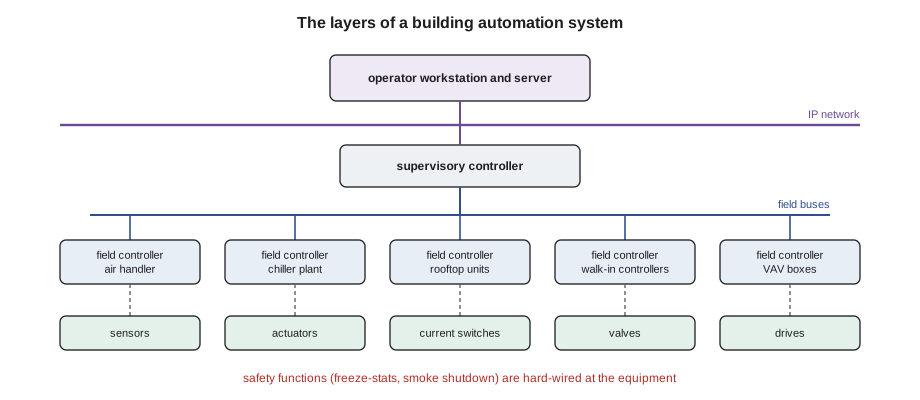
Most systems have three or four layers.
- Field devices: sensors, transmitters, actuators, relays, current switches, valves, dampers, drives and the equipment's own controls.
- Field controllers: programmable or application-specific controllers that read inputs, run control logic and drive outputs. A plant controller may run a chiller plant or a large air handler; unitary controllers run rooftop units, fan coils, heat pumps or variable-air-volume boxes.
- Supervisory or network controllers: coordinate field controllers, hold schedules and trends, pass alarms and connect field networks to the building's IP network.
- Servers and operator interfaces: the front end, graphics, alarm consoles, data storage and remote access, on a workstation or through a web browser.
Each field controller must be able to keep its equipment running safely if the network fails, using its last commands or local defaults. Life-safety functions, such as fire alarm shutdowns and freeze protection, should be hard-wired at the equipment, not depend on the network.
Points and signals
Everything a BAS knows or does is a point. Physical points are wired to a controller's terminals; software points, also called virtual points or variables, exist only in the program, such as a calculated setpoint or a mode. Physical points are classified by direction and type.
| Point type | Direction | Typical signals | Examples |
|---|---|---|---|
| Analog input (AI) | Into the controller | Thermistor or RTD resistance, 0–10 V, 4–20 mA | Supply air temperature, duct static pressure, CO2 |
| Analog output (AO) | Out of the controller | 0–10 V, 2–10 V, 4–20 mA | Valve position, damper position, drive speed |
| Binary input (BI) | Into the controller | Dry contact, current switch | Fan status, filter alarm, freeze-stat, door |
| Binary output (BO) | Out of the controller | Relay or triac | Fan start, pump start, enable a chiller |
A points list for a piece of equipment lists every point, its type, its signal, its range or states, its alarm limits and its name. Good naming conventions, such as building, system, equipment and point in a fixed order, make thousands of points searchable. Engineering units and ranges must match the sensor: a 4–20 mA transmitter ranged 0 to 500 Pa, entered in the controller as 0 to 250 Pa, reads half the real pressure and the fan control will chase the wrong number.
Command and status
A binary output that starts a fan is a command; it says what the controller wants. Whether the fan actually runs is a separate fact, proved by a status input, often a current switch on one motor lead that closes when the motor draws current above a set threshold, or a differential pressure switch across the fan. Comparing command and status is one of the most useful checks in building automation: a command of on with a status of off means the fan has failed, a belt has broken, a hand-off-auto switch is in off or a safety has tripped; a command of off with a status of on means someone has the starter in hand or a relay contact has welded. Current switches must be adjusted so that a broken belt, which still lets the motor draw a little current, reads as off.
- Hand-off-auto switches: at motor starters and drives. In hand, the equipment runs regardless of the BAS; in off, it cannot run; in auto, the BAS controls it. Many after-hours complaints come from a switch left in hand.
- Feedback on analog outputs: some actuators and drives report their actual position or speed, which can be compared with the command.
Sequences of operation
A sequence of operation is the written description of how a system should be controlled. The designer writes it, the controls contractor programs it, and the commissioning agent tests it. A technician who understands the sequence knows what the equipment is supposed to be doing at any moment and can tell a fault from intended behaviour. Typical air handler sequences describe:
- Occupancy: schedules for occupied and unoccupied modes, optimal start that starts the system early enough to reach setpoint by occupancy, and night setback or setup.
- Fan control: start, stop and speed, often holding a duct static pressure setpoint that may itself be reset by the demand of the zones.
- Supply air temperature: a setpoint that may be reset with outdoor temperature or zone demand, and the order of heating, economizer and mechanical cooling.
- Ventilation: minimum outdoor air, economizer and demand-controlled ventilation, as in lesson 8.
- Safeties and alarms: freeze-stat, smoke shutdown, high static limit, filter alarms and their responses.
Reset schedules are common in sequences because they save energy without sacrificing comfort. A supply air temperature reset, for example, raises the cooling supply air setpoint when it is cool outside, so less mechanical cooling and reheat are needed.
# A supply air temperature reset and occupancy schedule from a sequence of operation (illustrative values)
def sat_setpoint(oat):
    # reset linearly from 16.0 at 15.0 outdoors and below, to 13.0 at 24.0 outdoors and above
    if oat <= 15.0: return 16.0
    if oat >= 24.0: return 13.0
    return 16.0 + (13.0 - 16.0) * (oat - 15.0) / (24.0 - 15.0)

def occupied(hour, day):
    if day in ("Sat", "Sun"): return 7 <= hour < 21
    return 6 <= hour < 22

outdoor = {0: 9.0, 6: 8.5, 10: 14.0, 14: 21.0, 18: 26.0, 22: 16.0}
for day in ("Tue", "Sun"):
    for hour, oat in outdoor.items():
        mode = "occupied" if occupied(hour, day) else "unoccupied"
        sp = f"supply air setpoint {sat_setpoint(oat):.1f} C" if mode == "occupied" else "fan off, setback"
print(f"{day} {hour:02d}:00 outdoor {oat:5.1f} C -> {mode:10s} {sp}")Tue 00:00 outdoor 9.0 C -> unoccupied fan off, setback Tue 06:00 outdoor 8.5 C -> occupied supply air setpoint 16.0 C Tue 10:00 outdoor 14.0 C -> occupied supply air setpoint 16.0 C Tue 14:00 outdoor 21.0 C -> occupied supply air setpoint 14.0 C Tue 18:00 outdoor 26.0 C -> occupied supply air setpoint 13.0 C Tue 22:00 outdoor 16.0 C -> unoccupied fan off, setback Sun 00:00 outdoor 9.0 C -> unoccupied fan off, setback Sun 06:00 outdoor 8.5 C -> unoccupied fan off, setback Sun 10:00 outdoor 14.0 C -> occupied supply air setpoint 16.0 C Sun 14:00 outdoor 21.0 C -> occupied supply air setpoint 14.0 C Sun 18:00 outdoor 26.0 C -> occupied supply air setpoint 13.0 C Sun 22:00 outdoor 16.0 C -> unoccupied fan off, setback
Schedules, overrides and priorities
Schedules decide when equipment runs: weekly schedules, holiday exceptions and temporary events. Overrides change a point's value outside its normal logic: an operator commands a fan on for a test, a technician locks a valve open, or a tenant presses an after-hours button on a thermostat. Every override should be temporary and documented, because a forgotten override silently defeats the sequence for months. Most modern systems use priority levels for commands, so that a safety or manual command takes precedence over the normal program, and releasing the override hands control back to the program. Lesson 10 describes how BACnet does this. Good practice is to search the system regularly for points in override, in hand or out of service.
Raj found two of the residence's problems in the first hour. The corridor make-up air unit's fan command had been overridden to on by a previous contractor during a balancing visit two years earlier, at a priority above the schedule, and never released; that was the fan running at 2 a.m. And the third-floor air handler's status point showed off while its command was on, because a technician had replaced the motor and the new motor drew less current than the old current switch's threshold. The BAS had been raising a fan failure alarm every day, and the staff had learned to ignore it.
Graphics and the operator's view
Graphics show each system as a picture with live values: an air handler with its dampers, coils, fans and sensors, or a floor plan with zone temperatures. They are the fastest way to understand a system, but they can also mislead. A graphic shows what the controller believes, which is only as true as its sensors, and a value can be stale if a controller is offline. Good graphics show setpoints next to measured values, show which points are overridden, and show command and status together. When a graphic and the equipment disagree, believe the equipment, then find out why the BAS is wrong.
Who does what
On many sites, the controls contractor owns the programming, the networks and the front end, while mechanical service technicians maintain the equipment and use the BAS to diagnose it. Changes to programs and sequences belong to whoever is responsible for the system under the building's service contracts, and should be documented and backed up. Technicians commonly adjust setpoints within agreed limits, release overrides they placed, test points and report problems. Field wiring of controls must meet the electrical code, and in Ontario, the Electrical Safety Authority's rules on who may do electrical work apply to controls wiring as to any other.
Cleaning up the residence's system
With Wes's agreement, Raj released the old override on the make-up air unit, and the fan dropped to its unoccupied mode at the scheduled time that night. Theo adjusted the third-floor air handler's current switch threshold so it read on at the new motor's normal current and off with the belt removed, testing both conditions. They then ran a report of every point in override or out of service: there were 31, including two chilled-water valves locked at 100 % for a test in a previous summer. Raj gave Wes the list, released the ones that were clearly left over from old work, and flagged the rest for the controls contractor. "You just found more energy savings in an afternoon than a new boiler would give you," he told Wes.
Documentation a BAS needs
A building automation system is only maintainable if its documentation is current. Each site should have the points list, the sequences of operation as programmed, network riser diagrams showing every controller and its address, wiring diagrams for each panel, the controller programs and databases backed up, and a list of user accounts. When a technician changes a setpoint, a schedule or a hardware device, the change belongs in the system's records with the date and the reason. Many systems keep an audit log of who changed what; reading it can explain a mysterious change in equipment behaviour faster than any amount of testing. At the residence, the forgotten override from two years earlier was easy to find once Raj looked at the audit log, which recorded the contractor's login and the exact time the command was written.
Common mistakes
MistakeTrusting the graphic as if it were the equipment.
InsteadConfirm with the equipment and a reference instrument when they disagree.
MistakeLeaving overrides in place after testing.
InsteadRelease every override you place, and search regularly for forgotten ones.
MistakeIgnoring a daily command and status mismatch alarm.
InsteadInvestigate it: the equipment may have failed or the status device may be misadjusted.
MistakeEntering the wrong range for a transmitter.
InsteadMatch the controller's engineering range to the transmitter's range.
MistakeLeaving a starter in hand after service.
InsteadReturn hand-off-auto switches to auto.
Summary and key terms
- A BAS has field devices, field controllers, supervisory controllers and operator interfaces.
- Points are analog or binary inputs and outputs, plus software points.
- Comparing command and status reveals failed equipment, misadjusted status devices and manual overrides.
- Sequences of operation describe how the system should run and guide diagnosis.
- Schedules, overrides and priorities decide what controls each point; forgotten overrides waste energy.
- Safety functions should be hard-wired at the equipment.
- Building automation system
- A network of controllers that monitors and controls building equipment.
- Point
- A single input, output or software value in a BAS.
- Analog input
- A point that reads a continuously variable signal such as a temperature.
- Binary output
- A point that switches equipment on or off.
- Current switch
- A device on a motor lead that proves the motor is drawing current.
- Sequence of operation
- The written description of how a system should be controlled.
- Override
- A command that sets a point outside its normal program.
- Hand-off-auto switch
- A selector that lets equipment run manually, stop, or follow automatic control.
Practice problems
Work each problem on paper first, then reveal the answer to check.
A fan's command is on and its status is off. Name three possible causes.
Show answer
Failed motor, broken belt with a misadjusted current switch, tripped safety or a hand-off-auto switch in off.
A 4–20 mA static pressure transmitter ranged 0–500 Pa reads 12 mA. What is the pressure?
Show answer
250 Pa.
A supply air reset goes from 16 °C at 15 °C outdoors to 13 °C at 24 °C outdoors. What is the setpoint at 19.5 °C outdoors?
Show answer
14.5 °C.
Why should freeze protection be hard-wired at the air handler?
Show answer
So it works even if the controller or network fails.
Lesson quiz · 5 questions
Score 60% or more to complete this lesson.
Create a free account to save your progress, take quizzes and earn a certificate.