
RAC-230 · Lesson 6 of 12 · 17 min
Walk-in and display case controllers
After the oil safety trip in the residence's kitchen freezer, Wes asked Northfield for a proposal. The residence had a walk-in cooler and a walk-in freezer side by side, each with an old mechanical thermostat and a seven-day defrost timer, and the only alarm was a cook noticing the ice cream was soft. The kitchen also kept handwritten temperature logs for its food safety inspections. Dana proposed replacing both controls with electronic walk-in controllers that could log temperatures, raise alarms and report to the residence's building automation system. Theo would do the installation and programming, with Raj checking his work.
Electronic controllers are now standard on new walk-ins, reach-ins and display cases. A single controller replaces the thermostat, defrost timer, fan delay, door switch logic and alarm, and many also drive an electronic expansion valve and talk to a network. This lesson covers what these controllers measure, what they switch, how their parameters work, and how to set them up so they protect food without nuisance alarms.
Inputs and outputs
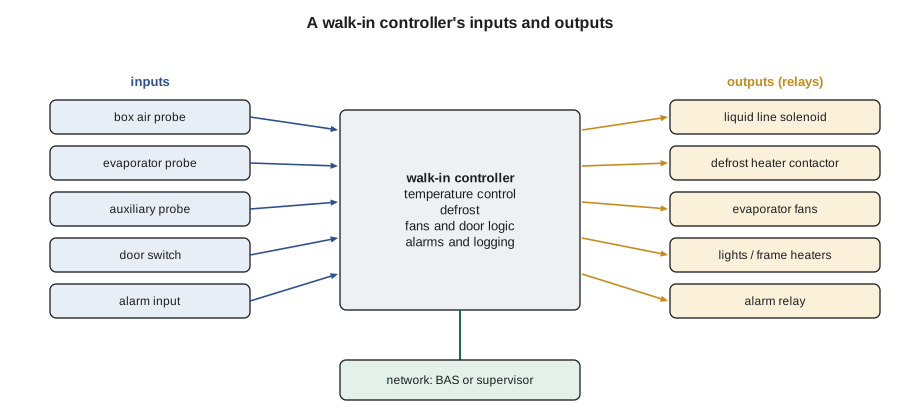
A typical walk-in or case controller has three or four probe inputs, a few digital inputs and four to six relay outputs, plus a display and keypad. The probes are usually NTC thermistors of the type the manufacturer supplies; some controllers accept several types, selected by a parameter, and a wrong selection reads several degrees off.
- Box or air probe: in the return air entering the evaporator, or as the manufacturer directs; this is the control probe.
- Evaporator or defrost probe: clamped to the coil at the last place to clear frost; used for defrost termination and fan delay.
- Auxiliary probe: may monitor the condenser, the discharge air or a second box zone, or act as a display or logging probe.
- Digital inputs: door switch, high-pressure or alarm contacts, an external defrost signal or a remote on-off.
- Outputs: compressor or liquid line solenoid, defrost heaters or hot-gas valve, evaporator fans, lights, door or frame heaters and an alarm relay.
Parameters and access levels
Controllers are set by parameters, each with a short code in the display and a description in the manual. Manufacturers group them into menus for control, defrost, fans, alarms, probes and communication, and protect them with access levels so staff can see the setpoint but not change the defrost settings. Parameters interact: a high-temperature alarm that ignores defrost, a door switch that stops the fans but not the compressor, or a probe offset that shifts every reading. Before changing anything on an existing installation, record the current values; many controllers can save them to a copy key or download them over the network. When setting up a new controller, start from the equipment manufacturer's recommended values and change only what the application requires.
| Group | Typical parameters | What to watch |
|---|---|---|
| Control | Setpoint, differential, minimum on and off times, probe offsets | Differential direction and anti-short-cycle times |
| Defrost | Type, interval or demand, termination temperature, fail-safe time, drip time | Termination probe location |
| Fans | Run with compressor or continuously, delay after defrost, stop with door open | Fan delay temperature |
| Alarms | High and low limits, delays, suppression after defrost and door openings | Delays that hide real problems |
| Door | Fan stop, compressor stop, alarm delay when the door stays open | Freezer doors left ajar |
| Probes and network | Probe type, display units, address, baud rate | Matching the probe type and network settings |
Door switches
A door switch tells the controller when the box is open. Most controllers stop the evaporator fans while the door is open, so warm, humid air is not pulled through the coil and the coil does not blast cold air at the person standing in the doorway. Some also stop the compressor for a short time. If the door stays open longer than a set delay, perhaps five or ten minutes, the fans restart so the box does not warm too far, and an alarm sounds. On walk-ins with lights, the switch may also turn the lights on. A failed door switch causes strange symptoms: a box that warms because its fans never run, or a coil that frosts quickly because the fans run with the door wide open. In RAC-130, the restaurant freezer's door switch was found iced in place by a torn gasket; switches and gaskets go together.
Frame and door heaters
Freezer door frames, and the glass doors of reach-ins and display cases, have heaters that keep their surfaces above the dew point of the room air, so condensation does not form and doors do not freeze shut. Run continuously, these heaters use a surprising amount of energy. Anti-sweat heater controls switch or pulse them based on the room's dew point, measured with a humidity sensor, running them hard only when the kitchen or store is humid. Energy standards for walk-ins and commercial refrigeration in both countries have tightened over time, and Canada's federal energy efficiency regulations and some provincial rules include requirements on items such as door closers, anti-sweat heater controls and efficient fan motors; check the current requirements when replacing equipment.
Alarms that people trust
A temperature alarm is useful only if people act on it, and people stop acting on alarms that are often false. The commonest causes of nuisance alarms are a high-temperature alarm without enough delay after a defrost or a delivery, and a probe in the wrong place, such as directly in the coil discharge or next to the door. The commonest cause of a missed real problem is the opposite: an alarm delay so long that product warms before anyone is told. Good alarm settings combine a limit, a delay and a suppression window.
- High-temperature limit: for a cooler holding food that must be kept cold, set below the food safety limit, so the alarm comes before the limit is reached.
- Delay: long enough to ride through a normal door opening or delivery, often 30 to 60 minutes on a walk-in.
- Post-defrost suppression: a window after each defrost during which the high-temperature alarm is ignored while the box recovers.
- Low-temperature alarm: freezing in a cooler damages produce and drinks as surely as warming spoils meat.
- Probe failure alarm: any open or shorted probe should alarm immediately.
Food safety regulations set the holding temperatures that alarms protect. In Ontario, the food premises regulation requires foods that need refrigeration to be held at 4 °C or colder, and frozen foods to remain frozen. Inspectors look for records, and a logging controller that keeps a temperature history can replace or support handwritten logs, as long as the kitchen still checks the readings.
# Testing alarm settings against a day of box temperatures (illustrative cooler log, one reading per minute)
import math
LIMIT = 5.0      # high-temperature alarm limit, C
def box_temp(m):
    t = 2.5 + 0.5 * math.sin(m / 9.0)                      # normal cycling
    for start in (360, 720, 1080, 1320):                       # defrosts: about 50 minutes of warm-up and recovery
        if start <= m < start + 50: t += 6.0 * math.sin(math.pi * (m - start) / 50)
    if 600 <= m < 640: t += 4.5 * (1 - abs(m - 620) / 20)    # morning delivery, door propped open
    if m >= 1200: t += 7.0 * min(1.0, (m - 1200) / 100)      # evening: condenser fan fails, box warms steadily
    return t

def alarms(delay, defrost_hold):
    over, out = 0, []
    for m in range(1440):
        in_hold = any(s <= m < s + defrost_hold for s in (360, 720, 1080, 1320))
        if box_temp(m) > LIMIT and not in_hold:
            over += 1
            if over == delay: out.append(m)
        else:
            over = 0
    return out

for delay, hold in ((5, 0), (30, 0), (30, 60), (120, 60)):
    hits = alarms(delay, hold)
    times = ", ".join(f"{h // 60:02d}:{h % 60:02d}" for h in hits) or "none"
    print(f"delay {delay:3d} min, post-defrost hold {hold:2d} min -> alarms at {times}")
print("the real fault starts at 20:00")delay 5 min, post-defrost hold 0 min -> alarms at 06:11, 10:17, 12:12, 18:10, 20:44 delay 30 min, post-defrost hold 0 min -> alarms at 06:36, 12:37, 18:35, 21:09 delay 30 min, post-defrost hold 60 min -> alarms at 21:09, 23:29 delay 120 min, post-defrost hold 60 min -> alarms at none the real fault starts at 20:00
The output shows the balance. A five-minute delay with no defrost hold alarms on every defrost and on the delivery, the kind of alarms a kitchen learns to ignore. A thirty-minute delay without a hold still alarms on three of the four defrosts. A thirty-minute delay with a one-hour post-defrost hold reports only the real fault, about seventy minutes after it starts, and reports it again when the late-evening defrost interrupts the count. A two-hour delay never alarms at all that night, because the late defrost's hold resets its timer: the box would sit warm until morning. It also points to a detail worth checking: well-designed controllers do not let a defrost hold cancel an alarm that is already timing.
Logging and records
Controllers that log temperatures record at a set interval, often every five to fifteen minutes, and keep weeks or months of data along with alarms and defrosts. The kitchen can download or view the records, and a networked controller can send them to a building automation system, a supervisory refrigeration controller or a cloud service. Clock settings matter: a controller whose clock was never set after a power failure logs every event at the wrong time, which confuses diagnosis and food safety records alike. Battery-backed or network-synchronized clocks avoid this.
Controllers with valves and networks
Many case and walk-in controllers also drive an electronic expansion valve, using a suction pressure transducer and a suction temperature probe to control superheat as described in RAC-220. Some report to a supervisory controller that coordinates defrosts across many cases, adjusts setpoints at night and sends alarms to service companies. Others connect to a building automation system over a network such as Modbus or BACnet, the subject of lesson 10. Each controller on a network needs a unique address and matching communication settings, and the person who sets it up should record them.
Commissioning the residence walk-ins
Theo mounted each controller outside its box at eye level, ran the box probes into the return air in front of each evaporator and clamped each coil probe at the last-to-clear location shown in the coil manual. He wired the door switches and the alarm relays, and connected both controllers to the network cable Wes's controls contractor had pulled. He set the cooler to 2 °C (36 °F) with a 2 K (4 °F) differential, off-cycle defrost four times a day and a high alarm at 5 °C (41 °F) after 30 minutes; the freezer to −20 °C (−4 °F) with electric defrost and temperature termination; and both with a post-defrost alarm hold, door alarm delays and probe failure alarms. He then tested every function: he held each door open to confirm the fans stopped and the door alarm sounded after its delay, forced a defrost on the freezer and watched it terminate, unplugged a probe to confirm the alarm, and warmed the cooler's box probe in his hand to confirm the high alarm reached the maintenance office. He saved the final parameter lists and gave Wes a copy.
Probe checks and replacements
Controller probes fail less often than people think, but they are easily damaged during installation and cleaning. A probe cable pinched in a door frame, crushed under a shelf or nicked by a cleaning scraper can read erratically or not at all. Most controllers display each probe's reading separately in a service menu, so a probe can be compared directly with a calibrated thermometer beside it. If a probe disagrees, disconnect it and measure its resistance against the manufacturer's table, as in lesson 2. Replace probes with the controller manufacturer's part, because a probe with a different curve may read correctly at one temperature and several degrees off at others. Route probe cables away from heater wiring and line-voltage cables, seal the hole where they pass through the box wall, and leave a drip loop so condensation runs off before it reaches the controller.
Common mistakes
MistakeSetting alarm delays as short as possible.
InsteadUse delays and post-defrost holds that ride through normal events but report real faults quickly.
MistakeChoosing the wrong probe type in the controller.
InsteadMatch the probe type parameter to the probes installed.
MistakeInstalling the box probe in the coil discharge or by the door.
InsteadPlace it in the return air entering the coil, or where the manufacturer specifies.
MistakeLeaving frame heaters on continuously when anti-sweat control is available.
InsteadUse dew-point-based anti-sweat control where the equipment allows it.
MistakeChanging parameters without recording the originals.
InsteadRecord or save the parameter list before making changes.
Summary and key terms
- Electronic controllers combine temperature, defrost, fan, door, alarm and logging functions.
- Probes must match the controller's probe type and be placed correctly.
- Door switches stop fans while doors are open and alarm when doors are left open.
- Alarms need a limit, a delay and post-defrost suppression to be both reliable and trusted.
- Food safety limits in each jurisdiction set the temperatures alarms must protect.
- Logging, clocks, network addresses and saved parameter lists are part of commissioning.
- Case controller
- An electronic controller that runs a display case, reach-in or walk-in, including temperature, defrost, fans and alarms.
- Parameter
- A setting in an electronic controller, identified by a code and described in its manual.
- Door switch
- A switch that tells a controller the box door is open.
- Anti-sweat heater
- A heater in a door, frame or glass that prevents condensation.
- Alarm delay
- The time a condition must last before an alarm is raised.
- Post-defrost suppression
- A period after defrost during which high-temperature alarms are ignored.
- Copy key
- A device that stores and loads a controller's parameter list.
- Supervisory controller
- A controller that coordinates and monitors many case or walk-in controllers.
Practice problems
Work each problem on paper first, then reveal the answer to check.
A walk-in alarms high after every defrost. What setting is most likely missing?
Show answer
A post-defrost alarm hold.
The coil frosts rapidly and the kitchen staff say the fans blow cold air at them in the doorway. What should be checked?
Show answer
The door switch and the controller's door fan-stop setting.
A controller reads 4 K warmer than a calibrated probe beside its box probe, and the probe tests correctly. What parameter should be checked?
Show answer
The probe type setting and any offset.
Why should the high-temperature alarm limit for a food cooler be set below the food safety limit?
Show answer
So staff are warned before the limit is reached.
Lesson quiz · 5 questions
Score 60% or more to complete this lesson.
Create a free account to save your progress, take quizzes and earn a certificate.