
PMP-140 · Lesson 5 of 12 · 25 min
Kanban and flow
Not all agile work fits neatly into sprints. Support requests arrive unpredictably, priorities change daily, and some work items take an hour while others take two weeks. For this kind of work, many teams use Kanban, an approach that manages the flow of work rather than organizing it into timeboxes. On Project Compass, the library's IT team uses Kanban for the stream of integration tasks that connect kiosks, security gates, the app and the catalogue system: network changes, test accounts, firmware updates, data fixes and vendor tickets.
Where Kanban comes from
Kanban means roughly "signboard" or "visual card" in Japanese. In the Toyota Production System, kanban cards signalled when an upstream process should produce more parts, so that production was pulled by demand instead of pushed by a schedule. In knowledge work, the Kanban method, popularized by David J. Anderson in the late 2000s, applies the same ideas: make the work visible, limit how much is in progress and manage the flow so that work moves smoothly from request to completion. Kanban is described as an evolutionary method: you start with your current process and improve it, rather than replacing it with a new set of roles.
| Practice | What it means | Compass IT integration board |
|---|---|---|
| Visualize the work | Show every work item and the stages it moves through | A board with columns: requested, ready, in progress, waiting on vendor, testing, done |
| Limit work in progress | Cap the number of items in each stage or overall | At most 4 in progress and 3 in testing |
| Manage flow | Watch how work moves and remove blockages | Weekly review of items older than 10 days |
| Make policies explicit | Write down the rules for moving and prioritizing work | An item is ready when it has a named requester, acceptance test and any vendor ticket number |
| Implement feedback loops | Regular reviews of the work and the process | A daily 10-minute board walk and a fortnightly service review with the project manager |
| Improve collaboratively, evolve experimentally | Change the process in small steps based on data | Trial a separate lane for urgent items for one month and compare cycle times |
Visualizing the work
A Kanban board shows columns for the stages of the workflow and cards for work items. Unlike a Scrum task board, which is reset each sprint, a Kanban board is continuous: items enter on the left whenever they are requested and leave on the right when they are done. The columns should reflect how work really flows, including waiting states. Making waiting visible is one of the most useful things a board does. The Compass IT team added a "waiting on vendor" column after realizing that items sat for days while kiosk or catalogue vendors responded, a delay that had been invisible when everything in progress shared one column.
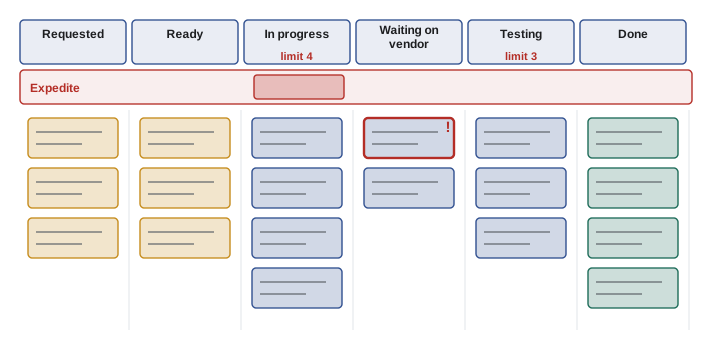
Boards often use swimlanes to separate classes of work, such as an expedite lane for urgent items, and visual markers for blocked items. Some teams split columns into "doing" and "done" sub-columns so it is clear when an item is waiting to be pulled by the next stage. The goal is that anyone looking at the board can answer quickly: what is being worked on, what is stuck and why.
Limiting work in progress
Work-in-progress (WIP) limits are what turn a board from a picture into a management tool. When a column reaches its limit, nobody starts new work in it; instead, people help finish items already there or remove the blockage that is stopping them. This creates a pull system: work is pulled into a stage when there is capacity, not pushed in because someone upstream has finished their part. Teams new to WIP limits often find them uncomfortable at first because they reveal bottlenecks that were previously hidden by starting more and more work.
Why does limiting WIP help? Multitasking carries a switching cost; every extra item in progress divides attention and delays everything. More importantly, there is a simple mathematical relationship between WIP, throughput and cycle time, known as Little's law. For a stable system, average WIP equals throughput multiplied by average cycle time. Rearranged, average cycle time equals WIP divided by throughput. If the team can finish six items a week, having 18 items in progress means each takes about three weeks on average, whereas having six in progress means about one week.
# Little's law on the kiosk integration Kanban board: average items in progress
# = throughput x average cycle time, so cycle time = WIP / throughput.
throughput_per_week = 6          # items finished per week (stable for a month)
for wip in (6, 9, 12, 18):
    cycle_weeks = wip / throughput_per_week
print(f"WIP {wip:>2} items -> average cycle time {cycle_weeks:.1f} weeks ({cycle_weeks * 5:.0f} working days)")WIP 6 items -> average cycle time 1.0 weeks (5 working days) WIP 9 items -> average cycle time 1.5 weeks (8 working days) WIP 12 items -> average cycle time 2.0 weeks (10 working days) WIP 18 items -> average cycle time 3.0 weeks (15 working days)
Starting more work does not make the team finish more; it only makes each item take longer and makes forecasts less reliable. Before WIP limits, the Compass IT team routinely had 15 to 20 items open and requesters complained that nothing ever seemed to finish. After introducing a limit of four in progress, the number of items finished per week stayed about the same, but average cycle time fell from roughly three weeks to just over one, and requesters could get a reliable answer to "when will it be done?"
Measuring flow
Kanban teams use a small set of flow measures. Cycle time is the time an item spends from when work starts on it to when it is done. Lead time usually means the time from when it is requested to when it is delivered, so it includes waiting in the queue before work starts; definitions vary between organizations, so check what a particular question or tool means. Throughput is the number of items finished per unit of time. WIP is the number of items started but not finished. Work item age, the time an item in progress has been open so far, is a useful early warning: an item much older than usual needs attention now, not after it finishes.
| Measure | Definition | Typical use |
|---|---|---|
| Lead time | Request to delivery (includes queue time) | What the requester experiences; service level expectations |
| Cycle time | Start of work to done | How efficiently the team processes work; forecasting |
| Throughput | Items finished per period | Forecasting how many items can be done by a date |
| WIP | Items started and not finished | Controlling flow; Little's law |
| Work item age | Time since an in-progress item started | Spotting stuck items early |
A cumulative flow diagram (CFD) shows the number of items in each stage over time as stacked bands. The top edge of the chart shows total arrivals; the bottom band shows items done. The vertical distance between bands at any date is the WIP in those stages; the horizontal distance approximates how long items take to pass through. Bands that widen indicate a growing queue or bottleneck. Bands that run flat mean nothing is moving. Parallel bands that rise steadily indicate healthy, stable flow.
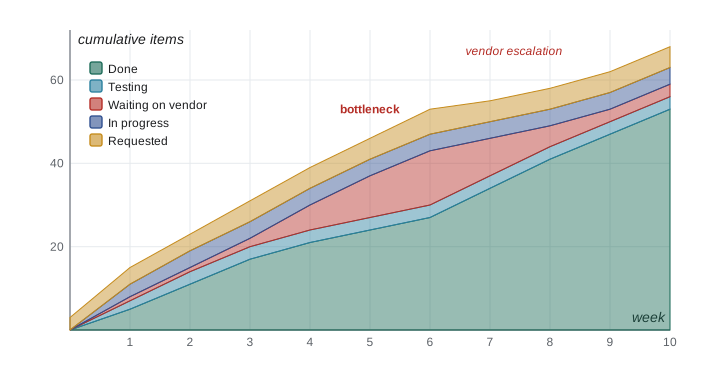
In the Compass CFD, the waiting-on-vendor band swells in weeks 4 to 6 while the kiosk supplier is slow to respond to firmware tickets. The project manager uses the chart in a meeting with the supplier, invoking the response-time clause in the kiosk contract. After week 6 the band narrows. The CFD turned a vague feeling that "the vendor is slow" into a visible, specific issue.
Explicit policies and classes of service
Explicit policies make the rules of the system visible so that everyone handles work the same way. Typical policies include when an item is ready to start, what done means for each column, how items are prioritized and how blocked items are escalated. Classes of service give different kinds of work different treatment. An expedite class handles urgent items that jump the queue, usually limited to one at a time because every expedited item delays the others. A fixed-date class covers items that must be done by a deadline. A standard class is handled first in, first out within priority, and an intangible class covers important but not urgent work such as technical improvements.
| Class of service | When used | Policy on the Compass board |
|---|---|---|
| Expedite | Severe impact now, such as gates failing in a live branch | Maximum one at a time; anyone can stop current work to help |
| Fixed date | Must finish by a known date | Started early enough to meet the date based on cycle time data |
| Standard | Most requests | Pulled in priority order, then oldest first |
| Intangible | Improvements with no immediate deadline | At least one in progress at all times so improvement work never stops |
Kanban, Scrum and Scrumban
Kanban and Scrum are not rivals. Scrum prescribes roles, timeboxed sprints and specific events; Kanban prescribes none of these and focuses on flow. Many Scrum teams use Kanban practices inside their sprints, such as WIP limits on the task board. Some teams combine them in a hybrid often called Scrumban: they keep regular planning and retrospectives but pull work continuously instead of committing to a fixed batch per sprint. The right choice depends on the nature of the work. Work that benefits from a shared goal and regular stakeholder reviews suits Scrum; interrupt-driven or highly variable work suits Kanban.
| Aspect | Scrum | Kanban |
|---|---|---|
| Cadence | Fixed-length sprints | Continuous flow; cadences for reviews if wanted |
| Roles | Product owner, Scrum Master, developers | None prescribed; existing roles kept |
| Commitment | Sprint goal per sprint | Service level expectations based on flow |
| Change during the period | Avoid changes that endanger the sprint goal | New items can be pulled whenever capacity frees up |
| Key metrics | Velocity, burn-up and burndown | Cycle time, throughput, CFD, work item age |
| Limiting work | Indirectly, by what fits in a sprint | Directly, with WIP limits |
Worked problem
The board is full
The Compass IT board's in-progress column has reached its limit of four. A technician has just finished testing an item and is free. The branch manager asks him to start configuring the new receipt printers, a standard-class request at the top of the ready column. What should he do?
Show solution
- The in-progress column is at its WIP limit, so starting the receipt printer work would break the policy.
- He should first look right to left on the board: can he help finish an item in testing or in progress, or unblock the item waiting on the vendor?
- Helping finish existing work increases throughput and shortens cycle times, which benefits the branch manager's request too, since it can start sooner.
- If the team often has idle people while columns are full, that is a signal to review the WIP limits or the workflow at the next service review.
Answer: Do not start new work; help finish or unblock items already in progress, and raise the pattern at the next review if it recurs.
Common mistakes
MistakeStarting new work whenever someone is free.
InsteadRespect WIP limits; help finish work already in progress.
MistakeHiding waiting time inside an in-progress column.
InsteadMake queues and waiting states visible on the board.
MistakeAssuming more WIP means more output.
InsteadAt the same throughput, more WIP means longer cycle times (Little's law).
MistakeTreating lead time and cycle time as the same in every organization.
InsteadCheck definitions; lead time usually includes queue time before work starts.
MistakeExpediting many items at once.
InsteadLimit expedite to one or very few items; each one delays everything else.
Summary and key terms
- Kanban manages the flow of work rather than timeboxes, starting from the current process.
- Core practices: visualize, limit WIP, manage flow, make policies explicit, use feedback loops, improve collaboratively.
- WIP limits create a pull system and expose bottlenecks.
- Little's law: average cycle time = WIP / throughput for a stable system.
- Flow measures include lead time, cycle time, throughput, WIP and work item age.
- Cumulative flow diagrams show WIP and bottlenecks over time.
- Kanban and Scrum can be combined; choose based on the nature of the work.
- Kanban board
- A visual board with columns for workflow stages and cards for work items.
- WIP limit
- A cap on the number of items allowed in a stage or in the whole system.
- Pull system
- A system in which work is started only when there is capacity to take it.
- Little's law
- For a stable system, average WIP equals throughput times average cycle time.
- Cycle time
- The time from starting work on an item to finishing it.
- Lead time
- The time from a request to its delivery, including waiting before work starts.
- Cumulative flow diagram
- A stacked area chart showing items in each workflow stage over time.
- Class of service
- A policy that gives a category of work its own priority and handling rules.
Practice problems
Work each problem on paper first, then reveal the answer to check.
What does a WIP limit do when a column is full?
Show answer
Stops new work entering that column until an item moves on.
A team finishes 5 items per week with 15 in progress. What is the average cycle time?
Show answer
3 weeks.
Which measure includes time waiting before work starts?
Show answer
Lead time (as usually defined).
What does a widening band on a CFD indicate?
Show answer
A growing queue or bottleneck in that stage.
Why limit the expedite lane to one item?
Show answer
Every expedited item delays all other work.
Does Kanban prescribe roles?
Show answer
No; it starts with existing roles and processes.
What is work item age used for?
Show answer
Spotting items that are taking unusually long while still in progress.
What is Scrumban?
Show answer
A hybrid that keeps some Scrum events but pulls work continuously with WIP limits.
Why did the Compass team add a waiting-on-vendor column?
Show answer
To make vendor delays visible.
Name two explicit policies a Kanban team might write down.
Show answer
When an item is ready; what done means for a column (also prioritization and escalation rules).
Lesson quiz · 5 questions
Score 60% or more to complete this lesson.
Create a free account to save your progress, take quizzes and earn a certificate.