
PMP-140 · Lesson 4 of 12 · 26 min
Scrum events and artifacts in practice
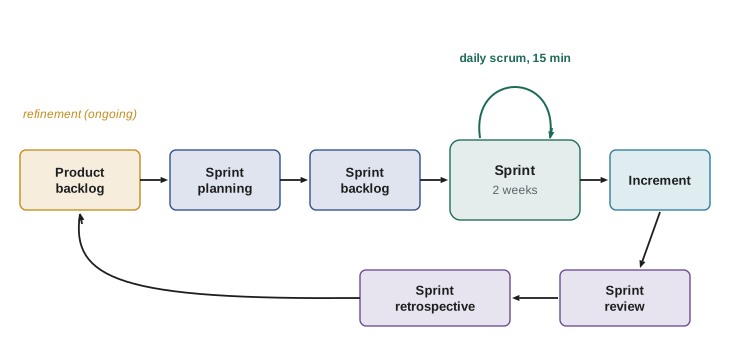
Lesson 3 described who does what in Scrum. This lesson follows the Compass app team through one sprint, sprint 7, to show how the Scrum events and artifacts work together. Each event is a formal opportunity to inspect something and adapt. If an event is skipped or turned into something else, such as a status meeting, the team loses one of those opportunities, which is why exam answers that cancel retrospectives or reviews to save time are almost always wrong.
The sprint
The sprint is the container for all the other events. It is a fixed-length period of one month or less, during which the team turns ideas into a usable increment. A new sprint starts immediately after the previous one ends. During the sprint, no changes are made that would endanger the sprint goal, quality does not decrease, the product backlog is refined as needed, and scope may be clarified and renegotiated with the product owner as more is learned. Consistent sprint lengths create a rhythm that makes planning and forecasting easier.
The Compass app team uses two-week sprints, a common choice. Shorter sprints give more frequent feedback and limit the risk of going far in the wrong direction; longer sprints suit work where a usable increment takes more time to assemble. Only the product owner can cancel a sprint, and only if the sprint goal becomes obsolete, for example if the library board suddenly decided to drop the app entirely. Cancelling is rare and disruptive.
Sprint planning
Sprint planning starts the sprint by laying out the work to be performed. The whole Scrum Team attends, and the team may invite others to give advice. It is timeboxed to a maximum of eight hours for a one-month sprint, and is usually shorter for shorter sprints; the Compass team takes about three hours. Planning addresses three topics. Why is this sprint valuable? The product owner proposes how the product could increase its value, and the team crafts a sprint goal. What can be done this sprint? The developers select items from the product backlog, discussing them with the product owner. How will the chosen work get done? The developers plan the work needed, often by decomposing items into tasks of a day or less.
Selecting how much work to take on is the developers' decision. They look at their past performance, their upcoming capacity and the definition of done. For sprint 7, two developers have planned leave and Ravi is spending two days helping the library's IT staff with a server migration. The team does a quick capacity check before agreeing the sprint goal.
# Sprint 7 capacity for the Compass app team (10 working days in the sprint).
team = {"Sana": 10, "Luc": 10, "Mei": 8, "Ravi": 10, "Tess": 6}   # days available
focus = 0.7          # share of a day for sprint work after meetings, support and refinement
hours_per_day = 7.5
capacity_hours = sum(team.values()) * hours_per_day * focus
print(f"Available person-days: {sum(team.values())}")
print(f"Capacity for sprint work: {capacity_hours:.0f} hours")
velocities = [18, 20, 22, 23, 21, 24]
recent = velocities[-3:]
print(f"Average of last three sprints: {sum(recent) / 3:.1f} points")
scale = sum(team.values()) / 50   # 50 person-days in a full sprint
print(f"Adjusted for availability: {sum(recent) / 3 * scale:.1f} points")Available person-days: 44 Capacity for sprint work: 231 hours Average of last three sprints: 22.7 points Adjusted for availability: 19.9 points
The team's recent velocity is about 23 points per sprint, but with 44 of 50 person-days available, roughly 20 points is a sensible ceiling. They agree the sprint goal (patrons can see their place in the holds queue and get notified when an item is ready) and pull in 19 points of stories that serve it. Velocity is used here as a planning aid for the team itself, not as a target handed down by managers; lesson 10 returns to why.
The sprint backlog is the output: the sprint goal, the selected product backlog items and the developers' plan for delivering them. It belongs to the developers, is updated throughout the sprint and should be visible enough that anyone can see what the team is working on. Many teams show it as a task board with columns such as to do, in progress and done.
The daily scrum
The daily scrum is a 15-minute event for the developers, held at the same time and place every working day to reduce complexity. Its purpose is to inspect progress toward the sprint goal and adapt the sprint backlog as necessary. The developers can use any format that keeps the focus on the goal and produces an actionable plan for the next day. The well-known three questions (what did I do yesterday, what will I do today, what is in my way) are one option, but the 2020 Scrum Guide no longer requires them, and many teams prefer to "walk the board" from right to left, looking at the items closest to done first.
Three common dysfunctions show up in exam questions. First, the daily scrum becomes a status report to a manager or product owner; the fix is to remind everyone that it is the developers' planning event and that others may attend but not run it. Second, it runs long because people solve problems in the meeting; the fix is to note the issue and have the people involved meet straight afterwards. Third, impediments are mentioned but nothing happens; the Scrum Master should make sure they are acted on.
Product backlog refinement
Refinement is not a formal event but an ongoing activity: breaking down and further defining product backlog items into smaller, more precise items, and adding details such as descriptions, order and size. The developers who will do the work are responsible for sizing. The Scrum Guide does not set a time limit, but many teams spend no more than about a tenth of their capacity on it. Items that are clear enough to be selected at the next sprint planning are often described as ready, although Scrum itself does not define a "definition of ready" and teams should avoid turning it into a gate that blocks collaboration.
The Compass team holds a one-hour refinement session midway through each sprint with Amara and, when needed, the branch manager. In sprint 7 they split the large "room booking" item into four stories and discovered that the library's room booking system has no interface for external apps, a dependency that became a risk for release 2.
The sprint review
The sprint review inspects the outcome of the sprint and determines future adaptations. The Scrum Team presents the results of its work to key stakeholders and discusses progress toward the product goal. It is a working session, not a slide presentation, and it is timeboxed to four hours for a one-month sprint. Only work that meets the definition of done is shown as part of the increment. The product backlog may be adjusted as a result, so the review is often where the most valuable new ideas appear.
At the sprint 7 review, branch staff try the hold queue display on their own phones. They point out that patrons with several holds want them sorted by expected pickup date, not by the order in which they were placed. Amara adds a small story to the backlog. The sponsor sees the release burn-up and asks whether release 1 is on track for the soft opening; the honest answer, worked out in lesson 9, is "probably not unless something moves to release 2".
The increment itself deserves a closer look. Each increment adds to all prior increments and must be usable. Several increments may be created within a sprint, and an increment may be released to users before the sprint ends; the sprint review is not a release gate. Scrum does not forbid releasing more often; it requires that something usable exist at least by the end of each sprint.
The sprint retrospective
The retrospective is the team's opportunity to plan ways to increase quality and effectiveness. The Scrum Team inspects how the last sprint went with regard to individuals, interactions, processes, tools and its definition of done, identifies the most helpful changes and may add them to the next sprint backlog. It is timeboxed to three hours for a one-month sprint and concludes the sprint. Retrospectives need psychological safety: people must be able to say what went wrong without fear, and the team should focus on the system, not on blame.
The sprint 7 retrospective uses a simple format: what helped, what hindered, what will we try. The team notices that two stories were blocked for three days waiting for catalogue test data. They agree to ask Mei to prepare test data one sprint ahead and add a definition-of-done item for regression tests of the catalogue connection. The improvement goes into the sprint 8 backlog so that it does not get lost.
Timeboxes at a glance
| Event | Purpose | Maximum for a one-month sprint | Compass (two-week sprint) | Attendees |
|---|---|---|---|---|
| Sprint | Container for all work and events | One month | Two weeks | Scrum Team |
| Sprint planning | Why, what and how for the sprint | 8 hours | About 3 hours | Scrum Team, invited advisers |
| Daily scrum | Inspect progress toward the sprint goal; adapt the plan | 15 minutes (every sprint length) | 15 minutes | Developers (others may observe) |
| Sprint review | Inspect the increment with stakeholders; adapt the backlog | 4 hours | About 1.5 hours | Scrum Team and key stakeholders |
| Sprint retrospective | Inspect how the team works; plan improvements | 3 hours | About 1.5 hours | Scrum Team |
| Refinement (activity) | Prepare backlog items | No timebox set | About 1 hour per sprint plus ad hoc | Product owner, developers |
The Scrum Guide gives timeboxes for a one-month sprint and says that events for shorter sprints are usually shorter. A precise scaling rule is not defined, so avoid exam answers that state one as fact. The daily scrum is the exception: it is 15 minutes regardless of sprint length.
Artifacts and transparency
Scrum's three artifacts, the product backlog, the sprint backlog and the increment, represent work or value. They are designed to maximize transparency of key information, so everyone inspecting them has the same basis for decisions. Artifacts that are not transparent lead to poor decisions: a backlog that only the product owner can read, a task board that is updated once a week or an increment that is "done except for testing" all hide the true state of the work. The Scrum Master's job includes helping the team and organization keep the artifacts honest.
| Artifact | Owner | Updated | What makes it transparent |
|---|---|---|---|
| Product backlog | Product owner | Continuously, especially in refinement and after reviews | Ordered, visible to stakeholders, top items clear and small |
| Sprint backlog | Developers | Daily, as work progresses | Shows the sprint goal and current state of each item and task |
| Increment | Scrum Team | Each time work meets the definition of done | Usable, meets the definition of done, can be inspected by stakeholders |
Worked problem
Saving time by skipping events?
Before the soft opening crunch, the development firm's account manager suggests dropping sprint reviews and retrospectives for three sprints to give the developers more coding time. The team would still hold daily scrums. What should the project manager recommend?
Show solution
- Reviews are where stakeholders inspect the product and the backlog is adapted; without them, the team risks building the wrong thing at the time when mistakes are most costly.
- Retrospectives are where the team fixes problems such as the catalogue test data delays; skipping them lets known problems persist.
- The time saved is small: about three hours per two-week sprint.
- If time is short, the right levers are scope (the product owner moves lower-value items to release 2) and impediment removal, not removing inspection points.
Answer: Keep the reviews and retrospectives, possibly shortened, and address the crunch through scope decisions by the product owner and removal of impediments.
Common mistakes
MistakeTurning the daily scrum into a status report to the product owner or manager.
InsteadIt is the developers' 15-minute planning event focused on the sprint goal.
MistakeSkipping retrospectives when the team is busy.
InsteadRetrospectives drive improvement; keep them, shortened if necessary.
MistakeAdding new work to the sprint that endangers the sprint goal.
InsteadPut new requests in the product backlog; scope may be clarified with the product owner without abandoning the goal.
MistakeShowing unfinished work as part of the increment at the review.
InsteadOnly items meeting the definition of done are part of the increment.
MistakeTreating the sprint review as the only time a release can happen.
InsteadIncrements can be released whenever ready; the review inspects them.
Summary and key terms
- The sprint is a fixed container of one month or less; sprints follow one another without gaps.
- Sprint planning answers why, what and how; the developers decide how much work to take.
- The daily scrum is a 15-minute developers' event to inspect progress toward the sprint goal.
- Refinement is an ongoing activity to clarify, split and size backlog items.
- The sprint review inspects the increment with stakeholders and adapts the product backlog.
- The retrospective inspects how the team works and plans improvements.
- Artifacts (product backlog, sprint backlog, increment) exist to make work transparent.
- Sprint
- A fixed-length event of one month or less in which a usable increment is created.
- Sprint planning
- The event that sets the sprint goal, selects backlog items and plans the work.
- Daily scrum
- A 15-minute event in which developers inspect progress and adapt their plan.
- Sprint review
- The event in which the team and stakeholders inspect the increment and adapt the product backlog.
- Sprint retrospective
- The event in which the Scrum Team plans improvements to quality and effectiveness.
- Backlog refinement
- The ongoing activity of clarifying, splitting and sizing product backlog items.
- Sprint backlog
- The sprint goal, the selected items and the developers' plan for the sprint.
- Timebox
- A fixed maximum duration for an event or activity.
Practice problems
Work each problem on paper first, then reveal the answer to check.
What is the maximum length of a sprint?
Show answer
One month.
How long is the daily scrum?
Show answer
15 minutes, whatever the sprint length.
What three topics does sprint planning cover?
Show answer
Why the sprint is valuable, what can be done and how it will be done.
Who can cancel a sprint, and when?
Show answer
Only the product owner, if the sprint goal becomes obsolete.
Is backlog refinement a Scrum event?
Show answer
No; it is an ongoing activity.
What is shown at the sprint review?
Show answer
The increment (work meeting the definition of done) and progress toward the product goal.
What is the timebox of the retrospective for a one-month sprint?
Show answer
Three hours.
Who owns the sprint backlog?
Show answer
The developers.
Why did the Compass team plan only 19 points in sprint 7?
Show answer
Reduced availability lowered capacity to about 20 points.
Can an increment be released before the sprint review?
Show answer
Yes; the review is not a release gate.
Lesson quiz · 5 questions
Score 60% or more to complete this lesson.
Create a free account to save your progress, take quizzes and earn a certificate.