
PMP-120 · Lesson 10 of 12 · 28 min
Virtual, hybrid and distributed teams
Many project teams now include people who never share a room. Some members work from home, some from offices in other cities, some from vendor sites on other continents. Hybrid arrangements, with some people co-located and others remote, have become normal since 2020. Distributed teams give access to wider talent, lower some costs, allow follow-the-sun work and offer flexibility that many people value. They also make the things earlier lessons described, such as trust, psychological safety, conflict resolution and onboarding, harder to achieve. This lesson covers the challenges of distributed work and the practices that help project managers lead such teams well.
Kinds of distribution
Not all distributed teams are the same, and the right practices depend on the pattern.
| Pattern | Description | Typical challenge |
|---|---|---|
| Fully co-located | Everyone works in the same place | Excluding occasional remote stakeholders |
| Hybrid | Some members together, others remote, or everyone splitting time | Proximity bias: remote members miss informal information and opportunities |
| Fully remote, same region | Everyone remote but in similar time zones | Isolation; loss of informal contact |
| Distributed across time zones | Members in widely separated time zones | Little overlap for live collaboration; slow feedback loops |
| Multi-organization | Members from client, vendors and partners | Different tools, policies, incentives and loyalties |
Hybrid teams can be the hardest to lead well, because the co-located group naturally builds relationships and shares information in corridors and over lunch, while remote members find out later or not at all. This proximity bias can also affect recognition and career opportunities. The fix is to design communication as if everyone were remote: decisions and information go into shared channels, meetings are run so remote participants are equal, and the project manager makes a conscious effort to spend time with remote members.
Why distance makes teamwork harder
Research on distributed teams highlights several mechanisms. Communication is thinner: text and video carry less nuance than face-to-face conversation, so misunderstandings rise and conflicts take longer to notice. Trust develops more slowly, because people have fewer chances to see each other's reliability and goodwill. Researchers have described "swift trust", a provisional trust that temporary teams extend at the start based on roles and professionalism; it must be confirmed quickly by reliable behaviour or it collapses. Coordination costs rise, especially across time zones, because a question asked at the end of one person's day may not be answered until the next. And people are more likely to attribute problems to the character of distant colleagues ("they're careless") rather than to circumstances ("their network was down"), a pattern known as the fundamental attribution error.
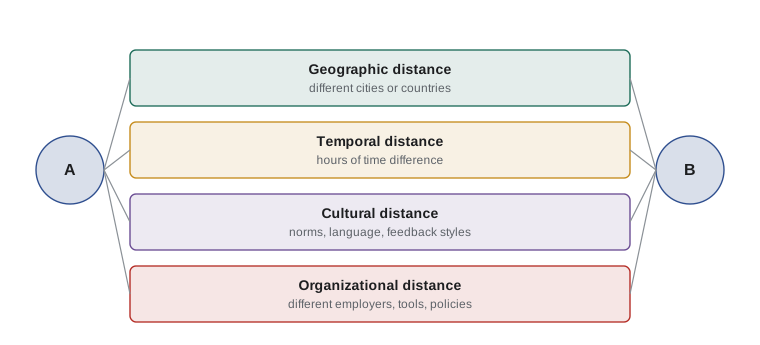
Time-zone overlap
When a team spans time zones, the hours when everyone is working at once, the overlap, become a scarce resource. Live meetings, pair work and quick questions all compete for those hours. A project manager should calculate the overlap explicitly, protect it for work that genuinely needs live interaction and move everything else to asynchronous channels.
Worked problem
Calculating time-zone overlap
A team has members in Toronto (UTC−4 in summer), Vancouver (UTC−7) and Lisbon (UTC+1). Toronto and Lisbon work 09:00 to 17:00 local time; Vancouver works 08:00 to 16:00. When can all three meet, and what are the options?
Show solution
- Convert to UTC by subtracting the offset: Toronto 09:00 to 17:00 local is 13:00 to 21:00 UTC; Vancouver 08:00 to 16:00 local is 15:00 to 23:00 UTC; Lisbon 09:00 to 17:00 local is 08:00 to 16:00 UTC.
- Overlap starts at the latest start (15:00 UTC) and ends at the earliest finish (16:00 UTC): one hour.
- In local time, that hour is 08:00 to 09:00 in Vancouver, 11:00 to 12:00 in Toronto and 16:00 to 17:00 in Lisbon.
- Options: protect that hour for the daily sync and decisions; agree flexible hours (for example, Lisbon members occasionally work until 18:00 to give two hours); rotate the inconvenience fairly; and move status updates to written, asynchronous channels.
Answer: One hour of three-way overlap (15:00 to 16:00 UTC). Protect it for live collaboration, consider modest, fairly shared flexibility, and work asynchronously the rest of the day.
For larger teams, a short script makes the calculation repeatable. The one below lists each member's working day in UTC and the overlap for several groups. Remember that daylight saving time changes offsets at different dates in different countries; recheck overlaps in March, April, October and November.
# Working hours for each member, as (UTC offset, local start, local end)
team = {
    "Halifax":   (-3, 9, 17),
    "Toronto":   (-4, 9, 17),
    "Vancouver": (-7, 8, 16),
    "Lisbon":    (1, 9, 17),
    "Pune":      (5.5, 10, 18),
}

def utc_window(offset, start, end):
    return (start - offset, end - offset)

windows = {city: utc_window(*hours) for city, hours in team.items()}
for city, (s, e) in windows.items():
    print(f"{city:10s} works {s:5.1f} to {e:5.1f} UTC")

def overlap(names):
    start = max(windows[n][0] for n in names)
    end = min(windows[n][1] for n in names)
    return max(0, end - start), start, end

for group in [["Halifax", "Toronto", "Vancouver"],
              ["Toronto", "Lisbon"],
              ["Vancouver", "Lisbon"],
              ["Toronto", "Lisbon", "Pune"],
              list(team)]:
    hours, s, e = overlap(group)
print(", ".join(group), "->", hours, "h", f"({s} to {e} UTC)" if hours else "")Halifax works 12.0 to 20.0 UTC Toronto works 13.0 to 21.0 UTC Vancouver works 15.0 to 23.0 UTC Lisbon works 8.0 to 16.0 UTC Pune works 4.5 to 12.5 UTC Halifax, Toronto, Vancouver -> 5 h (15 to 20 UTC) Toronto, Lisbon -> 3 h (13 to 16 UTC) Vancouver, Lisbon -> 1 h (15 to 16 UTC) Toronto, Lisbon, Pune -> 0 h Halifax, Toronto, Vancouver, Lisbon, Pune -> 0 h
The output shows a common pattern: plenty of overlap within North America, a little with Europe and none at all when India is added. A team in that situation needs a different working model, such as splitting work so that each location owns components end to end, using a relay or follow-the-sun hand-off at the end of each day, or rotating meeting times so the same people do not always join at night.
Synchronous and asynchronous communication
Distributed teams depend on choosing the right channel for each purpose. Synchronous communication (live calls, video meetings, instant chat when both are online) is best for complex, ambiguous or emotional topics, building relationships and making decisions quickly. Asynchronous communication (email, shared documents, recorded videos, task comments, discussion threads) is best for status updates, reference information, considered input and work across time zones. Media richness theory suggests matching the richness of the channel to the ambiguity of the message.
| Purpose | Suggested channel | Why |
|---|---|---|
| Daily coordination | Short video stand-up in the overlap, or written check-in thread | Fast alignment; written option works across zones |
| Status reporting | Dashboard or written update | Reference; no meeting needed |
| Design discussion | Written proposal for comment, then a live call to decide | Considered input plus quick resolution |
| Difficult feedback or conflict | Video call, never email or chat | Tone and nuance matter |
| Urgent production issue | Phone or dedicated incident channel | Speed |
| Decision record | Shared decision log | Everyone can see what was decided and why |
| Relationship building | Video coffee chats, occasional in-person meetings | Trust needs richer contact |
Good asynchronous habits are a skill. Write messages that can be understood without a conversation: state the context, the question and the decision needed, and by when. Use threads to keep topics together. Record short videos to explain complex screens or designs. Document decisions where everyone can find them. And agree response-time expectations in the team charter, so people neither feel pressured to reply instantly nor wait days for an answer.
Building trust and connection at a distance
Trust and relationships do not happen by accident on distributed teams; they need deliberate investment.
- Start with a strong launch: if budget allows, bring the team together in person at the start, even for a few days. Relationships formed face to face sustain remote collaboration for months.
- Make people visible: share photos and short introductions; use video for meetings where possible, while respecting reasons people may sometimes turn cameras off.
- Create informal time: virtual coffee pairings, a social channel, a few minutes of non-work talk at the start of meetings.
- Be reliable: in distributed teams, trust is built mainly by doing what you said you would do, on time.
- Share information generously: work in the open, with shared boards and documents, so nobody feels excluded.
- Check in individually: regular one-to-ones are even more important for remote members, who have fewer chances to raise concerns informally.
- Celebrate together: mark milestones in ways remote members can join fully.
Cultural differences
Distributed teams often cross national and organizational cultures. Cultures differ in how directly people disagree, how they treat hierarchy, whether they prefer explicit or implied communication and how they view deadlines. Frameworks such as Hofstede's cultural dimensions, Erin Meyer's culture map and the GLOBE study describe these differences at a national level. They are useful starting points, but every individual differs, and organizational and professional cultures matter too. Use frameworks to generate questions, not to stereotype.
| Dimension (after Meyer) | One end | Other end | Project implication |
|---|---|---|---|
| Communicating | Low-context: explicit, precise, repeated | High-context: implied, layered, read between the lines | Confirm understanding in writing; ask open questions |
| Evaluating | Direct negative feedback | Indirect negative feedback | Agree how the team gives feedback; watch for softened warnings |
| Leading | Egalitarian | Hierarchical | Some members may not challenge the project manager openly; invite input privately |
| Deciding | Consensual | Top-down | Clarify decision rights explicitly in the team charter |
| Disagreeing | Confrontational | Avoids confrontation | Separate ideas from people; use written input |
| Scheduling | Linear time | Flexible time | Agree what a deadline means and how to signal risk to it |
Worked problem
A cultural misunderstanding
A project manager asks a development partner's lead, "Can you finish the module by Friday?" The lead replies, "We will try our best; it is quite challenging." The project manager records the date as agreed. On Friday the module is not ready, and the lead says he had signalled that the date was not realistic. What went wrong, and how could it be avoided?
Show solution
- The lead may come from a higher-context or less confrontational communication culture, in which "it is quite challenging" signals a serious concern without saying no directly.
- The project manager heard the words literally and treated "we will try" as a commitment.
- Better practice: ask open questions that make it easy to share concerns ("What would need to be true to finish by Friday? What could get in the way?").
- Agree as a team what a commitment sounds like, for example a confidence vote of one to five, and make it safe to say a date is unrealistic.
- Confirm agreements in writing, including assumptions and risks.
Answer: The signal was indirect and was missed. Open questions, explicit confidence checks and written confirmation help bridge different communication styles.
Tools and practices
Distributed teams rely on a tool stack: video conferencing, chat, shared document editing, a work management board, a shared repository, digital whiteboards and a knowledge base. More tools are not better; each additional tool fragments information. Agree a small set in the team charter, specify what goes where ("decisions in the decision log, not in chat") and make sure everyone, including vendor staff, has access and training. Accessibility matters too: captions, screen-reader compatibility and recordings help members with disabilities and those working in a second language.
Distributed work raises compliance questions. Privacy laws such as PIPEDA and provincial equivalents, and data residency rules in some public-sector contracts, may restrict which tools can store personal or sensitive information. Employment standards in the province where each employee works, not where the project is based, generally apply to hours and overtime. Quebec's Charter of the French Language can affect the language of work tools and documents for employees there.
Meetings that work for everyone
Hybrid meetings fail when the people in the room dominate. Simple practices help: everyone joins from their own device, even in the room, so all faces are equal size; a facilitator watches the chat and calls on remote participants; materials are shared in advance and on screen; decisions and actions are recorded in a shared document during the meeting; and the meeting time rotates if it is always inconvenient for the same location. If a meeting is mostly information sharing, consider replacing it with a written update or a recorded video.
Common mistakes
MistakeRunning hybrid meetings around the people in the room.
InsteadDesign meetings so remote participants are equal, for example everyone on their own device.
MistakeScheduling all live meetings at times convenient for headquarters.
InsteadCalculate overlap and rotate inconvenience fairly.
MistakeHandling conflict or difficult feedback by email or chat.
InsteadUse video or a call for sensitive conversations.
MistakeAdding more tools to fix communication problems.
InsteadAgree a small tool set and what information goes where.
MistakeUsing cultural frameworks to stereotype individuals.
InsteadUse frameworks to generate questions; learn each person's preferences.
MistakeForgetting daylight saving time changes.
InsteadRecheck overlaps when clocks change in each country.
Summary and key terms
- Distribution can be hybrid, fully remote, across time zones or across organizations, each with different challenges.
- Distance weakens communication and trust, raises coordination costs and encourages attribution errors.
- Calculate time-zone overlap and protect it for work that needs live interaction.
- Match synchronous and asynchronous channels to the purpose and ambiguity of the message.
- Build trust deliberately through launches, visibility, informal time, reliability and one-to-ones.
- Cultural frameworks help raise questions about communication, feedback, hierarchy and time.
- Agree a small tool set, accessible practices and meeting habits that treat remote members equally.
- Distributed team
- A team whose members work in different locations.
- Hybrid team
- A team with some members co-located and others remote, or members splitting time between locations.
- Proximity bias
- The tendency to favour people who are physically close.
- Swift trust
- Provisional trust extended at the start of a temporary team, which must be confirmed by behaviour.
- Time-zone overlap
- The hours when team members in different zones are working at the same time.
- Synchronous communication
- Communication in which participants interact in real time.
- Asynchronous communication
- Communication in which participants respond at different times.
- Follow-the-sun
- A model where work is handed between locations at the end of each working day.
- High-context communication
- Communication that relies on implied meaning, relationships and shared understanding.
- Fundamental attribution error
- Attributing others' behaviour to character rather than circumstances.
Practice problems
Work each problem on paper first, then reveal the answer to check.
Members in UTC−5 and UTC+2 both work 09:00 to 17:00 local. Overlap?
Show answer
UTC−5 works 14:00 to 22:00 UTC; UTC+2 works 07:00 to 15:00 UTC; overlap 14:00 to 15:00 UTC, one hour.
What is proximity bias?
Show answer
Favouring people who are physically close, which can disadvantage remote members.
Which channel suits difficult feedback?
Show answer
A video or phone call, not email or chat.
What is swift trust?
Show answer
Provisional trust extended at the start of a temporary team, confirmed or lost through behaviour.
Name two ways to make hybrid meetings fairer.
Show answer
For example, everyone joins on their own device and a facilitator calls on remote participants.
Why recheck overlaps in spring and autumn?
Show answer
Daylight saving time changes on different dates in different countries.
What should an asynchronous message include?
Show answer
Context, the question or decision needed and the deadline.
Name a working model when there is no overlap at all.
Show answer
For example, follow-the-sun hand-offs or each location owning components end to end.
A partner says "we will try our best" about a deadline. What should you do?
Show answer
Ask open questions about what could get in the way and confirm commitment and risks explicitly.
Why limit the number of collaboration tools?
Show answer
Each extra tool fragments information and makes it harder to find.
Lesson quiz · 5 questions
Score 60% or more to complete this lesson.
Create a free account to save your progress, take quizzes and earn a certificate.