
MSBA-132 · Lesson 9 of 12 · 21 min
Embedding Power BI in apps
▶ Video coming soon A video version of this lesson is on the way.
Coordinators at Lumenvale spent their days in two places: Microsoft Teams, where the Student Success team chatted and met, and the tutoring app Maribeth had built in Power Apps. Asking them to open a third place, the Power BI service, every time they wanted a number was asking for the report to be ignored. The answer was to bring the report to where people already worked. Power BI calls this embedding, and it ranges from a two-click Teams tab to a fully custom web application. This lesson walks through the options from simplest to most technical and shows how to choose between them.
Why embed?
Embedding puts a live, interactive Power BI report or visual inside another application or page. Readers can filter, drill and hover just as they would in the service, and the data refreshes on the same schedule. The benefits are practical: people see data in context, at the moment they need it, without switching tools. The trade-off is that every embedding option has its own rules about who signs in, which licences apply and what security protects the data, and choosing the wrong one can either lock out the people who need the report or expose it to people who should never see it.
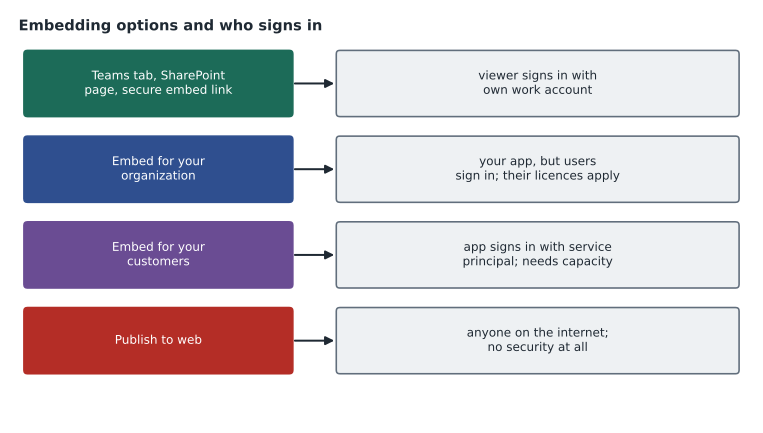
No-code embedding in Microsoft 365
The simplest options need no code at all, and they all have the same security model: each viewer signs in with their own Microsoft Entra ID work account, and Power BI applies their own permissions, licence and row-level security.
Microsoft Teams. A Power BI report can be added as a tab in a Teams channel or chat, with the Power BI app for Teams installed. Everyone in the channel sees the tab, but each person sees the report only if they have permission to it and a suitable licence. The Power BI app in Teams also lets people browse their reports, apps and Copilot without leaving Teams, and Power BI links pasted into a Teams chat expand into a preview card. Kwabena added the Attendance page as a tab in the Student Success Coordinators channel, which turned it into the team's shared reference during weekly meetings.
SharePoint Online. The Power BI web part embeds a report on a modern SharePoint page. The author copies the report's "Embed report" link for SharePoint Online from the service and pastes it into the web part. Visitors to the page sign in automatically with their Microsoft 365 account and see the report only if they have access to it in Power BI; sharing the SharePoint page does not share the report. Lumenvale's Student Success intranet page now shows the Hours page above the office's announcements. One older SharePoint integration has gone: the "Visualize the list" feature that created Power BI reports directly from SharePoint lists and libraries stopped creating reports in November 2025, and reports made that way became unavailable in December 2025.
Secure embed links. For an internal website or portal that is not built on SharePoint, the service's Embed report menu also offers a website or portal option. It produces a link and an iframe snippet that the web team can paste into a page. Unlike publish to web, this is secure: the viewer must sign in, and Power BI checks their permissions and licence. It is the right choice when someone asks for "the report on our intranet" and the intranet is not SharePoint.
<iframe title="Tutoring hours" width="1140" height="541"
        src="https://app.powerbi.com/reportEmbed?reportId=REPORT-ID&autoAuth=true&ctid=TENANT-ID"
        frameborder="0" allowFullScreen="true"></iframe>
Power BI and Power Apps together
Power BI and Power Apps can be combined in both directions.
Power BI inside Power Apps. A canvas app can show a Power BI tile from a dashboard with the Power BI tile control. Model-driven apps can embed Power BI reports or dashboards on a form or as a system dashboard, so that a record, such as a tutor, can show a filtered report about itself. Maribeth added a Power BI tile to the coordinator's home screen in her tutoring app, showing this week's no-show rate.
Power Apps inside Power BI. The Power Apps visual goes the other way: it places a canvas app inside a Power BI report and passes it the data selected in the report. A coordinator looking at the list of students who missed two sessions can select a student in the report and use the embedded app to book a follow-up session without leaving the page. This closes the loop between seeing a problem in a report and acting on it, and it is one of the strongest arguments for Power Platform's tools working together.
In both directions, users need licences for both products. Viewing a Power BI tile still needs a Power BI licence that allows access to the content, and using an embedded Power App still needs a Power Apps licence that covers the app.
Embedding in your own applications
When a developer builds a custom web application, the Power BI embedded analytics platform provides REST APIs and a JavaScript client library to place reports inside it. There are two models, and the names are worth learning exactly because exams and documentation use them.
Embed for your organization (also called user owns data) is for internal applications. Each user signs in with their own Entra ID account, and Power BI applies their permissions, licence and row-level security, just as in the service. A college's staff portal that shows Power BI reports alongside other tools would use this model. Users need Pro or PPU licences unless the content is on F64 or larger capacity.
Embed for your customers (also called app owns data) is for applications whose users do not have Power BI accounts at all, such as a public-facing website where students or external partners sign in to the college's own system. The application signs in to Power BI on its own, with a service principal (an app identity registered in Entra ID) or a master account, and generates an embed token for each viewer. The application is responsible for deciding what each viewer may see, typically by passing their identity to row-level security in the token. Viewers need no Power BI licence, but the content must be on a capacity: an Azure Power BI Embedded A SKU, a Fabric F SKU, or a Premium P or EM SKU. Independent software vendors use this model to put analytics inside the products they sell.
| Question | Embed for your organization | Embed for your customers |
|---|---|---|
| Who signs in to Power BI? | Each user, with their own Entra ID account | The application, with a service principal or master account |
| Do viewers need Power BI licences? | Yes, unless content is on F64 or larger | No |
| What capacity is needed? | None required | Embedded A SKU, Fabric F SKU, or Premium P or EM SKU |
| Who controls which data a viewer sees? | Power BI permissions and row-level security | The application, through the embed token |
| Typical use | Internal portals and line-of-business apps | Customer-facing apps and commercial software |
One recent change affects embedded reports. Microsoft announced that from May 1, 2026, R and Python visuals are not supported in reports embedded for customers or shared through publish to web; reports still load, but those visuals do not render. Reports embedded for your organization and secure embedding in SharePoint and websites were reported as unaffected. Authors who use R or Python visuals in customer-facing reports need to replace them with built-in visuals or move the calculation into the data preparation stage.
Worked problem
Choosing an embedding option
Lumenvale has four requests: (a) coordinators want the Attendance page in their Teams channel; (b) the web team wants tutoring hours on the staff intranet, which runs on a non-Microsoft content management system; (c) the continuing education unit wants students who log in to its registration website to see a report of their own course history, and students have no Power BI accounts; (d) the communications office wants a chart of total graduates by year on the public college website. Choose an option for each.
Show solution
- (a) A Teams tab: viewers sign in with their work accounts and their own permissions apply.
- (b) A secure embed link for a website or portal: staff sign in, so the data stays protected.
- (c) Embed for your customers, on capacity, with the app passing each student's identity to row-level security in the embed token.
- (d) Genuinely public, aggregate data: publish to web is acceptable here if the administrator allows it, because there is nothing confidential in it.
Answer: Teams tab; secure embed link; embed for your customers; and, for public aggregate data only, publish to web.
Publish to web, revisited
Lesson 7 warned about publish to web, and it belongs in this lesson's list for completeness. It creates an embed code that anyone on the internet can view, with no sign-in. It is suitable only for data the organization would happily print on a poster, and administrators can restrict who may use it or turn it off. If a report contains anything personal, confidential or internal, use one of the secure options instead. A useful test: if the data would be a problem in a newspaper, it does not belong in publish to web.
Planning an embedded report
Embedding changes how a report is read, so it changes how it should be designed. Kwabena adjusted the Attendance page before putting it in Teams. He removed the report header, because the Teams tab already showed the name; he made the page fit a smaller window without scrolling; and he hid the Filters pane, relying on a single term slicer, because people glancing at a tab during a meeting would not open a pane. For the SharePoint page, he set the web part to show only the Hours page and hid the page navigation.
Security deserves the same attention. For every embedded report, ask three questions: Who signs in? Which licence does each viewer need? What stops a viewer from seeing rows they should not? For Teams, SharePoint, secure embed links and embed for your organization, the answers are the viewer, their own Power BI licence (or F64 capacity) and Power BI row-level security. For embed for your customers, the answers are the application, no viewer licence but a capacity, and the application's own logic in the embed token.
Licensing and performance for embedded content
Embedding does not change licensing, except in the embed for your customers model. A report in a Teams tab, on a SharePoint page, behind a secure embed link or inside an internal application built with embed for your organization needs exactly the same licences as the report opened in the service: Pro or PPU for viewers, unless the workspace is on F64 or larger capacity. Rupert found this the most frequently misunderstood point at Lumenvale. Managers assumed that because a report appeared on the intranet, anyone could see it; in fact, staff without Pro saw a sign-in prompt and then a message that they needed a licence.
Performance matters more when a report is embedded, because people glance at it rather than settle in. Pages with fewer visuals load faster, and import models respond faster than DirectQuery. Kwabena checked each embedded page with the Performance analyzer in Power BI Desktop, which records how long each visual takes to load, and removed a slow custom visual from the Teams page.
Worked problem
Who needs a licence?
The Attendance page is in a Pro workspace and embedded in three places: a Teams tab for 8 coordinators who all have Pro, the Student Success SharePoint page visited by 40 staff of whom 10 have Pro, and the coordinators' tutoring app. How many staff can actually see the report on the SharePoint page, and what would let all 40 see it?
Show solution
- On SharePoint, each visitor signs in with their own account and needs permission and a Pro licence (the workspace is Pro).
- Only the 10 visitors with Pro and permission can see it; the other 30 see a licence message.
- Either give the other 30 Pro licences, or move the workspace to a Fabric F64 or larger capacity so free users can view it.
Answer: Ten. Licensing the other 30, or moving the workspace to F64 or larger capacity, would let all 40 see it.
Common mistakes
MistakeAssuming that sharing a SharePoint page or Teams channel shares the embedded report.
InsteadViewers still need permission to the report in Power BI and a suitable licence.
MistakeUsing publish to web because it is the easiest way to get a report onto an intranet.
InsteadUse a secure embed link for websites and portals; publish to web is public to the internet.
MistakeChoosing embed for your organization for users who have no Power BI accounts.
InsteadUse embed for your customers, where the app signs in and capacity is required.
MistakeEmbedding a report designed for a full screen without changes.
InsteadSimplify the page for the smaller window: remove duplicate headers and rely on a few slicers.
Summary and key terms
- Embedding puts live, interactive Power BI content inside Teams, SharePoint, websites and other apps.
- Teams tabs, the SharePoint web part and secure embed links all make viewers sign in with their own accounts.
- Canvas and model-driven apps can show Power BI content; the Power Apps visual places an app inside a report.
- Embed for your organization uses each user's identity and licence; embed for your customers uses an app identity, embed tokens and capacity.
- R and Python visuals stopped rendering in customer-embedded and publish-to-web reports from May 1, 2026.
- Publish to web is public and suitable only for data that could be shown to anyone.
- Embedding
- Placing live Power BI content inside another application or page.
- Power BI web part
- The SharePoint Online component that displays a Power BI report on a page.
- Secure embed link
- An embed code for websites and portals that still requires viewers to sign in.
- Power Apps visual
- A Power BI visual that hosts a canvas app and passes it selected data.
- Embed for your organization
- Embedded analytics where each user signs in with their own account; also called user owns data.
- Embed for your customers
- Embedded analytics where the app signs in and issues embed tokens; also called app owns data.
- Service principal
- An application identity in Entra ID used by apps to sign in without a user.
Practice problems
Work each problem on paper first, then reveal the answer to check.
Which embedding model lets viewers without Power BI licences see a report?
Show answer
Embed for your customers (app owns data), with the content on a capacity.
What does the Power Apps visual do?
Show answer
It places a canvas app inside a Power BI report and passes it the data the reader selects.
Why is a secure embed link better than publish to web for an internal portal?
Show answer
Viewers must sign in and Power BI checks their permissions and licence; publish to web has no security.
Lesson quiz · 5 questions
Score 60% or more to complete this lesson.
Create a free account to save your progress, take quizzes and earn a certificate.