
MSBA-109 · Lesson 5 of 12 · 18 min
Domain 1 review: identity and security principles
▶ Video coming soon A video version of this lesson is on the way.
On Tuesday of week two, Ines opened the session with the incident everyone at Corvallin remembered. On September 2, a branch coordinator had approved a sign-in prompt she had not started, after entering her password into a fake page, and the attacker had used her mailbox to try to redirect a supplier payment. "Walk me through it again," Ines said, "but this time name the exam objective at each step." Teodor found that the one incident touched almost every objective in the second half of domain 1: authentication methods, Conditional Access, risky sign-ins, Defender XDR, audit logs and Privileged Identity Management.
This lesson reviews the two security objective groups in domain 1: understand the Microsoft 365 security principles and identify the core security features of Microsoft 365 services. Together with lesson 4 they make up the 30 to 35 percent of the exam that domain 1 carries. The detailed teaching is in MSBA-101 lessons 5 to 10.
| Objective | Where it was taught |
|---|---|
| Explain the core Zero Trust principles | MSBA-101 lesson 9 |
| Understand authorization and authentication methods | MSBA-101 lessons 5 and 6 |
| Understand threat protection and intelligence; Defender XDR | MSBA-101 lesson 10 |
| Features of Microsoft Entra ID; purpose and benefits of SSO | MSBA-101 lesson 5 |
| Conditional Access policies | MSBA-101 lesson 7 |
| The right security object (users and groups) | MSBA-101 lessons 4 and 5 |
| Tools to troubleshoot sign-in issues (MFA, Conditional Access, risky sign-ins) | MSBA-101 lessons 6 and 7 |
| Interpret Identity Secure Score; review audit logs | MSBA-101 lessons 8 and 10 |
| The role of Privileged Identity Management | MSBA-101 lesson 8 |
| App registrations and enterprise applications | MSBA-101 lesson 5 |
Zero Trust
Microsoft describes Zero Trust with three principles. Verify explicitly: always authenticate and authorize using all available signals, such as identity, location, device health and risk. Use least privilege access: give people only the access they need, for only as long as they need it. Assume breach: design as if an attacker is already inside, limiting the damage they can do and detecting them quickly. The exam tends to describe a control and ask which principle it supports.
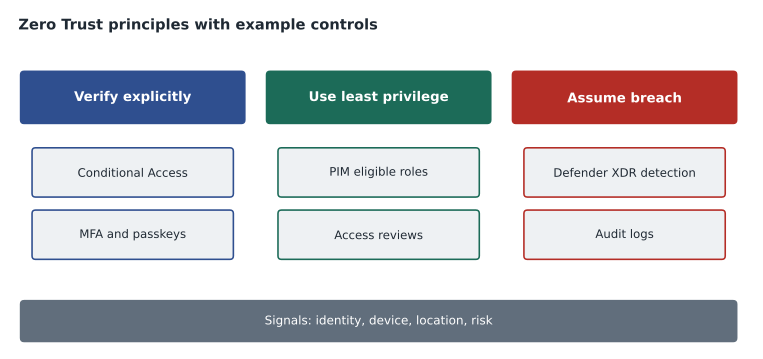
| Control | Principle it mainly supports |
|---|---|
| Requiring MFA and a compliant device for admin portals | Verify explicitly |
| Making Global Administrator an eligible role activated through PIM for two hours | Use least privilege |
| Automatic attack disruption suspending a compromised account | Assume breach |
| Blocking sign-ins with high user risk | Verify explicitly |
| Quarterly access reviews of a finance group | Use least privilege |
| Keeping audit logs to investigate after an incident | Assume breach |
Authentication and authorization
Authentication answers "who are you?" and authorization answers "what are you allowed to do?". A user authenticates with a password, a passkey or another method; Microsoft Entra ID then issues tokens that apps use to decide what the user can access. The exam objective "understand authorization" covers roles, group membership and permissions; "understand authentication methods" covers the methods themselves.
| Method | Phishing-resistant? | Notes |
|---|---|---|
| Password alone | No | One factor; easily phished or reused |
| SMS or voice call | No | Second factor, but vulnerable to interception and SIM swap |
| Microsoft Authenticator push with number matching | No | Stronger than plain approval, but an attacker-in-the-middle page can still relay it |
| Passkeys (FIDO2 security keys, device-bound or synced) | Yes | Bound to the real site; cannot be relayed by a fake page |
| Windows Hello for Business | Yes | Bound to the device |
| Certificate-based authentication | Yes | Uses a certificate on a smart card or device |
The September incident is the classic example. The coordinator used a password and an Authenticator approval, and a fake page relayed both to the real sign-in. A phishing-resistant method such as a passkey would have failed, because a passkey only works with the real site's address. That is why Corvallin gave FIDO2 keys to staff in exposed roles. Microsoft also enforces MFA for its admin portals: from October 2024 for the Azure portal, Entra and Intune admin centers, from February 2025 for the Microsoft 365 admin center, and from October 1, 2025 for command-line tools.
Microsoft Entra ID, SSO and security objects
Microsoft Entra ID is the identity service behind Microsoft 365: users, groups, devices, apps, authentication, Conditional Access and identity protection. Single sign-on (SSO) lets a user sign in once and reach many apps without signing in again. Its benefits on the exam are fewer passwords, fewer help desk resets, central control of access, and a single place to enforce MFA and Conditional Access.
The outline asks you to identify the right security object: users and groups. A security question that says "grant access to everyone in finance" points to a security group, ideally with dynamic membership or group-based assignment, not to assigning permissions to each user. A question about a person who is not in the organization points to a guest user created through B2B collaboration.
App registrations and enterprise applications
This pair is one of the most tested look-alikes in domain 1. An app registration is the definition of an application, created in the tenant where the app is developed: its identity, its credentials, the permissions it asks for, its redirect addresses. An enterprise application is the instance of an app in a tenant where it is used: the service principal that holds who can use it, the consent granted to it and its SSO settings. When Corvallin connected its VisitWise scheduling system to Entra for SSO, VisitWise appeared under Enterprise applications, because the vendor wrote the app and registered it in its own tenant.
| App registration | Enterprise application | |
|---|---|---|
| What it is | The app's definition and identity | The app's presence in a tenant that uses it |
| Created when | Your organization builds or registers an app | Any app, yours or a vendor's, is added to your tenant |
| You manage there | Credentials, API permissions requested, redirect addresses | Users and groups assigned, consent, SSO, Conditional Access scope |
| Example | Corvallin's own internal reporting tool | VisitWise, built by a vendor |
Conditional Access
Conditional Access is Entra ID's policy engine. A policy has assignments, which say who and what it applies to (users, groups, apps, conditions such as location, device platform and sign-in risk), and access controls, which say what happens (block, or grant with requirements such as MFA, a compliant device or a phishing-resistant method). Policies can run in report-only mode first, showing what they would have done without enforcing it. The What If tool simulates which policies would apply to a given sign-in. Conditional Access needs Entra ID P1; risk-based conditions need P2.
Corvallin cut its Conditional Access policies from 11 to 5 during the autumn, and every one was tested in report-only mode before being turned on. Ines's exam tip: if a question asks how to see the effect of a new policy before enforcing it, the answer is report-only mode; if it asks why a specific sign-in was blocked, the answer is the sign-in logs or What If.
Troubleshooting sign-in problems
The outline names three kinds of sign-in issue: MFA, Conditional Access and risky sign-ins. Each has its natural tool.
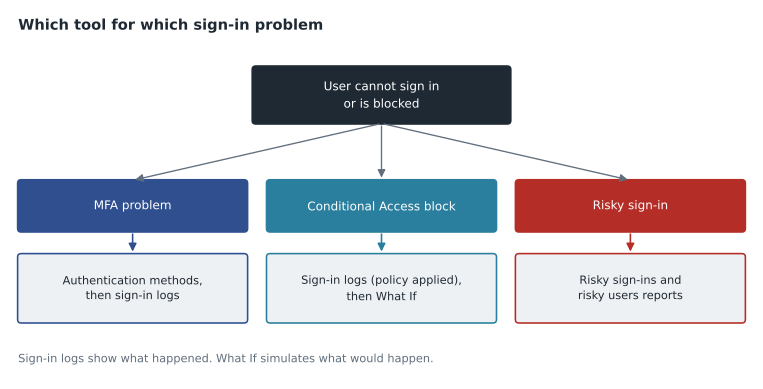
| Symptom | First tool | What it shows |
|---|---|---|
| User says the MFA prompt never arrives | The user's authentication methods, then sign-in logs | Registered methods and the failure reason |
| User is blocked with a Conditional Access message | Sign-in logs (Conditional Access tab) | Which policy applied and why |
| Admin wants to know whether a new policy would block a user | What If tool | Which policies would apply to a simulated sign-in |
| Sign-in blocked because of risk | Risky sign-ins and risky users reports | Risk level, detections and history |
Identity Secure Score, audit logs and PIM
Identity Secure Score in Microsoft Entra ID is a percentage showing how well identity settings match Microsoft's recommendations, with a list of improvement actions, each with its potential score impact. It is not the same as Microsoft Secure Score in the Defender portal, which covers identity, devices, apps and data together. The exam objective is to "interpret" it: a higher score means more recommendations implemented, and the improvement actions show what to do next. Corvallin's overall Secure Score rose from 41 to 68 during the autumn.
To review audit logs for user and admin activity, administrators use the Entra audit logs for directory changes and the unified audit log in Microsoft Purview for activity across services. Purview Audit (Standard) keeps records for 180 days by default. Privileged Identity Management (PIM) makes administrative roles eligible rather than permanently active, so an administrator activates a role when needed, for a limited time, with justification and, if required, approval. It needs Entra ID P2 or ID Governance licences. Corvallin moved from seven permanent Global Administrators to two emergency access accounts and two named administrators eligible through PIM.
Threat protection and Defender XDR
Microsoft Defender XDR brings together Defender for Endpoint, Defender for Office 365, Defender for Identity and Defender for Cloud Apps in one portal, correlating alerts from each into incidents. "Threat protection and intelligence" on the exam covers this idea of combined signals, automated investigation and response, and Microsoft's threat intelligence feeding detections. In the September incident, alerts from email, identity and mailbox activity were grouped into one incident, which showed the whole attack on one page.
Worked problem
One incident, many objectives
For each step of the September incident, name the tool or feature an administrator would use: (a) see that the coordinator's sign-in came from an unusual location; (b) see every alert from the attack together; (c) find the inbox rule the attacker created; (d) stop the same attack working again with a stolen password and relayed approval.
Show solution
- (a) The sign-in logs and the risky sign-ins report in Entra ID Protection.
- (b) The incident in the Defender XDR portal, which correlates related alerts.
- (c) The unified audit log in Purview, searching for inbox rule creation.
- (d) A Conditional Access policy requiring a phishing-resistant authentication method for the targeted users.
Answer: Entra sign-in and risk reports, a Defender XDR incident, the Purview audit log, and Conditional Access with phishing-resistant authentication. Each maps to a separate domain 1 objective.
Security defaults and Conditional Access
One more look-alike in domain 1 is between security defaults and Conditional Access. Security defaults are a fixed set of baseline protections that Microsoft turns on for new tenants: they require all users to register for MFA, require MFA for administrators, block legacy authentication and protect privileged actions. They cannot be customized. Conditional Access replaces them when an organization needs its own policies, such as requiring a compliant device only for some apps, and it needs Entra ID P1. The two are not used together: turning on Conditional Access policies means turning off security defaults.
| Need | Better fit |
|---|---|
| A small organization without Entra ID P1 wants baseline MFA with least effort | Security defaults |
| Require a compliant device for administrators only | Conditional Access |
| Block sign-ins from a country where the organization does not operate | Conditional Access with a named location |
| Require phishing-resistant methods for finance staff | Conditional Access with an authentication strength |
Corvallin had used security defaults briefly in 2022, before moving to Conditional Access once its Entra ID P1 licences were in place. For the exam, the cue is in the wording: "least administrative effort" and "without additional licences" point to security defaults; anything that says "only", "except" or names a group, app or location points to Conditional Access.
Teodor added one line to his card: "Defaults: on or off, same for everyone. Conditional Access: who, what, when, how."
Common mistakes
MistakeTreating number matching as phishing-resistant.
InsteadNumber matching resists fatigue attacks, but only passkeys, Windows Hello and certificates are phishing-resistant.
MistakeConfusing app registrations with enterprise applications.
InsteadRegistrations define an app; enterprise applications are its instances in tenants that use it.
MistakeUsing What If to explain a past block.
InsteadSign-in logs show what happened; What If simulates what would happen.
MistakeMixing up Identity Secure Score and Microsoft Secure Score.
InsteadIdentity Secure Score is in Entra and covers identity; Secure Score in Defender covers several areas.
MistakeThinking PIM removes admin roles.
InsteadPIM makes roles eligible and time-limited; administrators still have them when activated.
Summary and key terms
- Zero Trust: verify explicitly, use least privilege, assume breach.
- Authentication proves identity; authorization decides access. Passkeys, Windows Hello and certificates are phishing-resistant.
- Conditional Access combines assignments and access controls; test in report-only mode; troubleshoot with sign-in logs and What If.
- App registrations define apps; enterprise applications are their instances where they are used.
- Identity Secure Score measures identity posture; audit logs record activity; PIM makes privileged roles eligible and time-limited; Defender XDR correlates alerts into incidents.
- Zero Trust
- A security model built on verifying explicitly, least privilege access and assuming breach.
- Phishing-resistant authentication
- A method, such as a passkey, that cannot be relayed through a fake sign-in page.
- Conditional Access
- The Entra ID policy engine that grants or blocks access based on signals and conditions.
- Report-only mode
- A Conditional Access setting that records what a policy would do without enforcing it.
- Enterprise application
- The instance (service principal) of an app in a tenant that uses it.
- Identity Secure Score
- A score in Entra ID showing how many identity recommendations are implemented.
- Privileged Identity Management
- An Entra feature that makes privileged roles eligible, time-limited and audited.
Practice problems
Work each problem on paper first, then reveal the answer to check.
Which Zero Trust principle does PIM mainly support?
Show answer
Use least privilege access.
Where would you see which Conditional Access policy blocked a sign-in yesterday?
Show answer
In the Entra sign-in logs, on the Conditional Access details of that sign-in.
A vendor app is added to your tenant for SSO. Where do you assign users to it?
Show answer
Under Enterprise applications in Microsoft Entra ID.
Lesson quiz · 5 questions
Score 60% or more to complete this lesson.
Create a free account to save your progress, take quizzes and earn a certificate.