
MSBA-109 · Lesson 3 of 12 · 24 min
Question types and how to read them
▶ Video coming soon A video version of this lesson is on the way.
On Friday of the first week, Ines brought printouts of questions she had written herself, one in each style Microsoft uses, and covered the answer options with sticky notes. "Read the question first, without the options," she said. "Tell me what you would answer before you see what they offer you." Teodor got the first two right that way and then stalled on the third, which asked which of three statements were true. He had read "select all that apply" as "pick one". That mistake, Ines said, costs more marks on fundamentals exams than any gap in knowledge.
This lesson covers the question styles you can expect on AB-900, how the exam is scored, and a reading method that works across all of them. Every sample question here is original, written for this course. None comes from the exam or from Microsoft's practice assessment.
The exam sandbox
Microsoft provides an exam sandbox at aka.ms/examdemo, linked from the AB-900 study guide. It is a demonstration of the exam interface with sample items in each question style. It contains no real exam content, but it shows how answers are selected, how items are flagged for review, how the review screen works and where the timer is. The AB-900 certification page also notes that the exam may include interactive components. Teodor spent twenty minutes in the sandbox before this session, and Ines recommends every candidate do the same at least once before exam day.
The styles you may see
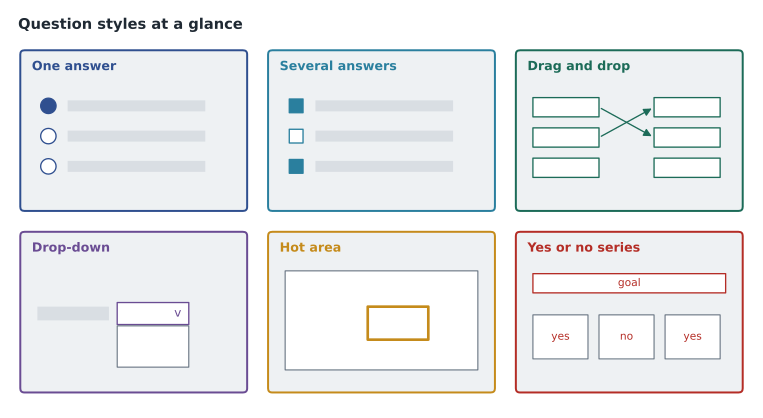
Microsoft does not publish the exact mix of question styles for each exam, and the mix varies between exam forms. The table lists the styles Microsoft describes for its exams generally, with what to watch for in each.
| Style | What you do | What to watch for |
|---|---|---|
| Multiple choice, one answer | Choose the single best option | Several options may be partly true; choose the best fit for the stated need |
| Multiple choice, several answers | Choose all that apply, or a stated number | Read whether it says "Select all that apply" or "Choose two" |
| Drag and drop | Match items to targets or put steps in order | Not every item is always used; some targets can take more than one item |
| Drop-down completion | Pick values to complete a statement | Each drop-down is usually scored on its own |
| Hot area | Select the correct part of an image or table | Read the labels in the image carefully |
| Yes or no series | Decide whether each proposed solution meets a goal | Some cannot be revisited once answered |
| Scenario set | Answer several questions about one situation | Facts in the scenario apply to every question in the set |
How the exam is scored
Scores are reported on a scale of 1 to 1,000, and AB-900 requires 700 or greater. The scaled score is not a straight percentage. Questions can carry different weights, and Microsoft scales each exam form so that 700 represents the same standard on every form. Microsoft's general guidance is that there is no penalty for a wrong answer, so an unanswered question is always worse than a reasoned guess. Some questions with several parts award partial credit and some do not, and the exam does not say which, so treat every part as if it counts.
Microsoft exams can also include a small number of unscored items being tried out for future forms. You cannot tell which they are, so the practical rule is simple: answer every question as if it counts.
A reading method that works
Ines's method has five steps, and she made Teodor say them aloud until they were automatic.
| Step | What to do | Why |
|---|---|---|
| 1. Find the ask | Read the last sentence first: what exactly is being asked? | Long stems bury the question at the end |
| 2. Mark the constraints | Note words like least administrative effort, without a licence, first, must, all users | The constraint usually decides between two good answers |
| 3. Answer before looking | Form your own answer before reading the options | Stops a plausible distractor from steering you |
| 4. Eliminate | Cross out options that are wrong for the stated need, not just wrong in general | Usually leaves two; the constraint picks one |
| 5. Check the count | Confirm how many answers are required | Selecting one when the question needs two scores nothing |
Constraint words deserve their own list, because AB-900 uses them to separate answers that would all work in some sense. "Least administrative effort" points toward a built-in or default feature rather than a custom build. "Without additional licences" rules out anything that needs a premium plan. "First" asks about the order of a process, often the discovery step before a remediation step. "Prevent" means stopping something before it happens, which is different from "detect" or "investigate". And "users who do not have a Microsoft 365 Copilot licence" is a strong hint toward Copilot Chat and pay-as-you-go billing.
| Constraint word or phrase | What it usually points to |
|---|---|
| Least administrative effort | A built-in, default or Microsoft-managed option rather than something custom |
| Without additional licences | Features included in the existing plan; rules out premium add-ons |
| Prevent | A blocking control such as a DLP policy, Conditional Access or a sharing restriction |
| Detect or identify | A report, alert, explorer or assessment |
| Investigate | Audit logs, eDiscovery, activity explorer or incident pages |
| First | The discovery or assessment step before remediation |
| Users without a Copilot licence | Copilot Chat, web-grounded agents, or pay-as-you-go for shared data |
Worked examples in each style
The four examples below follow the method. They are short because fundamentals questions usually are; the difficulty is in the near-miss options.
Worked problem
Multiple choice, one answer
A school wants to stop staff from sending files labelled Confidential to people outside the organization in email. Which Microsoft Purview feature should it use? Options: (A) a retention policy, (B) a data loss prevention policy, (C) Insider Risk Management, (D) Content search.
Show solution
- The ask: which feature stops something happening.
- Constraint: "stop", which means prevent.
- Own answer before looking: a DLP policy that uses the sensitivity label as a condition.
- Eliminate: retention keeps or deletes content; Insider Risk Management detects risky behaviour patterns; Content search finds content.
Answer: B. Data loss prevention is the Purview feature that prevents sensitive content from being shared, and it can use sensitivity labels as conditions.
Worked problem
Multiple choice, several answers
Which of these can an administrator use to find out why a user was blocked at sign-in? Select all that apply: (A) Microsoft Entra sign-in logs, (B) the Conditional Access What If tool, (C) Microsoft Purview Data Explorer, (D) the risky sign-ins report.
Show solution
- The ask: tools to troubleshoot a blocked sign-in.
- Count: "Select all that apply", so there may be more than one.
- Sign-in logs show the failure and the policy applied; What If simulates which policies apply; the risky sign-ins report shows risk-based blocks.
- Data Explorer shows where sensitive information sits; it has nothing to do with sign-in.
Answer: A, B and D. All three are sign-in troubleshooting tools named in the domain 1 objectives area; Data Explorer belongs to domain 2.
Worked problem
Drag and drop
Match each admin center to an object configured there: Exchange admin center, SharePoint admin center, Teams admin center, Microsoft 365 admin center. Objects: distribution group, site, meeting policy, custom domain.
Show solution
- Exchange admin center manages mailboxes and distribution groups.
- SharePoint admin center manages sites and site-level settings.
- Teams admin center manages teams, channels and policies such as meeting policies.
- Microsoft 365 admin center manages organization settings, including domains.
Answer: Exchange: distribution group. SharePoint: site. Teams: meeting policy. Microsoft 365 admin center: custom domain.
Worked problem
Yes or no series
Goal: users without a Microsoft 365 Copilot licence must be able to use a SharePoint agent grounded in an internal policy library. Proposed solution: create a pay-as-you-go billing policy linked to an Azure subscription and include those users. Does the solution meet the goal?
Show solution
- SharePoint agents use shared tenant data.
- For users without a Copilot licence, Microsoft meters that use through pay-as-you-go billing.
- A billing policy connected to an Azure subscription, covering those users, provides the access.
Answer: Yes. Read the next solution in the series on its own terms; once answered, you may not be able to return to this one.
Scenario sets
Some exams group several questions under one scenario: a short description of an organization, its users, its licences and its goals. The scenario stays available while you answer the questions attached to it. Two habits help. First, read the questions before reading the whole scenario in depth, so you know which facts matter. Second, treat every fact in the scenario as true for every question in the set: if the scenario says the organization has Microsoft 365 E3 licences, an answer that needs E5 is wrong even if it would otherwise be best.
Flagging and review
Most question styles let you flag an item for review and return to it from the review screen. Ines taught Teodor a single-pass routine. Answer every question on the first pass, choosing your best answer even when unsure. Flag the uncertain ones. Use the remaining time only on flagged items. Leaving a question blank to come back later is risky: if time runs out, a blank scores nothing, while a reasoned guess might score.
Changing answers during review is worth doing only for a concrete reason, such as noticing a constraint word you missed, or a later question reminding you of a fact. Changing because of a vague second thought tends to move more right answers to wrong than the other way. Teodor's rule became: change an answer only if he could say in one sentence why the new one is better.
Distractors and how they are built
Wrong options on Microsoft exams are not random. They tend to come from a small number of families, and recognizing the family is often enough to eliminate an option.
| Distractor family | Example |
|---|---|
| A real feature from the wrong product | Answering a Purview question with an Intune compliance policy |
| The right product, the wrong feature | Choosing retention when the need is DLP |
| A feature that needs a licence the scenario lacks | An E5-only feature when the scenario says E3 |
| A detection tool when the ask is prevention, or the reverse | Activity explorer offered for "prevent oversharing" |
| A retired or renamed feature | The Prompt Gallery app, retired in 2025 |
| An option that would work but with far more effort | A custom Copilot Studio agent when a built-in agent meets the need |
Lesson 10 returns to these families with the look-alike pairs that appear most often in AB-900 topics.
Drop-down and hot area questions
Two styles appear less often in practice sets but deserve a moment. A drop-down completion question gives a statement with one or more gaps, each with a list of choices, such as "To limit a site to members of the HR group, use [restricted access control / restricted content discovery / a retention label] in the [SharePoint admin center / Exchange admin center]." Each drop-down is usually scored separately, so a candidate who knows one part should still answer both. A hot area question shows a screenshot or table and asks you to select the right part: a setting, a row, a column. Read every label in the image before choosing, because the distractors are usually the neighbouring items.
Ines wrote one of each for Teodor. The drop-down asked him to complete "Copilot only uses content the user [can access / has opened before / owns]". The hot area showed a mock table of four sign-in log entries and asked him to select the one blocked by Conditional Access. He got the drop-down at once and spent too long on the hot area, reading every column. Her advice: read the question first, decide which column matters, then scan only that column.
Common mistakes
MistakeReading "Select all that apply" as a single-answer question.
InsteadCheck the count before answering every question.
MistakeLeaving hard questions blank to return to later.
InsteadAnswer everything on the first pass and flag what you are unsure of.
MistakeChoosing an option because it names a feature you recognize.
InsteadChoose the option that meets the stated need and constraint.
MistakeIgnoring licences stated in a scenario.
InsteadTreat every scenario fact as true for every question attached to it.
MistakeChanging answers on review because of a feeling.
InsteadChange only with a concrete reason you can state.
Summary and key terms
- The exam sandbox at aka.ms/examdemo shows the interface and question styles without real content.
- Styles include single and multiple answer, drag and drop, drop-down, hot area, yes or no series and scenario sets.
- Scores run from 1 to 1,000 with 700 to pass; there is no penalty for a wrong answer, so never leave a question blank.
- Read the ask first, mark the constraint words, answer before looking, eliminate, and check the answer count.
- Distractors come from recognizable families: wrong product, wrong feature, missing licence, detect versus prevent, retired features, too much effort.
- Exam sandbox
- Microsoft's demonstration of the exam interface and question styles, without real exam content.
- Scaled score
- A score on a 1 to 1,000 scale adjusted so that 700 represents the same standard on every exam form.
- Distractor
- A wrong answer option written to look plausible.
- Constraint word
- A word or phrase in a question, such as "least effort" or "prevent", that decides between plausible answers.
- Yes or no series
- A set of questions that propose different solutions to one goal; some cannot be revisited.
- Flag for review
- Marking a question to return to from the review screen before submitting.
Practice problems
Work each problem on paper first, then reveal the answer to check.
What does "least administrative effort" usually point toward?
Show answer
A built-in, default or Microsoft-managed option rather than a custom build.
Is there a penalty for a wrong answer on Microsoft exams?
Show answer
Microsoft's guidance is that there is not, so a reasoned guess is always better than a blank.
In a scenario set, which facts apply to each question?
Show answer
All of them: every scenario fact is true for every question attached to it.
Lesson quiz · 5 questions
Score 60% or more to complete this lesson.
Create a free account to save your progress, take quizzes and earn a certificate.