
MSAZ-301 · Lesson 5 of 12 · 20 min
Vector distance functions
▶ Video coming soon A video version of this lesson is on the way.
Once products and guide chunks had embeddings, Hana could ask the question semantic search depends on: which stored vectors are closest to the vector of the user's question? Closest needs a definition. SQL Server 2025 and Azure SQL offer three, through the VECTOR_DISTANCE function, and choosing among them, and understanding why they often give the same ranking, is a small but regular part of the DP-800 outline.
VECTOR_DISTANCE
VECTOR_DISTANCE takes a metric name and two vectors of the same type and dimensions and returns a float. It always computes the exact distance and never uses a vector index; approximate search is the job of VECTOR_SEARCH, in lesson 6. For all three metrics, a smaller value means more similar, so queries sort ascending.
| Metric | What it measures | Range | Identical vectors give |
|---|---|---|---|
| 'cosine' | One minus the cosine of the angle between the vectors | 0 to 2 | 0; opposite directions give 2 |
| 'euclidean' | Straight-line distance between the two points | 0 upwards | 0 |
| 'dot' | The negative of the dot product | Any value | The most negative value for that length |
The dot metric returns the negative dot product precisely so that ascending order means most similar first, the same as the other two. That trips people up on the exam: a raw dot product is larger for more similar vectors, but VECTOR_DISTANCE('dot', ...) is smaller.
DECLARE @q vector(1536) = AI_GENERATE_EMBEDDINGS(N'stop the bathroom mirror fogging' USE MODEL CatalogEmbedder);

SELECT TOP (10) p.ProductId, p.ProductName,
       VECTOR_DISTANCE('cosine', e.Embedding, @q) AS distance
FROM catalog.ProductEmbedding AS e
JOIN catalog.Product AS p ON p.ProductId = e.ProductId
WHERE p.IsActive = 1
ORDER BY distance;
The first result for the fogging mirror question was an anti-fog mirror film at a cosine distance of 0.31, followed by a bathroom exhaust fan at 0.38 and a humidity-sensing fan switch at 0.40. None of those descriptions contains the word fogging. Hana showed the list to Grace, who said it was the first time a computer had answered the question the way a good store associate would: fix the symptom, then fix the cause.
Seeing the metrics on small vectors
Real embeddings have 1,536 dimensions, which nobody can picture. The same arithmetic works in two or three dimensions, and small examples make the relationships between the metrics clear. Nikolai uses three made-up vectors: a query, a document pointing almost the same way but twice as long, and a document pointing somewhere else.
import math

def dot(a, b): return sum(x * y for x, y in zip(a, b))
def norm(a): return math.sqrt(dot(a, a))
def cosine_distance(a, b): return 1 - dot(a, b) / (norm(a) * norm(b))
def euclidean(a, b): return math.sqrt(sum((x - y) ** 2 for x, y in zip(a, b)))

q  = [0.6, 0.8, 0.0]       # query
d1 = [1.2, 1.5, 0.1]       # same direction, about twice as long
d2 = [0.0, 0.6, 0.8]       # a different direction

for name, d in [("d1", d1), ("d2", d2)]:
    print(f"{name}: cosine {cosine_distance(q, d):.3f}  "
f"euclidean {euclidean(q, d):.3f} dot {-dot(q, d):.3f}")d1: cosine 0.002 euclidean 0.927 dot -1.920 d2: cosine 0.520 euclidean 1.020 dot -0.480
What this code does
The program defines the three measures by hand and applies them to a query vector and two documents. The first document points almost the same way as the query but is longer; the second points elsewhere. The output shows cosine distance ranks the first document far closer, because it ignores length, while Euclidean distance puts both documents at similar distances, because the first one's extra length pushes it away; the dot measure favours the first document, partly because it is long.
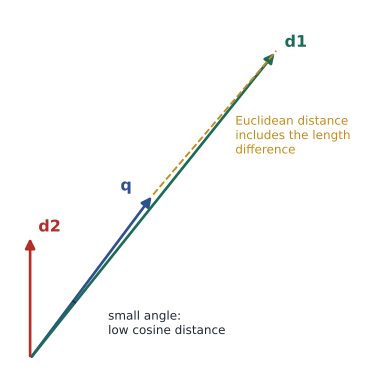
The example shows the main practical difference. Cosine distance cares only about direction, not length. Euclidean distance cares about both, so a longer vector in the same direction looks farther away. The dot product grows with length, so long vectors look more similar. For text embeddings, where direction carries meaning and length usually does not, cosine is the safe default.
Normalized vectors make the metrics agree
A vector is normalized when it has been scaled to length 1. For normalized vectors the three metrics are tied together: the cosine distance equals one minus the dot product, and the squared Euclidean distance equals twice the cosine distance. They therefore produce the same ranking, and the dot product is the cheapest to compute. Many embedding models, including the Azure OpenAI embedding models, return vectors that are already normalized; others do not, so the documentation advises checking the model's output and normalizing when needed.
VECTOR_NORMALIZE scales a vector to length 1 under a chosen norm: 'norm2', the ordinary Euclidean length and the usual choice; 'norm1', the sum of the absolute values; or 'norminf', the largest absolute value. Hana checked her model's vectors by computing the distance of each from the zero vector on a sample; every one came back as 1 to within rounding, so no normalization step was needed.
-- Is the model's output already unit length? Euclidean distance from the origin is the length.
DECLARE @zero vector(1536) = CAST('[' + REPLICATE(CAST('0,' AS varchar(max)), 1535) + '0]' AS vector(1536));  -- 1,536 zeros
SELECT TOP (100) ProductId, VECTOR_DISTANCE('euclidean', Embedding, @zero) AS length
FROM catalog.ProductEmbedding;

-- If not, store normalized copies
UPDATE catalog.ProductEmbedding
SET Embedding = VECTOR_NORMALIZE(Embedding, 'norm2');import math
def normalize(v):
n = math.sqrt(sum(x * x for x in v))
return [x / n for x in v]
q = normalize([0.6, 0.8, 0.0])
d1 = normalize([1.2, 1.5, 0.1])
d2 = normalize([0.0, 0.6, 0.8])
for name, d in [("d1", d1), ("d2", d2)]:
dp = sum(a * b for a, b in zip(q, d))
cos_d = 1 - dp
euc = math.sqrt(sum((a - b) ** 2 for a, b in zip(q, d)))
print(f"{name}: cosine {cos_d:.4f} euclidean squared {euc**2:.4f} "
f"twice cosine {2 * cos_d:.4f} dot {-dp:.4f}")d1: cosine 0.0018 euclidean squared 0.0037 twice cosine 0.0037 dot -0.9982 d2: cosine 0.5200 euclidean squared 1.0400 twice cosine 1.0400 dot -0.4800
What this code does
The program scales the three toy vectors to length 1 and recomputes the measures. It prints the squared Euclidean distance next to twice the cosine distance so they can be compared. The output shows the two columns are equal for each document, and all three measures now put the first document closer, which is why normalized embeddings let any metric give the same ranking.
Exact search, and when it is enough
A query with VECTOR_DISTANCE and TOP ... ORDER BY distance is an exact nearest-neighbour search, sometimes called exact k-nearest neighbours, kNN, or ENN. It is always correct, needs no index, and works on any table. It also reads every vector the WHERE clause leaves, computing 1,536 multiplications for each. On the 18,400 products, an exact search took about 140 milliseconds of CPU on the test database's serverless 2-vCore setting, fast enough. On the 10,416 guide chunks it took about 80. Elena's view was that exact search is the right answer until it is measurably too slow, because it can never miss a result.
Filters make exact search cheaper. If a store associate searches only in-stock products at Store 12, a WHERE clause on an ordinary indexed column cuts the rows before any distance is computed. The DP-800 outline asks candidates to choose between approximate (ANN) and exact (ENN) search; a good rule is that exact search suits up to tens of thousands of vectors, or any query with a selective filter, and approximate search suits large tables where queries scan most of the rows.
Choosing a metric for a model
The DP-800 outline asks candidates to evaluate vector index types and metrics, and the metric choice starts with the model. The documentation for an embedding model usually says which metric it was trained for; for most text models it is cosine similarity. If the model returns unit-length vectors, any of the three metrics gives the same ranking, and the choice comes down to which one the index and the queries agree on. If it does not, cosine is the safe default for text, Euclidean distance suits models whose documentation says so, such as some image models, and the dot product suits models trained for it, where vector length deliberately carries information such as popularity or confidence.
Hana checked the documentation, confirmed the vectors were unit length, and chose cosine for all product and guide search, writing it into the team's design notes. Consistency matters more than the choice itself: an index built for one metric is not used by queries asking for another, as lesson 6 explains, and mixing metrics across procedures makes distance thresholds meaningless.
Distances and how people read them
Distances are hard for people to interpret, so the staff app never shows them. Instead it shows a match strength in three bands, strong, fair and weak, mapped from cosine distance using the calibration on the test questions: below 0.35 strong, 0.35 to 0.45 fair, above 0.45 weak and hidden. The bands are stored in a small table rather than in code, so they can be changed when the model changes without a release.
Nikolai pointed out that the bands are also a useful signal for the reviewers. A week in which many questions return only weak matches means either that staff are asking about products the company does not sell, which is useful buying information for Grace's team, or that descriptions are poor, which is useful work for the catalogue team.
A last point on metrics concerns half precision. When vectors are stored as float16, each element carries fewer significant digits, so distances computed from them differ slightly from distances computed in full precision. The differences are tiny, usually in the third or fourth decimal place for cosine distance, and they rarely change which result ranks first. They can, however, move a result across a threshold such as 0.45 when it sits right at the edge. Hana recalibrated the match-strength bands after testing float16 storage in lesson 11 and found that the bands did not need to move, but she recorded the check in the design notes so it would be repeated after any change of model, metric or storage type.
Worked problem
Estimating exact-search work
The website team wants semantic search over 2.4 million customer reviews, each with a 1,536-dimension embedding. How many multiply-add operations does one exact search perform, compared with the 18,400 products?
Show solution
- \[18{,}400 \times 1{,}536 \approx 28.3 \text{ million}\]
- \[2{,}400{,}000 \times 1{,}536 \approx 3{,}686 \text{ million}\]
- That is about 130 times the work, and it also means reading about 14 GiB of vectors (2.4 million × 6,144 bytes) for every query unless they are cached.
- At several searches a second, exact search would saturate the database. The reviews need a vector index and approximate search.
Answer: About 3.7 billion operations per query, 130 times the product search: too much for exact search at website traffic.
Thresholds
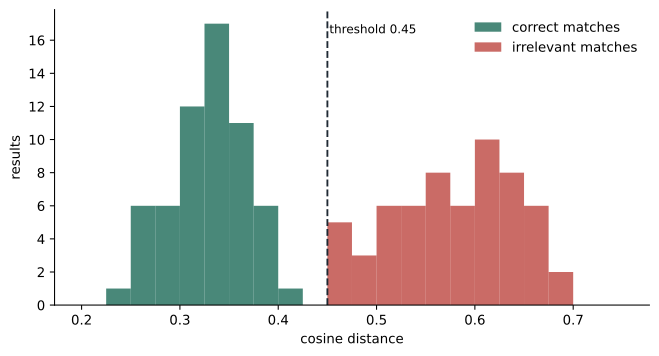
Sometimes the right number of results is not ten but however many are close enough. A WHERE clause on the distance, such as VECTOR_DISTANCE('cosine', e.Embedding, @q) < 0.45, returns only matches within a threshold. Thresholds depend on the model: one model's 0.3 is another's 0.6, so they must be calibrated on known good and bad matches for that model. Hana used the 60 test questions: correct products sat mostly below 0.42 and irrelevant ones mostly above 0.5, so she set 0.45 for showing a no good match found message rather than weak results.
Common mistakes
MistakeA larger VECTOR_DISTANCE('dot', ...) value means more similar.
InsteadVECTOR_DISTANCE returns the negative dot product, so smaller is more similar for every metric.
MistakeVECTOR_DISTANCE uses the vector index when one exists.
InsteadVECTOR_DISTANCE is always exact; VECTOR_SEARCH uses the index.
MistakeCosine and Euclidean distance always rank results differently.
InsteadFor normalized vectors they give the same ranking.
MistakeA distance threshold of 0.5 means the same thing for every model.
InsteadThresholds must be calibrated for each model on known matches.
Summary and key terms
- VECTOR_DISTANCE computes exact cosine, Euclidean or negative dot distances; smaller always means more similar.
- Cosine distance ranges from 0 to 2 and ignores vector length; Euclidean distance depends on length; dot grows with length.
- For unit-length vectors the three metrics give the same ranking, and squared Euclidean distance is twice the cosine distance.
- VECTOR_NORMALIZE scales vectors with 'norm2', 'norm1' or 'norminf'; many hosted embedding models already return unit vectors.
- Exact search with TOP and ORDER BY distance is always correct and suits small tables or selective filters.
- Distance thresholds must be calibrated per model.
- VECTOR_DISTANCE
- A function that returns the exact distance between two vectors under a chosen metric.
- Cosine distance
- One minus the cosine of the angle between two vectors; 0 for identical directions, 2 for opposite.
- Euclidean distance
- The straight-line distance between two vectors as points.
- Dot product
- The sum of products of matching elements; VECTOR_DISTANCE returns its negative.
- Normalized vector
- A vector scaled to length 1.
- Exact nearest neighbour (ENN, kNN)
- Search that computes the distance to every candidate vector and returns the closest.
Practice problems
Work each problem on paper first, then reveal the answer to check.
Why does VECTOR_DISTANCE return the negative dot product?
Show answer
So that, like the other metrics, smaller values mean more similar and results sort ascending.
What is the cosine distance between a vector and one pointing in exactly the opposite direction?
Show answer
2.
For normalized vectors, how is squared Euclidean distance related to cosine distance?
Show answer
It equals twice the cosine distance.
Which norm type does VECTOR_NORMALIZE use for ordinary Euclidean length?
Show answer
'norm2'.
When is exact search the better choice?
Show answer
For small tables, up to tens of thousands of vectors, or when a selective filter leaves few rows.
Lesson quiz · 5 questions
Score 60% or more to complete this lesson.
Create a free account to save your progress, take quizzes and earn a certificate.