
LVT-220 · Lesson 11 of 12 · 21 min
Network security basics for installers
Every device Cobalt Line connects is a small computer on the owner's network, and some of them sit in public places: cameras in parking lots, intercoms at front doors, card readers in lobbies, access points in ceilings anyone can reach with a stepladder. If one is left with its factory password, running old firmware, or connected to the wrong network, it can become the easiest way for someone to get into a system that the owner's IT team has spent years protecting. Installers do not need to be security specialists, but the security of an installation depends heavily on habits that are entirely the installer's. This lesson covers those habits: credentials, firmware, network separation, physical security of ports and equipment, and records. It is about protecting the owner's systems, and nothing in it involves testing or attacking anyone else's.
Why installed devices matter
Security agencies in both countries have warned for years that network-connected devices, sometimes called the Internet of Things, are a common weak point. Cameras, recorders and building controllers have been taken over in large numbers and used to attack other networks, mostly because they were left with default passwords or never updated. The Canadian Centre for Cyber Security and the US National Institute of Standards and Technology both publish guidance on securing such devices; NIST's baseline for device manufacturers, published in 2020, lists capabilities such as unique credentials, secure updates and the ability to log events, and the Canadian guidance for organizations stresses changing defaults, updating firmware and separating devices from other networks. In the United States, the FCC has also started a voluntary label for consumer smart devices that meet a security baseline. Owners now write those expectations into their specifications, and the installer is the person who carries them out on site.
The principle behind all of it is simple: each device should be able to do its job and nothing more, reachable only by the systems that need it, protected by credentials only authorized people know, and kept up to date. Every habit in this lesson follows from that.
Credentials
Nearly every IP device ships with an administrator account and a default password, printed in the manual and published online. Some newer devices force a new password on first setup; many still do not. The rule for the crew is absolute: no device goes into service with a default password. The new passwords are not invented on site. Each owner has a process: Brightwater's IT team issues device credentials through a password manager, with a different password for each device type, and the security team's access is separate from the network team's. At St. Brendan's, the hospital's security staff set the passwords themselves after Cobalt Line hands over each device. The installer follows the owner's process exactly.
Passwords are never written on the device, on a label inside the ceiling, in the commissioning sheet or in an email. The commissioning sheet records that the password was changed, when and by whom, not the password itself. When the crew needs access to a device after handover, they ask the owner for it. Shared crew accounts, a single password for every device on a job, or a password reused from the last job, all defeat the purpose and are not used.
# Credential check on the commissioning sheet: no defaults, no reuse, nothing written down
sheet = [
    {"device": "CAM-6-01", "user": "admin", "default_changed": True,  "set_by": "MO", "secret_in_sheet": False},
    {"device": "CAM-6-02", "user": "admin", "default_changed": False, "set_by": "",   "secret_in_sheet": False},
    {"device": "DC-6-01",  "user": "installer", "default_changed": True, "set_by": "MO", "secret_in_sheet": True},
    {"device": "AP-6-05",  "user": "managed", "default_changed": True, "set_by": "controller", "secret_in_sheet": False},
]
for row in sheet:
    issues = []
    if not row["default_changed"]:
        issues.append("factory password still set")
    if row["secret_in_sheet"]:
        issues.append("password written in the sheet: remove it")
    if row["user"] in ("installer", "tech", "temp"):
        issues.append("temporary crew account left on device")
print(f"{row['device']:9s} " + ("ok" if not issues else "; ".join(issues)))CAM-6-01 ok CAM-6-02 factory password still set DC-6-01 password written in the sheet: remove it; temporary crew account left on device AP-6-05 ok
Access points managed from a controller are a special case: the controller sets their credentials and settings, and nobody logs into them individually. Their protection is the controller's account, which belongs to the owner's network team. Temporary installer accounts created during setup are removed before handover; a forgotten account named installer on a door controller is exactly what a security review looks for.
Firmware
Firmware updates fix security problems as well as faults, and devices installed with old firmware may carry problems that were fixed years ago. The owner's specification usually names the firmware version, or says the current approved release. The crew brings each device to that version during commissioning, as lesson 8 described, records the version, and gets firmware only from the manufacturer's official site or the owner's own repository. Firmware from a forum, a file-sharing site or a colleague's USB drive is not used, however convenient. Some owners check the files' published signatures or checksums before installation; the crew follows that step where it is required.
Updates continue after handover, and that is the owner's job, but the installer's records make it possible. A commissioning sheet that lists each device's model and firmware version lets the owner's team know, when a manufacturer announces a security fix, exactly which devices on the floor need it.
# Firmware inventory check against the owner's approved versions
approved = {"dome camera DX-4": (3, 2, 1), "door controller AC-2": (5, 0, 4), "access point W7-2": (31, 1, 0)}
devices = [("CAM-6-01", "dome camera DX-4", "3.2.1"), ("CAM-6-05", "dome camera DX-4", "2.9.7"),
           ("DC-6-01", "door controller AC-2", "5.0.4"), ("DC-6-03", "door controller AC-2", "4.8.0"),
           ("AP-6-02", "access point W7-2", "31.1.0")]
def ver(s):
    return tuple(int(x) for x in s.split("."))
behind = 0
for name, model, fw in devices:
    ok = ver(fw) >= approved[model]
    behind += not ok
    want = ".".join(map(str, approved[model]))
    print(f"{name:9s} {model:22s} {fw:8s} " + ("approved" if ok else f"update to {want}"))
print(f"{behind} of {len(devices)} devices need an update before handover")CAM-6-01 dome camera DX-4 3.2.1 approved CAM-6-05 dome camera DX-4 2.9.7 update to 3.2.1 DC-6-01 door controller AC-2 5.0.4 approved DC-6-03 door controller AC-2 4.8.0 update to 5.0.4 AP-6-02 access point W7-2 31.1.0 approved 2 of 5 devices need an update before handover
Network separation
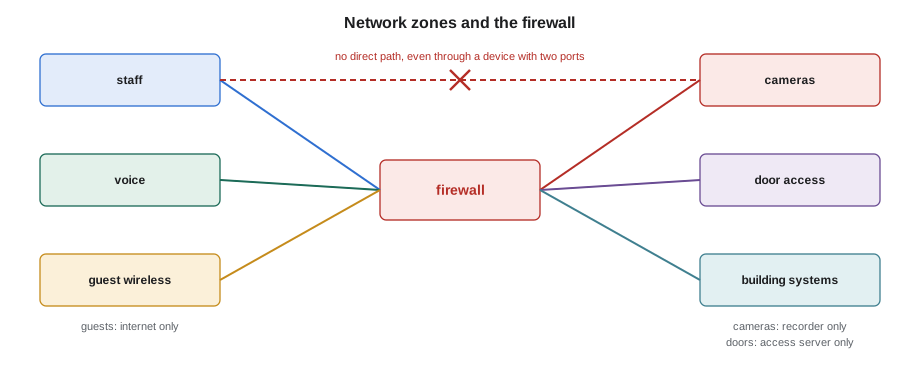
Lesson 3 explained VLANs, and their main purpose on Brightwater's floor is security. Cameras can reach only the recorder; door controllers only the access server; building systems only their management servers; guests only the internet. The network team configures those rules on the firewall between the VLANs. The installer's part is to put each device on the port and VLAN the plan names, never to move a device to another VLAN because it works there, and never to bridge two networks: connecting a device with two network ports to two different VLANs, or plugging a camera recorder's second port into the staff network for convenience, connects networks the firewall was meant to keep apart.
Remote access is the other side of separation. Some manufacturers offer cloud services that let a device be reached from anywhere, and some technicians set up remote access to devices so they can support them from the office. On an owner's network, remote access is the owner's decision: the network team decides whether devices may reach cloud services and how support staff connect, usually through the owner's own secure access system. The crew does not enable a device's cloud or remote access features unless the specification says so, and does not install remote access tools, wireless hotspots or cellular modems to reach a site more easily.
Ports and physical security
A network port in a public place is a way into the network for anyone with a laptop and a cable. Owners protect against that in several ways, and the installer should know them so they are not mistaken for faults. Unused switch ports are usually disabled. Ports for cameras and door controllers are often limited to the one MAC address of the device on them, or require the device to prove its identity with a certificate before the port opens, a method called 802.1X. A different device plugged in is shut out, and the switch logs a security event. That is why lesson 8 said not to unplug a door controller to test the cable with a laptop.
Physical security is the installer's direct responsibility. Telecommunications rooms are kept locked, and keys or access cards are signed out, not left in doors. Devices in public places are mounted with the manufacturer's tamper-resistant fasteners and brackets, and their cables are not left exposed where they can be unplugged. Outdoor cameras and readers have their cables entering from behind, in conduit or through the wall. Ceiling outlets serving access points are above the ceiling, not on an exposed wall jack in a lobby. At Juniper Point, the lobby intercom's cable enters through the back box, and the intercom's network settings page has been disabled by the security team after setup.
| Habit | Why | Who decides |
|---|---|---|
| Change every default password through the owner's process | Defaults are published and widely known | Owner's IT or security team |
| Bring firmware to the approved version from official sources | Old firmware carries known problems | Owner's specification |
| Patch each device to its planned port and VLAN only | VLANs and firewall rules separate systems | Owner's network team |
| Never bridge networks or enable remote access unasked | Bypasses the firewall | Owner's network team |
| Lock rooms and use tamper-resistant mounting | Ports and devices can be reached physically | Specification and site rules |
| Remove temporary accounts and test devices | Forgotten accounts are easy targets | Installer, before handover |
| Record identity, firmware and changes, not passwords | Lets the owner maintain and patch | Installer and owner |
The crew's own equipment
The crew's laptops and testers connect to many owners' networks, which makes them a possible carrier of problems from one network to another. Cobalt Line's laptops are company-managed, with current updates, security software and disk encryption, and they are used for work only. USB drives that carry firmware are company drives, scanned and used for one job at a time. The network testers' saved results contain the owner's network names, addresses and switch details, and they are cleared after each job's results are delivered. Photos on phones of labels, port maps and rack layouts are moved to the job file and deleted from the phone. None of this is complicated, and all of it is the kind of thing an owner's security team now asks about before a contractor is allowed on site.
Wireless needs a particular word. The crew never connects to an owner's wireless network with a personal device, never creates a hotspot on site to get internet access for a laptop that is also plugged into the owner's network, and never sets up a temporary access point of its own. A rogue access point, even one meant to help the crew work, opens the wired network to anyone nearby, and most owners' wireless systems detect them and report them as security events.
Information the installer handles
Port maps, IP plans, rack elevations, device lists and commissioning sheets describe the owner's network in detail. They are useful to anyone who wants to get into it, so they are treated as confidential: stored in the job file, shared only with the people who need them, and not posted in public places or sent to personal accounts. Dev's rule is that the job's network documents travel the same way the room keys do: signed out, carried with care and returned. At St. Brendan's, network documents are watermarked and numbered, and the crew signs for each copy.
Reporting something that looks wrong
Installers see things on site that the network team does not: an unknown device plugged into a ceiling outlet, a wireless network with a strange name, a door left propped open to a telecommunications room, a switch port in a lobby that is live when the plan says it should be disabled. The right response is to report it to the owner's contact, with what was seen, where and when, and not to investigate further. Unplugging an unknown device can destroy evidence or disrupt something legitimate; logging into it is never the installer's business. On a hospital or school network, an unexplained device is also a safety question, and the owner's security team will want to know quickly.
Worked problem
Handover security check for the Brightwater floor
Before handover, Lucia asks Cobalt Line to confirm the security items in the specification for the 32 security and building devices Cobalt Line configured. What does Maya check, and how does she show it?
Show solution
- For each device on the commissioning sheet: default password changed through the password manager, temporary accounts removed, firmware at the approved version.
- For each device's switch port: on the planned VLAN, with the MAC address the port is locked to matching the device label.
- For the room: unused switch ports disabled, as Omar confirms; room 6A locked, with the key log up to date; no crew equipment left connected.
- For the crew: tester results and phone photos moved to the job file and cleared from the devices.
Answer: Maya delivers the completed sheet with each item initialled, and Lucia's team spot-checks five devices before signing the handover.
Common mistakes
MistakeLeaving a device on its factory password.
InsteadChange every default through the owner's process before service.
MistakeWriting passwords on the commissioning sheet or the device.
InsteadRecord that the password was changed, not what it is.
MistakeMoving a device to another VLAN because it works there.
InsteadPatch to the planned port and VLAN and report problems to the network team.
MistakeEnabling cloud or remote access features to make support easier.
InsteadLeave remote access to the owner's decision and process.
MistakeSetting up a hotspot or temporary access point on site.
InsteadNever create wireless connections into an owner's network.
Summary and key terms
- Connected devices are a common weak point; owners write security expectations into specifications and the installer carries them out.
- No device goes into service with a default password; passwords follow the owner's process and are never written down.
- Bring firmware to the approved version from official sources and record it.
- VLANs and the firewall separate systems; never bridge networks or move devices to other VLANs.
- Ports may be locked to one device or require 802.1X; plugging in something else is a security event.
- Keep rooms locked, mount public devices securely, keep crew equipment and documents clean and confidential.
- Report anything that looks wrong to the owner instead of investigating it.
- Default password
- The factory password shipped with a device, published by the manufacturer.
- Firmware update
- A manufacturer's new version of a device's built-in software.
- Network separation
- Keeping different systems on separate networks with controlled paths between them.
- 802.1X
- A method that requires a device to prove its identity before a switch port opens.
- Rogue access point
- An unauthorized access point connected to a network.
- Remote access
- Reaching a device or network from outside the site.
Practice problems
Work each problem on paper first, then reveal the answer to check.
Where is a device's new password recorded?
Show answer
In the owner's password system; the commissioning sheet records only that it was changed.
Why should a camera recorder's second port not be plugged into the staff network?
Show answer
It would bridge the camera and staff networks around the firewall.
A door controller's port shuts down when a laptop is plugged in. Is that a fault?
Show answer
No; the port is locked to the controller, as a security measure.
What should Maya do if she finds an unknown device in a ceiling outlet?
Show answer
Report it to the owner's contact without unplugging or logging into it.
Lesson quiz · 5 questions
Score 60% or more to complete this lesson.
Create a free account to save your progress, take quizzes and earn a certificate.