
JS-201 · Lesson 7 of 12 · 25 min
Sorting algorithms
▶ Video coming soon A video version of this lesson is on the way.
At the seventh session, on Tuesday, September 28, Gareth shows Mira a bug report from Lucy. The dashboard's list of hamper sizes runs 1, 10, 12, 2, 3, and so on, which is not the order anyone expected. The cause is one line: sizes.sort(). "Sorting is the most studied problem in computer science," Gareth says, "and you will almost never write your own sort for production. But you need to know what the built-in one does, how to tell it what order you want, and why some sorts are fast and others are not."
Telling sort what order you want
Array.prototype.sort sorts an array in place. With no arguments, it converts every element to a string and sorts the strings by their UTF-16 code units, which is roughly dictionary order for plain English text. That is why the number 10 comes before 2: as strings, '10' begins with '1', which comes before '2'. For anything other than plain strings, pass a comparison function.
A comparison function takes two elements, a and b, and returns a negative number if a should come first, a positive number if b should come first, and 0 if their order does not matter. For numbers, returning a − b sorts in ascending order and b − a in descending order. The function must be consistent: it must always give the same answer for the same pair, and if a comes before b and b before c, then a must come before c. A comparison that returns true or false, or a random number, breaks these rules, and the result is unpredictable.
const sizes = [4, 10, 1, 2, 12, 3];
console.log('default:   ', sizes.toSorted());
console.log('ascending: ', sizes.toSorted((a, b) => a - b));
console.log('descending:', sizes.toSorted((a, b) => b - a));

const names = ['zoe', 'Émile', 'Ana', 'ben', 'Ángel'];
console.log('code units:', names.toSorted());
const collator = new Intl.Collator('en', { sensitivity: 'base' });
console.log('collator: ', names.toSorted(collator.compare));default: [ 1, 10, 12, 2, 3, 4 ] ascending: [ 1, 2, 3, 4, 10, 12 ] descending: [ 12, 10, 4, 3, 2, 1 ] code units: [ "Ana", "ben", "zoe", "Ángel", "Émile" ] collator: [ "Ana", "Ángel", "ben", "Émile", "zoe" ]
What this code does
The default sort compares the numbers as strings, so 10 and 12 land before 2. Subtracting in the comparison function sorts by numeric value, and swapping the order of the subtraction reverses it. For names, Intl.Collator compares the way a person would, ignoring case and treating accented letters as their base letters, while the default sort puts every capital and accented letter in code-unit order.
For people's names, always use Intl.Collator or localeCompare. Code-unit order puts every capital letter before every lower-case letter and every accented letter after z, which is wrong for names like Émile or Ángel and wrong for French-speaking volunteers in particular. A collator created once and reused is faster than calling localeCompare inside every comparison.
Sorting by more than one key
Records usually need sorting by more than one field: shifts by date, then by start time; volunteers by area, then by name. One way is a comparison function that compares the first key and moves on to the next only when the first keys are equal. The || operator makes this short, because 0 counts as false.
const shifts = [
  { date: '2027-09-29', start: '13:00', area: 'Kitchen' },
  { date: '2027-09-28', start: '11:00', area: 'Counter' },
  { date: '2027-09-29', start: '09:00', area: 'Garden' },
  { date: '2027-09-28', start: '09:00', area: 'Kitchen' },
];
const byDateThenStart = (a, b) => a.date.localeCompare(b.date) || a.start.localeCompare(b.start);
for (const s of shifts.toSorted(byDateThenStart)) console.log(s.date, s.start, s.area);2027-09-28 09:00 Kitchen 2027-09-28 11:00 Counter 2027-09-29 09:00 Garden 2027-09-29 13:00 Kitchen
What this code does
byDateThenStart compares the dates first and, only when they are equal and the comparison gives 0, falls through to compare the start times. Dates written as year, month and day and times written as two-digit hours sort correctly as strings, which is one reason that format is used. The four shifts come out in calendar order.
Stable sorting
A sort is stable if elements that compare as equal keep the order they had before the sort. Since ECMAScript 2019, the standard requires Array.prototype.sort to be stable, and all current engines comply. Stability gives a second way to sort by several keys: sort by the least important key first, then by the more important one. Elements that tie on the second sort stay in the order the first sort gave them.
const volunteers = [
  { name: 'Dev', area: 'Kitchen' }, { name: 'Ana', area: 'Garden' }, { name: 'Chi', area: 'Kitchen' },
  { name: 'Ben', area: 'Garden' }, { name: 'Eli', area: 'Counter' },
];
const byName = volunteers.toSorted((a, b) => a.name.localeCompare(b.name));
const byAreaThenName = byName.toSorted((a, b) => a.area.localeCompare(b.area));
console.log(byAreaThenName.map((v) => v.area + ':' + v.name).join(' '));Counter:Eli Garden:Ana Garden:Ben Kitchen:Chi Kitchen:Dev
What this code does
The first sort puts the volunteers in name order. The second sort orders them by area, and because the sort is stable, volunteers in the same area keep the name order from the first sort. The result is grouped by area and alphabetical within each area.
Stability also matters on the dashboard. When Lucy clicks the Area column header after sorting by name, she expects the names to stay in order within each area, and a stable sort guarantees it.
Simple sorts and why they are slow
To see why some sorting algorithms are faster than others, it helps to write a few. Selection sort finds the smallest element and swaps it to the front, then the smallest of the rest, and so on. Insertion sort works like sorting a hand of cards: it takes each element in turn and slides it left past every larger element until it is in place. Both use nested loops, so both are O(n²) in the worst case. The functions below count their comparisons.
function selectionSort(a) {
  a = [...a]; let comparisons = 0;
  for (let i = 0; i < a.length - 1; i++) {
    let min = i;
    for (let j = i + 1; j < a.length; j++) { comparisons++; if (a[j] < a[min]) min = j; }
    [a[i], a[min]] = [a[min], a[i]];
  }
  return { a, comparisons };
}
function insertionSort(a) {
  a = [...a]; let comparisons = 0;
  for (let i = 1; i < a.length; i++) {
    const x = a[i]; let j = i - 1;
    while (j >= 0) { comparisons++; if (a[j] <= x) break; a[j + 1] = a[j]; j--; }
    a[j + 1] = x;
  }
  return { a, comparisons };
}

const shuffled = [38, 27, 43, 3, 9, 82, 10, 21];
const nearly = [3, 9, 10, 21, 27, 38, 82, 43];
console.log(selectionSort(shuffled).a, selectionSort(shuffled).comparisons, selectionSort(nearly).comparisons);
console.log(insertionSort(shuffled).a, insertionSort(shuffled).comparisons, insertionSort(nearly).comparisons);[ 3, 9, 10, 21, 27, 38, 43, 82 ] 28 28 [ 3, 9, 10, 21, 27, 38, 43, 82 ] 20 8
What this code does
Selection sort always compares every remaining pair, so it makes 28 comparisons for eight items whatever their order. Insertion sort stops sliding an element as soon as it meets a smaller one, so on the nearly sorted list it makes only eight comparisons. Both are quadratic in the worst case, but insertion sort is very fast when the data is already almost in order.
That last property makes insertion sort useful despite its worst case. For very short arrays, of around ten to twenty elements, its simplicity beats more complex algorithms, and real sorting functions switch to it for short runs. Bubble sort, which repeatedly swaps neighbouring pairs that are out of order, is the other famous simple sort; it is easy to describe and almost never the right choice.
Merge sort: divide and conquer
Merge sort applies the divide and conquer idea from Lesson 6. Split the array in half, sort each half recursively, and merge the two sorted halves by repeatedly taking the smaller of their front elements. An array of one element is already sorted, which is the base case. Merging two sorted lists of total length n takes at most n − 1 comparisons, because each comparison moves one element into the output.
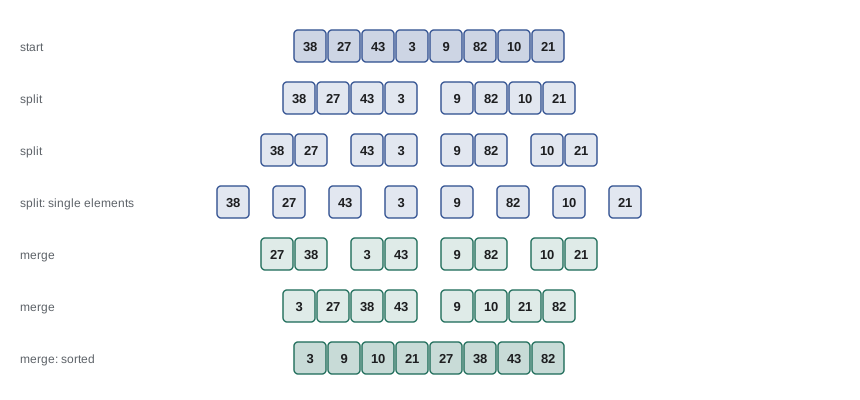
How much work is that in total? Each level of splitting halves the pieces, so there are about log₂ n levels. At every level, the merges together handle all n elements once. The total is about n × log₂ n, so merge sort is O(n log n) in every case, best, average and worst. It is stable as long as the merge takes from the left half when two elements are equal. Its main cost is memory: the merges need O(n) extra space.
let comparisons = 0;
function mergeSort(a) {
  if (a.length <= 1) return a;
  const mid = Math.floor(a.length / 2);
  return merge(mergeSort(a.slice(0, mid)), mergeSort(a.slice(mid)));
}
function merge(left, right) {
  const out = [];
  let i = 0, j = 0;
  while (i < left.length && j < right.length) {
    comparisons++;
    if (left[i] <= right[j]) out.push(left[i++]);   // <= keeps it stable
    else out.push(right[j++]);
  }
  return out.concat(left.slice(i), right.slice(j));
}

console.log(mergeSort([38, 27, 43, 3, 9, 82, 10, 21]), comparisons, 'comparisons');

function lcg(seed) { return () => (seed = (seed * 1103515245 + 12345) % 2147483648) / 2147483648; }
const rand = lcg(42);
for (const n of [1000, 10000, 100000]) {
  comparisons = 0;
  mergeSort(Array.from({ length: n }, () => Math.floor(rand() * 1e6)));
  console.log('n =', n, 'comparisons:', comparisons, '| n log2 n =', Math.round(n * Math.log2(n)));
}[ 3, 9, 10, 21, 27, 38, 43, 82 ] 17 comparisons n = 1000 comparisons: 8689 | n log2 n = 9966 n = 10000 comparisons: 120440 | n log2 n = 132877 n = 100000 comparisons: 1536577 | n log2 n = 1660964
What this code does
mergeSort splits the array until each piece has one element, and merge combines two sorted pieces by always taking the smaller front element. The comparison count for random arrays stays just under n times log₂ n, as the analysis predicts. The arrays come from a small seeded random number generator, so every run sorts the same numbers and prints the same counts.
Compare that with selection sort: for 100,000 elements, selection sort would make about 5 billion comparisons and merge sort makes about 1.5 million. That difference, more than three thousand times, is what O(n²) against O(n log n) means in practice.
Quicksort: partitioning
Quicksort is the other famous divide and conquer sort. Pick one element as the pivot, rearrange the array so that everything smaller than the pivot comes before it and everything larger after it, a step called partitioning, and then sort the two sides recursively. Partitioning can be done in place, so quicksort needs little extra memory, and in practice it is often the fastest general-purpose sort.
Its weakness is the choice of pivot. If the pivot splits the array evenly, there are about log₂ n levels and the total is O(n log n). If it is always the smallest or largest element, one side is empty, there are n levels, and the total is O(n²). Choosing the first element as the pivot does exactly that on an array that is already sorted, which is common in real data.
let comparisons = 0;
function quickSort(a, pickPivot, lo = 0, hi = a.length - 1) {
  if (lo >= hi) return a;
  const p = pickPivot(lo, hi);
  [a[p], a[hi]] = [a[hi], a[p]];               // move the pivot to the end
  let store = lo;
  for (let i = lo; i < hi; i++) {
    comparisons++;
    if (a[i] < a[hi]) { [a[i], a[store]] = [a[store], a[i]]; store++; }
  }
  [a[store], a[hi]] = [a[hi], a[store]];       // the pivot lands in its final place
  quickSort(a, pickPivot, lo, store - 1);
  quickSort(a, pickPivot, store + 1, hi);
  return a;
}
const first = (lo, hi) => lo;
const middle = (lo, hi) => Math.floor((lo + hi) / 2);

console.log(quickSort([38, 27, 43, 3, 9, 82, 10, 21], middle));
for (const [name, pick] of [['first element', first], ['middle element', middle]]) {
  comparisons = 0;
  quickSort(Array.from({ length: 2000 }, (_, i) => i), pick);   // already sorted input
  console.log('pivot =', name, '| comparisons on sorted input:', comparisons);
}[ 3, 9, 10, 21, 27, 38, 43, 82 ] pivot = first element | comparisons on sorted input: 1999000 pivot = middle element | comparisons on sorted input: 17964
What this code does
quickSort moves the chosen pivot to the end, sweeps the range moving smaller elements to the front, and then puts the pivot between the two groups before sorting each group recursively. On already sorted input, always choosing the first element makes every split as uneven as possible and costs about two million comparisons for 2,000 items. Choosing the middle element splits evenly and needs fewer than eighteen thousand.
Real quicksorts choose the pivot carefully, for example as the median of three elements or at random, and switch to another method if the recursion goes too deep. Quicksort as written is not stable, because partitioning swaps elements across long distances.
How fast can sorting be?
Merge sort and good quicksorts make about n log₂ n comparisons. It can be proved that no sorting algorithm that works only by comparing pairs of elements can do fundamentally better in the worst case. There are n! possible orders of n elements, each comparison has two outcomes, so telling them all apart needs at least log₂(n!) comparisons, which is about n log₂ n. O(n log n) is therefore the best possible Big-O for comparison sorting.
Algorithms that do not compare can beat that bound when the keys are small whole numbers. Counting sort counts how many elements have each key value and then writes them out in key order. Food Hub households have between 1 and 8 members, so sorting thousands of hampers by household size needs only one pass to count and one pass to write: O(n + k), where k is the number of possible keys.
function countingSortBy(items, key, maxKey) {
  const buckets = Array.from({ length: maxKey + 1 }, () => []);
  for (const item of items) buckets[key(item)].push(item);   // keeps arrival order, so it is stable
  return buckets.flat();
}

const hampers = [
  { id: 'H1', people: 4 }, { id: 'H2', people: 1 }, { id: 'H3', people: 6 },
  { id: 'H4', people: 1 }, { id: 'H5', people: 4 }, { id: 'H6', people: 2 },
];
console.log(countingSortBy(hampers, (h) => h.people, 8).map((h) => h.id + '(' + h.people + ')').join(' '));H2(1) H4(1) H6(2) H1(4) H5(4) H3(6)
What this code does
countingSortBy puts each hamper into the bucket for its household size and then joins the buckets in order from 0 to 8. Hampers with the same size stay in the order they arrived, so the sort is stable. It never compares two hampers, which is how it avoids the n log n limit for comparison sorts.
What the built-in sort does
The standard says what sort must do, not how. Since 2018, V8, the engine in Chrome, Edge and Node.js, has used TimSort, a hybrid of merge sort and insertion sort originally written for Python. It finds runs that are already in order, extends short runs with insertion sort and merges runs carefully, so it is O(n log n) in the worst case, stable, and close to O(n) on data that is already nearly sorted, which real data often is. Other engines use their own stable algorithms.
| Algorithm | Worst case | Nearly sorted input | Extra space | Stable |
|---|---|---|---|---|
| Selection sort | O(n²) | O(n²) | O(1) | No |
| Insertion sort | O(n²) | About O(n) | O(1) | Yes |
| Merge sort | O(n log n) | O(n log n) | O(n) | Yes |
| Quicksort | O(n²), rare with good pivots | O(n log n) with good pivots | O(log n) stack | No |
| Counting sort | O(n + k) | O(n + k) | O(n + k) | Yes |
| TimSort (V8) | O(n log n) | About O(n) | O(n) | Yes |
The practical rules are short. Use the built-in sort or toSorted with a correct comparison function. Use Intl.Collator for names. Rely on stability for multi-key sorts if it makes the code clearer. Remember that sorting is O(n log n), so do not sort inside a loop or on every key press when the order could be kept up to date another way, and that a sorted array opens the door to the fast searches in the next lesson.
Try it yourself
Sort the hamper sizes
Lucy's bug: sizes.sort() puts 10 and 12 before 2. Fix sortSizes so that it returns a new array sorted in ascending numeric order and leaves the original unchanged.
Use toSorted with a comparison function.
function sortSizes(sizes) {
  return sizes.sort();
}

const sizes = [4, 10, 1, 2, 12, 3, 8];
console.log(sortSizes(sizes).join(' '));
console.log(sizes.join(' '));
Try it yourself
Volunteers by area, then newest first
Complete the comparison function byAreaThenNewest so that volunteers are sorted by area name in ascending order and, within an area, by the date they joined with the most recent first.
Dates are strings in the form YYYY-MM-DD, which sort correctly as strings.
const byAreaThenNewest = (a, b) => a.area.localeCompare(b.area);

const people = [
  { name: 'Ana', area: 'Kitchen', joined: '2026-05-02' }, { name: 'Ben', area: 'Garden', joined: '2027-03-15' },
  { name: 'Chi', area: 'Kitchen', joined: '2027-08-30' }, { name: 'Dev', area: 'Garden', joined: '2025-11-20' },
  { name: 'Eli', area: 'Kitchen', joined: '2026-12-01' },
];
console.log(people.toSorted(byAreaThenNewest).map((p) => p.name).join(' '));
Try it yourself
Write insertion sort
Complete insertionSort(a) so that it sorts the array in place in ascending order and returns it. For each element from index 1 onwards, slide it left past every larger element.
Do not call the built-in sort.
function insertionSort(a) {
  return a;
}

console.log(insertionSort([5, 2, 9, 1, 5, 6]).join(' '));
console.log(insertionSort([]).length, insertionSort([7]).join(' '));
console.log(insertionSort.toString().includes('.sort(') ? 'uses sort' : 'own algorithm');
Common mistakes
MistakeCalling sort() on numbers with no comparison function.
InsteadThe default compares strings, so 10 comes before 2. Pass (a, b) => a - b.
MistakeReturning a boolean from a comparison function, such as a > b.
InsteadReturn a negative number, zero or a positive number; true and false do not give a consistent order.
MistakeSorting names with the default sort.
InsteadUse Intl.Collator or localeCompare, or capitals and accented letters sort wrongly.
MistakeCalling sort when the original order is still needed elsewhere.
Insteadsort changes the array in place. Use toSorted for a sorted copy.
MistakeSorting inside a loop to keep a list in order.
InsteadEach sort is O(n log n). Sort once, or insert new items at the right place.
Summary and key terms
- sort with no arguments compares elements as strings, so numbers and names need a comparison function that returns a negative number, zero or a positive number consistently. a − b sorts numbers ascending, and Intl.Collator sorts names as people expect.
- Multi-key sorts chain comparisons with ||, and because the built-in sort has been stable since ECMAScript 2019, sorting by the less important key first also works.
- Selection and insertion sort are O(n²), though insertion sort is fast on nearly sorted and very short arrays.
- Merge sort divides, sorts the halves and merges them, which takes O(n log n) in every case, is stable and needs O(n) extra space.
- Quicksort partitions around a pivot, is fast and in place on average, but is O(n²) with bad pivots such as the first element of sorted input.
- Comparison sorts cannot beat about n log₂ n comparisons in the worst case, while counting sort sorts small whole-number keys in O(n + k).
- V8's built-in sort is TimSort, a stable hybrid that is fast on nearly sorted data.
- comparison function
- A function that tells sort the order of two elements by returning a negative number, zero or a positive number.
- stable sort
- A sort that keeps equal elements in the order they had before sorting.
- collator
- An object that compares strings according to the rules of a language, provided by Intl.Collator.
- selection sort
- A sort that repeatedly moves the smallest remaining element to the front, always O(n²).
- insertion sort
- A sort that slides each element left into place, O(n²) in the worst case but fast on nearly sorted data.
- merge sort
- A divide and conquer sort that sorts halves recursively and merges them, O(n log n).
- quicksort
- A divide and conquer sort that partitions around a pivot and sorts each side recursively.
- pivot
- The element quicksort uses to split the array into smaller and larger parts.
- counting sort
- A non-comparison sort for small whole-number keys that counts each key, O(n + k).
- TimSort
- A stable hybrid of merge sort and insertion sort used by V8 for Array.prototype.sort.
Practice problems
Work each problem on paper first, then reveal the answer to check.
What does [10, 9, 1, 100].sort() return?
Show answer
[1, 10, 100, 9], because the elements are compared as strings.
Write a comparison function for sorting by price, highest first.
Show answer
(a, b) => b.price - a.price
Why is merge sort O(n log n)?
Show answer
There are about log₂ n levels of halving and the merges at each level handle n elements.
When does quicksort become O(n²)?
Show answer
When the pivot is repeatedly the smallest or largest element, for example the first element of an already sorted array.
Why can counting sort be faster than n log n?
Show answer
It does not compare elements; it counts keys from a small known range.
Lesson quiz · 5 questions
Score 60% or more to complete this lesson.
Create a free account to save your progress, take quizzes and earn a certificate.