
JS-201 · Lesson 2 of 12 · 26 min
Arrays, Maps and Sets
▶ Video coming soon A video version of this lesson is on the way.
At the second session, on Thursday, September 9, Gareth opens the riverside-data library and counts the data structures in it. There are 41 arrays, 6 Maps, 3 Sets and dozens of plain objects used as lookup tables. "Before we build anything new," he says, "we should know exactly what the built-in ones cost. Most of the slow code I find is a reasonable structure used for the wrong job."
JavaScript gives you three general-purpose collections: the array, the Map and the Set, plus the plain object, which is often used as a fourth. Each is very fast at some operations and slow at others. This lesson measures them, using the Food Hub's volunteers, shifts and hampers, and ends with a guide to choosing between them.
Arrays: an ordered list with numbered slots
An array holds values in order, each in a numbered slot called an index, starting at 0. JavaScript engines store a typical array as a block of memory with the slots side by side. Because the engine can work out where slot i is from the start of the block, reading or writing volunteers[i] takes the same time whether the array has ten items or ten million. That is O(1) random access, and it is the array's great strength.
The ends of an array behave differently. Adding or removing at the end, with push and pop, only touches the last slot, so both are O(1), with push amortized as Lesson 1 showed. Adding or removing at the start, with unshift and shift, is O(n), because every other element has to move along one slot to keep the indexes in order. Inserting or deleting in the middle with splice moves everything after that point.
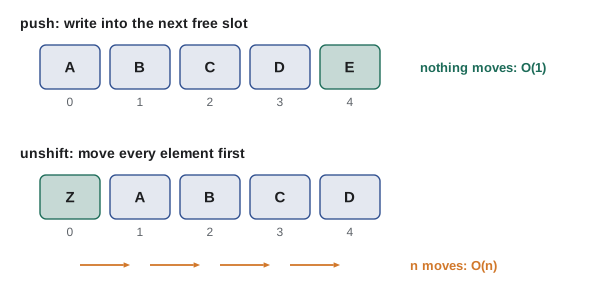
// Count how many elements move when adding at each end.
function addAtEnd(arr, value) { arr[arr.length] = value; return 0; }
function addAtStart(arr, value) {
  let moves = 0;
  for (let i = arr.length; i > 0; i--) { arr[i] = arr[i - 1]; moves++; }
  arr[0] = value;
  return moves;
}

for (const n of [10, 1000, 100000]) {
  const a = Array.from({ length: n }, (_, i) => i);
  const b = Array.from({ length: n }, (_, i) => i);
  console.log('n =', n, '| end:', addAtEnd(a, -1), 'moves | start:', addAtStart(b, -1), 'moves');
}n = 10 | end: 0 moves | start: 10 moves n = 1000 | end: 0 moves | start: 1000 moves n = 100000 | end: 0 moves | start: 100000 moves
What this code does
addAtStart does by hand what unshift does inside the engine: it moves every element one slot to the right, starting from the end, and then writes the new value into slot 0. addAtEnd writes into the next free slot and moves nothing. The start version needs as many moves as there are elements, which is why unshift and shift are O(n).
| Array operation | Big-O | Notes |
|---|---|---|
| arr[i], arr[i] = x, arr.length | O(1) | Random access by index |
| push, pop | O(1) | push is amortized O(1) |
| unshift, shift | O(n) | Every element moves one slot |
| splice at position i | O(n) | Elements after i move |
| includes, indexOf, find, findIndex, some | O(n) | Linear search; stops early when found |
| map, filter, forEach, reduce | O(n) | Visit every element once |
| slice, concat, spread [...arr] | O(n) | Copies the elements |
| sort, toSorted | O(n log n) | Comparisons, Lesson 7 |
The costs in the table are what engines achieve for ordinary arrays. Engines optimize arrays that are dense, with no gaps between indexes, and that hold one kind of value, such as all numbers or all objects. An array with holes, created by writing arr[1000] into an empty array, or one that mixes numbers, strings and objects, may be stored in a slower form. You rarely need to think about this, but it is one more reason to build arrays with push and to keep each array to one kind of value.
Copying methods
Some array methods change the array they are called on: sort, reverse, splice, push and the others in the table that write. Since 2023, JavaScript has had copying versions of the first three, plus a copying version of index assignment. toSorted, toReversed and toSpliced return a new array and leave the original alone, and with(i, value) returns a copy with one slot replaced. Each of them copies the whole array, so each is at least O(n), but they avoid a whole class of bugs in which one part of a program sorts an array that another part was still using.
const shifts = ['Kitchen 09:00', 'Garden 10:00', 'Counter 11:00', 'Grocery 08:30'];

const sorted = shifts.toSorted();
const fixed = shifts.with(1, 'Garden 10:30');
const removed = shifts.toSpliced(2, 1);

console.log('original:', shifts);
console.log('sorted:  ', sorted);
console.log('fixed:   ', fixed);
console.log('removed: ', removed);original: [ "Kitchen 09:00", "Garden 10:00", "Counter 11:00", "Grocery 08:30" ] sorted: [ "Counter 11:00", "Garden 10:00", "Grocery 08:30", "Kitchen 09:00" ] fixed: [ "Kitchen 09:00", "Garden 10:30", "Counter 11:00", "Grocery 08:30" ] removed: [ "Kitchen 09:00", "Garden 10:00", "Grocery 08:30" ]
What this code does
Each copying method returns a new array and leaves shifts exactly as it was, as the first line of output shows. toSorted sorts the copy, with replaces the value at index 1, and toSpliced removes one element starting at index 2. The original sort and splice would have changed shifts itself.
Searching an array is linear
Finding a value in an array, when you do not already know its index, means looking at the elements one by one. includes, indexOf, find and findIndex all do this, so they are O(n) in the worst case. That is fine for a short list or a search done once. It becomes a problem when the search happens inside a loop or on every key press, because the cost multiplies.
The usual fix is to build an index: a second structure that maps a key, such as a volunteer's id, straight to the record. Building it takes one O(n) pass, after which each lookup is O(1) on average. If the program searches more than a handful of times, the index pays for itself quickly.
const volunteers = Array.from({ length: 3000 }, (_, i) => ({ id: 1001 + i, name: 'Volunteer ' + (i + 1) }));
const signups = [4000, 1002, 3999, 2500, 1001];  // volunteer ids from today's sign-ups

// Without an index: a linear search for each sign-up.
let steps = 0;
for (const id of signups) {
  const v = volunteers.find((x) => { steps++; return x.id === id; });
}
console.log('find steps:', steps);

// With an index: one pass to build, then one step per lookup.
const byId = new Map();
for (const v of volunteers) byId.set(v.id, v);
let lookups = 0;
for (const id of signups) { byId.get(id); lookups++; }
console.log('build steps:', volunteers.length, 'lookup steps:', lookups);
console.log(byId.get(2500).name);find steps: 7502 build steps: 3000 lookup steps: 5 Volunteer 1500
What this code does
The first loop calls find once per sign-up, and find checks volunteers one at a time until the id matches. The second part builds a Map from id to volunteer in one pass, after which each lookup is a single get. With only five sign-ups the index costs about as much as it saves, but with five hundred it would be far cheaper.
Map: keys of any kind
A Map stores key and value pairs. You add with set(key, value), read with get(key), test with has(key) and remove with delete(key), and size gives the number of entries. All four operations are O(1) on average, because a Map is a hash table inside, which Lesson 5 explains. Keys can be any value at all: numbers, strings, objects, even functions. Iterating over a Map visits its entries in the order they were first added, which makes the output of Map code predictable.
Before Map was added to JavaScript in 2015, programs used plain objects as lookup tables, and much code still does. Objects work for simple cases, but they have three traps that Map avoids. Object keys are always strings or symbols, so the number 7 and the string '7' become the same key. Objects inherit properties from Object.prototype, so a key such as toString or constructor may seem to exist when you never added it. And objects do not keep keys in insertion order when the keys look like whole numbers: those always come first, in numeric order.
const obj = {};
obj['shift-b'] = 'Garden';
obj['10'] = 'Kitchen';
obj['2'] = 'Counter';
console.log('object keys:', Object.keys(obj));
console.log('inherited:', 'toString' in obj, '| own:', Object.hasOwn(obj, 'toString'));

const map = new Map();
map.set('shift-b', 'Garden');
map.set('10', 'Kitchen');
map.set('2', 'Counter');
map.set(10, 'a number key');
console.log('map keys:', [...map.keys()]);
console.log('size:', map.size, '| "10" and 10 differ:', map.get('10'), '/', map.get(10));object keys: [ "2", "10", "shift-b" ] inherited: true | own: false map keys: [ "shift-b", "10", "2", 10 ] size: 4 | "10" and 10 differ: Kitchen / a number key
What this code does
The object puts the number-like keys 2 and 10 first, in numeric order, whatever order they were added in, and the in operator finds toString on its prototype. The Map keeps keys in insertion order, has no inherited keys, and treats the string '10' and the number 10 as different keys. Object.hasOwn checks only the object's own properties.
Plain objects remain the right choice for records, values with a fixed set of named fields such as a volunteer with name, email and area. Use a Map when the keys are data, such as volunteer ids or dates, when they are not strings, when entries are added and removed often, or when you need the size or a reliable order. Lesson 5 adds one more case: WeakMap, for attaching data to objects without keeping them alive.
Counting and grouping
Two jobs come up again and again with the Food Hub's data: counting how often each value appears, and grouping records by a field. Both are one pass over the data with a Map. For counting, each record's key either already has a count, which is increased, or does not, and starts at 1.
const hampers = ['family', 'single', 'family', 'senior', 'family', 'single', 'halal', 'family'];

const counts = new Map();
for (const type of hampers) counts.set(type, (counts.get(type) ?? 0) + 1);
console.log(counts);

// Most common type: one more pass over the counts.
let best = null;
for (const [type, n] of counts) if (best === null || n > best[1]) best = [type, n];
console.log('most common:', best[0], 'x', best[1]);Map(4) { "family" => 4, "single" => 2, "senior" => 1, "halal" => 1 }
most common: family x 4What this code does
The loop reads the current count for each hamper type, uses 0 if there is none yet, and stores one more. Because a Map keeps insertion order, the types are listed in the order they first appeared. Finding the most common type is a second O(n) pass, so the whole job stays linear.
For grouping, JavaScript added two functions in 2024. Object.groupBy(items, fn) returns a plain object whose keys are the values fn returns, each holding an array of the items with that key. Map.groupBy does the same but returns a Map, which you need when the keys are not strings or when their order matters. Both are O(n) and both are supported in current browsers and in Node.js 21 and later.
const shifts = [
  { id: 1, area: 'Kitchen', start: '09:00' }, { id: 2, area: 'Garden', start: '10:00' },
  { id: 3, area: 'Kitchen', start: '13:00' }, { id: 4, area: 'Counter', start: '11:00' },
  { id: 5, area: 'Garden', start: '14:00' },
];

const byArea = Object.groupBy(shifts, (s) => s.area);
console.log(Object.keys(byArea));
console.log(byArea.Kitchen.map((s) => s.start));

const byHour = Map.groupBy(shifts, (s) => Number(s.start.slice(0, 2)) < 12 ? 'morning' : 'afternoon');
for (const [part, list] of byHour) console.log(part, list.map((s) => s.id));[ "Kitchen", "Garden", "Counter" ] [ "09:00", "13:00" ] morning [ 1, 2, 4 ] afternoon [ 3, 5 ]
What this code does
Object.groupBy calls the arrow function for every shift and collects the shifts that return the same area into one array. Map.groupBy does the same into a Map, here grouping by whether the shift starts before noon. Each item is visited once, so both are O(n).
Set: a collection without duplicates
A Set holds values with no duplicates. add puts a value in, has tests for it, delete removes it and size counts the values, all in O(1) on average. A Set also keeps its values in insertion order. Turning an array into a Set, and back with the spread operator, is the shortest way to remove duplicates, as Lesson 1's duplicate check showed.
Sets decide whether two values are the same using a rule called SameValueZero. It is the same as === with one exception: NaN is treated as equal to NaN, so a Set can hold NaN once. Objects and arrays are compared by reference, not by content. Two separate objects that look identical are two different values, so a Set of volunteer objects does not remove a volunteer who was loaded twice from two different responses. To remove duplicates among records, put their ids or emails in the Set, not the objects.
const ids = new Set([1001, 1002, 1001, 1003, 1002]);
console.log(ids.size, [...ids]);

console.log(new Set([NaN, NaN, 0, -0]).size);

const a = { id: 1001, name: 'Ana' };
const b = { id: 1001, name: 'Ana' };
const people = new Set([a, b, a]);
console.log('objects:', people.size);
console.log('by id:', new Set([a, b].map((p) => p.id)).size);3 [ 1001, 1002, 1003 ] 2 objects: 2 by id: 1
What this code does
The first Set keeps each id once, in the order first seen. NaN appears once, and 0 and -0 count as the same value under SameValueZero. The two objects a and b have the same contents but are different objects, so the Set keeps both; using their ids instead removes the duplicate.
Since 2024, Sets also have methods for combining them: union, intersection, difference, symmetricDifference, isSubsetOf, isSupersetOf and isDisjointFrom. Each returns a new Set or a true or false answer, and each runs in time proportional to the sizes of the Sets involved. They make questions about groups of volunteers short to write.
const kitchen = new Set(['Ana', 'Ben', 'Chi', 'Dev']);
const garden = new Set(['Chi', 'Eli', 'Ana']);
const trained = new Set(['Ana', 'Ben', 'Chi', 'Dev', 'Eli', 'Fay']);

console.log('both areas:', [...kitchen.intersection(garden)]);
console.log('either area:', [...kitchen.union(garden)]);
console.log('kitchen only:', [...kitchen.difference(garden)]);
console.log('all trained?', kitchen.union(garden).isSubsetOf(trained));both areas: [ "Chi", "Ana" ] either area: [ "Ana", "Ben", "Chi", "Dev", "Eli" ] kitchen only: [ "Ben", "Dev" ] all trained? true
What this code does
intersection keeps the names in both Sets, union keeps names in either, and difference keeps the kitchen names that are not in the garden. isSubsetOf answers whether every name in the combined group is also in the trained Set. Each method returns a new Set, so the originals do not change.
Choosing a collection
The choice usually follows from the question the code asks most often. If it asks for the item at a position, or needs to keep items in an order you control, use an array. If it asks for the value belonging to a key, use a Map, or an object for a fixed record. If it only asks whether something is present, use a Set. When code needs two of these, it is normal to keep two structures side by side, such as an array of shifts in display order and a Map from shift id to shift for lookups, as long as both are updated together.
| Question the code asks | Best built-in | Typical cost |
|---|---|---|
| What is item number i? | Array | O(1) |
| Add or remove at the end | Array (push, pop) | O(1) |
| Add or remove at the front | Not an array; see Lesson 4 | O(n) with shift and unshift |
| What is the value for this key? | Map | O(1) average |
| Is this value present? | Set | O(1) average |
| How many of each kind? | Map of counts | O(n) to build |
| A record with named fields | Plain object | O(1) per field |
| Items in sorted order, with fast insertion | None built in; see Lesson 9 | O(log n) with a balanced tree |
The last row is a reminder that the built-ins do not cover everything. JavaScript has no built-in linked list, queue, priority queue or tree, and the next lessons build them from scratch. In practice you will use the built-ins most of the time, but knowing how the others work tells you when the built-ins are the wrong tool.
Try it yourself
Count sign-ups per area
Lucy wants the number of sign-ups for each area. Complete countByArea(signups) so that it returns a Map from area name to count, using one pass over the array.
The program prints each area and its count in the order the areas first appear.
function countByArea(signups) {
  const counts = new Map();
  // count each sign-up's area here
  return counts;
}

const signups = [
  { name: 'Ana', area: 'Kitchen' }, { name: 'Ben', area: 'Garden' }, { name: 'Chi', area: 'Kitchen' },
  { name: 'Dev', area: 'Grocery' }, { name: 'Eli', area: 'Kitchen' }, { name: 'Fay', area: 'Garden' },
];
for (const [area, n] of countByArea(signups)) console.log(area, n);
Try it yourself
Volunteers on both lists
Two arrays list the volunteers trained for food safety and those who can drive the van. Complete bothLists(a, b) so that it returns an array of the names that appear in both, in the order they appear in a.
Do it in O(n) time: build a Set from b and use has, rather than calling b.includes for every name.
function bothLists(a, b) {
  return [];
}

const foodSafe = ['Ana', 'Ben', 'Chi', 'Dev', 'Eli'];
const drivers = ['Eli', 'Gus', 'Ana', 'Hal'];
console.log(bothLists(foodSafe, drivers).join(', '));
Common mistakes
Mistakeshift() is as cheap as pop().
Insteadpop removes the last element in O(1); shift removes the first and moves every other element, which is O(n).
MistakeA plain object is a good map for any keys.
InsteadObject keys become strings, inherit prototype names and put number-like keys first. Use a Map for keys that are data.
MistakeA Set removes duplicate records.
InsteadObjects are compared by reference. Put ids or emails in the Set to remove duplicate records.
MistaketoSorted is faster than sort because it does not change the array.
InsteadtoSorted copies and then sorts, so it does slightly more work. Its benefit is safety, not speed.
MistakeBuilding a Map index is wasteful for one search.
InsteadThat is true for one search, but for repeated lookups an O(n) index saves O(n) on every later search.
Summary and key terms
- Arrays give O(1) access by index and O(1) push and pop at the end, but unshift, shift and splice move elements and are O(n). includes, indexOf and find are linear searches.
- Engines are fastest with dense arrays of one kind of value. toSorted, toReversed, toSpliced and with return copies instead of changing the original.
- A Map stores key and value pairs with O(1) average get, set, has and delete, accepts keys of any type and keeps insertion order.
- Plain objects suit fixed records but convert keys to strings, inherit prototype properties and order number-like keys first.
- Counting and grouping take one pass with a Map, Object.groupBy or Map.groupBy.
- A Set holds unique values compared with SameValueZero, so objects are unique by reference, and its union, intersection and difference methods combine groups.
- Choose the collection by the question the code asks most often, and build an index when the same search repeats.
- array
- An ordered collection of values in numbered slots starting at 0.
- random access
- Reading or writing any position directly, in O(1), without visiting the positions before it.
- dense array
- An array with no gaps between its indexes, which engines can store efficiently.
- copying method
- An array method such as toSorted or with that returns a changed copy and leaves the original alone.
- Map
- A built-in collection of key and value pairs with keys of any type, kept in insertion order.
- Set
- A built-in collection of unique values, kept in insertion order.
- index
- A second structure, often a Map, that leads straight from a key to a record.
- SameValueZero
- The equality rule used by Map keys and Set values: like === except that NaN equals NaN.
- reference equality
- Treating two objects as equal only if they are the very same object in memory.
- Object.groupBy
- A function that groups an array's items into an object of arrays by a key function.
Practice problems
Work each problem on paper first, then reveal the answer to check.
Why is arr.shift() O(n)?
Show answer
After removing the first element, every remaining element moves down one slot so that the indexes stay in order.
Which is better for counting volunteers per postal code: an object or a Map?
Show answer
A Map: postal codes are data, and a Map keeps insertion order and has no inherited keys.
What does new Set([NaN, NaN]).size give?
Show answer
1, because SameValueZero treats NaN as equal to NaN.
What does arr.with(0, 'X') return?
Show answer
A new array equal to arr except that index 0 holds 'X'; arr is unchanged.
When is it worth building a Map index?
Show answer
When the same kind of lookup happens more than a few times, so the one O(n) build replaces many O(n) searches.
Lesson quiz · 5 questions
Score 60% or more to complete this lesson.
Create a free account to save your progress, take quizzes and earn a certificate.