
JAVA-230 · Lesson 8 of 12 · 22 min
Working with CSV data
▶ Video coming soon A video version of this lesson is on the way.
On Wednesday, November 10, Kofi brought a USB stick with the shop's real exports: parts.csv from StockRoom, repairs.csv from ShopBook and sales.csv from the till. Every one of them was a CSV file, comma-separated values, the plain-text table format that spreadsheets, databases and almost every business program can read and write. It looks trivially easy to parse, and Hamza's first try was the obvious line.split(","). It worked on the first hundred lines and then produced a part with five fields instead of four: the description Tube, 700x25, Presta valve contained commas. That was the same bug Leif had found in Thursday's testing course with a round-trip test, and this evening was about doing CSV properly.
What a CSV file really contains
There is no single official CSV format, but most programs follow RFC 4180, a short document from 2005. Its rules are few. Each record is one line, ended by a line break, usually CRLF from Windows programs. Fields are separated by commas. A field that contains a comma, a double quote or a line break must be wrapped in double quotes, and a double quote inside such a field is written twice. The first line is often a header naming the columns. Real files add their own quirks: a byte order mark at the start, semicolons instead of commas in some countries, spaces after commas, a blank last line, or a spreadsheet's idea of a date.
| Raw text in the file | Fields after correct parsing |
|---|---|
| TUBE-700x25,Velotek,899 | TUBE-700x25 | Velotek | 899 |
| TUBE-700x25,"Tube, 700x25, Presta valve",899 | TUBE-700x25 | Tube, 700x25, Presta valve | 899 |
| BELL,"Brass bell, ""ding"" sound",650 | BELL | Brass bell, "ding" sound | 650 |
| PEDAL-FLAT,,1899 | PEDAL-FLAT | (empty) | 1899 |
| "CHAIN-11","Kessler",2499 | CHAIN-11 | Kessler | 2499 |
public class Main {
    record Part(String code, String description, long priceCents) { }

    static Part parse(String line) {
        String[] f = line.split(",");
        return new Part(f[0], f[1], Long.parseLong(f[2]));
    }

    public static void main(String[] args) {
        System.out.println(parse("BELL,Brass bell,650"));
        System.out.println(parse("TUBE-700x25,\"Tube, 700x25, Presta valve\",899"));
    }
}
What this code does
The first line has no quoted commas, so split works and the part is printed. The second line's description contains two commas inside quotes, so split cuts it into five pieces, and the third piece, the text 700x25 with a space in front, is read as the price, which throws NumberFormatException. split knows nothing about quotes, which is why a real CSV reader must look at the text one character at a time.
$ javac Main.java
$ java Main
Part[code=BELL, description=Brass bell, priceCents=650]
Exception in thread "main" java.lang.NumberFormatException: For input string: " 700x25"
	at java.base/java.lang.NumberFormatException.forInputString(NumberFormatException.java:67)
	at java.base/java.lang.Long.parseLong(Long.java:695)
	at java.base/java.lang.Long.parseLong(Long.java:832)
	at Main.parse(Main.java:6)
	at Main.main(Main.java:11)
split has a second, quieter problem: by default it drops empty fields at the end of a line, so "PEDAL-FLAT,,".split(",") gives one element, not three. Passing a limit of -1, split(",", -1), keeps them. Even with that fix, split cannot handle quotes, so it is only safe for files you produce yourself and know contain no commas in values.
A small parser that handles quotes
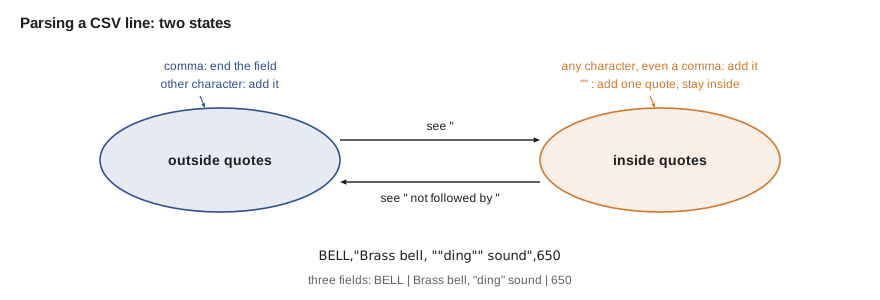
Parsing a CSV line correctly takes a small state machine: walk through the characters, remember whether you are inside quotes, and treat a comma as a separator only when you are not. A quote seen inside quotes either ends the quoted part or, if the next character is also a quote, stands for one literal quote. The parser below handles one line at a time, which covers every field except one that contains a line break; files with line breaks inside quoted fields need a reader that can continue a record onto the next line, which the libraries in the last section of this lesson provide.
import java.util.*;

public class Main {
    static List<String> parseLine(String line) {
        List<String> fields = new ArrayList<>();
        StringBuilder field = new StringBuilder();
        boolean inQuotes = false;
        for (int i = 0; i < line.length(); i++) {
            char c = line.charAt(i);
            if (inQuotes) {
                if (c == '"') {
                    if (i + 1 < line.length() && line.charAt(i + 1) == '"') {
                        field.append('"');
                        i++;                    // skip the second quote of the pair
                    } else {
                        inQuotes = false;       // closing quote
                    }
                } else {
                    field.append(c);
                }
            } else if (c == '"') {
                inQuotes = true;
            } else if (c == ',') {
                fields.add(field.toString());
                field.setLength(0);
            } else {
                field.append(c);
            }
        }
        if (inQuotes) throw new IllegalArgumentException("unclosed quote in: " + line);
        fields.add(field.toString());
        return fields;
    }

    public static void main(String[] args) {
        List<String> lines = List.of(
            "TUBE-700x25,\"Tube, 700x25, Presta valve\",899",
            "BELL,\"Brass bell, \"\"ding\"\" sound\",650",
            "PEDAL-FLAT,,1899",
            "\"CHAIN-11\",\"Kessler\",2499");
        for (String line : lines) {
            List<String> f = parseLine(line);
            System.out.println(f.size() + " fields: " + String.join(" | ", f));
        }
        try {
            parseLine("SADDLE,\"Gel saddle,1299");
        } catch (IllegalArgumentException e) {
            System.out.println("Rejected: " + e.getMessage());
        }
    }
}3 fields: TUBE-700x25 | Tube, 700x25, Presta valve | 899 3 fields: BELL | Brass bell, "ding" sound | 650 3 fields: PEDAL-FLAT | | 1899 3 fields: CHAIN-11 | Kessler | 2499 Rejected: unclosed quote in: SADDLE,"Gel saddle,1299
What this code does
parseLine walks the line one character at a time and treats a comma as a separator only when it is outside quotes, so every line comes out with exactly three fields. Two quotes in a row inside a quoted field become one literal quote, which is how the brass bell's description keeps its quoted word. A quote that is never closed is reported as an error instead of quietly swallowing the rest of the line.
From lines to records
Parsing fields is only half the job. Each line should become a typed record, with each field converted and checked: trimmed, parsed as a number, matched against an enum, rejected with a clear message if wrong. Use the header to find columns by name rather than by position, so a column added to the export later does not shift everything. Keep the line number with every error, because "bad price on line 214" is something Kofi can fix and "NumberFormatException" is not. And decide what one bad line means: stop the whole import, or skip it, report it and carry on. For Odile's reports, skipping and reporting was the right choice.
import java.util.*;

public class Main {
    record Part(String code, String description, String supplier, int quantity, long priceCents) { }

    static List<String> parseLine(String line) {
        List<String> fields = new ArrayList<>();
        StringBuilder field = new StringBuilder();
        boolean inQuotes = false;
        for (int i = 0; i < line.length(); i++) {
            char c = line.charAt(i);
            if (inQuotes) {
                if (c == '"' && i + 1 < line.length() && line.charAt(i + 1) == '"') { field.append('"'); i++; }
                else if (c == '"') inQuotes = false;
                else field.append(c);
            } else if (c == '"') inQuotes = true;
            else if (c == ',') { fields.add(field.toString()); field.setLength(0); }
            else field.append(c);
        }
        fields.add(field.toString());
        return fields;
    }

    public static void main(String[] args) {
        String file = """
            code,supplier,description,quantity,price_cents
            TUBE-700x25,Velotek,"Tube, 700x25, Presta valve",3,899
            BELL,Kessler,"Brass bell, ""ding"" sound",25,650
            CHAIN-11,Kessler,11-speed chain,two,2499
            PAD-ROAD,Velotek,Road brake pads,14,1299
            """;
        List<String> lines = file.lines().toList();
        List<String> header = parseLine(lines.get(0));
        Map<String, Integer> col = new HashMap<>();
        for (int i = 0; i < header.size(); i++) col.put(header.get(i), i);

        List<Part> parts = new ArrayList<>();
        List<String> problems = new ArrayList<>();
        for (int n = 1; n < lines.size(); n++) {
            List<String> f = parseLine(lines.get(n));
            try {
                parts.add(new Part(f.get(col.get("code")).trim(), f.get(col.get("description")).trim(),
                        f.get(col.get("supplier")).trim(), Integer.parseInt(f.get(col.get("quantity")).trim()),
                        Long.parseLong(f.get(col.get("price_cents")).trim())));
            } catch (NumberFormatException e) {
                problems.add("line " + (n + 1) + ": not a number (" + e.getMessage() + ")");
            }
        }
        parts.forEach(p -> System.out.println(p.code() + " | " + p.description() + " | " + p.quantity()));
        problems.forEach(p -> System.out.println("Skipped " + p));
    }
}TUBE-700x25 | Tube, 700x25, Presta valve | 3 BELL | Brass bell, "ding" sound | 25 PAD-ROAD | Road brake pads | 14 Skipped line 4: not a number (For input string: "two")
What this code does
The header line is parsed first and turned into a map from column name to position, so the code finds the description by name even though the export put supplier second. Each data line becomes a Part record, and a line whose quantity is the word two is skipped with a message naming its line number in the file. Three of the four parts load, and the problem list tells Kofi exactly which line to fix.
The text block in that example is how lesson 10 writes multi-line strings; here it stands in for the file so the program needs no disk. In the real tool the lines come from Files.readAllLines or, for a large file, Files.lines in a try-with-resources statement, exactly as lesson 7 showed.
Writing CSV correctly
Writing is the mirror image: quote a field when it contains a comma, a quote or a line break, and double any quotes inside it. Quoting every field is also legal and simpler, but it makes files bigger and some old tools treat quoted numbers as text. A round-trip test, write records out then read them back and compare, is the quickest way to prove a writer and a reader agree; it is exactly the test that caught Leif's comma bug.
import java.util.*;

public class Main {
    record Part(String code, String description, long priceCents) { }

    static String quote(String value) {
        boolean needs = value.contains(",") || value.contains("\"") || value.contains("\n") || value.contains("\r");
        return needs ? "\"" + value.replace("\"", "\"\"") + "\"" : value;
    }

    static String toCsv(Part p) {
        return String.join(",", quote(p.code()), quote(p.description()), Long.toString(p.priceCents()));
    }

    static List<String> parseLine(String line) {
        List<String> fields = new ArrayList<>();
        StringBuilder field = new StringBuilder();
        boolean inQuotes = false;
        for (int i = 0; i < line.length(); i++) {
            char c = line.charAt(i);
            if (inQuotes) {
                if (c == '"' && i + 1 < line.length() && line.charAt(i + 1) == '"') { field.append('"'); i++; }
                else if (c == '"') inQuotes = false;
                else field.append(c);
            } else if (c == '"') inQuotes = true;
            else if (c == ',') { fields.add(field.toString()); field.setLength(0); }
            else field.append(c);
        }
        fields.add(field.toString());
        return fields;
    }

    public static void main(String[] args) {
        List<Part> parts = List.of(
            new Part("TUBE-700x25", "Tube, 700x25, Presta valve", 899),
            new Part("BELL", "Brass bell, \"ding\" sound", 650),
            new Part("CHAIN-11", "11-speed chain", 2499));
        List<String> lines = new ArrayList<>();
        for (Part p : parts) lines.add(toCsv(p));
        lines.forEach(System.out::println);

        List<Part> back = new ArrayList<>();
        for (String line : lines) {
            List<String> f = parseLine(line);
            back.add(new Part(f.get(0), f.get(1), Long.parseLong(f.get(2))));
        }
        System.out.println("Round trip matches: " + back.equals(parts));
    }
}TUBE-700x25,"Tube, 700x25, Presta valve",899 BELL,"Brass bell, ""ding"" sound",650 CHAIN-11,11-speed chain,2499 Round trip matches: true
What this code does
quote wraps a value in quotes only when it contains a comma, a quote or a line break, and doubles any quotes inside, so the chain's description is written plainly and the other two are quoted. Reading the lines back with the parser rebuilds three records, and because records compare all their fields with equals, one comparison proves that every value survived. This round-trip check is the test to write whenever a program both writes and reads a format.
Use a library for real files
The parser in this lesson is short enough to understand completely, which is why it is here. For files from outside sources, use a tested library instead. Apache Commons CSV and OpenCSV are the two most widely used in Java; both handle quoted line breaks, different separators, byte order marks, header mapping and streaming of large files, and both have years of fixes for strange inputs. Jackson, next lesson's JSON library, also has a CSV module. The shop's export code went into the secondgear build as a dependency on Commons CSV, while the hand-written parser stayed as the reference in the test suite.
// build.gradle.kts in the secondgear core module
dependencies {
    implementation("org.apache.commons:commons-csv:1.14.1")   // check the current version
}

// Reading parts.csv with Commons CSV
CSVFormat format = CSVFormat.DEFAULT.builder()
        .setHeader()                  // read column names from the first line
        .setSkipHeaderRecord(true)
        .setTrim(true)
        .get();
try (Reader in = Files.newBufferedReader(Path.of("exports/parts.csv"), StandardCharsets.UTF_8);
     CSVParser parser = CSVParser.parse(in, format)) {
    for (CSVRecord r : parser) {
        String code = r.get("code");
        int quantity = Integer.parseInt(r.get("quantity"));
        System.out.println(code + " " + quantity + " (line " + r.getRecordNumber() + ")");
    }
}
What this code does
The dependency line adds Commons CSV to the build, and the version should be checked against Maven Central before use. The format reads the header from the first line and trims spaces, so fields can be fetched by column name with r.get. The reader and parser are opened in try-with-resources, and getRecordNumber gives the record count for error messages; this listing is not compiled here because the library is not installed.
Kofi's USB stick turned out to contain one more surprise: the till's export used semicolons, because its settings were French. With the parser's separator turned into a parameter, all three files loaded, and the problem report listed four lines for Kofi to fix.
Try it yourself
Keep the empty fields
split drops empty fields at the end of a line. Change the split call so that each line keeps all of its fields, then print the number of fields per line.
The program should print PEDAL-FLAT: 4 fields and SADDLE: 4 fields.
import java.util.*;

public class Main {
    public static void main(String[] args) {
        for (String line : List.of("PEDAL-FLAT,Velotek,,", "SADDLE,,,")) {
            String[] f = line.split(",");
            System.out.println(f[0] + ": " + f.length + " fields");
        }
    }
}
Try it yourself
Quote a field
Complete quote so that it follows the RFC 4180 rules: return the value unchanged unless it contains a comma or a double quote; otherwise wrap it in double quotes and double every quote inside it.
The program should print BELL, "Tube, 700x25" and "Bell, ""ding""", one per line.
import java.util.*;

public class Main {
    static String quote(String value) {
        return value;
    }

    public static void main(String[] args) {
        for (String v : List.of("BELL", "Tube, 700x25", "Bell, \"ding\"")) System.out.println(quote(v));
    }
}
Common mistakes
MistakeParsing CSV with line.split(",").
InsteadUse a parser that understands quotes, such as a small state machine or a library.
MistakeLosing empty trailing fields.
InsteadUse split(",", -1) when you must split, or a real parser.
MistakeFinding columns by position.
InsteadRead the header and look columns up by name.
MistakeLetting one bad line stop the whole import with an unclear exception.
InsteadReport the line number and the problem, and decide whether to skip or stop.
MistakeWriting values without quoting.
InsteadQuote fields that contain commas, quotes or line breaks, and test with a round trip.
Summary and key terms
- CSV stores a table as lines of comma-separated fields, and RFC 4180 describes the common rules: a field containing a comma, a quote or a line break is wrapped in double quotes, and a quote inside it is doubled.
- String.split cannot handle quoted fields and drops trailing empty fields unless given a limit of -1.
- A small state machine that tracks whether it is inside quotes parses lines correctly.
- Turn lines into typed records, look columns up by the header's names, and report bad lines with their line numbers.
- Writing quotes fields that need it, and a round-trip test proves writer and reader agree.
- For files from outside sources, use a tested library such as Apache Commons CSV or OpenCSV, which also handle quoted line breaks, other separators and byte order marks.
- CSV
- Comma-separated values: a plain-text table with one record per line.
- RFC 4180
- The 2005 document describing the common CSV format and its quoting rules.
- Quoted field
- A field wrapped in double quotes so it can contain commas, quotes and line breaks.
- Header row
- The first line of a CSV file, naming the columns.
- State machine
- A program that changes behaviour depending on which of a few states it is in.
- Round-trip test
- A test that writes data out, reads it back and checks it is unchanged.
- Delimiter
- The character that separates fields, usually a comma but sometimes a semicolon or tab.
- Apache Commons CSV
- A widely used Java library for reading and writing CSV files.
Practice problems
Work each problem on paper first, then reveal the answer to check.
Why does split(",") break on Tube, 700x25, Presta valve?
Show answer
It splits at every comma, including the ones inside the quoted field.
How is a double quote written inside a quoted CSV field?
Show answer
As two double quotes.
Why look columns up by header name?
Show answer
So adding or reordering columns in the export does not break the reader.
What does a round-trip test prove?
Show answer
That the writer and the reader agree, because the data survives unchanged.
What can a library handle that the one-line parser here cannot?
Show answer
Line breaks inside quoted fields, among other quirks.
Lesson quiz · 5 questions
Score 60% or more to complete this lesson.
Create a free account to save your progress, take quizzes and earn a certificate.