
JAVA-230 · Lesson 7 of 12 · 22 min
Reading and writing files with NIO
▶ Video coming soon A video version of this lesson is on the way.
After reading week, on Wednesday, November 3, the course turned to the data itself. ShopBook and StockRoom could both export their records, and Odile's reports would come from those exports, so Hamza's next tool had to read and write files. "Files are where programs meet the real world," Ingrid said, "and the real world has missing folders, half-written files and names with spaces in them." Java's modern file API, NIO.2 in the package java.nio.file, has been the standard way since Java 7. Its two central types are Path, which names a file or directory, and Files, a class of static methods that read, write, copy, move, delete and list.
Paths
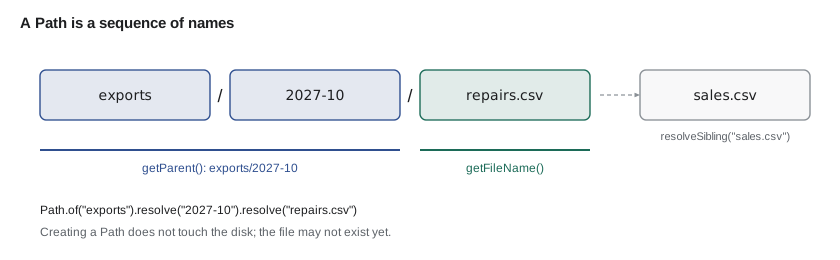
A Path is just a name; creating one does not touch the disk, and the file it names may not exist yet. Path.of("exports", "repairs.csv") builds a path from parts using the right separator for the operating system, a slash on Linux and macOS and a backslash on Windows, so never glue paths together with string concatenation. A path is relative (resolved against the program's working directory) or absolute (starting at the root). resolve adds a child, getParent and getFileName take it apart, and normalize removes . and .. segments.
import java.nio.file.*;

public class Main {
    public static void main(String[] args) {
        Path exports = Path.of("exports");
        Path month = exports.resolve("2027-10");
        Path file = month.resolve("repairs.csv");

        System.out.println("File: " + file);
        System.out.println("Name: " + file.getFileName());
        System.out.println("Parent: " + file.getParent());
        System.out.println("Parts: " + file.getNameCount());
        System.out.println("Absolute? " + file.isAbsolute());
        System.out.println("Normalized: " + Path.of("exports/2027-10/../2027-09/./sales.csv").normalize());
        System.out.println("Sibling: " + file.resolveSibling("sales.csv"));
        System.out.println("Ends with .csv? " + file.getFileName().toString().endsWith(".csv"));
    }
}File: exports/2027-10/repairs.csv Name: repairs.csv Parent: exports/2027-10 Parts: 3 Absolute? false Normalized: exports/2027-09/sales.csv Sibling: exports/2027-10/sales.csv Ends with .csv? true
What this code does
Every line here works only with names, so it runs the same whether or not the files exist. resolve builds the path one level at a time, and getFileName and getParent split it again. normalize removes the . and the .. that steps back out of 2027-10, and resolveSibling swaps the file name while keeping the directory.
Reading and writing whole files
For files small enough to fit in memory comfortably, which includes every export a bike shop produces, the simplest methods are the best. Files.writeString(path, text) and Files.readString(path) handle one string; Files.write(path, lines) and Files.readAllLines(path) handle a list of lines. All of them use UTF-8 by default since Java 11 (readString and writeString) or Java 8 (readAllLines with no charset), but say StandardCharsets.UTF_8 explicitly in shared code so nobody has to remember. Java 18 also made UTF-8 the default for the older APIs. Writing replaces the file unless you pass options such as StandardOpenOption.APPEND.
File methods throw IOException, a checked exception, because the disk can always refuse: the folder may not exist, the file may be locked or the disk may be full. The examples in this lesson declare throws IOException on main to keep them short. They also work in a fresh temporary directory made with Files.createTempDirectory, and print only names and contents, never the temporary path itself, so the output is the same on every run.
import java.io.IOException;
import java.nio.charset.StandardCharsets;
import java.nio.file.*;
import java.util.*;

public class Main {
    public static void main(String[] args) throws IOException {
        Path dir = Files.createTempDirectory("shop");
        Path notes = dir.resolve("notes.txt");

        Files.writeString(notes, "Order tubes from Velotek\n", StandardCharsets.UTF_8);
        Files.writeString(notes, "Café crème for the volunteers\n", StandardCharsets.UTF_8, StandardOpenOption.APPEND);
        String text = Files.readString(notes, StandardCharsets.UTF_8);
        System.out.println("notes.txt: " + text.lines().count() + " lines, " + text.length()
                + " characters, " + Files.size(notes) + " bytes");
        System.out.println("Accents survived? " + text.contains("Caf\u00e9 cr\u00e8me"));

        Path parts = dir.resolve("parts.txt");
        Files.write(parts, List.of("TUBE-700x25 3", "BELL 25", "CHAIN-11 2"), StandardCharsets.UTF_8);
        List<String> lines = Files.readAllLines(parts, StandardCharsets.UTF_8);
        System.out.println("Lines in parts.txt: " + lines.size() + ", first: " + lines.get(0));

        System.out.println("Exists? " + Files.exists(parts) + ", size: " + Files.size(parts) + " bytes");
        try (var entries = Files.list(dir)) {
            System.out.println("Files in the folder: " + entries.map(p -> p.getFileName().toString()).sorted().toList());
        }
    }
}notes.txt: 2 lines, 55 characters, 57 bytes Accents survived? true Lines in parts.txt: 3, first: TUBE-700x25 3 Exists? true, size: 33 bytes Files in the folder: [notes.txt, parts.txt]
What this code does
writeString creates notes.txt and the second call appends to it. The file holds 55 characters but 57 bytes, because é and è each take two bytes in UTF-8, and the accents survive because writing and reading use the same charset; the program checks for them with Unicode escapes rather than printing them, since the console may not use UTF-8. Files.write puts a list of lines into parts.txt with a line ending after each, and readAllLines reads them back as a list. The size of 33 bytes is the 30 characters of the three lines plus three newline characters, and Files.list sits in try-with-resources because it holds the directory open, with its result sorted because it returns entries in no particular order.
Streaming large files, and closing what you open
Some methods return a resource that holds the file open: Files.newBufferedReader, Files.newBufferedWriter, Files.lines (a Stream<String> of lines) and Files.list and Files.walk (streams of paths). Each must be closed when you are done, or the program leaks file handles, and on Windows the file stays locked. The try-with-resources statement closes them automatically, even if an exception is thrown. The previous example's Files.list(...) left its stream open, a small leak in a short program but a real bug in a long-running one; the next example does it properly. Files.lines reads lazily, one line at a time, so it handles a file larger than memory as easily as a small one.
import java.io.*;
import java.nio.charset.StandardCharsets;
import java.nio.file.*;
import java.util.stream.*;

public class Main {
    public static void main(String[] args) throws IOException {
        Path dir = Files.createTempDirectory("shop");
        Path log = dir.resolve("repairs.log");

        try (BufferedWriter out = Files.newBufferedWriter(log, StandardCharsets.UTF_8)) {
            for (int ticket = 501; ticket <= 512; ticket++) {
                String kind = ticket % 3 == 0 ? "FLAT" : (ticket % 3 == 1 ? "BRAKES" : "GEARS");
                out.write(ticket + " " + kind);
                out.newLine();
            }
        }

        long flats;
        try (Stream<String> lines = Files.lines(log, StandardCharsets.UTF_8)) {
            flats = lines.filter(l -> l.endsWith("FLAT")).count();
        }
        System.out.println("Flat repairs in the log: " + flats);

        try (BufferedReader in = Files.newBufferedReader(log, StandardCharsets.UTF_8)) {
            String first = in.readLine();
            String second = in.readLine();
            System.out.println("First two lines: " + first + " | " + second);
        }

        try (Stream<Path> files = Files.list(dir)) {
            System.out.println("Folder holds: " + files.map(p -> p.getFileName().toString()).toList());
        }
    }
}Flat repairs in the log: 4 First two lines: 501 FLAT | 502 BRAKES Folder holds: [repairs.log]
What this code does
The writer, the line stream, the reader and the folder listing are each opened in a try-with-resources header, so each is closed as soon as its block ends. Files.lines reads the log one line at a time, which is why the same code would work on a file of millions of repairs. Four of the twelve ticket numbers divide by three, so four FLAT lines are counted.
Directories, copying and walking a tree
Files.createDirectories(path) makes a directory and any missing parents, and does nothing if it already exists, which makes it the safe choice. Files.copy and Files.move take options such as StandardCopyOption.REPLACE_EXISTING; without it they refuse to overwrite and throw FileAlreadyExistsException. Files.delete throws if the file is missing, while Files.deleteIfExists does not. Files.walk(start) returns every path below a directory, depth first, and like Files.list must be closed. A common pattern for safe saving is to write to a temporary file in the same folder and then move it over the old file with ATOMIC_MOVE, so a reader never sees a half-written file.
import java.io.IOException;
import java.nio.file.*;
import java.util.*;
import java.util.stream.*;

public class Main {
    public static void main(String[] args) throws IOException {
        Path root = Files.createTempDirectory("exports");
        for (String month : List.of("2027-09", "2027-10")) {
            Path dir = Files.createDirectories(root.resolve(month));
            Files.writeString(dir.resolve("repairs.csv"), "ticket,kind\n");
            Files.writeString(dir.resolve("sales.csv"), "code,quantity\n");
        }
        Files.createDirectories(root.resolve("2027-10"));   // already there: no error

        Path archive = Files.createDirectories(root.resolve("archive"));
        Files.copy(root.resolve("2027-09/sales.csv"), archive.resolve("2027-09-sales.csv"));
        try {
            Files.copy(root.resolve("2027-09/sales.csv"), archive.resolve("2027-09-sales.csv"));
        } catch (FileAlreadyExistsException e) {
            System.out.println("Second copy refused: file already exists");
        }

        Path draft = root.resolve("2027-10/report.tmp");
        Files.writeString(draft, "October report\n");
        Files.move(draft, root.resolve("2027-10/report.txt"), StandardCopyOption.ATOMIC_MOVE);

        try (Stream<Path> all = Files.walk(root)) {
            all.filter(Files::isRegularFile)
               .map(p -> root.relativize(p).toString().replace('\\', '/'))
               .sorted()
               .forEach(System.out::println);
        }
        System.out.println("Deleted a missing file? " + Files.deleteIfExists(root.resolve("nothing.txt")));
    }
}Second copy refused: file already exists 2027-09/repairs.csv 2027-09/sales.csv 2027-10/repairs.csv 2027-10/report.txt 2027-10/sales.csv archive/2027-09-sales.csv Deleted a missing file? false
What this code does
createDirectories builds each month folder and quietly accepts one that already exists, while the second copy into the archive is refused because no REPLACE_EXISTING option was given. The report is written as report.tmp and then moved into place in one step, so no reader could see half of it. relativize prints each file relative to the root, which keeps the temporary directory's name out of the output, and deleteIfExists returns false for a file that was never there.
When things go wrong
Most file errors are subclasses of IOException with specific names: NoSuchFileException, FileAlreadyExistsException, AccessDeniedException, DirectoryNotEmptyException. Catch the specific one when you can do something about it, such as telling the user which export is missing, and let the rest propagate. Lambdas inside stream pipelines cannot throw checked exceptions, so Files.readString inside map will not compile; read in a loop, or catch inside the lambda and rethrow as UncheckedIOException, which the standard library itself does from Files.lines when a read fails midway.
import java.io.IOException;
import java.nio.file.*;

public class Main {
    public static void main(String[] args) throws IOException {
        Path dir = Files.createTempDirectory("shop");
        Path missing = dir.resolve("2027-11").resolve("repairs.csv");
        System.out.println("Reading " + dir.relativize(missing));
        String text = Files.readString(missing);
        System.out.println(text);
    }
}
What this code does
The November export has not been made yet, so Files.readString throws NoSuchFileException, a subclass of IOException. Because main declares throws IOException, the exception ends the program and its message is the full path, which here includes the random temporary directory. A real tool would catch NoSuchFileException and tell Odile that the November export is missing.
$ javac Main.java
$ java Main
Reading 2027-11/repairs.csv
Exception in thread "main" java.nio.file.NoSuchFileException: /tmp/shop2632803979405507086/2027-11/repairs.csv
	at java.base/sun.nio.fs.UnixException.translateToIOException(UnixException.java:92)
	at java.base/sun.nio.fs.UnixException.rethrowAsIOException(UnixException.java:106)
	at java.base/sun.nio.fs.UnixException.rethrowAsIOException(UnixException.java:111)
	at java.base/sun.nio.fs.UnixFileSystemProvider.newByteChannel(UnixFileSystemProvider.java:261)
	at java.base/java.nio.file.Files.newByteChannel(Files.java:380)
	at java.base/java.nio.file.Files.newByteChannel(Files.java:432)
	at java.base/java.nio.file.Files.readAllBytes(Files.java:3281)
	at java.base/java.nio.file.Files.readString(Files.java:3359)
	at java.base/java.nio.file.Files.readString(Files.java:3318)
	at Main.main(Main.java:9)
The trace above is the only place in the lesson where a temporary path appears, because the exception message includes it; the directory name is different on every run.
import java.io.*;
import java.nio.file.*;
import java.util.*;

public class Main {
    static List<String> loadMonth(Path root, String month) {
        Path file = root.resolve(month).resolve("repairs.csv");
        try {
            return Files.readAllLines(file);
        } catch (NoSuchFileException e) {
            System.out.println("No export for " + month + " yet");
            return List.of();
        } catch (IOException e) {
            throw new UncheckedIOException("could not read " + month, e);
        }
    }

    public static void main(String[] args) throws IOException {
        Path root = Files.createTempDirectory("exports");
        Files.createDirectories(root.resolve("2027-10"));
        Files.write(root.resolve("2027-10/repairs.csv"), List.of("ticket,kind", "531,FLAT", "532,GEARS"));

        for (String month : List.of("2027-10", "2027-11")) {
            List<String> lines = loadMonth(root, month);
            System.out.println(month + ": " + Math.max(0, lines.size() - 1) + " repairs");
        }
    }
}2027-10: 2 repairs No export for 2027-11 yet 2027-11: 0 repairs
What this code does
loadMonth handles the one error it can do something about, a missing export, by printing a short message and returning an empty list. Any other IOException is wrapped in UncheckedIOException with a message naming the month, so the cause is kept but callers are not forced to catch it. The header line is not a repair, so the count subtracts one, and an empty list counts as zero.
Hamza's first real file program read October's repairs export and printed Odile's table from lesson 4. It also failed politely when November's file was not there, which Ingrid said was the part she would check first in review.
Try it yourself
Count lines in a file
The program writes a small export file. Read it back with Files.lines inside a try-with-resources statement and count the lines that start with TUBE.
The program should print Tube lines: 2.
import java.io.IOException;
import java.nio.file.*;
import java.util.*;
import java.util.stream.*;

public class Main {
    public static void main(String[] args) throws IOException {
        Path dir = Files.createTempDirectory("shop");
        Path file = dir.resolve("parts.txt");
        Files.write(file, List.of("TUBE-700x25 3", "BELL 25", "TUBE-26x2 1", "CHAIN-11 2"));
        long tubes = 0;   // read the file and count
        System.out.println("Tube lines: " + tubes);
    }
}
Try it yourself
Write a summary file
Write the three lines in summary to a file called summary.txt in the temporary folder with Files.write, then read it back with Files.readString and print it.
The program should print the three lines October 2027, Repairs: 31 and Minutes: 1240.
import java.io.IOException;
import java.nio.file.*;
import java.util.*;

public class Main {
    public static void main(String[] args) throws IOException {
        Path dir = Files.createTempDirectory("reports");
        List<String> summary = List.of("October 2027", "Repairs: 31", "Minutes: 1240");
        // write summary to summary.txt, then read it back and print it
        System.out.println("(nothing yet)");
    }
}
Common mistakes
MistakeBuilding paths by joining strings with slashes.
InsteadUse Path.of with separate parts, and resolve to add children.
MistakeLeaving Files.lines, Files.list or a reader open.
InsteadOpen them in a try-with-resources statement so they are always closed.
MistakeRelying on the platform's default character set.
InsteadPass StandardCharsets.UTF_8 explicitly in shared code.
MistakeOverwriting a report in place.
InsteadWrite a temporary file in the same folder, then move it into place with ATOMIC_MOVE.
MistakeCatching IOException and printing nothing useful.
InsteadCatch the specific exception you can handle, such as NoSuchFileException, and let the rest propagate.
Summary and key terms
- NIO.2 in java.nio.file is Java's modern file API.
- A Path names a file or directory without touching the disk; Path.of builds one from parts, and resolve, getParent, getFileName, normalize and relativize manipulate it.
- The Files class reads and writes: readString and writeString for one string, readAllLines and write for lists of lines, and newBufferedReader, newBufferedWriter and lines for large files.
- Use UTF-8 explicitly.
- Methods that return open resources, including Files.lines, list and walk, must be closed, best with try-with-resources. createDirectories, copy, move, delete and deleteIfExists manage files; copy and move refuse to overwrite without REPLACE_EXISTING, and ATOMIC_MOVE gives safe saves.
- File operations throw IOException subclasses such as NoSuchFileException; lambdas cannot throw them, so read in loops or wrap failures in UncheckedIOException.
- NIO.2
- The java.nio.file API for files and directories, added in Java 7.
- Path
- An object that names a file or directory, which may or may not exist.
- Files
- A class of static methods that read, write, copy, move, delete and list files.
- Relative path
- A path resolved against the program's working directory.
- UTF-8
- The standard character encoding that can store every Unicode character.
- try-with-resources
- A try statement that closes the resources declared in its header automatically.
- IOException
- The checked exception thrown when an input or output operation fails.
- NoSuchFileException
- The IOException thrown when a file or directory does not exist.
- UncheckedIOException
- An unchecked exception that wraps an IOException.
- Atomic move
- A move that happens in one step, so no reader sees a partly written file.
Practice problems
Work each problem on paper first, then reveal the answer to check.
Does Path.of("exports", "repairs.csv") create the file?
Show answer
No; a Path is only a name.
Which method reads a whole small file into one string?
Show answer
Files.readString.
Why must Files.lines be used in try-with-resources?
Show answer
It holds the file open until the stream is closed.
What does Files.copy do if the target exists and no option is given?
Show answer
It throws FileAlreadyExistsException.
Which exception tells you an export file is missing?
Show answer
NoSuchFileException.
Lesson quiz · 5 questions
Score 60% or more to complete this lesson.
Create a free account to save your progress, take quizzes and earn a certificate.