
JAVA-220 · Lesson 8 of 12 · 18 min
Code coverage with JaCoCo
▶ Video coming soon A video version of this lesson is on the way.
By Thursday, November 4, the secondgear build had 112 tests, and Leif, visiting for the afternoon, asked a question nobody could answer: "Which parts of the code do the tests never touch?" Hamza guessed the command loop in PartsDesk, but guessing is not knowing. Leif showed him code coverage, a measurement of which lines and branches of the program ran during the tests, and the tool most Java teams use to collect it, JaCoCo. He also warned that coverage is one of the most misused numbers in software, and spent half the session on what it does not tell you.
What coverage measures
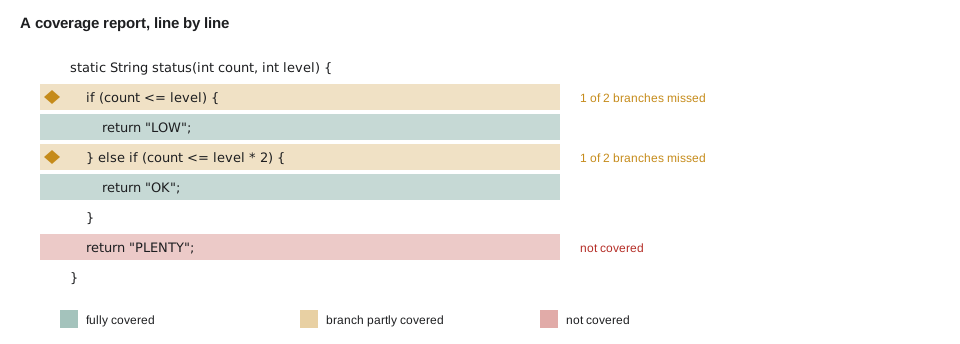
A coverage tool watches the program while the tests run and records which parts of the code were executed. The result is a report, usually per class and per method, showing executed lines in green, unexecuted lines in red and partly executed branches in yellow. Several measures are common, and they answer slightly different questions.
| Measure | Counts | What a gap means |
|---|---|---|
| Line coverage | Source lines with at least one instruction executed | Some lines never ran in any test |
| Branch coverage | Outcomes of each if, switch and loop condition taken | Some decision went only one way in every test |
| Instruction coverage | Java bytecode instructions executed (JaCoCo's basic unit) | The finest-grained view of unexecuted code |
| Method coverage | Methods called at least once | Whole methods no test calls |
| Complexity coverage | Independent paths through each method that were exercised | Combinations of decisions not tried |
Branch coverage is the most useful of these for finding missing tests, because bugs hide in the case nobody tried, and branches are exactly the places where the code chooses between cases. Line coverage is the easiest to understand and the easiest to fool, as the examples below show.
How a coverage tool works
JaCoCo, the Java Code Coverage library, works by instrumentation. When the test JVM starts, a Java agent rewrites each class as it is loaded, inserting tiny probes, markers that record "this point was reached" in an array of booleans. After the tests finish, JaCoCo writes the array to a file, test.exec in Gradle, and the report task maps the probes back to source lines and branches. The probes slow the tests very little, and the program's real class files are never changed.
public class Main {
    static final boolean[] PROBES = new boolean[5];
    static final String[] LINES = {
        "if (count <= level) {",
        "    return \"LOW\";",
        "} else if (count <= level * 2) {",
        "    return \"OK\";",
        "return \"PLENTY\";"
    };

    static String status(int count, int level) {
        PROBES[0] = true;
        if (count <= level) {
            PROBES[1] = true;
            return "LOW";
        }
        PROBES[2] = true;
        if (count <= level * 2) {
            PROBES[3] = true;
            return "OK";
        }
        PROBES[4] = true;
        return "PLENTY";
    }

    public static void main(String[] args) {
        // The tests: one low part and one comfortable part, but nothing with plenty.
        boolean ok = status(15, 40).equals("LOW") && status(60, 40).equals("OK");
        System.out.println("Tests pass: " + ok);
        int covered = 0;
        for (int i = 0; i < PROBES.length; i++) {
            System.out.println((PROBES[i] ? "  covered   " : "  MISSED    ") + LINES[i]);
            if (PROBES[i]) covered++;
        }
        System.out.println(covered + " of " + PROBES.length + " probes covered");
    }
}Tests pass: true
covered if (count <= level) {
covered return "LOW";
covered } else if (count <= level * 2) {
covered return "OK";
MISSED return "PLENTY";
4 of 5 probes coveredWhat this code does
Each probe is a boolean set to true when execution passes a point, the same idea JaCoCo inserts automatically into the bytecode. The two tests reach the low and the comfortable branches but never a part with plenty of stock, so the last probe stays false. The report shows exactly which line no test reached, which is the hint for the next test to write.
JaCoCo in the build
Gradle includes a jacoco plugin. Applying it attaches the JaCoCo agent to the test task automatically and adds a jacocoTestReport task that writes HTML and XML reports. The current JaCoCo release is 0.8.16, from October 2026, and the toolVersion setting pins it. A verification task can also fail the build when coverage falls below a chosen minimum, written as a fraction: 0.80 means 80 in 100.
plugins {
    java
    jacoco
}

jacoco {
    toolVersion = "0.8.16"
}

tasks.test {
    useJUnitPlatform()
    finalizedBy(tasks.jacocoTestReport)
}

tasks.jacocoTestReport {
    dependsOn(tasks.test)
    reports {
        xml.required = true
        html.required = true
    }
}

tasks.jacocoTestCoverageVerification {
    violationRules {
        rule {
            limit {
                counter = "BRANCH"
                minimum = "0.70".toBigDecimal()
            }
        }
    }
}

tasks.check {
    dependsOn(tasks.jacocoTestCoverageVerification)
}
What this code does
The jacoco plugin attaches the coverage agent to the test task, and finalizedBy makes the report run after every test run. The report writes HTML for people and XML for tools such as CI dashboards. The verification rule fails gradle check if fewer than 70 in 100 of the branches were covered, a floor the team chose for core, not a target.
$ ./gradlew :partsdesk:test :partsdesk:jacocoTestReportBUILD SUCCESSFUL in 4s partsdesk/build/reports/jacoco/test/html/index.html Element Missed Instructions Cov. Missed Branches Cov. org.secondgear.parts.cli 412 of 498 17% 61 of 70 12% org.secondgear.parts 21 of 640 96% 3 of 58 94% org.secondgear.parts.io 38 of 305 87% 6 of 34 82% Total 471 of 1,443 67% 70 of 162 56%
What this code does
The HTML report's summary table lists each package with its missed instructions and branches, and the percentages are JaCoCo's own format. PartsDesk's command loop, in the cli package, is barely covered, which matches Hamza's guess, while the stock rules are almost fully covered. Clicking a class in the report shows its source with each line coloured green, yellow or red.
100 lines covered, bug not found
Coverage measures what ran, not what was checked. A test that calls a method and makes no assertion covers every line it reaches and finds nothing. And a test with full line coverage can still miss a branch outcome, or the right boundary, because covering a line once is not the same as testing it well.
public class Main {
    // Requirement: a part is low when count is AT OR BELOW its level.
    static boolean isLow(int count, int level) {
        return count < level; // the bug: should be <=
    }

    static int linesRun = 0;

    public static void main(String[] args) {
        // Test 1 has no assertion: it runs the code and checks nothing.
        isLow(15, 40);
        linesRun++;
        System.out.println("Test 1 (no assertion): covers isLow, finds nothing");

        // Test 2 checks the typical case only.
        boolean ok = isLow(15, 40) && !isLow(60, 40);
        System.out.println("Test 2 (typical cases): " + (ok ? "PASS" : "FAIL"));

        // Test 3 checks the boundary from the requirement.
        boolean onTheLevel = isLow(40, 40);
        System.out.println("Test 3 (exactly on the level): " + (onTheLevel ? "PASS" : "FAIL, 40 of 40 should be low"));
        System.out.println("Line coverage was already complete after test 1.");
    }
}Test 1 (no assertion): covers isLow, finds nothing Test 2 (typical cases): PASS Test 3 (exactly on the level): FAIL, 40 of 40 should be low Line coverage was already complete after test 1.
What this code does
Test 1 calls isLow without checking anything, so a coverage tool would mark the method fully covered while nothing has been verified. Test 2 checks real values and passes, yet the bug survives because neither value sits on the boundary. Only test 3, written from the requirement's "at or below", catches the wrong operator, which no coverage number could have revealed.
Leif's rule of thumb: low coverage is a useful warning, because it proves some code is untested, but high coverage proves very little, because the tests might check nothing or the wrong thing. Use coverage to find blind spots, then write real tests for them. Never write tests just to raise the number.
| Use coverage to | Do not use coverage to |
|---|---|
| Find code that no test runs at all | Measure how good the tests are |
| Spot branches that only ever go one way | Set a target that developers chase with assertion-free tests |
| Check that new code arrives with tests, in review | Compare people or teams |
| Set a modest floor that stops coverage from dropping | Claim the code has no bugs |
Mutation testing
If coverage measures what ran, mutation testing measures what the tests can detect. A mutation testing tool makes many small changes to the code, called mutants: it flips <= to <, replaces + with -, returns true instead of a computed boolean, removes a method call. It runs the tests against each mutant. If some test fails, the mutant is killed; if all tests still pass, the mutant survived, which means the tests would not notice that bug. For Java, the standard tool is PIT (pitest), which has Maven and Gradle plugins.
import java.util.*;
import java.util.function.*;

public class Main {
    record Mutant(String change, BiPredicate<Integer, Integer> isLow) { }

    static boolean weakTests(BiPredicate<Integer, Integer> isLow) {
        return isLow.test(15, 40) && !isLow.test(60, 40);
    }

    static boolean strongTests(BiPredicate<Integer, Integer> isLow) {
        return weakTests(isLow) && isLow.test(40, 40) && !isLow.test(41, 40);
    }

    public static void main(String[] args) {
        List<Mutant> mutants = List.of(
            new Mutant("<= becomes <", (c, l) -> c < l),
            new Mutant("<= becomes >=", (c, l) -> c >= l),
            new Mutant("<= becomes <= level + 1", (c, l) -> c <= l + 1),
            new Mutant("always true", (c, l) -> true));
        BiPredicate<Integer, Integer> original = (c, l) -> c <= l;
        System.out.println("Original passes weak: " + weakTests(original) + ", strong: " + strongTests(original));
        for (Mutant m : mutants) {
            String weak = weakTests(m.isLow()) ? "survived" : "killed";
            String strong = strongTests(m.isLow()) ? "survived" : "killed";
            System.out.printf("%-26s weak tests: %-9s strong tests: %s%n", m.change(), weak, strong);
        }
    }
}Original passes weak: true, strong: true <= becomes < weak tests: survived strong tests: killed <= becomes >= weak tests: killed strong tests: killed <= becomes <= level + 1 weak tests: survived strong tests: killed always true weak tests: killed strong tests: killed
What this code does
Each mutant is a slightly broken version of isLow, and a set of tests kills a mutant when at least one of its checks fails. The weak tests, which check only typical values, let two of the four mutants survive, including the off-by-one bug from the previous example. Adding the two boundary checks, 40 and 41 against a level of 40, kills every mutant, which is the evidence that the stronger tests would catch those bugs.
Mutation testing is slower than ordinary testing, because it runs the tests many times, so teams usually run it on one module or overnight. It is the best answer to the question coverage cannot answer: would my tests notice if this line were wrong?
Try it yourself
Find the missed branch
The probes show which outcomes of discount ran. Add one more call in the tests section so that every probe is covered: a youth member who rents for fewer than 7 days. Check its result like the others.
The program should print 3 of 3 probes covered and All tests pass.
public class Main {
    static final boolean[] PROBES = new boolean[3];

    // Youth members get 10 in 100 off; anyone renting 7 days or more gets 20 in 100 off; the larger discount wins.
    static int discountPer100(boolean youth, int days) {
        if (days >= 7) { PROBES[0] = true; return 20; }
        if (youth) { PROBES[1] = true; return 10; }
        PROBES[2] = true;
        return 0;
    }

    public static void main(String[] args) {
        boolean ok = true;
        ok &= discountPer100(false, 7) == 20;
        ok &= discountPer100(false, 2) == 0;
        int covered = 0;
        for (boolean p : PROBES) if (p) covered++;
        System.out.println(covered + " of " + PROBES.length + " probes covered");
        System.out.println(ok ? "All tests pass" : "A test failed");
    }
}
Try it yourself
Kill the surviving mutant
The tests for isLow let the mutant count < level survive. Add one check to tests that kills it without breaking the original.
The program should print original: pass and mutant: killed.
import java.util.function.*;

public class Main {
    static boolean tests(BiPredicate<Integer, Integer> isLow) {
        return isLow.test(15, 40) && !isLow.test(60, 40);
    }

    public static void main(String[] args) {
        BiPredicate<Integer, Integer> original = (c, l) -> c <= l;
        BiPredicate<Integer, Integer> mutant = (c, l) -> c < l;
        System.out.println("original: " + (tests(original) ? "pass" : "FAIL"));
        System.out.println("mutant: " + (tests(mutant) ? "survived" : "killed"));
    }
}
Common mistakes
MistakeTreating high coverage as proof that code is well tested.
InsteadCoverage shows what ran, not what was checked; read the tests, and consider mutation testing.
MistakeWriting tests with no assertions to raise the coverage number.
InsteadEvery test must check results; use coverage only to find untested code.
MistakeLooking only at line coverage.
InsteadCheck branch coverage too: a line can run while one branch outcome is never tried.
MistakeSetting a very high coverage target for every module.
InsteadSet a modest floor that stops coverage dropping, and judge tests in review.
MistakeNot pinning the JaCoCo version.
InsteadSet toolVersion so reports are the same on every machine and in CI.
Summary and key terms
- Code coverage measures which parts of the program ran during the tests: lines, branches, instructions, methods and paths.
- JaCoCo collects it by instrumenting classes as they load, inserting probes whose results become HTML and XML reports; Gradle's jacoco plugin attaches the agent to the test task and adds jacocoTestReport and a verification task with minimums written as fractions.
- Branch coverage is the best guide to missing tests.
- Coverage shows what ran, not what was checked: assertion-free tests reach full coverage and find nothing, and boundary bugs survive tests that only use typical values.
- Coverage is good for finding blind spots and setting a floor, not for measuring test quality.
- Mutation testing, with tools such as PIT, makes small changes to the code and checks whether the tests kill them, measuring what the tests can actually detect.
- Code coverage
- A measurement of which parts of the code ran during the tests.
- Line coverage
- The share of source lines that ran at least once.
- Branch coverage
- The share of decision outcomes, such as both sides of an if, that were taken.
- JaCoCo
- The most widely used Java code coverage library.
- Instrumentation
- Rewriting classes as they load to add probes that record execution.
- Probe
- A marker inserted by a coverage tool that records that a point in the code was reached.
- Coverage floor
- A minimum coverage the build enforces so that coverage does not fall.
- Mutation testing
- Testing the tests by making small changes to the code and checking whether a test fails.
- Mutant
- A copy of the code with one small deliberate change.
- PIT
- The standard mutation testing tool for Java, also called pitest.
Practice problems
Work each problem on paper first, then reveal the answer to check.
What does a red line mean in a JaCoCo report?
Show answer
No test executed that line.
Why is branch coverage more useful than line coverage for finding missing tests?
Show answer
A line can run while one outcome of its decision is never tried.
Can a test with no assertions raise coverage?
Show answer
Yes, which is why coverage cannot measure test quality.
What does it mean when a mutant survives?
Show answer
No test failed, so the tests would not notice that kind of bug.
How is a minimum of 70 in 100 written in a JaCoCo rule?
Show answer
As the fraction 0.70.
Lesson quiz · 5 questions
Score 60% or more to complete this lesson.
Create a free account to save your progress, take quizzes and earn a certificate.