
JAVA-220 · Lesson 11 of 12 · 22 min
Code review and continuous integration
▶ Video coming soon A video version of this lesson is on the way.
Leif came back on Thursday, December 2, after a week off for midterm projects, to set up the last two habits of the course. Until now, Hamza had pushed his commits straight to the main branch of the secondgear repository on GitHub, and he ran the tests when he remembered. "From today, nothing reaches main unless two things have happened," Leif said. "A machine has built it and run every test, and a person other than the author has read it." The first is continuous integration; the second is code review. Together they are how professional teams keep a shared codebase healthy.
Why review code
In a code review, someone other than the author reads a change before it is merged. Reviews find bugs, but studies and experience suggest that is not even their main value. They spread knowledge, so more than one person understands every part of the code; they keep the design and style consistent; and they catch the problems tests cannot see, such as a confusing name, a missing test, a secret pasted into a file or a change that solves the wrong problem. Ingrid has reviewed and been reviewed for twelve years: "Every one of my best habits came from a reviewer's comment."
Pull requests
On GitHub, and similar services such as GitLab and Bitbucket, a review happens through a pull request, often shortened to PR (GitLab calls it a merge request). The author works on a branch, pushes it and opens a pull request asking to merge it into main. The pull request shows the diff, every line added and removed, and reviewers comment on specific lines, ask questions and finally approve or request changes. The CI results appear on the same page.
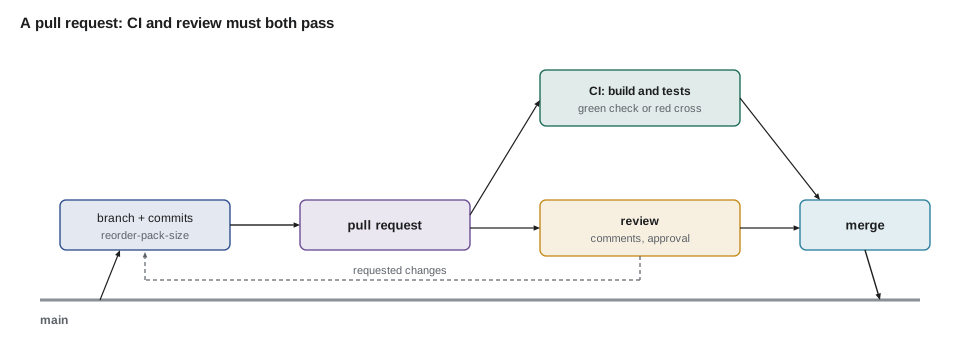
| Step | Who | What happens |
|---|---|---|
| Branch | Author | git switch -c reorder-pack-size creates a branch for one change |
| Commit and push | Author | Small commits with clear messages, pushed to GitHub |
| Open the pull request | Author | A title, a description of what and why, and how it was tested |
| CI runs | GitHub Actions | Build, tests and checks run on every push to the branch |
| Review | Reviewer | Comments, questions, approval or a request for changes |
| Respond | Author | Further commits that answer each comment |
| Merge | Author or reviewer | Allowed only when CI is green and the review is approved |
Small changes review better
Reviewers find far more problems in small changes than in large ones. A 40-line pull request gets careful, line-by-line attention; a 2,000-line one gets skimmed and approved. Many teams aim for pull requests that can be reviewed in under half an hour, and split larger work into a series: a refactoring first, then the new feature on top, each with its own tests. Leif's rule of thumb for the secondgear repository is a few hundred changed lines at most.
import java.util.*;

public class Main {
    record FileChange(String path, int added, int removed) {
        int changed() { return added + removed; }
    }

    static String verdict(List<FileChange> files) {
        int total = files.stream().mapToInt(FileChange::changed).sum();
        boolean testsTouched = files.stream().anyMatch(f -> f.path().contains("/src/test/"));
        boolean mainTouched = files.stream().anyMatch(f -> f.path().contains("/src/main/"));
        List<String> notes = new ArrayList<>();
        if (total > 400) notes.add("large: consider splitting");
        if (mainTouched && !testsTouched) notes.add("main code changed with no test changes");
        return total + " lines changed in " + files.size() + " files" + (notes.isEmpty() ? ", looks reviewable" : ": " + String.join("; ", notes));
    }

    public static void main(String[] args) {
        List<FileChange> good = List.of(
            new FileChange("partsdesk/src/main/java/org/secondgear/parts/Reorder.java", 24, 6),
            new FileChange("partsdesk/src/test/java/org/secondgear/parts/ReorderTest.java", 41, 0));
        List<FileChange> risky = List.of(
            new FileChange("partsdesk/src/main/java/org/secondgear/parts/PartsDesk.java", 380, 210),
            new FileChange("core/src/main/java/org/secondgear/core/Money.java", 12, 4));
        System.out.println("PR 41: " + verdict(good));
        System.out.println("PR 42: " + verdict(risky));
    }
}PR 41: 71 lines changed in 2 files, looks reviewable PR 42: 606 lines changed in 2 files: large: consider splitting; main code changed with no test changes
What this code does
Each FileChange records how many lines a pull request added and removed in one file, as GitHub's diff summary shows. The verdict adds up the changed lines and flags two common problems: a change too large to review well, and main code changed without any change to tests. PR 41 is small and comes with its tests, while PR 42 is both large and untested, which is the pull request a reviewer should send back first.
What reviewers look for
A good review reads the change against a few questions. It is not a hunt for style nits; formatters and static analysis, from JAVA-120, handle those automatically, so humans can concentrate on what machines cannot judge.
- Correctness: does it do what the description says, including the edge cases?
- Tests: is the new behaviour tested, and would the tests fail if the code were wrong?
- Design: is the code in the right place, with clear names and no duplication?
- Readability: will someone understand this in a year without asking the author?
- Safety: no secrets, no personal data in logs, no disabled tests without a reason.
- Scope: does the change do one thing, as described, and nothing extra?
Giving and receiving feedback
Reviews are conversations between people, and the tone matters as much as the content. Good reviewers comment on the code, not the author, explain why, and separate must-fix problems from suggestions, often by prefixing optional comments with nit: or suggestion:. They ask questions when they are unsure rather than asserting, and they say what is good as well as what needs work. Good authors explain their reasoning in the description, answer every comment, do not take comments personally, and say thank you.
| Instead of | Try |
|---|---|
| "This is wrong." | "This returns 39 for a part that isn't low; should it return 0 there?" |
| "Why didn't you use an enum?" | "Would an enum for the bikes make a misspelt name impossible?" |
| "Rename this." | "nit: maybe chargedDays instead of cd, so it matches Odile's sheet?" |
| Silent approval of a big change | "I read the pricing parts carefully but only skimmed the UI; could Ingrid look at that?" |
Continuous integration
Continuous integration, or CI, means that every change is merged often, at least daily, and that every push is automatically built and tested on a clean machine. The clean machine matters: it proves the build does not depend on something that happens to be on the author's laptop, such as a file not committed to Git or a different JDK. A CI pipeline is a series of stages, such as compile, test, analysis and coverage, and it stops at the first failure, reporting which stage broke.
import java.util.*;
import java.util.function.*;

public class Main {
    record Stage(String name, Supplier<String> run) { }

    static void pipeline(String label, List<Stage> stages) {
        System.out.println(label);
        for (Stage s : stages) {
            String problem = s.run().get();
            if (problem == null) {
                System.out.println("  ok      " + s.name());
            } else {
                System.out.println("  FAILED  " + s.name() + ": " + problem);
                System.out.println("  result: red, later stages skipped");
                return;
            }
        }
        System.out.println("  result: green");
    }

    public static void main(String[] args) {
        int coveredBranches = 41, branches = 58;
        List<Stage> good = List.of(
            new Stage("compile", () -> null),
            new Stage("unit tests", () -> null),
            new Stage("coverage floor 0.70", () -> coveredBranches * 100 >= branches * 70 ? null : "branch coverage too low"),
            new Stage("package", () -> null));
        List<Stage> bad = List.of(
            new Stage("compile", () -> null),
            new Stage("unit tests", () -> "ReorderTest.packSizeRoundsUp failed"),
            new Stage("coverage floor 0.70", () -> null),
            new Stage("package", () -> null));
        pipeline("Push 1 (reorder-pack-size branch):", good);
        pipeline("Push 2 (reorder-pack-size branch):", bad);
    }
}Push 1 (reorder-pack-size branch): ok compile ok unit tests ok coverage floor 0.70 ok package result: green Push 2 (reorder-pack-size branch): ok compile FAILED unit tests: ReorderTest.packSizeRoundsUp failed result: red, later stages skipped
What this code does
Each stage returns null when it passes or a message when it fails, and the pipeline runs them in order. The first push passes every stage, including a coverage floor that 41 of 58 branches meets. The second push fails at the unit tests, so the coverage and package stages never run and the result is red, exactly how a CI server reports a broken build.
GitHub Actions for a Gradle build
The secondgear repository is on GitHub, so Leif used GitHub Actions, GitHub's built-in CI service. A workflow is a YAML file under .github/workflows that says when to run (on pushes and pull requests), on what kind of machine, and which steps to perform. The official actions check out the code, install a JDK and set up Gradle with caching, and then the workflow runs the Gradle wrapper exactly as a developer would.
name: build

on:
  push:
    branches: [ main ]
  pull_request:

permissions:
  contents: read

jobs:
  build:
    runs-on: ubuntu-latest
    steps:
      - uses: actions/checkout@v6

      - uses: actions/setup-java@v5
        with:
          distribution: temurin
          java-version: '25'

      - uses: gradle/actions/setup-gradle@v6

      - name: Build, test and check coverage
        run: ./gradlew build

      - name: Keep the test and coverage reports
        if: always()
        uses: actions/upload-artifact@v4
        with:
          name: reports
          path: '**/build/reports/'
What this code does
The workflow runs on every push to main and on every pull request, on a fresh Ubuntu machine hosted by GitHub. It checks out the repository, installs Temurin JDK 25, sets up Gradle with its cache and runs ./gradlew build, which compiles, runs all the tests and the coverage check from lesson 8, and builds the JARs. The last step uploads the HTML test and coverage reports even when the build fails, so a red build can be investigated from the browser.
The permissions block gives the workflow read-only access to the repository, which is a good default: a build has no reason to push code or change settings. Actions are referred to here by their major version tags; security-conscious teams pin each action to a full commit hash instead, so that a compromised tag cannot change what runs, and let Dependabot propose updates. The JDK version in the workflow matches the toolchain in the build file, so CI tests with the same Java as the developers.
Checks on PR 41: Round reorder quantities up to the supplier's pack size✓ build / build (pull_request) Successful in 1m 42s ✓ Review: Ingrid Vallancourt approved these changes All checks have passed. This branch has no conflicts with the base branch. [ Merge pull request ]
What this code does
The pull request page lists the workflow's job with a green check and its run time, and the review status beside it. Clicking Details shows the full log, with each step's output. Because the repository requires both, the merge button stays grey until the build passes and Ingrid has approved.
Protecting the main branch
A workflow only reports; it does not stop anyone. To make the rules binding, the repository's owner turns on branch protection for main, or a ruleset, GitHub's newer form of the same feature. Leif set three rules for secondgear: changes reach main only through pull requests, the build check must pass, and at least one approving review is required, from someone other than the author.
import java.util.*;

public class Main {
    record PullRequest(int number, String author, boolean ciGreen, Set<String> approvals) { }

    static String canMerge(PullRequest pr) {
        List<String> blockers = new ArrayList<>();
        if (!pr.ciGreen()) blockers.add("required check 'build' has not passed");
        Set<String> others = new TreeSet<>(pr.approvals());
        others.remove(pr.author());
        if (others.isEmpty()) blockers.add("needs 1 approving review from someone other than the author");
        return "PR " + pr.number() + ": " + (blockers.isEmpty() ? "can be merged" : "blocked, " + String.join("; ", blockers));
    }

    public static void main(String[] args) {
        System.out.println(canMerge(new PullRequest(41, "hamza", true, Set.of("ingrid"))));
        System.out.println(canMerge(new PullRequest(42, "hamza", false, Set.of("ingrid"))));
        System.out.println(canMerge(new PullRequest(43, "hamza", true, Set.of("hamza"))));
    }
}PR 41: can be merged PR 42: blocked, required check 'build' has not passed PR 43: blocked, needs 1 approving review from someone other than the author
What this code does
canMerge applies the two rules Leif set: the build check must be green, and at least one approval must come from someone other than the author. PR 41 meets both, PR 42 has an approval but a failing build, and PR 43 was approved only by its own author, which does not count. GitHub enforces the same rules on the merge button, so even the repository's owner cannot slip past them by accident.
Two more habits keep CI useful. Keep the build fast, ideally a few minutes, so nobody is tempted to skip it; slow integration tests can run in a separate job. And fix a red main branch immediately, before anything else: a build that stays red trains everyone to ignore it, and then it protects nothing.
Try it yourself
Is this pull request reviewable?
Complete reviewable so it returns true only when the total of added and removed lines across all files is at most 400 and at least one file path contains /src/test/.
The program should print true, false and false.
import java.util.*;

public class Main {
    record FileChange(String path, int added, int removed) { }

    static boolean reviewable(List<FileChange> files) {
        return true;
    }

    public static void main(String[] args) {
        System.out.println(reviewable(List.of(new FileChange("core/src/main/java/Money.java", 20, 5),
                new FileChange("core/src/test/java/MoneyTest.java", 30, 0))));
        System.out.println(reviewable(List.of(new FileChange("core/src/main/java/Money.java", 20, 5))));
        System.out.println(reviewable(List.of(new FileChange("partsdesk/src/main/java/PartsDesk.java", 390, 200),
                new FileChange("partsdesk/src/test/java/PartsDeskTest.java", 15, 0))));
    }
}
Try it yourself
Stop at the first failure
runStages should run the stages in order and stop at the first one that returns false, printing FAILED and its name and then red. If every stage passes, it prints green. At the moment it runs every stage.
The program should print ok compile, FAILED unit tests and red, and must not print ok package.
import java.util.*;
import java.util.function.*;

public class Main {
    static void runStages(LinkedHashMap<String, BooleanSupplier> stages) {
        for (var s : stages.entrySet()) {
            boolean ok = s.getValue().getAsBoolean();
            System.out.println((ok ? "ok " : "FAILED ") + s.getKey());
        }
        System.out.println("green");
    }

    public static void main(String[] args) {
        LinkedHashMap<String, BooleanSupplier> stages = new LinkedHashMap<>();
        stages.put("compile", () -> true);
        stages.put("unit tests", () -> false);
        stages.put("package", () -> true);
        runStages(stages);
    }
}
Common mistakes
MistakePushing straight to main.
InsteadWork on a branch and merge through a pull request that CI and a reviewer have passed.
MistakeHuge pull requests that mix refactoring and features.
InsteadKeep pull requests small and focused, and split large work into a series.
MistakeReview comments aimed at the author or with no reason.
InsteadComment on the code, explain why, and mark optional suggestions as such.
MistakeRelying on everyone remembering to run the tests.
InsteadRun the build on every push with CI, and require it in branch protection.
MistakeLeaving the main branch red.
InsteadFix a broken main build immediately, before any other work.
Summary and key terms
- Code review means someone other than the author reads every change before it is merged, finding bugs and design problems, spreading knowledge and keeping the code consistent.
- On GitHub, reviews happen in pull requests from branches, showing the diff, comments, approvals and CI results.
- Small, focused pull requests review far better than large ones.
- Reviewers check correctness, tests, design, readability, safety and scope, and leave style to formatters; good feedback is about the code, explains why and separates must-fix points from suggestions.
- Continuous integration builds and tests every push on a clean machine in a pipeline that stops at the first failure.
- A GitHub Actions workflow checks out the code, installs the JDK, sets up Gradle and runs ./gradlew build.
- Branch protection or rulesets make a green build and an approving review from someone else required before merging, and a red main branch is fixed at once.
- Code review
- Reading a change by someone other than its author before it is merged.
- Pull request
- A request on GitHub to merge a branch, with its diff, discussion, review and CI results.
- Branch
- A separate line of commits in Git where one change is developed.
- Diff
- The lines added and removed by a change.
- Continuous integration (CI)
- Merging often and automatically building and testing every change on a clean machine.
- Pipeline
- The sequence of CI stages, such as compile, test and package, that stops at the first failure.
- GitHub Actions
- GitHub's built-in CI service, configured by workflow files.
- Workflow
- A YAML file under .github/workflows that defines when and how CI runs.
- Branch protection
- Repository rules, such as required checks and reviews, that must be met before merging.
- Required check
- A CI job that must pass before a pull request can be merged.
Practice problems
Work each problem on paper first, then reveal the answer to check.
Why should CI build on a clean machine?
Show answer
To prove the build does not depend on anything only on the author's computer.
Why are small pull requests better?
Show answer
Reviewers read them carefully and find more problems.
What does a CI pipeline do when the test stage fails?
Show answer
It stops, skips the later stages and reports the build as red.
Which three steps does the secondgear workflow use before running Gradle?
Show answer
Check out the code, install the JDK and set up Gradle.
Does an approval from the author count under Leif's rules?
Show answer
No; the approving review must come from someone else.
Lesson quiz · 5 questions
Score 60% or more to complete this lesson.
Create a free account to save your progress, take quizzes and earn a certificate.