
JAVA-102 · Lesson 8 of 12 · 23 min
Exceptions and error handling
▶ Video coming soon A video version of this lesson is on the way.
Until now, the booking classes reported problems by returning messages such as "Cannot confirm: READY", which the caller was free to ignore. JAVA-101 lesson 10 showed exceptions from the receiving side: a NumberFormatException when text was not a number, a stack trace when an index was out of range. The plan for Wednesday, March 10, 2027 is the other side: designing classes that throw exceptions when asked to do something impossible, choosing which exceptions to use, writing custom ones, and handling them in the right place without hiding problems.
Why exceptions instead of messages?
A returned message or error code has three weaknesses. The caller can ignore it, and the program carries on in a bad state. It takes over the return value, so a method that should return a booking has to return a message instead. And it must be passed up by hand through every method between the problem and the code that can deal with it. An exception fixes all three. Throwing one stops the method immediately, it cannot be ignored silently, and it travels up the chain of calls by itself until some code catches it.
public class Main {
    public static void main(String[] args) {
        Booking b = new Booking("Ana Ruiz");
        b.confirm();
        b.markReady();
        System.out.println("Status: " + b.getStatus());
        try {
            b.confirm();
        } catch (IllegalStateException e) {
            System.out.println("Refused: " + e.getMessage());
        }
        System.out.println("Status is still " + b.getStatus());
    }
}

class Booking {
    private final String customer;
    private String status = "REQUESTED";

    Booking(String customer) {
        if (customer == null || customer.isBlank()) {
            throw new IllegalArgumentException("customer is required");
        }
        this.customer = customer;
    }

    String getStatus() { return status; }

    void confirm() {
        if (!status.equals("REQUESTED")) {
            throw new IllegalStateException("cannot confirm a booking that is " + status);
        }
        status = "CONFIRMED";
    }

    void markReady() {
        if (!status.equals("CONFIRMED")) {
            throw new IllegalStateException("cannot mark ready a booking that is " + status);
        }
        status = "READY";
    }
}Status: READY Refused: cannot confirm a booking that is READY Status is still READY
What this code does
confirm and markReady now throw IllegalStateException when the booking is in the wrong state, so the caller cannot carry on as if nothing happened. main catches the exception, prints its message and continues, and the status is unchanged because the throw happened before the assignment. The constructor throws IllegalArgumentException for a missing customer.
The two exceptions used here are the most common ones to throw from your own classes. IllegalArgumentException means a caller passed a bad value. IllegalStateException means the object is not in a state where the request makes sense. Java's library also has NullPointerException for a null that is not allowed, UnsupportedOperationException for an operation a class does not support and IndexOutOfBoundsException for a bad index. Reusing these well-known exceptions tells other programmers exactly what went wrong.
The exception hierarchy
Exceptions are objects, and their classes form an inheritance tree. At the top is Throwable. Below it, Error covers serious problems in the JVM itself, such as running out of memory, which programs should not try to catch. Exception covers problems a program may reasonably handle. Its subclass RuntimeException and everything below it are unchecked exceptions; every other Exception is checked.
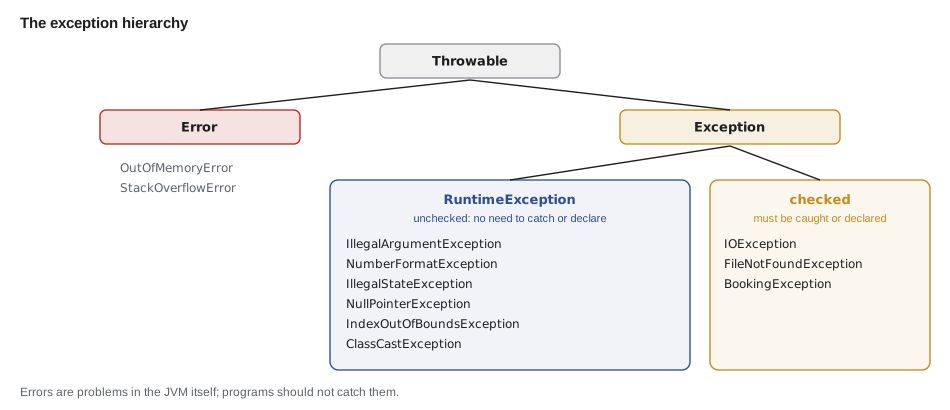
Checked and unchecked exceptions
The difference is a rule javac enforces. A method that may throw a checked exception must either catch it or declare it in its signature with throws, and every caller then faces the same choice. Checked exceptions are meant for problems outside the program's control that a careful caller should plan for, such as a missing file or a network failure. Unchecked exceptions need no declaration. They are meant for programming mistakes, such as a null where an object is required or a booking confirmed twice, which the right fix is to correct rather than to catch.
import java.io.FileReader;

public class Main {
    public static void main(String[] args) {
        FileReader reader = new FileReader("bookings.csv");
        System.out.println("opened");
    }
}
What this code does
The FileReader constructor declares that it may throw FileNotFoundException, a checked exception. main neither catches it nor declares it with throws, so javac refuses to compile. The sections below show both fixes: a try-catch, or adding throws to the method.
$ javac Main.java
Main.java:5: error: unreported exception FileNotFoundException; must be caught or declared to be thrown
        FileReader reader = new FileReader("bookings.csv");
                            ^
1 error| Checked | Unchecked | |
|---|---|---|
| Superclass | Exception, but not RuntimeException | RuntimeException |
| javac requires | catch or declare with throws | nothing |
| Typical cause | Something outside the program: files, network | A bug or misuse: bad argument, wrong state, null |
| Examples | IOException, FileNotFoundException | IllegalArgumentException, NullPointerException |
| Usual response | Handle it: tell the person, try again, use a default | Fix the code that caused it |
Java programmers debate how much to use checked exceptions, and many modern libraries prefer unchecked ones. A reasonable rule for this course: throw unchecked exceptions for misuse of your classes, and let checked exceptions from the library, such as IOException, reach a place that can actually do something about them.
try, catch and finally
A try block holds code that might throw. One or more catch blocks follow, each naming an exception type; when an exception is thrown inside try, Java runs the first catch whose type matches, and then carries on after the whole statement. Catch blocks are checked in order, so more specific types must come before more general ones. A finally block, if present, runs whether or not an exception was thrown, even when the try block returns early.
public class Main {
    public static void main(String[] args) {
        String[] inputs = {"3", "zero", "0", "-2"};
        for (String text : inputs) {
            System.out.println(rentalPrice(text));
        }
    }

    static String rentalPrice(String daysText) {
        try {
            int days = Integer.parseInt(daysText);
            if (days <= 0) {
                throw new IllegalArgumentException("days must be at least 1, was " + days);
            }
            return days + " days: " + (1500 * days) + " cents";
        } catch (NumberFormatException e) {
            return "Not a number: " + daysText;
        } catch (IllegalArgumentException e) {
            return "Rejected: " + e.getMessage();
        } finally {
            System.out.println("  (checked " + daysText + ")");
        }
    }
}(checked 3) 3 days: 4500 cents (checked zero) Not a number: zero (checked 0) Rejected: days must be at least 1, was 0 (checked -2) Rejected: days must be at least 1, was -2
What this code does
parseInt throws NumberFormatException for zero, and the method throws IllegalArgumentException for days that are not positive. NumberFormatException is a subclass of IllegalArgumentException, so its catch must come first or it would never be reached. The finally block runs every time, even though every path returns, which is why the checked lines appear before each result.
If the catch blocks were in the other order, javac would report that NumberFormatException has already been caught, because the more general block would always win. When two unrelated exceptions are handled the same way, a multi-catch, catch (IllegalStateException | IllegalArgumentException e), handles both in one block.
Letting exceptions travel
An exception that is not caught in a method leaves it immediately and continues up to the method that called it, and so on, until a matching catch is found. If none is found, the program stops and prints the stack trace. This is a feature: the code that detects a problem is often not the code that knows what to do about it. Booking knows a request is invalid; the counter screen knows to show a message and let Fenna try again. Catch an exception only where you can do something useful with it.
public class Main {
    public static void main(String[] args) {
        System.out.println("Booking Saturday...");
        bookSaturday(7);
        System.out.println("never printed");
    }

    static void bookSaturday(int alreadyBooked) {
        checkCapacity(alreadyBooked + 1);
    }

    static void checkCapacity(int count) {
        if (count > 6) {
            throw new IllegalStateException("Saturday is full: " + count + " repairs, limit 6");
        }
    }
}
What this code does
checkCapacity throws, nothing between it and main catches the exception, so it travels up through bookSaturday and out of main. The program stops and the JVM prints the message and the stack trace, with the throwing line at the top. The line after the call in main never runs.
$ javac Main.java
$ java Main
Booking Saturday...
Exception in thread "main" java.lang.IllegalStateException: Saturday is full: 8 repairs, limit 6
	at Main.checkCapacity(Main.java:14)
	at Main.bookSaturday(Main.java:9)
	at Main.main(Main.java:4)
Declaring exceptions with throws
A method that lets a checked exception pass declares it after its parameter list: void load(String file) throws IOException. The declaration is part of the method's contract: callers know they must deal with it. Unchecked exceptions may also be listed in throws, or described in a documentation comment, but javac does not require it.
Custom exceptions
When the library's exceptions do not describe a problem well, define your own by extending Exception for a checked exception or RuntimeException for an unchecked one. A good custom exception has a clear name ending in Exception, a constructor that takes a message, and often extra fields that let a handler respond precisely. For the booking system, Hamza and Ingrid plan a BookingException that carries the date and the reason a booking was refused.
public class Main {
    public static void main(String[] args) {
        Day saturday = new Day("2027-04-03", 2);
        String[] customers = {"Ana Ruiz", "Theo Park", "Mei Lin"};
        for (String c : customers) {
            try {
                saturday.book(c);
                System.out.println("Booked " + c);
            } catch (BookingException e) {
                System.out.println("Could not book " + c + ": " + e.getMessage()
                        + " (suggest " + e.getSuggestedDate() + ")");
            }
        }
    }
}

class BookingException extends Exception {
    private final String suggestedDate;

    BookingException(String message, String suggestedDate) {
        super(message);
        this.suggestedDate = suggestedDate;
    }

    String getSuggestedDate() { return suggestedDate; }
}

class Day {
    private final String date;
    private final int capacity;
    private int booked;

    Day(String date, int capacity) {
        this.date = date;
        this.capacity = capacity;
    }

    void book(String customer) throws BookingException {
        if (booked >= capacity) {
            throw new BookingException(date + " is full", "2027-04-10");
        }
        booked++;
    }
}Booked Ana Ruiz Booked Theo Park Could not book Mei Lin: 2027-04-03 is full (suggest 2027-04-10)
What this code does
BookingException extends Exception, so it is checked: book must declare it with throws and the caller must catch it. Its constructor passes the message to Exception with super(message), and it adds a suggested date that the handler can offer the customer. The third customer is refused with a useful message instead of a crash.
A full day is a normal business event that the counter must handle, not a bug, which is why a checked exception fits here. A booking confirmed twice is a bug in the calling code, which is why IllegalStateException, unchecked, fits there.
Chaining causes
Sometimes a low-level exception should be turned into a higher-level one that makes sense to the caller. Reading the rental fleet from a file might fail with an IOException, but the booking screen should hear "the fleet list could not be loaded". Wrap the original as the cause of the new exception, so the full story stays in the stack trace. Every exception class in the library has a constructor that takes a message and a cause.
public class Main {
    public static void main(String[] args) {
        try {
            loadFleet("4,city;2,cargo;one,tandem");
        } catch (FleetException e) {
            System.out.println("Problem: " + e.getMessage());
            System.out.println("Caused by: " + e.getCause());
        }
    }

    static void loadFleet(String data) throws FleetException {
        int total = 0;
        for (String entry : data.split(";")) {
            String[] parts = entry.split(",");
            try {
                total += Integer.parseInt(parts[0]);
            } catch (NumberFormatException e) {
                throw new FleetException("bad count in fleet entry '" + entry + "'", e);
            }
        }
        System.out.println("Fleet size: " + total);
    }
}

class FleetException extends Exception {
    FleetException(String message, Throwable cause) {
        super(message, cause);
    }
}Problem: bad count in fleet entry 'one,tandem' Caused by: java.lang.NumberFormatException: For input string: "one"
What this code does
The low-level NumberFormatException is wrapped as the cause of a FleetException with a message the caller understands. The handler prints the new message and then the original cause, so nothing is lost. A stack trace of the FleetException would show both, with the cause after the words Caused by.
try-with-resources
Some objects hold a resource that must be released when you are finished: an open file, a database connection, a network socket. Forgetting to close it, especially when an exception interrupts the code, slowly leaks the resource. The try-with-resources statement, try (Resource r = ...) { ... }, closes the resource automatically when the block ends, whether normally or by an exception. It works with any object whose class implements the AutoCloseable interface.
public class Main {
    public static void main(String[] args) {
        try (Till till = new Till("counter 1")) {
            till.ring(4500);
            till.ring(-200);
            till.ring(899);
        } catch (IllegalArgumentException e) {
            System.out.println("Error: " + e.getMessage());
        }
        System.out.println("Back at the counter");
    }
}

class Till implements AutoCloseable {
    private final String name;
    private long total;

    Till(String name) {
        this.name = name;
        System.out.println("Opened " + name);
    }

    void ring(long cents) {
        if (cents <= 0) throw new IllegalArgumentException("amount must be positive: " + cents);
        total += cents;
        System.out.println("Rang " + cents + ", total " + total);
    }

    @Override
    public void close() {
        System.out.println("Closed " + name + " with total " + total);
    }
}Opened counter 1 Rang 4500, total 4500 Closed counter 1 with total 4500 Error: amount must be positive: -200 Back at the counter
What this code does
Till implements AutoCloseable, so try-with-resources calls its close method when the block ends. The second ring throws, yet close still runs before the catch block, so the till is never left open. The third ring is skipped because the exception left the try block.
try-with-resources is the standard way to open files and database connections in JAVA-230 and JAVA-250. It replaces older code that closed resources in a finally block, which was long and easy to get wrong.
Do not swallow exceptions
The worst way to handle an exception is to catch it and do nothing, an empty catch block often written to make a compile error go away. The problem does not disappear; it hides, and the program goes on with bad data until something fails far away, with no clue to the cause. If you catch an exception, do something real: report it, retry, use a sensible default and say so, or wrap and rethrow it. If you cannot do any of those, let it travel.
| Instead of | Do |
|---|---|
| catch (Exception e) { } | Catch only the specific exceptions you can handle |
| Printing e and carrying on with bad data | Stop the operation and tell the person what failed |
| Catching Exception to make javac quiet | Declare throws, or wrap in a meaningful unchecked exception |
| Returning null after a failure | Throw, or return an empty result that is clearly empty |
| Using exceptions for normal flow, such as ending a loop | Use ordinary conditions; exceptions are for exceptional cases |
Try it yourself
Throw for a bad argument
Make the Rental constructor throw IllegalArgumentException with the message days must be between 1 and 28 when days is outside that range.
Complete main so it catches the exception and prints Rejected: days must be between 1 and 28. The program should print Rental for 3 days and then the rejection.
public class Main {
    public static void main(String[] args) {
        System.out.println(new Rental(3));
        System.out.println(new Rental(40));
    }
}

class Rental {
    private final int days;

    Rental(int days) {
        this.days = days;
    }

    @Override
    public String toString() {
        return "Rental for " + days + " days";
    }
}
Try it yourself
A custom checked exception
Write a checked exception OutOfStockException with a constructor that takes a message. Make Part.take(int n) throw it with the message only 5 left when n is more than the count.
Catch it in main so the program prints Took 3, Sorry: only 2 left and Count: 2.
public class Main {
    public static void main(String[] args) {
        Part p = new Part(5);
        p.take(3);
        System.out.println("Took 3");
        p.take(4);
        System.out.println("Count: " + p.getCount());
    }
}

class Part {
    private int count;
    Part(int count) { this.count = count; }
    int getCount() { return count; }

    void take(int n) {
        count -= n;
    }
}
Common mistakes
MistakeReturning an error message that the caller can ignore.
InsteadThrow an exception so the problem cannot pass unnoticed.
MistakePutting catch (IllegalArgumentException e) before catch (NumberFormatException e).
InsteadCatch the more specific subclass first, or javac reports it as already caught.
MistakeAn empty catch block written to silence javac.
InsteadHandle the exception for real, declare it with throws, or wrap and rethrow it.
MistakeWrapping an exception without passing the original as the cause.
InsteadUse a constructor that takes the cause so the stack trace keeps the full story.
MistakeClosing a resource only at the end of the try block.
InsteadUse try-with-resources so close runs even when an exception is thrown.
Summary and key terms
- Exceptions report problems in a way callers cannot ignore: throwing stops the method and the exception travels up the calls until a matching catch is found, or the program stops with a stack trace.
- Throw IllegalArgumentException for bad values and IllegalStateException for requests that make no sense in the object's state.
- Throwable splits into Error, which programs should not catch, and Exception; RuntimeException and its subclasses are unchecked, and other exceptions are checked, which javac requires to be caught or declared with throws. try runs code that may throw, catch blocks handle matching types in order from specific to general, and finally always runs.
- Custom exceptions extend Exception or RuntimeException and can carry extra data.
- Wrap low-level exceptions with the original as the cause. try-with-resources closes AutoCloseable objects automatically.
- Never swallow an exception with an empty catch.
- Exception
- An object that represents a problem and interrupts the normal flow of a program.
- throw
- The statement that raises an exception.
- throws
- The clause in a method signature that declares exceptions it may pass on.
- try
- A block of code whose exceptions may be handled by following catch blocks.
- catch
- A block that handles exceptions of a named type.
- finally
- A block that runs after try and catch whether or not an exception occurred.
- Checked exception
- An exception that javac requires to be caught or declared.
- Unchecked exception
- A RuntimeException or subclass, which need not be declared.
- IllegalArgumentException
- The usual exception for a bad argument value.
- IllegalStateException
- The usual exception for a request the object's state does not allow.
- Cause
- The original exception wrapped inside another.
- try-with-resources
- A try statement that automatically closes the resources it opens.
- AutoCloseable
- The interface a resource implements so try-with-resources can close it.
Practice problems
Work each problem on paper first, then reveal the answer to check.
What happens to the rest of a method when it throws an exception?
Show answer
It stops immediately; the remaining statements do not run.
What makes an exception unchecked?
Show answer
Its class is RuntimeException or a subclass of it.
Why must catch (NumberFormatException e) come before catch (IllegalArgumentException e)?
Show answer
NumberFormatException is a subclass, so the general block would catch it first.
When does a finally block run?
Show answer
After the try and any catch, whether or not an exception was thrown, even after a return.
What does try-with-resources need from the resource's class?
Show answer
It must implement AutoCloseable.
Lesson quiz · 5 questions
Score 60% or more to complete this lesson.
Create a free account to save your progress, take quizzes and earn a certificate.