
JAVA-102 · Lesson 5 of 12 · 21 min
Inheritance and method overriding
▶ Video coming soon A video version of this lesson is on the way.
Odile's plan for the spring is to rent out a small fleet of refurbished bikes: four city bikes, two cargo bikes and a tandem. A rental booking has everything a repair booking has, a customer, a bike, a date and a status, plus some things of its own: a number of days, a deposit and a return check. Copying the whole Booking class and adding three fields would work for a week and then the two copies would drift apart. The plan for Wednesday, February 10, 2027 is Java's answer: inheritance, which lets one class build on another.
Extending a class
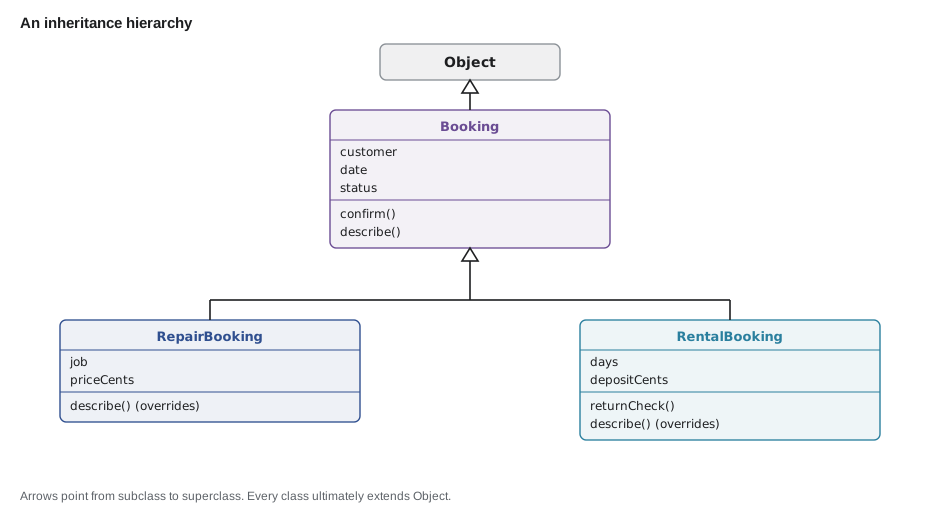
A class declared with extends inherits the fields and methods of another class. The class being extended is the superclass, also called the parent or base class; the new class is the subclass, or child. The subclass has everything the superclass has, can add fields and methods of its own and can replace inherited methods with its own versions. In Java a class can extend only one other class.
public class Main {
    public static void main(String[] args) {
        Booking repair = new Booking("Ana Ruiz", "2027-04-03");
        RentalBooking rental = new RentalBooking("Theo Park", "2027-04-03", 3);
        repair.confirm();
        rental.confirm();
        System.out.println(repair.describe());
        System.out.println(rental.describe());
        System.out.println(rental.getCustomer() + " has the bike for " + rental.getDays() + " days");
    }
}

class Booking {
    private final String customer;
    private final String date;
    private String status = "REQUESTED";

    Booking(String customer, String date) {
        this.customer = customer;
        this.date = date;
    }

    String getCustomer() { return customer; }
    String getDate() { return date; }
    String getStatus() { return status; }

    void confirm() {
        if (status.equals("REQUESTED")) status = "CONFIRMED";
    }

    String describe() {
        return date + " " + customer + " [" + status + "]";
    }
}

class RentalBooking extends Booking {
    private final int days;

    RentalBooking(String customer, String date, int days) {
        super(customer, date);
        this.days = days;
    }

    int getDays() { return days; }
}2027-04-03 Ana Ruiz [CONFIRMED] 2027-04-03 Theo Park [CONFIRMED] Theo Park has the bike for 3 days
What this code does
RentalBooking extends Booking, so a rental has a customer, date, status, confirm and describe without repeating any of them. It adds its own days field and getter. The constructor passes the shared values up to Booking's constructor with super(customer, date) before setting its own field.
Calling the superclass constructor
A subclass constructor must make sure the superclass part of the object is built first, and it does so with super(...), which calls a superclass constructor. Like this(...), it must be the first statement. If you leave it out, Java inserts super() with no arguments, which works only if the superclass has a constructor with no parameters. Booking has only a two-parameter constructor, so a RentalBooking constructor without super(customer, date) does not compile.
public class Main {
    public static void main(String[] args) {
        System.out.println(new RentalBooking("Theo Park", "2027-04-03", 3).days);
    }
}

class Booking {
    final String customer;
    final String date;

    Booking(String customer, String date) {
        this.customer = customer;
        this.date = date;
    }
}

class RentalBooking extends Booking {
    final int days;

    RentalBooking(String customer, String date, int days) {
        this.days = days;
    }
}
What this code does
The RentalBooking constructor does not call super(...), so Java tries to call Booking() with no arguments, which does not exist. javac reports that the constructor in Booking cannot be applied to the given types. Adding super(customer, date) as the first statement fixes it.
$ javac Main.java
Main.java:20: error: constructor Booking in class Booking cannot be applied to given types;
    RentalBooking(String customer, String date, int days) {
                                                          ^
  required: String,String
  found:    no arguments
  reason: actual and formal argument lists differ in length
1 error
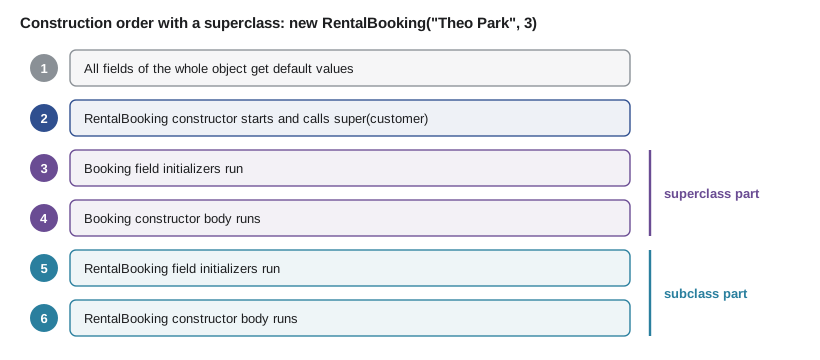
With inheritance, the initialization order from lesson 3 gains a step at the front: the superclass's part of the object is built completely, its field initializers and constructor body included, before the subclass's initializers and constructor body run.
public class Main {
    public static void main(String[] args) {
        new RentalBooking("Theo Park", 3);
    }
}

class Booking {
    private String status = note("Booking field initializer", "REQUESTED");

    Booking(String customer) {
        note("Booking constructor for " + customer, "");
    }

    static String note(String text, String value) {
        System.out.println(text);
        return value;
    }
}

class RentalBooking extends Booking {
    private int days = note("RentalBooking field initializer", "").length() + 1;

    RentalBooking(String customer, int days) {
        super(customer);
        note("RentalBooking constructor, days = " + days, "");
        this.days = days;
    }
}Booking field initializer Booking constructor for Theo Park RentalBooking field initializer RentalBooking constructor, days = 3
What this code does
The lines appear in construction order: Booking's field initializer, then Booking's constructor, and only then RentalBooking's field initializer and constructor. The superclass part is finished before the subclass begins. This is why a subclass can rely on inherited fields being set when its own constructor runs.
Overriding a method
A subclass can override an inherited method by declaring a method with the same name, the same parameter types and a compatible return type. When the method is called on a subclass object, the subclass's version runs. A rental booking should describe itself with its days, so RentalBooking overrides describe.
Mark every overriding method with the @Override annotation. It is optional but valuable: it tells javac you mean to override, and javac reports an error if no inherited method matches, which catches misspelled names and wrong parameter types that would otherwise silently create a new, unrelated method.
public class Main {
    public static void main(String[] args) {
        Booking a = new Booking("Ana Ruiz", "2027-04-03");
        RentalBooking b = new RentalBooking("Theo Park", "2027-04-03", 3);
        System.out.println(a.describe());
        System.out.println(b.describe());
    }
}

class Booking {
    private final String customer;
    private final String date;

    Booking(String customer, String date) {
        this.customer = customer;
        this.date = date;
    }

    String describe() {
        return date + " " + customer;
    }
}

class RentalBooking extends Booking {
    private final int days;

    RentalBooking(String customer, String date, int days) {
        super(customer, date);
        this.days = days;
    }

    @Override
    String describe() {
        return super.describe() + ", rental for " + days + " day" + (days == 1 ? "" : "s");
    }
}2027-04-03 Ana Ruiz 2027-04-03 Theo Park, rental for 3 days
What this code does
RentalBooking overrides describe, so calling it on a rental runs the rental version. Inside it, super.describe() calls the inherited version to build the shared part, and the override adds the rental details. Calling describe on a plain Booking still runs Booking's version.
super.method() is how an override reuses the behaviour it is replacing. It is common to extend rather than discard the parent's work: do what the parent does, then add the extra step.
public class Main {
    public static void main(String[] args) {
        System.out.println(new RentalBooking().describe());
    }
}

class Booking {
    String describe() {
        return "booking";
    }
}

class RentalBooking extends Booking {
    @Override
    String desribe() {
        return "rental";
    }
}
What this code does
The method name is misspelled as desribe, so it does not override anything. Because it is marked @Override, javac reports that the method does not override or implement a method from a supertype. Without the annotation, the program would compile and quietly print booking.
$ javac Main.java
Main.java:14: error: method does not override or implement a method from a supertype
    @Override
    ^
1 error
Overriding versus overloading
The two words sound alike and are easily confused. Overriding replaces an inherited method in a subclass, with the same name and parameters; which version runs depends on the object. Overloading declares several methods in one class with the same name but different parameters; which one runs is decided by javac from the argument types.
| Overriding | Overloading | |
|---|---|---|
| Where | In a subclass, replacing an inherited method | In the same class (or a subclass), alongside others |
| Parameters | Exactly the same types | Different number or types |
| Chosen | At run time, by the object's class | At compile time, by the argument types |
| Annotation | @Override | None |
| Example | RentalBooking.describe() | Booking(String, String) and Booking(String) |
protected access
A subclass cannot read its superclass's private fields, even though the object contains them; it must use the inherited getters. That is usually right, because it keeps the superclass in charge of its own invariants. Java also has the access level protected, which lets subclasses, and other classes in the same package, use a member directly. Use protected sparingly, for methods designed to be used or overridden by subclasses rather than for fields.
public class Main {
    public static void main(String[] args) {
        RentalBooking r = new RentalBooking("Theo Park", 3, 2500);
        System.out.println(r.describe());
        r.confirm();
        System.out.println(r.describe());
    }
}

class Booking {
    private final String customer;
    private String status = "REQUESTED";

    Booking(String customer) {
        this.customer = customer;
    }

    String getCustomer() { return customer; }
    String getStatus() { return status; }

    void confirm() {
        if (status.equals("REQUESTED") && readyToConfirm()) status = "CONFIRMED";
    }

    protected boolean readyToConfirm() {
        return true;
    }

    String describe() {
        return customer + " [" + status + "]";
    }
}

class RentalBooking extends Booking {
    private final int days;
    private final long depositCents;
    private boolean depositPaid;

    RentalBooking(String customer, int days, long depositCents) {
        super(customer);
        this.days = days;
        this.depositCents = depositCents;
    }

    @Override
    protected boolean readyToConfirm() {
        if (!depositPaid) {
            System.out.println("  taking deposit of " + depositCents + " cents from " + getCustomer());
            depositPaid = true;
        }
        return depositPaid;
    }

    @Override
    String describe() {
        return super.describe() + " " + days + " days, deposit " + (depositPaid ? "paid" : "due");
    }
}Theo Park [REQUESTED] 3 days, deposit due taking deposit of 2500 cents from Theo Park Theo Park [CONFIRMED] 3 days, deposit paid
What this code does
Booking's confirm calls readyToConfirm, a protected method designed for subclasses to override. RentalBooking overrides it to take the deposit before a rental can be confirmed, while ordinary bookings keep the default of true. The subclass reaches the customer's name only through the inherited getter, because the field itself is private.
This pattern, where the superclass writes the overall steps and calls a method that subclasses may override for one step, is called a template method. It keeps the rules about status in Booking while letting each kind of booking add its own condition.
Is-a and has-a
Inheritance models an is-a relationship: a rental booking is a booking, and should be usable anywhere a booking is expected. Many relationships are has-a instead: a booking has a customer and has a bike. Those are modelled by fields, a technique called composition. A common design mistake is to use inheritance just to borrow code, such as making Booking extend Customer to reach the customer's name. A booking is not a customer, and the result is confusing and fragile.
| Relationship | Test | Model with |
|---|---|---|
| RentalBooking and Booking | A rental booking is a booking: yes | extends |
| Booking and Customer | A booking is a customer: no; a booking has a customer | a field |
| CargoBike and Bike | A cargo bike is a bike: yes | extends, or a type field |
| Bike and Wheel | A bike has two wheels | fields |
A good rule of thumb is to prefer composition over inheritance unless the is-a test clearly passes and the subclass will honour every promise the superclass makes. Deep inheritance trees, three or four levels of subclasses, become hard to understand because the behaviour of one method may be spread across several classes.
final methods and classes
A method declared final cannot be overridden, and a class declared final cannot be extended. Use final when a subclass changing the behaviour would break the class's invariants. Java's String is a final class, so nobody can create a subclass of String with surprising behaviour. The Money class from lesson 2 is final for the same reason: a subclass could make it mutable and break the promise that Money values never change.
public class Main {
    public static void main(String[] args) {
        System.out.println("never runs");
    }
}

final class Money {
    private final long cents;
    Money(long cents) { this.cents = cents; }
}

class DiscountMoney extends Money {
    DiscountMoney(long cents) { super(cents); }
}
What this code does
Money is declared final, so no class may extend it. javac reports that DiscountMoney cannot inherit from the final class Money. Declaring value classes final protects their promise of immutability.
$ javac Main.java
Main.java:12: error: cannot inherit from final Money
class DiscountMoney extends Money {
                            ^
1 error
Java 17 added a middle ground, sealed classes, which allow only a listed set of subclasses. Lesson 6 introduces them.
Try it yourself
A subclass with super
Complete CargoBike, which extends Bike. Its constructor takes a name and a loadKg and passes the name to Bike with super(...).
Override describe() so it returns the inherited description followed by , carries up to 80 kg. The program should print City bike 2 and Cargo bike 1, carries up to 80 kg.
public class Main {
    public static void main(String[] args) {
        Bike a = new Bike("City bike 2");
        CargoBike b = new CargoBike("Cargo bike 1", 80);
        System.out.println(a.describe());
        System.out.println(b.describe());
    }
}

class Bike {
    private final String name;

    Bike(String name) {
        this.name = name;
    }

    String describe() {
        return name;
    }
}

class CargoBike extends Bike {
    private final int loadKg;

    CargoBike(String name, int loadKg) {
        super("");
        this.loadKg = loadKg;
    }
}
Try it yourself
A template method
Booking.price() adds a fee to a base price. Override the protected method fee() in RentalBooking so a rental's fee is 10 dollars per day, while ordinary bookings keep a fee of 0.
The program should print Repair price: 85 and Rental price: 75.
public class Main {
    public static void main(String[] args) {
        Booking repair = new Booking(85);
        RentalBooking rental = new RentalBooking(45, 3);
        System.out.println("Repair price: " + repair.price());
        System.out.println("Rental price: " + rental.price());
    }
}

class Booking {
    private final int base;

    Booking(int base) {
        this.base = base;
    }

    final int price() {
        return base + fee();
    }

    protected int fee() {
        return 0;
    }
}

class RentalBooking extends Booking {
    private final int days;

    RentalBooking(int base, int days) {
        super(base);
        this.days = days;
    }
}
Common mistakes
MistakeForgetting super(...) when the superclass has no no-argument constructor.
InsteadCall the right superclass constructor as the first statement of every subclass constructor.
MistakeLeaving off @Override and misspelling the method name.
InsteadAlways write @Override; javac then reports a method that overrides nothing.
MistakeTrying to read a private superclass field in a subclass.
InsteadUse the inherited getter, or a protected method designed for subclasses.
MistakeExtending a class only to reuse some of its code.
InsteadUse inheritance only for is-a relationships; otherwise use a field (composition).
MistakeConfusing overriding with overloading.
InsteadOverriding keeps the same parameters in a subclass; overloading changes the parameters.
Summary and key terms
- A class declared with extends inherits the fields and methods of its superclass and can add its own; Java allows one superclass per class.
- A subclass constructor must call a superclass constructor with super(...) as its first statement, or Java inserts super() with no arguments.
- The superclass part of an object is fully built before the subclass part.
- A subclass overrides a method by declaring one with the same name and parameters, and @Override makes javac check the match. super.method() lets an override reuse the inherited behaviour.
- Overriding is chosen at run time by the object; overloading is chosen at compile time by the argument types.
- Private superclass fields stay private; protected members are for subclasses, and template methods let a superclass fix the steps while subclasses change one.
- Use inheritance for is-a relationships and composition for has-a. final stops overriding or extending.
- Inheritance
- A class taking on the fields and methods of another class.
- Superclass
- The class being extended; also called the parent or base class.
- Subclass
- A class that extends another; also called the child class.
- extends
- The keyword that declares a class's superclass.
- super(...)
- A call to a superclass constructor, made as the first statement of a constructor.
- Overriding
- Replacing an inherited method with a subclass version that has the same name and parameters.
- @Override
- An annotation asking javac to check that a method really overrides one.
- protected
- An access level that allows subclasses and classes in the same package.
- Template method
- A superclass method that fixes the steps and calls methods subclasses may override.
- Composition
- Building a class from other objects held in fields.
- final class
- A class that cannot be extended.
Practice problems
Work each problem on paper first, then reveal the answer to check.
How many classes can a Java class extend directly?
Show answer
One.
What happens if a subclass constructor has no super(...) call?
Show answer
Java inserts super() with no arguments, which fails if the superclass has no such constructor.
Why mark an overriding method with @Override?
Show answer
javac then reports an error if the method does not actually override anything.
Is a booking and a customer an is-a or a has-a relationship?
Show answer
Has-a: a booking has a customer, so use a field.
Which runs first, the superclass constructor body or the subclass's field initializers?
Show answer
The superclass constructor body.
Lesson quiz · 5 questions
Score 60% or more to complete this lesson.
Create a free account to save your progress, take quizzes and earn a certificate.