
ENCM-100 · Lesson 12 of 12 · 25 min
Software practice and a course project
A program that produces the right answer once, on its author's computer, is a start. Engineering software must do more: give the right answer every time, for every valid input, after every change, on other people's computers, and be understandable by the colleague who has to check or extend it next year. Lesson 1 showed that software failures have killed people and destroyed spacecraft, and engineers are professionally responsible for the calculations their programs produce, just as for those done by hand. This final lesson gathers the practices that make code trustworthy: structure and style, automated testing, debugging strategies, version control, documentation and reproducibility, and the professional responsibilities that come with engineering software. It closes with the course project.
Structure and style
Readable code is easier to check, fix and extend. Python's style guide, PEP 8, sets widely followed conventions: four-space indentation, lines under about 80 to 100 characters, lower_case names for variables and functions, CapitalizedWords for classes, and spaces around operators. Tools called linters and formatters (for example, ruff and black) check and apply these conventions automatically. Beyond formatting:
- Use descriptive names that include units where useful: span_m, load_kN_per_m, not x or a2.
- Keep functions short and focused on one task (Lesson 4); put related functions in modules.
- Avoid "magic numbers": give constants names (E = 200_000.0 # MPa) and define them once.
- Separate input, calculation and output. Calculation functions should take arguments and return results, not read files or print; that makes them testable and reusable.
- Put the main program in a function, conventionally main(), called under if __name__ == "__main__":, so the module can be imported by other programs without running.
Automated testing
Testing by eye, running the program and seeing whether the answer looks plausible, catches gross errors only. Automated tests are small functions that call your code with known inputs and assert the expected outputs (Lesson 6). Once written, they run in seconds every time the code changes, catching regressions, previously working features broken by a later edit. The pytest framework finds and runs every function whose name starts with test_ and reports which pass and fail.
Good test cases come from:
- Hand calculations and textbook examples with known answers.
- Special and limiting cases: zero load gives zero deflection; doubling the span multiplies deflection by sixteen.
- Invalid inputs, which should raise the right exception (Lesson 6).
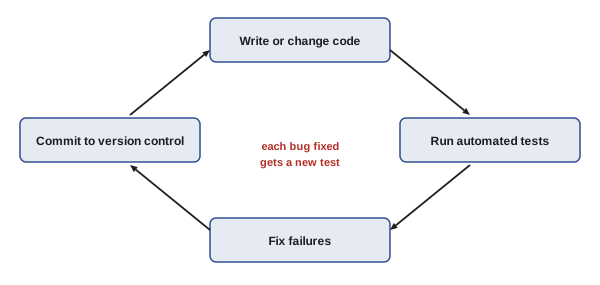
- Past bugs: when you fix a bug, add a test that would have caught it, so it never returns.
"""beamcheck: simple checks of simply supported steel beams under uniform load."""
import math

E = 200_000.0                                   # MPa

def max_moment(w, L):
    """Maximum moment (kN m) for uniform load w (kN/m) on span L (m)."""
    return w * L ** 2 / 8

def deflection(w, L, I):
    """Midspan deflection (mm) for w (kN/m), L (m), I (mm4)."""
    return 5 * w * (L * 1000) ** 4 / (384 * E * I)

def check(w, L, S, I, Fy=350.0, phi=0.9, limit=360):
    """Return a dict of utilization ratios: bending and deflection (L/limit)."""
    if min(w, L, S, I) <= 0:
        raise ValueError("w, L, S and I must be positive")
    bending = max_moment(w, L) * 1e6 / S / (phi * Fy)
    defl = deflection(w, L, I) / (L * 1000 / limit)
    return {"bending": bending, "deflection": defl, "ok": max(bending, defl) <= 1.0}

# ---- tests: each compares with a hand calculation ----
def test_moment():
    assert math.isclose(max_moment(10, 8), 80.0)

def test_deflection_known_case():
    # 10 kN/m on 6 m with I = 100e6 mm4: 5 x 10 x 6000^4 / (384 x 200000 x 100e6) = 8.44 mm
    assert math.isclose(deflection(10, 6, 100e6), 8.4375, rel_tol=1e-6)

def test_rejects_bad_input():
    try:
        check(10, 0, 500e3, 80e6)
    except ValueError:
        return
    raise AssertionError("zero span was accepted")

for test in (test_moment, test_deflection_known_case, test_rejects_bad_input):
    test()
    print("passed:", test.__name__)

# ---- use ----
r = check(w=17.7, L=8.0, S=549e3, I=85.1e6)
print({k: (round(v, 2) if isinstance(v, float) else v) for k, v in r.items()})passed: test_moment
passed: test_deflection_known_case
passed: test_rejects_bad_input
{'bending': 0.82, 'deflection': 2.5, 'ok': False}The module follows the practices above: named constants, short documented functions, input validation, and calculation functions that return results. The three tests check a moment against wL²/8, a deflection against a hand calculation, and the rejection of a zero span; in a real project they would live in a separate file run by pytest. Applied to the office floor beam of ENGG-130 (17.7 kN/m on 8 m) with a W310×39 section, the check shows a bending ratio of 0.82 (computed here with the service load; design uses factored loads) but a deflection 2.5 times the L/360 limit. Deflection, not strength, governs: the designer needs a deeper section. A program that checked only bending would have approved a floor that would sag visibly and bounce, a reminder that tests confirm a program does what it was written to do, not that it was written to do the right things. Reviews and engineering judgement address the second question.
Debugging
All programmers write bugs; good ones find them systematically. Effective debugging habits:
- Read the error message and traceback carefully, from the bottom: it names the exception, the line and the chain of calls that led there (Lesson 1).
- Reproduce the problem with the smallest possible input. A bug that appears with one specific data file can often be reproduced with three lines of it.
- Check assumptions by printing (or logging) intermediate values and their types and shapes, especially NumPy shapes (Lesson 7) and units.
- Use a debugger, built into most editors, to stop at a line and inspect variables step by step.
- Change one thing at a time, and test after each change.
- Explain the code line by line to someone else, or to a rubber duck on your desk; the act of explaining often reveals the error.
- When fixed, add a test (above) and ask whether the same mistake could exist elsewhere.
Version control
Version control systems record every change to a project's files, with who made it, when and why. Git is the standard. Its basic workflow is to make changes, review them (git diff), stage them (git add), and record a commit with a short message describing the change (git commit). Commits form a history to which you can return at any time, so an experiment that goes wrong is easily undone and the code that produced last month's report can be recovered exactly. Branches let you develop a feature without disturbing working code, and hosting services such as GitHub and GitLab let teams share repositories, review each other's changes before they are merged, and run tests automatically on every change (continuous integration).
Even for a solo course project, version control is worth the small effort: commit whenever a piece works, with a meaningful message ("Add deflection check and tests", not "stuff"), and never again lose work to an overwritten file. Do not commit passwords, keys or large raw data files; list them in a .gitignore file.
Documentation and reproducibility
Documentation has several layers. Docstrings explain what each function and class does, its parameters with units, its return value and its exceptions (Lesson 4). Comments explain why the code does something non-obvious, not what each line does. A README file at the top of a project says what the program is for, how to install and run it, what inputs it expects, and what its limitations are. For engineering calculations, documentation should also state the method, assumptions, references (codes and standards with their editions) and the range of validity.
A computational result is reproducible if someone else can rerun the code on the same data and get the same answer. That requires the code under version control, raw data kept unchanged, all processing done by scripts rather than by hand edits, random seeds fixed (Lesson 11), and the software environment recorded, for example by listing package versions in a requirements.txt file. Reproducibility is now expected in research and is increasingly required for engineering analyses submitted to regulators.
Professional responsibility for software
When an engineer uses a program, commercial or self-written, to design something, the engineer remains responsible for the result. Codes of ethics require practising within one's competence and taking responsibility for one's work, and regulators have disciplined engineers for relying on software they did not understand or check. Good practice includes:
- Understand the method, assumptions and limitations of any program you use.
- Verify software against hand calculations, published examples or independent programs before relying on it, and check critical results independently.
- Check that input data and units are right; most software-related errors in engineering are input errors.
- For software you write and others will use, document it, test it, control its versions, and state its limitations clearly.
- Treat data and code involving people with care: privacy, security and the potential for automated decisions to cause harm (AI-101).
The failures in Lesson 1, from the Therac-25 radiation overdoses to the Ariane 5 explosion, and the Boeing 737 MAX's MCAS software (ENGG-100), share a theme: software was trusted beyond what its testing and review justified, and its interaction with the larger system was not fully understood.
The course project
The course project asks you to write a Python program that solves a real engineering problem from another first-year course or your intended discipline, using the techniques of this course. Suitable projects include: analyzing a dataset (energy use, weather, traffic, test results) and reporting findings with plots; a design tool that sizes a component (beam, pipe, cable, battery bank, heat exchanger) and checks it against requirements; a simulation of a dynamic system (tank levels, projectile with drag, building temperature, population of vehicles charging); or an optimization or Monte Carlo study of a design under uncertainty.
Your submission should include:
- A short proposal: the problem, inputs, outputs and how you will know the results are right.
- Well-structured code in one or more modules, following the style and structure practices above, with docstrings and a README.
- At least five automated tests, including at least two checked against hand calculations and one for invalid input.
- Use of at least three of: functions and modules, classes, file input (CSV or JSON), NumPy, pandas, Matplotlib, SciPy, recursion or a graph algorithm, Monte Carlo simulation.
- A version-control history showing steady progress, with meaningful commit messages.
- A four- to six-page report (ENGG-160) explaining the problem, method, verification, results with figures, limitations and recommendations, written for an engineer who will use the program.
- A five-minute demonstration.
Worked problem
Scoping a project
A student proposes "a program to design bridges". How should the project be scoped to be achievable in five weeks?
Show solution
- Narrow the problem: "a program that analyzes a statically determinate pedestrian truss of up to 15 members, finds member forces by the method of joints, and checks each member for tension yield and compression buckling."
- Define inputs and outputs: a JSON file of joints, members, supports and loads; a table of member forces and utilization ratios, and a plot of the truss coloured by force.
- Plan verification: compare with the hand solutions of ENGG-130's examples and a published truss problem; test that a symmetric truss under symmetric load gives symmetric forces.
- List extensions for if time allows: self-weight, multiple load cases, choosing the lightest section from a table.
Answer: A focused, testable project that uses files, NumPy (assembling and solving the joint equations, Lesson 7), classes for joints and members (Lesson 9), Matplotlib (Lesson 8), and tests against known solutions. "Design bridges" was too broad to finish or to verify; the scoped version can be done well and demonstrates every skill the course aims to build.
Where to go next
Programming is a skill that grows with use. Use Python in your other courses: for lab data, design calculations and checking homework. Read other people's well-written code, such as the documentation examples of NumPy, pandas and SciPy. Later courses build on this one: numerical methods (MATH-300), data science and machine learning (AI-110 and beyond), control systems, and simulation. Whatever your discipline, the ability to turn an engineering question into a correct, tested and documented program is one of the most valuable skills you can bring to a team.
Common mistakes
MistakeTesting only by looking at whether the output seems plausible.
InsteadWrite automated tests against known answers and run them after every change.
MistakeChanging several things at once while debugging.
InsteadReproduce minimally and change one thing at a time.
MistakeKeeping only the latest copy of the code.
InsteadUse version control with frequent, meaningful commits.
MistakeEditing data by hand between analysis steps.
InsteadKeep raw data unchanged and script every step.
MistakeTrusting software output because a program produced it.
InsteadUnderstand the method, verify against independent checks and remain responsible.
Summary and key terms
- Follow PEP 8; use descriptive names with units, named constants and short single-purpose functions.
- Separate input, calculation and output; put the main program under if __name__ == "__main__".
- Automated tests (pytest) check known answers, limiting cases, invalid inputs and past bugs.
- Debug systematically: read tracebacks, reproduce minimally, check assumptions, change one thing at a time.
- Git records every change; commit often with clear messages; use branches and reviews in teams.
- Document with docstrings, comments and a README; make analyses reproducible.
- Engineers remain responsible for software-based results; verify and understand the tools.
- PEP 8
- Python's official style guide.
- Linter
- A tool that checks code for style problems and likely errors.
- Regression
- A previously working feature broken by a later change.
- pytest
- A Python framework that discovers and runs test functions.
- Traceback
- The report of the chain of calls leading to an exception.
- Debugger
- A tool for pausing a program and inspecting its state.
- Version control
- A system recording the history of changes to files.
- Commit
- A recorded snapshot of changes with a message.
- README
- A file describing a project's purpose, use and limitations.
- Reproducibility
- The ability to rerun an analysis and obtain the same results.
Practice problems
Work each problem on paper first, then reveal the answer to check.
Rename the variable d2 that holds a pipe diameter in millimetres.
Show answer
For example, diameter_mm.
Why should calculation functions return results rather than print them?
Show answer
So they can be tested and reused.
What does if __name__ == "__main__": achieve?
Show answer
The main program runs only when the file is executed directly, not when imported.
Write a test that checks max_moment(5, 4) equals 10.
Show answer
def test_small(): assert math.isclose(max_moment(5, 4), 10.0).
Suggest a limiting-case test for the deflection function.
Show answer
For example, zero load gives zero deflection, or doubling L multiplies deflection by 16.
In the beam check, which limit governs, and what should the designer do?
Show answer
Deflection (2.5 times the limit); choose a deeper section with larger I.
What I would make the deflection ratio exactly 1.0 for that beam?
Show answer
About 2.5 × 85.1 × 10⁶ ≈ 213 × 10⁶ mm⁴.
Write a good commit message for adding input validation.
Show answer
For example, "Validate positive span and load in check(); add test".
Name four things needed for a reproducible analysis.
Show answer
Version-controlled code, unchanged raw data, scripted processing, fixed seeds and recorded package versions.
Who is responsible for a design calculated with commercial software?
Show answer
The engineer who uses it and seals the work.
Lesson quiz · 5 questions
Score 60% or more to complete this lesson.
Create a free account to save your progress, take quizzes and earn a certificate.