
CON-385 · Lesson 11 of 12 · 21 min
Turnover: operating information, training and records
Eight months after the dialysis unit opened, a supply fan in the new air handling unit tripped at 3:15 on a January morning. Marco, a night operator who had joined the hospital after the unit opened, found the alarm, opened the automation graphic for AHU-3, clicked the fan, and saw a link to the fan's page in the digital systems manual: the motor data, the reset procedure, a ten-minute video recorded during training of the controls technician walking through exactly this fault, and the phone number for the manufacturer's service line. He reset the fan's drive, confirmed the other three fans had carried the load as designed, logged a work order and went back to his rounds. Nobody had to call Harbourline. That quiet night was the purpose of turnover: giving the people who will run the building everything they need to do it without the people who built it.
Turnover, also called handover, is the transfer of the completed work, and the information and knowledge needed to operate and maintain it, from the project team to the owner. It is often treated as paperwork at the end of a long job, delivered late and incomplete. Owners pay for that for years: equipment maintained wrongly, warranties lost, systems overridden because nobody understands them. Good turnover starts early, is planned as part of the project and is checked as carefully as the construction itself.
What the owner needs
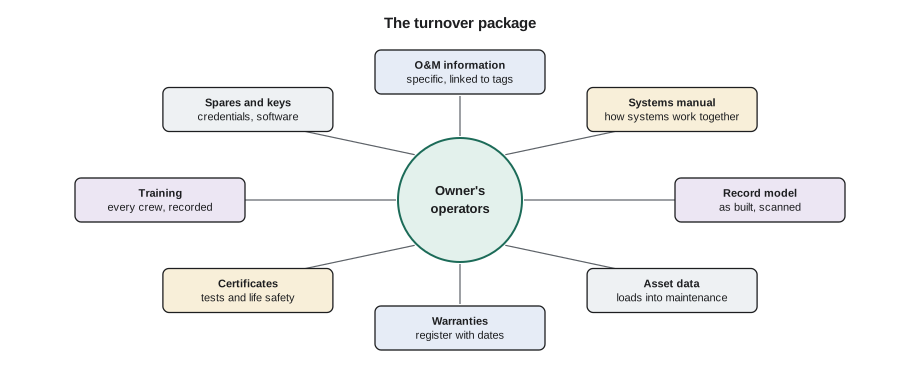
| Turnover item | What it contains | Who produces it on Ashgrove |
|---|---|---|
| Operation and maintenance (O&M) information | Equipment data, operating instructions, maintenance tasks and frequencies, parts lists, service contacts | Each trade, compiled by Harbourline |
| Systems manual | OPR, BOD, sequences of operation, system descriptions, operating procedures, commissioning records | Commissioning authority with designers and Harbourline |
| Record drawings and model | Drawings and model updated to show what was actually built | Harbourline and trades, reviewed by designers |
| Asset data | A list of maintainable assets with tags, locations, makes, models, serial numbers and warranty dates, ready to load into the maintenance system | Harbourline, to the hospital's template |
| Warranties and guarantees | Each warranty with start date, term, coverage and contact | Harbourline, from each trade and supplier |
| Certificates and test reports | Life safety certificates, pressure tests, TAB, start-up and functional test reports | Trades, testing firms and commissioning authority |
| Training records | Agenda, attendance, materials and recordings of every training session | Trades and commissioning authority |
| Spare parts and maintenance materials | Extra filters, belts, ceiling tiles, paint, flooring, as specified | Trades, delivered to the hospital's stores |
| Keys, access credentials and software | Keys, cards, passwords, software licences, controller programs and backups | Trades, handed to the hospital's security and IT staff |
Operation and maintenance information
O&M information tells the owner's technicians how to run and look after each piece of equipment. The traditional form was a set of binders, one per trade, full of manufacturers' brochures. Binders still exist, but they have two problems: brochures often describe a whole product range rather than the model installed, and nobody can find anything in a binder at three in the morning. Ashgrove's specification required O&M information that was specific to the installed equipment, with irrelevant models crossed out or removed, and delivered as searchable electronic files organized by system and linked to the equipment tags used on the automation graphics and in the hospital's maintenance management system.
The specification also set a schedule. Draft O&M information was due when 75 % of the equipment had been delivered, so that Helen's staff could review it before training; final information was due before substantial performance of each area. Harbourline tracked submissions in the closeout register and withheld part of each subcontractor's progress payment until its O&M draft was accepted. The rule was unpopular at first and effective in practice: by the time the dialysis unit opened, every O&M document for its systems had been reviewed and accepted.
The systems manual
O&M information describes equipment; the systems manual describes how the equipment works together. Commissioning guidance recommends a systems manual that brings together the OPR, the BOD, system descriptions, final sequences of operation, controls point lists, single-line diagrams, operating procedures for normal and emergency modes, recommended recommissioning intervals and the commissioning report. Kwame's team assembled it from documents produced throughout the project. Helen called it the most useful document she had ever received from a project, because it answered the question operators ask most often: why is the system doing that?
Record drawings, models and asset data
Record drawings show the work as it was actually built, including changes made during construction, the real routes of services and the locations of concealed items such as valves, dampers and cleanouts. The terms record drawings and as-built drawings are often used loosely. A useful distinction is that as-built mark-ups are the field records kept by the trades as work proceeds, and record drawings are the clean documents prepared from them at the end. Either way, they are only as good as the mark-ups, and mark-ups are only good if they are kept up to date while the work is visible.
On Ashgrove, each trade's foreman marked changes on the drawings in the project platform weekly, and Tomas Reyes checked a sample against the work before ceilings were closed. The design team's model was updated from the mark-ups and from a final laser scan of the ceiling spaces before the ceilings went in, so the record model showed not just the design intent but the measured position of major services. The hospital's renovation team would use that model on the next project, as Harbourline had wished it had for this one.
Asset data is the bridge between construction and maintenance. The hospital's maintenance management system needed a record for every maintainable asset: each fan, pump, valve actuator, damper, filter bank and fire alarm device, with a unique tag, location, make, model, serial number, installation date and warranty end date. Collecting that data at the end of a project is slow and error-prone. Ashgrove's specification required it to be captured as equipment was installed, in a spreadsheet template the hospital provided, using the same tags as the drawings and the automation system. Some owners use structured data formats such as COBie for the same purpose; the principle is to agree the format at the start and collect the data as you go.
Training the people who will run the building
Documents do not operate buildings; people do. Training gives the owner's operators, technicians and users the knowledge to run, maintain and use the systems. It is often the weakest part of turnover: sessions are scheduled at the last minute, delivered by a sales representative instead of a technician, attended by whoever happens to be free, and never recorded. Ashgrove's commissioning plan treated training as a commissioning activity with its own plan, agendas, competency checks and records.
- A training plan listing each system, the audience, the trainer, the duration, the location and the timing relative to handover.
- Agendas submitted in advance and reviewed by the commissioning authority and Helen's staff.
- Trainers who are technicians familiar with the installed equipment, not general product presenters.
- A mix of classroom explanation and hands-on time at the equipment.
- Sessions recorded on video and indexed by topic so that new staff can learn later.
- Attendance sheets and short competency checks, such as having each operator reset a fan alarm or put a zone into smoke mode under supervision.
The hospital's operators work around the clock in four rotating crews. Training only the day shift would leave three quarters of the operators untrained when a fault happened at night. Simone and Helen scheduled most operator sessions twice, at shift changes, so that each crew could attend, and used the recordings for anyone who missed a session.
Worked problem
Planning operator training hours
The East Wing training plan has five operator topics: AHU-3 and its controls (3 hours), heating and cooling distribution and reheat (2 hours), automation system graphics and alarms (2 hours), fire alarm and smoke control interfaces (1.5 hours) and emergency power interfaces (1 hour). Each topic must be delivered so that all four operator crews attend live. Sessions are held at shift changes and each session can include two crews. How many hours of trainer time are needed, and how many operator-hours of training result if each crew has 5 operators?
Show solution
- Hours per complete set of topics: 3 + 2 + 2 + 1.5 + 1 = 9.5 hours.
- Each session covers two crews, so four crews need two deliveries of each topic.
- Trainer time: 9.5 × 2 = 19 hours.
- Operators: 4 crews × 5 = 20 operators, each attending 9.5 hours.
- Operator-hours: 20 × 9.5 = 190 hours of training.
Answer: 19 hours of trainer time, producing 190 operator-hours of training, plus recordings for future staff.
# Operator training plan: trainer time and operator-hours
topics = {'AHU-3 and controls': 3.0, 'Distribution and reheat': 2.0,
          'Automation graphics and alarms': 2.0, 'Fire alarm and smoke control': 1.5,
          'Emergency power interfaces': 1.0}
crews, per_crew, crews_per_session = 4, 5, 2
deliveries = -(-crews // crews_per_session)     # round up
set_hours = sum(topics.values())
print(f'One set of topics: {set_hours} h')
print(f'Trainer time: {set_hours * deliveries} h ({deliveries} deliveries)')
print(f'Operator-hours: {set_hours * crews * per_crew:.0f}')One set of topics: 9.5 h Trainer time: 19.0 h (2 deliveries) Operator-hours: 190
Users need training too
Operators are not the only people who need to understand the systems. The dialysis nurses needed to know how to adjust the temperature in each bay within the allowed range and whom to call when a room felt wrong; the clinic staff needed to know how the new nurse call and access control systems worked; the childcare staff needed to know what the alarms and door releases would do in a fire. Short, practical sessions for users, held in the space a week before opening, prevented many of the calls that new spaces usually generate. Housekeeping staff were trained on the new flooring and finishes, because the wrong cleaning product can void a flooring warranty in a month.
Warranties
A warranty is only worth something if the owner knows it exists, when it started, when it ends, what it covers and whom to call. Harbourline built a warranty register with a row for every warranty: the general contract warranty, each trade's warranty, and the extended manufacturer warranties on items such as the roofing membrane, the air handling unit's compressors and the flooring. Each row recorded the start date, which on a phased project depended on which area the item served, the term, the conditions, such as required maintenance that had to be documented to keep the warranty valid, and the contact. Lesson 12 covers how the warranty period was managed.
Keys, passwords and software
Modern systems run on software, and software has passwords. The automation controllers, fire alarm panels, access control system, variable speed drives and the dialysis water treatment system each had programs, configuration files and administrator accounts. Harbourline's turnover checklist required every trade to hand over current program backups, licences in the hospital's name, and administrator credentials changed from the factory defaults and delivered sealed to the hospital's IT security team. The hospital's IT staff also reviewed which devices were connected to its network, because a controller left with a default password on a hospital network is a security risk as well as an operating one. Physical keys were handed over against a key schedule, with every master and change key counted and signed for.
Checking the turnover package
Turnover packages are checked like any other deliverable. Kwame's team reviewed the systems manual and training records; Pell & Strand and Coldwater reviewed record drawings against their site observations; Helen's staff checked O&M information and asset data by loading them into the maintenance system and picking ten assets at random to find in the field. The asset data check found that 6 % of tags in the spreadsheet did not match the tags on the equipment, because a few trades had used their own numbering. Fixing the data before handover took a week; finding the errors one work order at a time would have taken years.
Common mistakes
MistakeDelivering O&M binders of generic brochures at the end of the job.
InsteadDeliver specific, searchable information linked to equipment tags, with drafts reviewed before training.
MistakeCollecting asset data after installation is finished.
InsteadCapture asset data as equipment is installed, in the owner's format and tags.
MistakeUpdating record drawings from memory at the end.
InsteadKeep mark-ups current weekly and check them before concealment.
MistakeTraining only the day shift.
InsteadSchedule sessions for every crew and record them for future staff.
MistakeHanding over warranties without start dates and conditions.
InsteadKeep a warranty register with start dates by area, terms, conditions and contacts.
Summary and key terms
- Turnover transfers the work and the knowledge to operate it from the project team to the owner.
- O&M information should be specific to the installed equipment, searchable and linked to equipment tags.
- The systems manual explains how systems work together, from the OPR and BOD to sequences and procedures.
- Record drawings and models are only as good as the mark-ups kept during the work; final scans improve accuracy.
- Asset data in the owner's format and tags should be captured as equipment is installed.
- Training is planned, delivered by technicians, hands-on, recorded and checked, and reaches every operator crew and the users.
- A warranty register records each warranty's start date, term, conditions and contact, and the whole package is checked before handover.
- Turnover
- The transfer of completed work and the information needed to operate it to the owner.
- O&M information
- Operating and maintenance information for installed equipment.
- Systems manual
- A document explaining how systems work together, assembled through commissioning.
- Record drawings
- Drawings updated to show the work as actually built.
- Asset data
- Structured information about each maintainable asset for the owner's maintenance system.
- Warranty register
- A list of all warranties with start dates, terms, conditions and contacts.
Practice problems
Work each problem on paper first, then reveal the answer to check.
Why should O&M information be linked to equipment tags?
Show answer
So operators can find the right document quickly from the automation graphic or maintenance system.
What is the difference between O&M information and the systems manual?
Show answer
O&M information describes equipment; the systems manual explains how systems work together.
Why capture asset data during installation?
Show answer
Collecting it afterwards is slow and error-prone; capture as you go gives accurate tags and serial numbers.
Three topics of 2, 2 and 1 hours must reach six crews, two per session. How much trainer time?
Show answer
5 hours × 3 deliveries = 15 hours.
What did the asset data check find, and why did it matter?
Show answer
6 % of tags did not match the equipment; fixing them before handover avoided years of confusion.
Lesson quiz · 5 questions
Score 60% or more to complete this lesson.
Create a free account to save your progress, take quizzes and earn a certificate.