
CON-260 · Lesson 10 of 12 · 31 min
AI, robotics and emerging technology on site
Artificial intelligence, robots, sensors, prefabrication and digital twins attract more attention than any other construction technology. Some of it is hype; some is already changing how work is done. A construction manager needs to judge new technology on evidence: what problem it solves, how well it works in real site conditions, what it costs, what new risks it brings and what data it needs. This lesson surveys the main emerging technologies, with a closer look at how AI predictions should be evaluated and used. Robotics courses (ROB-430 and ROB-440) cover robot design and safety standards in depth; here the focus is on deployment decisions on construction projects.
What AI is good at, and what it is not
Most AI used in construction today is machine learning: software that learns patterns from historical data and applies them to new cases. Typical applications include classifying images (is this worker wearing a hard hat?), predicting outcomes (is this activity likely to finish late?), extracting information from documents (what are the submittal requirements in this specification?) and generating content (a first draft of meeting minutes, a design option, a schedule fragment). Generative AI tools based on large language models have spread quickly since 2023, especially for drafting, summarizing and searching project documents.
Machine learning works best when there is plenty of relevant, well-labelled data, when the future resembles the past, and when errors are cheap or will be caught. It works poorly when data are scarce or inconsistent (as on many construction projects), when conditions change (a new market, a new building type), or when a confident wrong answer could cause harm. Generative AI can produce fluent, plausible text that is wrong, including invented references and numbers, so outputs must be checked by someone who knows the subject.
| Application | Data needed | Maturity (2026) | Main caution |
|---|---|---|---|
| Document search and summarizing | Project documents | Widely available | Can miss or invent details; check against sources |
| Specification and submittal extraction | Specifications | Commercially available | Check completeness of extracted registers |
| Computer vision for safety (PPE, exclusion zones) | Labelled site images | Commercially available | False alarms, privacy, worker trust |
| Progress detection from images and scans | Captures plus model | Emerging to available | Occlusion; verify before payment |
| Schedule and cost risk prediction | Many past projects with consistent data | Emerging | Bias toward past projects; explainability |
| Generative design (layouts, structure options) | Rules, objectives, parameters | Emerging | Options are only as good as the objectives set |
Evaluating an AI prediction
Suppose a vendor offers a tool that flags activities likely to be delayed. How should a construction manager judge it? The key is to ask how often its predictions are right, in the specific sense that matters. A confusion matrix compares predictions with what actually happened.
| Actually delayed | Actually on time | |
|---|---|---|
| Predicted delayed | True positive (TP) | False positive (FP) |
| Predicted on time | False negative (FN) | True negative (TN) |
Precision answers: when the tool flags an activity, how often is it really delayed? Recall answers: of the activities that were really delayed, how many did the tool flag? A tool can score high accuracy simply by predicting that nothing will be late if most activities finish on time, so accuracy alone is misleading. The right balance depends on cost: if investigating a flagged activity is cheap and a missed delay is expensive, recall matters more.
import random

random.seed(7)
# Simulate 1,000 activities: 15 % are actually delayed.
actual = [random.random() < 0.15 for _ in range(1000)]
# A model that catches most delays but also raises false alarms.
pred = [(random.random() < 0.70) if a else (random.random() < 0.12) for a in actual]

tp = sum(a and p for a, p in zip(actual, pred))
fp = sum((not a) and p for a, p in zip(actual, pred))
fn = sum(a and (not p) for a, p in zip(actual, pred))
tn = sum((not a) and (not p) for a, p in zip(actual, pred))
print(f"TP {tp}  FP {fp}  FN {fn}  TN {tn}")
print(f"accuracy  {(tp + tn) / 1000:.1%}")
print(f"precision {tp / (tp + fp):.1%}")
print(f"recall    {tp / (tp + fn):.1%}")
always_on_time = sum(not a for a in actual) / 1000
print(f"accuracy of always predicting 'on time': {always_on_time:.1%}")TP 117 FP 109 FN 51 TN 723 accuracy 84.0% precision 51.8% recall 69.6% accuracy of always predicting 'on time': 83.2%
In this simulation the model's accuracy looks similar to that of a trivial rule that always predicts "on time", yet the model catches most of the real delays, which the trivial rule never does. Precision shows that roughly half of its flags are false alarms. Whether that is useful depends on how much a review costs compared with an unnoticed delay. Asking a vendor for precision and recall, measured on projects like yours, is far more informative than a single accuracy figure.
Worked problem
Is a delay-prediction tool worth it?
On a pilot project, a tool flagged 60 activities as likely to be delayed. Of these, 33 were in fact delayed. Of the 300 activities it did not flag, 12 were delayed. Each review of a flagged activity takes about 1 hour of a project engineer's time at $75/hour. Each delay that is caught early is estimated to save $2,500 on average through earlier mitigation; missed delays save nothing. Calculate precision and recall and the net value of the tool on the pilot.
Show solution
- TP = 33, FP = 60 − 33 = 27, FN = 12.
- Precision = 33 ÷ 60 = 55 %. Recall = 33 ÷ (33 + 12) = 33 ÷ 45 ≈ 73 %.
- Review cost = 60 × $75 = $4,500.
- Savings from caught delays = 33 × $2,500 = $82,500.
- Net value ≈ $82,500 − $4,500 = $78,000 before licence fees.
Answer: With 55 % precision and 73 % recall, the tool is worth using if its licence costs well under $78,000 for a comparable project, and if the $2,500 saving per caught delay holds up when tracked.
Other questions matter as much as the numbers. What data was the model trained on, and are those projects like ours? Can it explain why it flagged an activity, so the team can act? Who is accountable if it misses something? What happens to our data once uploaded? A prediction that nobody can interpret or act on adds noise, not value.
Computer vision and safety
Computer vision systems analyse images from fixed site cameras, 360-degree walks or drones. Safety applications include detecting missing personal protective equipment, people inside exclusion zones around equipment, unprotected edges, housekeeping problems and blocked egress. Some systems alert supervisors in real time; others produce weekly trend reports. These tools can extend what supervisors see, but they raise issues of accuracy (false alarms erode trust), privacy (workers being watched constantly) and labour relations (whether images will be used for discipline). Successful deployments involve workers and unions early, focus on hazards rather than individuals, and are transparent about what is recorded and how it is used.
Robots on site
Robots are moving from factories to construction sites, mostly for repetitive, precise or hazardous tasks. Layout robots print floor plans directly onto slabs from the model, using a total station for positioning, replacing chalk lines and tape measures. Drilling robots install overhead anchors from the model. Rebar-tying robots work across bridge decks. Brick-laying and block-laying systems, autonomous compaction equipment and robotic total stations are in use on some projects. Quadruped robots carry scanners and 360-degree cameras through sites on repeatable routes to capture progress. Exoskeletons, worn by workers, reduce strain for overhead work.
Worked problem
Layout robot productivity
A field engineer and assistant lay out interior partitions with a total station and chalk lines at about 280 m of wall per day. A layout robot prints about 1,100 m of wall per day with one operator. A floor has 2,450 m of partitions. Labour costs $95/hour per person over an 8-hour day; the robot rents for $900 per day including the total station. Compare time and cost per floor.
Show solution
- Manual: 2,450 ÷ 280 ≈ 8.75 days; cost = 8.75 × 2 people × 8 h × $95 = $13,300.
- Robot: 2,450 ÷ 1,100 ≈ 2.23 days; labour = 2.23 × 1 × 8 × $95 ≈ $1,695; rental = 2.23 × $900 ≈ $2,007; total ≈ $3,700.
- Savings ≈ $9,600 and about 6.5 days per floor, before allowing for set-up, battery changes and slabs that are not clear.
- The robot only helps if the model is coordinated and the slab is clean and free of materials when it runs.
Answer: On these assumptions the robot is several times faster and much cheaper per floor, but the gains depend on a coordinated model and a clear slab.
Site robots face challenges that factory robots do not: uneven and changing surfaces, dust, weather, clutter, people moving unpredictably and limited connectivity. They also need safe working arrangements: risk assessments, exclusion zones, trained operators and compliance with robot safety standards (ROB-430 and ROB-440 discuss ISO 10218 and related standards). Many site robots are deployed by specialist subcontractors who provide the robot and the operator together.
Prefabrication and modular construction
Prefabrication moves work from the site into a factory: MEP racks and risers, wall panels, bathroom pods, mass timber elements and whole volumetric modules. Factory work offers better quality control, safer conditions, less weather exposure and shorter site schedules. It depends heavily on digital information: models must be coordinated and frozen earlier, tolerances must be tighter, and design decisions must be made before fabrication starts. BIM-to-fabrication workflows send model data directly to cutting, bending and assembly machines.
In Canada, factory-built buildings are commonly certified to CSA A277, which covers the factory quality program, inspection and labelling, with on-site work governed by the provincial building code. Volumetric modular housing has attracted renewed public interest as part of housing-supply strategies.
Worked problem
Schedule benefit of prefabricated MEP racks
On a 10-storey hospital tower, corridor MEP rough-in is planned at 18 working days per floor on site. Prefabricated multi-trade racks, built in a shop while the structure rises, would reduce on-site installation to 7 days per floor, but require the corridor coordination to be signed off 10 weeks before installation. How many working days are saved across 10 floors, and what is the main risk?
Show solution
- Site days saved per floor = 18 − 7 = 11.
- If corridor rough-in is on the critical path, total saving = 11 × 10 = 110 working days, about 22 weeks; in practice overlapping trades reduce the gain.
- Main risk: late coordination or design changes after sign-off. Racks built to an outdated model may need rework or scrapping.
Answer: Up to about 110 working days of site time, with the critical condition that coordination is finished and frozen early.
Sensors, IoT and digital twins
Low-cost wireless sensors, part of what is called the Internet of Things (IoT), report conditions on site: concrete temperature and maturity (helping decide when to strip forms or stress tendons), humidity and moisture in materials, vibration near sensitive neighbours, noise, dust, water leaks, equipment location and worker proximity to hazards. The data feed dashboards (Lesson 9) and alerts.
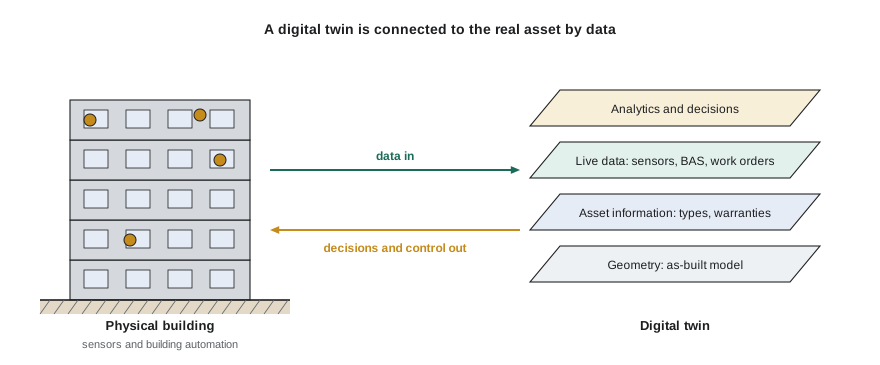
A digital twin is a digital representation of a physical asset that is connected to it by data and kept in sync over time. During construction, a twin might combine the model, schedule, reality captures and sensor data to show the current state of the site. In operation, a building twin links the as-built model and asset data to the building automation system, maintenance records and occupancy data, so operators can see equipment performance and plan maintenance. The term is used loosely in marketing; a useful test is whether the digital representation is actually updated from the real asset and used to make decisions.
Other emerging technologies
Several other technologies are worth watching. Construction 3D printing of concrete walls and small buildings has moved from demonstrations to some real projects, though code approval and economics vary. Augmented reality overlays the model on the real site through a tablet or headset, helping trades see where hidden services run or check installed work. Autonomous and remote-controlled heavy equipment extend machine control (CON-250). Blockchain-based tools have been proposed for payments and supply-chain records but remain marginal. Low-carbon materials and digital carbon accounting tools are increasingly linked to BIM so embodied carbon can be estimated from model quantities.
Rules for AI at work
Regulation of AI is developing. At the time of writing, Canada has no general federal AI statute in force; the proposed Artificial Intelligence and Data Act died when Parliament was prorogued in January 2025. Privacy law already applies to personal information used in AI systems (Lesson 11), and Ontario now requires employers with 25 or more employees to disclose in public job postings whether AI is used to screen, assess or select applicants. Firms should check current federal and provincial rules before deploying AI that affects workers.
Beyond legal minimums, a firm adopting AI should have a simple policy: which tools are approved, what data may be entered (never confidential owner information into a public tool without permission), who reviews outputs before they are relied on, and how workers are informed. The principle is that AI assists people; accountability stays with people.
Common mistakes
MistakeJudging an AI tool by a single accuracy figure.
InsteadAsk for precision and recall on comparable projects and compare with the cost of false alarms and missed cases.
MistakeRelying on generative AI output without checking it.
InsteadTreat AI drafts as drafts; verify facts, numbers and references against sources.
MistakeIntroducing camera-based safety monitoring without involving workers.
InsteadEngage workers and unions early, focus on hazards, and be transparent about data use.
MistakeCommitting to prefabrication without early coordination.
InsteadPlan design freeze, coordination sign-off and tolerances before fabrication starts.
MistakeCalling any 3D model a digital twin.
InsteadA twin is connected to the real asset by data and used for decisions.
Summary and key terms
- Machine learning finds patterns in historical data; it works best with plentiful, consistent data and stable conditions.
- Generative AI drafts and summarizes but can be confidently wrong; outputs must be checked.
- Precision and recall, not accuracy alone, show whether a prediction tool is useful.
- Computer vision can improve safety oversight but raises accuracy, privacy and trust issues.
- Site robots for layout, drilling, rebar tying and capture are in use; they depend on coordinated models and safe deployment.
- Prefabrication and modular construction depend on early, frozen, accurate digital information.
- Sensors and digital twins connect real assets to digital models for monitoring and decisions.
- AI regulation is evolving; firms need policies on approved tools, data and human review.
- Machine learning
- Software that learns patterns from data to make predictions or classifications.
- Generative AI
- AI that produces new content such as text, images or designs.
- Confusion matrix
- A table comparing predicted and actual outcomes.
- Precision
- The share of positive predictions that are correct.
- Recall
- The share of actual positives that are detected.
- Computer vision
- AI that interprets images and video.
- Layout robot
- A robot that marks layout on slabs from model data.
- Prefabrication
- Making building components off site for installation on site.
- Internet of Things (IoT)
- Networked sensors and devices that report data.
- Digital twin
- A digital representation kept in sync with a physical asset by data and used for decisions.
Practice problems
Work each problem on paper first, then reveal the answer to check.
A tool flags 40 activities; 28 are actually delayed. What is its precision?
Show answer
70 %.
Of 50 actually delayed activities, the tool flagged 35. What is its recall?
Show answer
70 %.
Why can accuracy be misleading for delay prediction?
Show answer
If most activities are on time, predicting 'on time' always gives high accuracy but catches no delays.
Name three questions to ask an AI vendor besides accuracy.
Show answer
Training data, explainability, accountability, data use and ownership, performance on comparable projects.
Give two concerns about camera-based safety monitoring.
Show answer
False alarms, privacy, use for discipline, worker trust.
What site conditions does a layout robot need?
Show answer
A coordinated model, a clean and clear slab, and total station positioning.
What is the main schedule risk of prefabricated MEP racks?
Show answer
Late coordination or design changes after sign-off.
What does a concrete maturity sensor help decide?
Show answer
When concrete is strong enough to strip forms or stress tendons.
What makes a model a digital twin?
Show answer
It is connected to the real asset by data, kept in sync and used for decisions.
Name two elements of a firm's AI policy.
Show answer
Approved tools, permitted data, human review of outputs, informing workers.
Lesson quiz · 5 questions
Score 60% or more to complete this lesson.
Create a free account to save your progress, take quizzes and earn a certificate.