
CMPUT-331 · Lesson 9 of 12 · 34 min
Secure software II: web application security
Web applications are where most organizations meet the internet, and where most attacks on them begin. They combine untrusted input from browsers, business logic, databases and third-party code, often written quickly by teams under pressure. This lesson works through the OWASP Top 10, the most widely used summary of web application risks, and for each category concentrates on the controls that prevent it: parameterized queries, output encoding, CSRF tokens, security headers, server-side URL allow-lists and dependency pinning. All examples show the safe pattern.
CMPUT-291 covered SQL injection and database permissions from the database side, and CMPUT-301 covered the secure development life cycle; CISSP-115 covered security testing programs. This lesson focuses on how a developer builds a web application that resists attack.
The OWASP Top 10 (2025)
The Open Worldwide Application Security Project (OWASP) publishes the Top 10 every few years from data contributed by testing firms and a community survey. The 2025 edition reorganized several categories: supply chain failures gained their own category, server-side request forgery was folded into broken access control, and a new category covers mishandling of exceptional conditions.
Access control and design (A01, A06)
Broken access control stays at number one because it is easy to introduce and hard to detect with generic scanners: the application works perfectly for honest users. The defences come from Lesson 7: a central authorization layer that every request passes through, deny-by-default rules, object-level checks that tie each record to its owner, and automated tests that try to read and modify other users' data. Insecure design is the broader version of the same problem: a flow that is correct line by line but unsafe as a whole, such as a password reset that can be attempted unlimited times or a checkout that trusts a price sent by the browser. Threat modelling during design, covered in Lesson 1, is the main control.
Injection (A05)
Injection happens when untrusted data is mixed into a command or query that an interpreter parses, so that the data can change the structure of the command. The cure is to keep code and data separate. For SQL, use parameterized queries, also called prepared statements: the query text contains placeholders and the values are sent separately, so the database never parses them as SQL. An apostrophe in a surname is then just a character. Parts of a query that cannot be parameterized, such as column names for sorting, must come from a fixed allow-list.
import sqlite3
con = sqlite3.connect(":memory:")
con.execute("CREATE TABLE students (id INTEGER PRIMARY KEY, surname TEXT, program TEXT)")
con.executemany("INSERT INTO students (surname, program) VALUES (?, ?)",
                [("O'Brien", "Computing"), ("Nguyen", "Biology"), ("Obi", "Computing")])
def find(surname: str):
    # Placeholders send the value separately from the SQL text, so it is never parsed as SQL
    return con.execute("SELECT id, surname, program FROM students WHERE surname = ?", (surname,)).fetchall()
print(find("O'Brien"))           # an apostrophe is just data
print(find("Nguyen"))
print(find("nobody"))
# Identifiers (column names) cannot be placeholders, so allow-list them instead
ALLOWED_SORT = {"surname", "program"}
def list_sorted(col: str):
    if col not in ALLOWED_SORT:
        raise ValueError("unsupported sort column")
    return [r[0] for r in con.execute(f"SELECT surname FROM students ORDER BY {col}, id")]
print(list_sorted("surname"))
try:
    list_sorted("surname; anything")
except ValueError as e:
print("rejected:", e)[(1, "O'Brien", 'Computing')] [(2, 'Nguyen', 'Biology')] [] ['Nguyen', "O'Brien", 'Obi'] rejected: unsupported sort column
The same principle applies to other interpreters. For operating system commands, pass arguments as a list to subprocess and never use a shell to join strings; for LDAP, XPath and NoSQL queries, use the library's parameter mechanisms; for templates, never build a template from user input. Object-relational mappers parameterize by default, but most also offer raw-query escape hatches that reintroduce the risk.
Cross-site scripting and output encoding
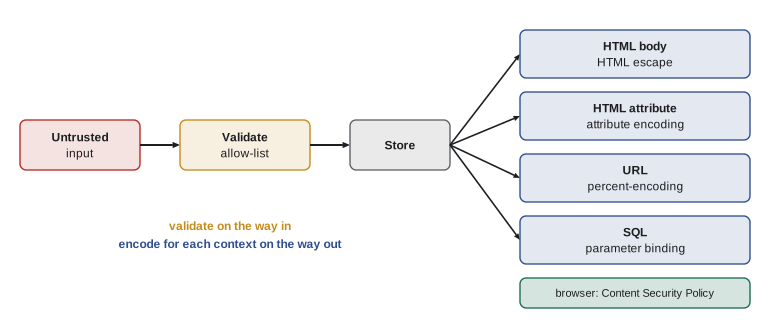
Cross-site scripting (XSS) is injection into HTML: if a page includes user-supplied text without encoding it, the browser may interpret part of it as markup or script, running in the context of the site with access to the victim's session. The defence is context-aware output encoding at the point where data is inserted: HTML-escape text placed in element content, use attribute encoding for attributes, URL-encode values placed in links and JavaScript-encode values placed in scripts. Modern template engines such as Jinja2, Django templates and React's JSX escape by default; the risk returns wherever developers mark content as safe or build HTML by string concatenation.
import html
from string import Template
# Context-aware output encoding: data is escaped for the HTML context it lands in
PAGE = Template('<p class="comment">$body</p><a href="/profile?u=$user">profile</a>')
def render(body: str, user: str) -> str:
    from urllib.parse import quote
    return PAGE.substitute(body=html.escape(body), user=quote(user, safe=""))
print(render("Great lecture <3 & thanks", "ana lima"))
print(render('He said "use <b>bold</b>"', "o'brien"))<p class="comment">Great lecture <3 & thanks</p><a href="/profile?u=ana%20lima">profile</a> <p class="comment">He said "use <b>bold</b>"</p><a href="/profile?u=o%27brien">profile</a>
A Content Security Policy (CSP) adds a second layer: a response header telling the browser which script sources are allowed, so that even if markup is injected, inline or foreign scripts do not run. A strict CSP using nonces or hashes for allowed scripts is one of the most effective defences against XSS, though it takes effort to retrofit to older applications.
Cross-site request forgery and cookies
Cross-site request forgery (CSRF) abuses the fact that browsers send cookies automatically: a page on another site can cause the victim's browser to submit a form to your site, and the request arrives with valid session cookies. Defences include the SameSite cookie attribute, which stops cookies being sent on most cross-site requests (browsers now default to Lax), and anti-CSRF tokens: an unpredictable value bound to the session, embedded in each form and checked on submission. A request from another site cannot read the token, so it cannot include it. Requests that change state should never use GET.
import hmac, hashlib, secrets
SERVER_KEY = b"demo key; load from a secrets manager in real code"
def csrf_token(session_id: str) -> str:
    # Synchronizer token bound to the session (HMAC), so it cannot be reused across sessions
    return hmac.new(SERVER_KEY, session_id.encode(), hashlib.sha256).hexdigest()
def check(session_id: str, submitted: str) -> bool:
    return hmac.compare_digest(csrf_token(session_id), submitted)
s1, s2 = "session-A-demo", "session-B-demo"
t1 = csrf_token(s1)
print("form token for session A:", t1[:24] + "...")
print("valid token, same session :", check(s1, t1))
print("token from another session:", check(s2, t1))
print("missing token              :", check(s1, ""))
cookie = "sid=...; Secure; HttpOnly; SameSite=Lax; Path=/"
print("cookie attributes:", cookie.split("; ", 1)[1])form token for session A: a26eeb8c98583703b50eb468... valid token, same session : True token from another session: False missing token : False cookie attributes: Secure; HttpOnly; SameSite=Lax; Path=/
Misconfiguration and headers (A02)
Many breaches need no clever attack at all: an administration panel with a default password, a storage bucket left public, directory listings turned on, stack traces shown to users or test endpoints left in production. Configuration should be defined as code, reviewed and applied automatically, with the same hardened baseline in every environment. Security response headers are a cheap part of that baseline: HTTP Strict Transport Security tells browsers to use HTTPS only, Content-Security-Policy restricts scripts and framing, X-Content-Type-Options stops content-type guessing, and Referrer-Policy limits what URLs leak to other sites.
# Checking a response's security headers against a baseline
baseline = {
    "Content-Security-Policy": "default-src 'self'; object-src 'none'; frame-ancestors 'none'",
    "Strict-Transport-Security": "max-age=31536000; includeSubDomains",
    "X-Content-Type-Options": "nosniff",
    "Referrer-Policy": "strict-origin-when-cross-origin",
}
response = {"Content-Type": "text/html; charset=utf-8", "X-Content-Type-Options": "nosniff",
            "Strict-Transport-Security": "max-age=600", "Server": "ExampleServer/2.4.1"}
for name, expected in baseline.items():
    got = response.get(name)
    if got is None:
        print(f"MISSING  {name}")
    elif name == "Strict-Transport-Security" and int(got.split("=")[1].split(";")[0]) < 31536000:
        print(f"WEAK     {name}: {got} (use at least one year)")
    else:
        print(f"OK       {name}")
if "Server" in response and any(ch.isdigit() for ch in response["Server"]):
print("ADVISE remove version numbers from the Server header")MISSING Content-Security-Policy WEAK Strict-Transport-Security: max-age=600 (use at least one year) OK X-Content-Type-Options MISSING Referrer-Policy ADVISE remove version numbers from the Server header
Server-side request forgery
Many applications fetch URLs on the server: link previews, webhooks, image imports and PDF generators. If the URL comes from a user, the server might be induced to request internal services that are not reachable from outside, such as cloud metadata endpoints or administration interfaces. OWASP 2025 places this server-side request forgery (SSRF) under broken access control. The defence is an allow-list of schemes and destination hosts, a check of the IP address the name actually resolves to, rejection of private, loopback and link-local ranges, and network egress rules so the fetching service cannot reach sensitive internal addresses even if the application check fails.
import ipaddress, socket
from urllib.parse import urlsplit
# Server-side URL fetching (for example, link previews): allow-list schemes and hosts, block internal addresses
ALLOWED_HOSTS = {"images.example.org", "cdn.example.net"}
def check_url(url: str, resolve=lambda h: "93.184.215.14") -> str:
    parts = urlsplit(url)
    if parts.scheme != "https":
        return "rejected: only https is allowed"
    if parts.hostname not in ALLOWED_HOSTS:
        return "rejected: host not on the allow-list"
    ip = ipaddress.ip_address(resolve(parts.hostname))      # check the address actually used
    if ip.is_private or ip.is_loopback or ip.is_link_local or ip.is_reserved:
        return "rejected: resolves to an internal address"
    return f"allowed: {parts.hostname} -> {ip}"
print(check_url("https://images.example.org/cat.png"))
print(check_url("http://images.example.org/cat.png"))
print(check_url("https://intranet.local/admin"))
print(check_url("https://cdn.example.net/x", resolve=lambda h: "10.0.0.5"))allowed: images.example.org -> 93.184.215.14 rejected: only https is allowed rejected: host not on the allow-list rejected: resolves to an internal address
Supply chain and integrity (A03, A08)
A typical web application runs far more third-party code than first-party code: frameworks, libraries and their dependencies, base container images and build tools. Attackers increasingly target that supply chain, compromising a maintainer account, publishing look-alike package names, or tampering with a build system, as in the 2020 SolarWinds compromise and the 2024 discovery of a backdoor planted in the xz compression library. Defences include lock files that pin exact versions and hashes, so a changed artifact is rejected; a software bill of materials (SBOM) listing every component, so you can answer quickly whether you are affected by a new vulnerability; automated dependency updates with review; signed releases verified before deployment; and reproducible, isolated builds. Integrity failures also include unsafe deserialization: formats such as Python's pickle can execute code while loading, so data from untrusted sources should use simple formats such as JSON and be validated against a schema.
import hashlib
# Verifying a downloaded package against a pinned hash, as "pip install --require-hashes" does
lockfile = {"tinylib-1.4.2.tar.gz": "sha256:" + hashlib.sha256(b"tinylib source 1.4.2").hexdigest()}
def install(name: str, data: bytes) -> str:
    want = lockfile.get(name)
    if want is None:
        return f"refuse {name}: not in the lock file"
    got = "sha256:" + hashlib.sha256(data).hexdigest()
    return f"install {name}" if got == want else f"refuse {name}: hash mismatch"
print(install("tinylib-1.4.2.tar.gz", b"tinylib source 1.4.2"))
print(install("tinylib-1.4.2.tar.gz", b"tinylib source 1.4.2 (altered)"))
print(install("tinylib-9.9.9.tar.gz", b"unexpected new version"))
print("lock entry:", "tinylib==1.4.2 --hash=" + lockfile["tinylib-1.4.2.tar.gz"][:30] + "...")install tinylib-1.4.2.tar.gz refuse tinylib-1.4.2.tar.gz: hash mismatch refuse tinylib-9.9.9.tar.gz: not in the lock file lock entry: tinylib==1.4.2 --hash=sha256:2cbc17f6ad8323763385390...
In Canada, the Canadian Centre for Cyber Security's guidance on software supply chain security and its secure-by-design publications, issued jointly with allied agencies, recommend SBOMs and secure development practices to suppliers, and federal procurement increasingly asks vendors about them. Protecting personal information processed by web applications is also a legal duty under PIPEDA and provincial laws, which require safeguards appropriate to the sensitivity of the information.
Logging and exceptional conditions (A09, A10)
Detection and error handling complete the picture. Log security-relevant events (logins, failures, access denials, changes of privileges and data exports) with enough context to investigate, without logging secrets such as passwords or full tokens, and send alerts on suspicious patterns. Handle errors centrally so that every failure path fails closed: if an authorization service cannot be reached, deny access rather than allowing it, and show users a generic message while recording details server-side.
Worked examples
Worked problem
Fixing a search feature
A product search builds SQL as "SELECT * FROM products WHERE name LIKE '%" + term + "%' ORDER BY " + sort. Rewrite it safely.
Show solution
- Replace string concatenation for the search term with a placeholder: WHERE name LIKE ? with the parameter "%" + term + "%".
- The sort column cannot be a placeholder, so map the user's choice through an allow-list such as {"name": "name", "price": "price"} and reject anything else.
- Select only the columns needed instead of *, run the query as a database user with read-only permissions, and add a test with an apostrophe in the term.
Answer: Parameterize values, allow-list identifiers, select specific columns and use a least-privilege database account.
Worked problem
Hardening a comment page
A forum shows user comments by inserting them into HTML with string concatenation. What changes stop script injection and limit damage if one slips through?
Show solution
- Render comments through a template engine with autoescaping, or call html.escape on each comment before insertion.
- If rich text is needed, accept a limited markup language and sanitize the result with a maintained allow-list sanitizer.
- Add a strict Content-Security-Policy with script nonces, and set session cookies HttpOnly so scripts cannot read them.
Answer: Autoescape output, sanitize any allowed markup, deploy a strict CSP and use HttpOnly cookies.
Worked problem
Responding to a vulnerable dependency
A critical vulnerability is announced in a logging library. A team runs 40 services. How do an SBOM and lock files help?
Show solution
- Query the SBOMs for the library and affected versions to find every service that includes it, directly or through other packages.
- Update the pinned version in each lock file, regenerate hashes and let the pipeline rebuild and test each service.
- Deploy the fixed builds, then check runtime inventories to confirm no old version remains, and record the response.
Answer: SBOMs show where the component is used in minutes; lock files make the update precise and verifiable.
Common mistakes
MistakeEscaping quotes in input prevents SQL injection.
InsteadUse parameterized queries; manual escaping misses cases and differs between databases.
MistakeInput validation alone prevents cross-site scripting.
InsteadEncode output for its context; validation cannot anticipate every place data is displayed.
MistakeHiding an admin URL protects it.
InsteadEnforce authorization on the server for every request.
MistakeUsing a popular library means the supply chain is safe.
InsteadPin versions with hashes, keep an SBOM and review updates; popular packages are prime targets.
MistakeDetailed error messages help users and are harmless.
InsteadShow generic messages, log details server-side and fail closed.
Summary and key terms
- The OWASP Top 10 (2025) is led by broken access control, misconfiguration and supply chain failures.
- Keep code and data separate: parameterized queries, argument lists for commands, allow-lists for identifiers.
- Prevent XSS with context-aware output encoding and add a strict Content Security Policy.
- Stop CSRF with SameSite cookies and session-bound tokens; never change state on GET.
- Harden configuration as code and send security headers such as HSTS and CSP.
- Prevent SSRF with scheme and host allow-lists, resolved-address checks and egress rules.
- Secure the supply chain with lock files, hashes, SBOMs and signatures, and avoid unsafe deserialization.
- Injection
- A flaw where untrusted data changes the structure of a command or query.
- Parameterized query
- A query whose values are passed separately from its text, so they are never parsed as code.
- Cross-site scripting
- Injection of markup or script into pages viewed by other users.
- Output encoding
- Converting data so it is treated as text in a specific output context.
- Content Security Policy
- A response header restricting which scripts and resources a page may load.
- CSRF
- Cross-site request forgery: tricking a browser into sending authenticated requests to another site.
- SameSite
- A cookie attribute that limits sending cookies on cross-site requests.
- SSRF
- Server-side request forgery: inducing a server to fetch URLs chosen by an attacker.
- SBOM
- Software bill of materials: a list of all components in a piece of software.
- Lock file
- A file pinning exact dependency versions and hashes for reproducible installs.
Practice problems
Work each problem on paper first, then reveal the answer to check.
Which category tops the OWASP Top 10 (2025)?
Show answer
A01 Broken Access Control.
Why can an apostrophe not break a parameterized query?
Show answer
The value is sent separately and treated as data, never parsed as SQL.
How should a sort column chosen by the user be handled?
Show answer
Map it through a fixed allow-list of permitted column names.
What does html.escape do to < and &?
Show answer
It converts them to < and & so they display as text.
How does a CSP limit damage from XSS?
Show answer
It tells the browser to refuse scripts from sources not explicitly allowed.
Why can a malicious site not include a valid CSRF token?
Show answer
It cannot read pages from your site, so it cannot learn the session-bound token.
What does HSTS tell the browser?
Show answer
To use only HTTPS for the site for the specified period.
Name two checks against SSRF.
Show answer
Allow-list destination hosts and reject resolved private, loopback or link-local addresses.
Why avoid pickle for untrusted data?
Show answer
Loading a pickle can execute code; use JSON with schema validation instead.
What question does an SBOM answer during an incident?
Show answer
Which of our systems contain the affected component and version.
Lesson quiz · 5 questions
Score 60% or more to complete this lesson.
Create a free account to save your progress, take quizzes and earn a certificate.