
CMP-320 · Lesson 2 of 12 · 33 min
Processes
A process is a program in execution. The program is a file on disk, a passive list of instructions and data; the process is the running instance, with its own memory, open files, current position in the code and permissions. Run the same editor twice and you have one program but two processes, each with separate state. The process is the operating system's basic unit of isolation and resource accounting, and nearly every other topic in this course, from scheduling to memory management to security, is defined in terms of processes.
This lesson looks at what the kernel stores about each process, the states a process moves through, and the Unix system calls that create, replace and wait for processes: fork, exec and wait. It also covers pipes and signals, two of the oldest ways processes communicate. Threads, which share a process's memory, are the subject of Lesson 3.
What a process contains
From the program's point of view, a process has an address space divided into regions: the text segment with machine code, initialized and uninitialized data for global variables, a heap that grows as malloc requests memory, a stack for function calls and memory-mapped regions for shared libraries and files. From the kernel's point of view, a process also has a set of resources: a table of open file descriptors, a current working directory, signal handlers, resource limits and credentials such as the user and group identifiers that decide what it may access.
The kernel tracks all this in a process control block, called task_struct in Linux. It records the process identifier (PID) and the parent's PID, the scheduling state and priority, the saved registers and program counter used when the process is not running, a pointer to its page tables, accounting information such as processor time used, and pointers to its files, signal state and credentials. A Linux task_struct is several kilobytes. When the operating system switches the processor from one process to another, it saves the outgoing process's registers into its control block and loads the incoming one's, a context switch that typically takes a few microseconds.
Process states
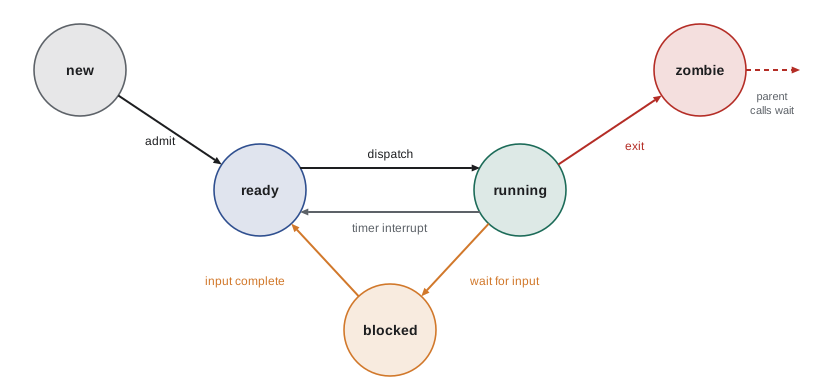
A process is not always running. On a computer with four cores, at most four processes run at any instant; the rest wait. The classic model has five states. A new process is being created. A ready process could run but is waiting for a processor. A running process is executing instructions. A blocked (or waiting) process cannot run until some event happens, such as data arriving from a disk or network, a lock being released or a timer expiring. A terminated process has finished. Unix adds a sixth: a zombie is a process that has exited but whose parent has not yet collected its exit status.
# A process life cycle as a state machine, replaying one trace of events
TRANSITIONS = {
    ("new", "admit"): "ready",
    ("ready", "dispatch"): "running",
    ("running", "timer interrupt"): "ready",
    ("running", "read() blocks on disk"): "blocked",
    ("blocked", "disk interrupt: data ready"): "ready",
    ("running", "exit()"): "zombie",
    ("zombie", "parent calls wait()"): "terminated",
}
state = "new"
events = ["admit", "dispatch", "timer interrupt", "dispatch", "read() blocks on disk",
          "disk interrupt: data ready", "dispatch", "exit()", "parent calls wait()"]
for e in events:
    new = TRANSITIONS[(state, e)]
    print(f"{state:<10} --{e:^28}--> {new}")
state = newnew -- admit --> ready ready -- dispatch --> running running -- timer interrupt --> ready ready -- dispatch --> running running -- read() blocks on disk --> blocked blocked -- disk interrupt: data ready --> ready ready -- dispatch --> running running -- exit() --> zombie zombie -- parent calls wait() --> terminated
Most processes on a typical system are blocked most of the time. A text editor waits for keystrokes, a web server waits for connections, and a shell waits for its child to finish. Being blocked costs no processor time, which is why a laptop can have hundreds of processes and still be mostly idle. On Linux, the ps command shows the state letter: R for running or ready, S for interruptible sleep, D for uninterruptible sleep (usually waiting on disk), T for stopped and Z for zombie.
Creating processes: fork, exec and wait
Unix creates processes in two steps. The fork system call creates a new process, the child, that is an almost exact copy of the caller, the parent: same code, same memory contents, same open files. Fork returns twice, once in each process: it returns the child's PID to the parent and zero to the child, which is how each knows which role it plays. The exec family of system calls then replaces the calling process's program with a new one loaded from a file, keeping the same PID and open files. Finally, wait (or waitpid) lets a parent pause until a child finishes and collect its exit status.
#include <stdio.h>
#include <stdlib.h>
#include <sys/wait.h>
#include <unistd.h>

int main(void) {
    int x = 10;
    fflush(stdout);                      /* empty stdio buffers before duplicating them */
    pid_t pid = fork();
    if (pid < 0) { perror("fork"); return 1; }
    if (pid == 0) {                      /* child: a copy of the parent */
        x += 5;
        printf("child : x = %d (my own copy changed)\n", x);
        fflush(stdout);                  /* exec discards unflushed stdio buffers */
        execlp("echo", "echo", "child : now running echo after exec", (char *)NULL);
        perror("exec");                  /* only reached if exec fails */
        _exit(127);
    }
    int status;
    waitpid(pid, &status, 0);            /* parent waits, so the output order is fixed */
    printf("parent: x = %d (unchanged)\n", x);
    if (WIFEXITED(status))
        printf("parent: child exited with status %d\n", WEXITSTATUS(status));
    return 0;
}$ gcc -Wall -g -fsanitize=address,undefined toy.c -o toy $ ./toy child : x = 15 (my own copy changed) child : now running echo after exec parent: x = 10 (unchanged) parent: child exited with status 0
Note that the child changed x but the parent still sees 10. After fork, each process has its own address space. Copying a whole address space would be slow, so kernels use copy-on-write: parent and child share the same physical pages, marked read-only, and the kernel copies a page only when one of them writes to it. A fork followed immediately by exec therefore copies almost nothing. The program also calls fflush before fork and exec: the C library's output buffer lives in user memory, so an unflushed buffer would be duplicated by fork, or thrown away by exec. Forgetting this is a classic source of duplicated or missing output.
Splitting process creation into fork and exec looks odd at first, but it is powerful. Between fork and exec, the child can rearrange its environment: redirect standard output to a file, change directory, drop privileges or set resource limits, all using ordinary system calls, before the new program starts. That is exactly how a shell implements redirection and pipelines. Windows takes the other approach, with a single CreateProcess call that takes many parameters, and POSIX also offers posix_spawn for the common case.
Parents, children and the process tree
# Build and print a process tree from (pid, ppid, name) records, like `pstree`
procs = [(1, 0, "systemd"), (420, 1, "sshd"), (2711, 420, "sshd: ana"), (2712, 2711, "bash"),
         (2790, 2712, "python3 grader.py"), (2791, 2790, "gcc"), (2795, 2790, "./a.out"),
         (512, 1, "cron"), (3001, 512, "backup.sh")]
children = {}
for pid, ppid, name in procs:
    children.setdefault(ppid, []).append((pid, name))
def show(pid, name, indent=""):
    print(f"{indent}{name} ({pid})")
    for cpid, cname in sorted(children.get(pid, [])):
        show(cpid, cname, indent + "    ")
show(1, "systemd")systemd (1)
sshd (420)
sshd: ana (2711)
bash (2712)
python3 grader.py (2790)
gcc (2791)
./a.out (2795)
cron (512)
backup.sh (3001)Every process except the first has a parent, so processes form a tree rooted at process 1. When a child exits, the kernel keeps a small record of it, the zombie, until the parent calls wait to read its exit status. A parent that never waits leaks zombies; each holds a PID and a process table slot, and a server that forks thousands of children without waiting can eventually exhaust the PID space. If a parent dies first, its children become orphans and are adopted by process 1 (or a designated subreaper), which waits for them so they do not linger as zombies.
Communicating through pipes
A pipe is a one-way byte stream inside the kernel, created with the pipe system call, which returns two file descriptors: one for reading and one for writing. Combined with fork and dup2 (which makes one file descriptor refer to the same open file as another), pipes let a shell connect the standard output of one program to the standard input of the next. The kernel buffers data in the pipe (64 KiB by default on Linux), blocks a writer when the buffer is full and blocks a reader when it is empty, so the two programs run concurrently at the pace of the slower one.
#include <stdio.h>
#include <sys/wait.h>
#include <unistd.h>

/* Run the shell pipeline  printf 'b\na\nc\n' | sort  using pipe, fork, dup2 and exec */
int main(void) {
    int fd[2];
    if (pipe(fd) < 0) { perror("pipe"); return 1; }
    pid_t left = fork();
    if (left == 0) {                       /* writer: stdout -> pipe */
        dup2(fd[1], STDOUT_FILENO);
        close(fd[0]); close(fd[1]);
        execlp("printf", "printf", "b\\na\\nc\\n", (char *)NULL);
        _exit(127);
    }
    pid_t right = fork();
    if (right == 0) {                      /* reader: stdin <- pipe */
        dup2(fd[0], STDIN_FILENO);
        close(fd[0]); close(fd[1]);
        execlp("sort", "sort", (char *)NULL);
        _exit(127);
    }
    close(fd[0]); close(fd[1]);            /* parent must close both ends, or sort never sees EOF */
    int s1, s2;
    waitpid(left, &s1, 0); waitpid(right, &s2, 0);
    printf("both children finished: %d %d\n", WEXITSTATUS(s1), WEXITSTATUS(s2));
    return 0;
}$ gcc -Wall -g -fsanitize=address,undefined toy.c -o toy $ ./toy a b c both children finished: 0 0
The most common pipe bug is forgetting to close unused ends. A reader sees end-of-file only when every write end of the pipe is closed. If the parent keeps its copy of the write end open, sort waits forever for more input. Other communication mechanisms build on the same ideas: named pipes (FIFOs) have names in the file system, Unix domain sockets allow two-way communication between local processes, shared memory segments let processes map the same pages, and message queues pass discrete messages.
Signals
A signal is a small asynchronous notification sent to a process: SIGINT when you press Ctrl-C, SIGTERM as a polite request to exit, SIGKILL to end a process immediately (it cannot be caught), SIGSEGV for an invalid memory access, SIGCHLD when a child exits and SIGALRM when a timer expires. A process can ignore most signals, accept the default action (often termination) or install a handler with sigaction. Because a handler can interrupt the program at almost any instruction, it should do very little: setting a flag of type volatile sig_atomic_t is the safe pattern, with the main loop checking the flag.
#include <signal.h>
#include <stdio.h>
#include <string.h>
#include <sys/wait.h>
#include <unistd.h>

static volatile sig_atomic_t stop = 0;
static void on_term(int sig) { (void)sig; stop = 1; }   /* only set a flag in a handler */

int main(void) {
    int ready[2]; pipe(ready);
    pid_t pid = fork();
    if (pid == 0) {
        struct sigaction sa; memset(&sa, 0, sizeof sa);
        sa.sa_handler = on_term; sigaction(SIGTERM, &sa, NULL);
        char c = 'r'; write(ready[1], &c, 1);             /* tell the parent the handler is installed */
        while (!stop) pause();                            /* sleep until a signal arrives */
        printf("child : got SIGTERM, saving work and exiting cleanly\n");
        fflush(stdout);
        _exit(0);
    }
    char c; read(ready[0], &c, 1);                        /* wait until the child is ready */
    kill(pid, SIGTERM);
    int status; waitpid(pid, &status, 0);
    printf("parent: child exited normally=%d status=%d\n", WIFEXITED(status), WEXITSTATUS(status));
    return 0;
}$ gcc -Wall -g -fsanitize=address,undefined toy.c -o toy $ ./toy child : got SIGTERM, saving work and exiting cleanly parent: child exited normally=1 status=0
Services rely on this pattern. When an administrator stops a service, the service manager sends SIGTERM, waits a few seconds for a clean shutdown (flushing data, closing connections), and only then sends SIGKILL. A program that ignores SIGTERM or takes too long loses its unsaved work. Signals are also how a shell implements job control: Ctrl-Z sends SIGTSTP to stop a job, and fg resumes it with SIGCONT.
Worked examples
Worked problem
Counting processes created by fork
A program calls fork() three times in a row, with no if statements around the calls. How many processes exist at the end, including the original?
Show solution
- After the first fork there are 2 processes, and each continues to the second fork.
- After the second fork each of the 2 becomes 2: 4 processes.
- After the third fork: 8 processes.
- In general, n unconditional forks produce 2^n processes, which is why fork belongs inside a test of its return value.
Answer: Eight processes, 2 to the power 3.
Worked problem
How a shell runs grep error log.txt > errors.txt
List the system calls a shell makes to run this command.
Show solution
- The shell calls fork to create a child.
- In the child, it opens errors.txt for writing (openat with O_WRONLY, O_CREAT and O_TRUNC) and calls dup2 to make that file descriptor 1, standard output, then closes the original descriptor.
- The child calls execve on /usr/bin/grep with the arguments grep, error and log.txt; grep writes to descriptor 1 without knowing it is a file.
- The parent shell calls waitpid until the child exits, then records the exit status in $?.
Answer: fork, then openat and dup2 in the child, then execve, while the parent waits with waitpid.
Worked problem
A server leaking zombies
An old network service forks a child for each connection but never calls wait. After a week, new connections fail. What happened, and how is it fixed?
Show solution
- Each finished child becomes a zombie that holds a PID and process table entry until reaped.
- Thousands of zombies eventually exhaust the per-user process limit or the PID space, so fork fails.
- Fix it by reaping children: handle SIGCHLD and call waitpid with WNOHANG in a loop, or set SIGCHLD to SIG_IGN so the kernel reaps them automatically.
- Better still, use a process pool or threads so the server does not fork per connection.
Answer: Unreaped zombies used up the process limit; reap children with waitpid on SIGCHLD or ignore SIGCHLD.
Common mistakes
MistakeA program and a process are the same thing.
InsteadA program is a file; a process is a running instance with its own state, and one program can have many processes.
MistakeAfter fork, parent and child share variables.
InsteadEach has its own copy of the address space; changes in one are invisible to the other (copy-on-write only delays the copying).
Mistakeexec starts a new process.
Insteadexec replaces the program in the current process, keeping its PID and open files; fork creates the new process.
MistakeIt is safe to call printf or malloc inside a signal handler.
InsteadHandlers should only use async-signal-safe functions; set a sig_atomic_t flag and act on it in the main loop.
MistakeA pipe reader will see end-of-file once the writer program exits.
InsteadIt sees end-of-file only when every copy of the write end, including the parent's, is closed.
Summary and key terms
- A process is a running program with its own address space, resources and credentials, described by a process control block.
- Processes move between new, ready, running, blocked, zombie and terminated states.
- fork copies the caller, exec replaces the program, and wait collects a child's exit status.
- Copy-on-write makes fork cheap; flushing stdio buffers before fork and exec avoids duplicated or lost output.
- Processes form a tree; parents must reap children, and orphans are adopted by process 1.
- Pipes connect processes through kernel buffers; unused pipe ends must be closed.
- Signals are asynchronous notifications; handlers should only set flags.
- Process
- A program in execution, with its own address space and resources.
- Process control block
- The kernel data structure describing a process; task_struct in Linux.
- PID
- The numeric process identifier assigned by the kernel.
- Context switch
- Saving one process's state and loading another's so the processor can switch between them.
- fork
- The system call that creates a child process as a copy of the parent.
- exec
- The family of system calls that replaces the current program with another.
- Zombie
- A finished process whose exit status has not yet been collected by its parent.
- Orphan
- A process whose parent has exited; it is adopted by process 1.
- Pipe
- A one-way byte stream between processes, buffered in the kernel.
- Signal
- An asynchronous notification delivered to a process.
Practice problems
Work each problem on paper first, then reveal the answer to check.
What does fork return in the parent, in the child and on failure?
Show answer
The child's PID in the parent, 0 in the child and -1 on failure.
Why did the child's change to x not affect the parent?
Show answer
After fork each process has its own copy of memory.
What is copy-on-write?
Show answer
Sharing pages read-only after fork and copying a page only when one process writes to it.
Which state is a process in while waiting for a disk read?
Show answer
Blocked (waiting).
What creates a zombie and what removes it?
Show answer
A child exiting creates it; the parent calling wait removes it.
Why must the parent close both pipe ends in the pipeline example?
Show answer
Otherwise sort never sees end-of-file because a write end remains open.
What does dup2(fd, 1) do?
Show answer
Makes file descriptor 1, standard output, refer to the same open file as fd.
Which signal cannot be caught or ignored?
Show answer
SIGKILL (and SIGSTOP).
Why should a signal handler only set a flag?
Show answer
It may interrupt the program anywhere, so calling non-reentrant functions could corrupt state.
Why is splitting creation into fork and exec useful?
Show answer
The child can set up redirection, directories, limits and privileges with ordinary calls before the new program starts.
Lesson quiz · 5 questions
Score 60% or more to complete this lesson.
Create a free account to save your progress, take quizzes and earn a certificate.