
CMP-320 · Lesson 12 of 12 · 34 min
Capstone: virtualization, containers and the operating system end to end
This final lesson draws the course together in two ways. First, it follows a single command from the shell through the kernel and back, touching processes, system calls, pipes, scheduling, memory and files along the way. Second, it looks at virtualization and containers, the technologies that let one physical machine run many isolated operating systems or applications and that underpin every cloud platform. Both build directly on the mechanisms of earlier lessons: privilege levels and traps (Lesson 1), processes (Lesson 2), scheduling (Lesson 4), page tables (Lessons 8 and 9) and file systems (Lessons 10 and 11).
One command, end to end
Type echo hi | wc -c into a shell and press Enter. The terminal driver delivers the line to the shell's read call, waking the shell, which the scheduler had blocked. The shell parses the line and finds a pipeline. It calls pipe to get two file descriptors, then forks twice. The first child points its standard output at the pipe's write end with dup2 and runs echo, a shell built-in, so this child never calls exec. The second child points its standard input at the read end and calls execve on /usr/bin/wc. The kernel replaces that child's address space: it maps wc's code and data from the page cache, with page faults loading pages lazily (Lesson 9). wc reads from the pipe, blocking until data arrives, counts three bytes (h, i and the newline), writes the count, and exits. The parent reaps both children with wait4, and the kernel frees their memory and descriptors.
strace -f -o raw.txt -e trace=pipe2,clone,clone3,execve,dup2,wait4,exit_group sh -c "echo hi | wc -c"
cat trace.txt$ strace -f -o raw.txt -e trace=pipe2,clone,clone3,execve,dup2,wait4,exit_group sh -c "echo hi | wc -c"
3
$ cat trace.txt
100 execve("/usr/bin/sh", ["sh", "-c", "echo hi | wc -c"], 0x... /* environment */) = 0
100 pipe2([3, 4], 0) = 0
100 clone(child_stack=NULL, flags=CLONE_CHILD_CLEARTID|CLONE_CHILD_SETTID|SIGCHLD, child_tidptr=0x...) = 101
101 dup2(4, 1) = 1
101 exit_group(0) = ?
101 +++ exited with 0 +++
100 --- SIGCHLD {si_signo=SIGCHLD, si_code=CLD_EXITED, si_pid=101} ---
100 clone(child_stack=NULL, flags=CLONE_CHILD_CLEARTID|CLONE_CHILD_SETTID|SIGCHLD, child_tidptr=0x...) = 102
102 dup2(3, 0) = 0
100 wait4(-1, [{WIFEXITED(s) && WEXITSTATUS(s) == 0}], 0, NULL) = 101
100 wait4(-1, <unfinished ...>
102 execve("/usr/bin/wc", ["wc", "-c"], 0x... /* environment */) = 0
102 exit_group(0) = ?
102 +++ exited with 0 +++
100 <... wait4 resumed>[{WIFEXITED(s) && WEXITSTATUS(s) == 0}], 0, NULL) = 102
100 --- SIGCHLD {si_signo=SIGCHLD, si_code=CLD_EXITED, si_pid=102} ---
100 wait4(-1, 0x..., WNOHANG, NULL) = -1 ECHILD (No child processes)
100 exit_group(0) = ?
100 +++ exited with 0 +++Every concept from the course appears in these few lines: processes created with clone (the system call behind fork), file descriptors redirected with dup2, a program loaded with execve, blocking on a pipe until the scheduler runs the other process, signals (SIGCHLD) reporting each child's exit, and the parent reaping zombies with wait4. Behind the scenes, each process got its own page tables, copy-on-write pages after the fork, scheduling by CFS or EEVDF on whichever CPU was free, and file reads served from the page cache. The order of lines can differ from run to run because the two children run concurrently, a reminder of Lesson 5.
Virtual machines
A virtual machine (VM) is a software-defined computer that runs a complete operating system, the guest, as if it had real hardware. The software that creates and runs VMs is a hypervisor or virtual machine monitor (VMM). A type 1 (bare-metal) hypervisor runs directly on the hardware and is itself a small operating system: examples are VMware ESXi, Microsoft Hyper-V and Xen, and Linux KVM, which turns the Linux kernel into a hypervisor. A type 2 (hosted) hypervisor, such as VirtualBox or VMware Workstation, runs as an application on a conventional host operating system. Public clouds run type 1 hypervisors: Amazon EC2's Nitro is based on KVM.
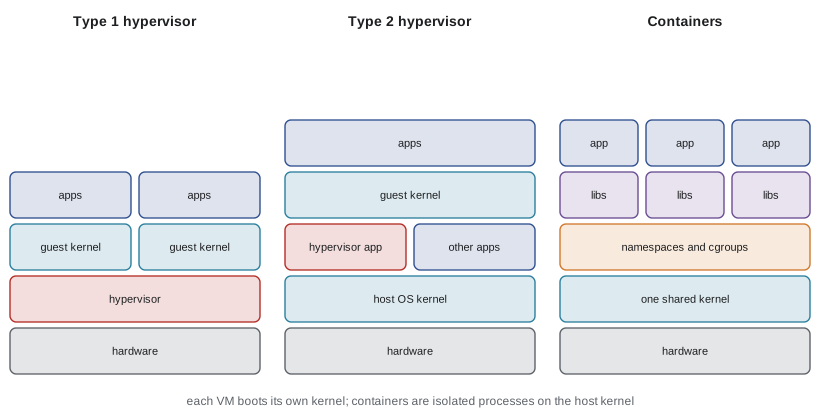
The classic technique is trap and emulate. The guest kernel runs in user mode, so whenever it executes a privileged instruction, such as loading a page-table base register or disabling interrupts, the processor traps to the hypervisor, which emulates the instruction's effect on the virtual machine's state. Popek and Goldberg showed in 1974 that this works only if every sensitive instruction, one that reads or changes machine state, is also privileged and so traps. Classic x86 broke this rule.
# Popek and Goldberg: trap-and-emulate works only if every sensitive instruction is privileged
instructions = {
    # name: (sensitive: reads or changes machine state, privileged: traps in user mode)
    "load control register (mov cr3)": (True, True),
    "halt (hlt)":                       (True, True),
    "read flags (pushf)":               (True, False),   # reveals the interrupt flag
    "write flags (popf)":               (True, False),   # silently ignores the interrupt flag in user mode
    "store descriptor table (sgdt)":    (True, False),
    "add":                              (False, False),
}
problems = [n for n, (sens, priv) in instructions.items() if sens and not priv]
for n, (sens, priv) in instructions.items():
    verdict = "trap and emulate" if sens and priv else "runs directly" if not sens else "BREAKS virtualization"
    print(f"{n:<33} sensitive={str(sens):<5} privileged={str(priv):<5} -> {verdict}")
print(f"classic x86 is not virtualizable by trap-and-emulate: {len(problems)} sensitive, unprivileged instructions")load control register (mov cr3) sensitive=True privileged=True -> trap and emulate halt (hlt) sensitive=True privileged=True -> trap and emulate read flags (pushf) sensitive=True privileged=False -> BREAKS virtualization write flags (popf) sensitive=True privileged=False -> BREAKS virtualization store descriptor table (sgdt) sensitive=True privileged=False -> BREAKS virtualization add sensitive=False privileged=False -> runs directly classic x86 is not virtualizable by trap-and-emulate: 3 sensitive, unprivileged instructions
Early x86 hypervisors worked around the problem in two ways. VMware used binary translation, rewriting the guest kernel's problem instructions on the fly. Xen used paravirtualization, modifying the guest kernel to call the hypervisor explicitly (hypercalls). Since 2005-2006, Intel VT-x and AMD-V have added hardware support: a new root mode for the hypervisor, in which the guest kernel runs in its normal ring 0 while sensitive events cause VM exits to the hypervisor. Paravirtualized device drivers such as virtio remain common, because emulating real network cards and disks instruction by instruction is slow.
Virtualizing memory
A guest kernel manages its own page tables mapping guest-virtual to guest-physical addresses, but guest-physical memory is itself virtual: the hypervisor must map it to host-physical memory. Before hardware support, hypervisors kept shadow page tables that combined both mappings and had to trap every guest page-table update. Intel EPT and AMD NPT now do nested paging in hardware: the processor walks the guest's tables and the hypervisor's tables together. The cost appears on a TLB miss, because each of the guest's page-table references needs its own host walk.
# Address translation cost: native paging vs a virtual machine with nested (two-dimensional) paging
def native(levels):
    return levels                                   # one memory reference per page-table level
def nested(guest, host):
    # every guest page-table reference is itself a guest-physical address that needs a host walk,
    # and the final guest-physical address needs one more host walk
    return (guest + 1) * (host + 1) - 1
for g, h in ((4, 4), (5, 5)):
    print(f"{g}-level guest on {h}-level host: native walk {native(g)} references, nested walk {nested(g, h)}")
tlb_hit = 0.99
for name, walk in (("native", native(4)), ("nested", nested(4, 4))):
    avg = 1 + (1 - tlb_hit) * walk                  # memory references per access, TLB lookup free
print(f"{name:<6}: {avg:.2f} memory references per access at a {tlb_hit:.0%} TLB hit rate")4-level guest on 4-level host: native walk 4 references, nested walk 24 5-level guest on 5-level host: native walk 5 references, nested walk 35 native: 1.04 memory references per access at a 99% TLB hit rate nested: 1.24 memory references per access at a 99% TLB hit rate
This is why large pages (Lesson 9) are especially valuable in virtual machines: they shorten both walks and multiply TLB reach. Hypervisors also overcommit memory using techniques from Lesson 9: ballooning, in which a driver in the guest allocates memory to hand pages back to the host; page sharing, which merges identical pages across VMs as copy-on-write (Linux's KSM); and host-level swapping as a last resort. Live migration copies a running VM's memory to another host while it runs, re-sending dirtied pages, then pauses it for a fraction of a second to move the rest, which lets clouds patch hardware without stopping customers' workloads.
Containers
A container isolates a group of processes while they share the host's kernel. There is no guest operating system: a containerized web server is an ordinary Linux process that the kernel shows a restricted view of the system. Two kernel features make this possible. Namespaces give a process its own view of a global resource: process IDs, mount points, network interfaces, host name, users, inter-process communication and more. Control groups (cgroups) limit and account for the resources a group of processes may use: CPU time (through CFS quotas, Lesson 4), memory (with a per-group out-of-memory killer, Lesson 9), input and output bandwidth and the number of processes.
ls /proc/self/ns
hostname
unshare --user --map-root-user --uts sh -c 'hostname lab379; hostname'
hostname
unshare --user --map-root-user --pid --fork --mount-proc ps -o pid,comm
unshare --user --map-root-user --net sh -c 'tail -n +3 /proc/net/dev | cut -c1-30'$ ls /proc/self/ns
cgroup
ipc
mnt
net
pid
pid_for_children
time
time_for_children
user
uts
$ hostname
vm
$ unshare --user --map-root-user --uts sh -c 'hostname lab379; hostname'
lab379
$ hostname
vm
$ unshare --user --map-root-user --pid --fork --mount-proc ps -o pid,comm
PID COMMAND
1 ps
$ unshare --user --map-root-user --net sh -c 'tail -n +3 /proc/net/dev | cut -c1-30'
lo: 0 0 0The transcript shows each namespace type the process belongs to, then creates new ones without any special container software. In a new UTS namespace, changing the host name does not affect the real machine. In a new PID namespace, ps sees itself as process 1, because the namespace has its own numbering, and the first process in it acts as that namespace's init. In a new network namespace the only interface is the loopback device lo, with no connection to the outside until one is configured. The user namespace lets an ordinary user be root inside the namespace without root rights outside, which is how rootless containers work.
Container engines such as Docker and Podman combine namespaces and cgroups with layered images (stacked read-only file system layers with copy-on-write on top, using the overlay file system) and security filters: seccomp restricts which system calls a container may make, and capabilities split root's powers into pieces. Kubernetes orchestrates containers across many machines, scheduling them onto nodes much as an operating system schedules threads onto CPUs, a topic for CMPUT-450.
The two are often combined. Cloud providers run each customer's containers inside VMs, and lightweight microVM hypervisors such as AWS Firecracker (used by Lambda) boot a minimal Linux guest in about 125 ms, giving VM-strength isolation with nearly container-like speed. gVisor takes another route, intercepting a container's system calls with a user-space kernel written in Go.
The operating system as a security boundary
Everything in this course is also a security mechanism. Dual-mode execution keeps applications away from hardware; virtual memory keeps processes out of each other's memory; file permissions guard data; namespaces and hypervisors separate tenants. Each boundary has been attacked. Meltdown (2018) let user programs read kernel memory through speculative execution, and the fix, kernel page-table isolation, made every system call more expensive by switching page tables on kernel entry. Container escapes exploit kernel bugs reachable through the shared system call interface. CMPUT-331 covers exploitation and defences such as address space layout randomization (ASLR), stack canaries and non-executable memory in depth, and CMPUT-450 covers the distributed systems that run across many machines.
Where operating systems are going
Several trends are reshaping operating systems. Memory-safe languages are entering kernels: Linux has accepted Rust for drivers since version 6.1, and Android and Windows are rewriting components in Rust, aiming at the memory-safety bugs behind most serious vulnerabilities. eBPF lets verified programs run safely inside the Linux kernel for tracing, networking and security, without kernel modules. io_uring offers shared-memory queues for submitting input and output without a system call per operation. Heterogeneous processors with performance and efficiency cores make scheduling harder, and persistent memory and disaggregated memory blur the line between memory and storage. The core ideas of this course, protection, abstraction, concurrency, resource management and persistence, will remain.
Worked examples
Worked problem
Counting system calls in a pipeline
Using the trace, list the process-related system calls the shell made for echo hi | wc -c and say why only one execve appears for the children.
Show solution
- The parent shell (100) called pipe2 once, clone twice and wait4 to reap both children.
- Child 101 called dup2(4, 1) to write to the pipe, then exited; it ran echo as a shell built-in, so no exec was needed.
- Child 102 called dup2(3, 0) to read from the pipe, then execve("/usr/bin/wc").
- So the only child execve is wc's; the first execve in the trace is the shell itself starting.
Answer: One pipe2, two clones, two dup2s, one child execve and wait4 calls to reap both; echo is built in.
Worked problem
Nested paging cost
A guest uses 4-level page tables on a host using 4-level tables. How many memory references does a TLB miss cost, compared with native execution, and what helps?
Show solution
- Each of the 4 guest page-table entries is at a guest-physical address needing a 4-reference host walk, plus the entry itself: 4 x 5 = 20.
- The final guest-physical address needs one more host walk of 4: 20 + 4 = 24.
- Native execution needs 4, so a TLB miss is 6 times as expensive.
- Large pages in the guest and host, and page-walk caches in the processor, cut this cost.
Answer: 24 references versus 4; large pages and walk caches help.
Worked problem
VM or container?
A university needs to (a) give each of 300 students an isolated environment to run untrusted assignment code that should start in under a second, and (b) host an old Windows Server application on Linux hosts. Which technology suits each?
Show solution
- (a) Containers start in milliseconds and use little memory, so 300 are practical; to harden isolation for untrusted code, run them with seccomp, rootless user namespaces, or inside microVMs such as Firecracker.
- (b) Windows needs its own kernel, which a container on a Linux host cannot provide, so use a VM under KVM.
Answer: (a) Containers, hardened or inside microVMs; (b) a virtual machine.
Common mistakes
MistakeA container is a lightweight virtual machine with its own kernel.
InsteadContainers share the host kernel; isolation comes from namespaces and cgroups.
MistakeHardware virtualization means VMs run with no overhead.
InsteadVM exits, nested page walks and device emulation still cost time; paravirtual drivers and large pages reduce it.
MistakeRoot inside a container is root on the host.
InsteadWith user namespaces, container root maps to an unprivileged user outside; without them, a kernel bug may escalate.
MistakeType 2 hypervisors cannot use hardware virtualization.
InsteadVirtualBox and others use VT-x or AMD-V; type refers to whether a host operating system sits underneath.
MistakeThe order of strace lines for a pipeline is always the same.
InsteadThe children run concurrently, so their interleaving varies between runs.
Summary and key terms
- A single shell pipeline exercises interrupts, process creation, file descriptors, exec, scheduling, demand paging, signals and reaping.
- Hypervisors run guest operating systems in virtual machines; type 1 runs on hardware, type 2 on a host OS.
- Trap-and-emulate needs every sensitive instruction to be privileged; x86 needed binary translation, paravirtualization, then VT-x and AMD-V.
- Nested paging virtualizes memory in hardware at the cost of longer page walks; large pages help.
- Containers isolate processes on a shared kernel using namespaces and cgroups.
- VMs give stronger isolation and any guest OS; containers start faster and use less memory; microVMs combine them.
- Every operating system mechanism is also a security boundary that must be defended.
- Hypervisor
- Software that creates and runs virtual machines; also called a virtual machine monitor.
- Type 1 hypervisor
- A hypervisor running directly on the hardware.
- Type 2 hypervisor
- A hypervisor running as an application on a host operating system.
- Trap and emulate
- Running a guest kernel unprivileged and emulating each privileged instruction when it traps.
- Paravirtualization
- Modifying a guest to call the hypervisor directly instead of relying on traps.
- Nested paging
- Hardware translation through both guest and host page tables (EPT or NPT).
- Namespace
- A kernel feature giving processes a private view of a global resource.
- Control group
- A kernel feature limiting and accounting for a process group's resources.
- Container
- Isolated processes sharing the host kernel, built from namespaces and cgroups.
- Live migration
- Moving a running virtual machine to another host with only a brief pause.
Practice problems
Work each problem on paper first, then reveal the answer to check.
Which system call in the trace turned the second child into wc?
Show answer
execve("/usr/bin/wc", ...).
Why did the parent call wait4?
Show answer
To collect each child's exit status and free its zombie entry.
Give one example each of a type 1 and a type 2 hypervisor.
Show answer
Type 1: KVM, ESXi, Hyper-V or Xen; type 2: VirtualBox or VMware Workstation.
State the Popek and Goldberg condition for trap-and-emulate.
Show answer
Every sensitive instruction must be privileged, so that it traps when run in user mode.
What is paravirtualization?
Show answer
Modifying the guest to make explicit hypercalls to the hypervisor.
How many memory references can a nested walk need with 4-level guest and host tables?
Show answer
24.
Which namespace lets a process see itself as PID 1?
Show answer
The PID namespace.
What do cgroups provide that namespaces do not?
Show answer
Limits and accounting for resources such as CPU, memory and input and output.
Why can a Linux host not run a Windows container natively?
Show answer
Containers share the host kernel, and Windows programs need a Windows kernel.
What is ballooning?
Show answer
A guest driver allocates memory and hands those pages back to the hypervisor for use elsewhere.
Lesson quiz · 5 questions
Score 60% or more to complete this lesson.
Create a free account to save your progress, take quizzes and earn a certificate.