
BUS-120 · Lesson 9 of 12 · 29 min
Presentations
Presentations are where many careers become visible. A clear, confident pitch to a client, an update to senior leaders or a talk at an industry event can do more for your reputation than months of quiet work. Yet many people fear public speaking more than almost anything else, and many presentations waste the audience's time with crowded slides read aloud. This lesson takes you through planning, structuring, designing slides, timing, delivering, handling questions and presenting online. The same principles of purpose, audience and plain language that guide your writing guide your speaking too, with one big difference: listeners cannot reread. A presentation must be simpler and more repetitive than a document to be understood.
Planning: purpose, audience and the big idea
Begin, as with any message, with purpose and audience. What should the audience know, believe or do at the end? Who will be in the room, what do they already know and what do they care about? How much time do you really have, and what happens before and after your slot? Then write your big idea: one sentence that states your point of view and what is at stake. The presentation designer Nancy Duarte recommends exactly this, and it is a useful discipline. "Our customer churn is rising" is a topic; "We will lose $1.2 million in revenue next year unless we fix onboarding in the first 30 days" is a big idea.
Consider the context, too. A five-minute update in a weekly meeting, a 20-minute pitch to a client, a 45-minute conference talk and a two-minute elevator pitch need very different levels of detail. A board presentation may be preceded by a written briefing, so the slides can focus on discussion. A virtual presentation may be recorded and watched later at double speed.
Structuring the talk
A presentation needs a clear opening, body and close, with signposts that tell the audience where they are. Many speakers follow the old advice: tell them what you are going to tell them, tell them, then tell them what you told them. That repetition, which would be tedious in a report, helps listeners who cannot flip back.
| Part | Purpose | Share of time | Techniques |
|---|---|---|---|
| Opening | Capture attention, establish credibility, preview the talk | About 10 to 15 % | A striking fact, a question, a short story, the big idea, a roadmap |
| Body | Develop two to four main points with evidence | About 70 to 80 % | One idea per section; examples, data, stories; transitions and signposts |
| Close | Summarize and call for action | About 10 % | Recap the main points; restate the big idea; a specific call to action |
| Questions | Clarify, address concerns, engage | Plan separately | Prepare for likely questions; keep answers short |
Organize the body with a pattern the audience can follow: problem and solution, chronological, by topic, comparison of options, or a persuasive sequence such as Monroe's motivated sequence (attention, need, satisfaction, visualization, action), which resembles the AIDA pattern from lesson 6. Limit yourself to two to four main points. Audiences remember little of what they hear; three well-supported points beat ten rushed ones.
Timing and speaking rate
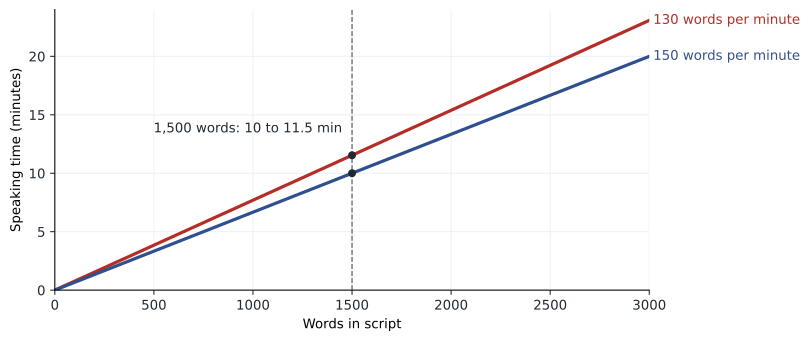
Conversational English is commonly spoken at about 130 to 150 words per minute in presentations, a little slower than everyday conversation, with pauses. You can use this rate to plan the length of a script or speaking notes, and to check whether your content fits the time. Leave a margin of 10 to 15 % for pauses, audience reactions, a slide that takes longer than expected and transitions.
Worked problem
Fitting a script to a time slot
You have a 12-minute slot at a sales conference, including 2 minutes for questions. Your draft script is 1,850 words. At a planned rate of 140 words per minute, with a 10 % margin, does it fit? If not, how many words should you cut?
Show solution
- Speaking time available = 12 − 2 = 10 minutes; with a 10 % margin, plan for 9 minutes of speech.
- Target length = 9 × 140 = 1,260 words.
- Current script time = 1,850 ÷ 140 ≈ 13.2 minutes, more than 3 minutes over.
- Words to cut = 1,850 − 1,260 = 590, about 32 % of the draft.
- Range check: at 130 wpm, 1,260 words take 9.7 minutes; at 150 wpm, 8.4 minutes. Both fit the 10-minute window.
Answer: The script must drop about 590 words to roughly 1,260. Cut a whole point or example rather than trimming every sentence, and rehearse with a timer.
Designing slides
Slides are visual aids, not a script and not a document. If the audience is reading dense text on a slide, it is not listening to you. Effective slides follow a few principles. Put one idea on each slide, stated in a headline that makes the point (a takeaway title, as for charts). Use images, charts and diagrams more than text. Keep text to a minimum; one common rule of thumb is no more than about six lines of about six words each, and many designers aim for far less. Use large type: body text of at least 24 points and headlines of 32 or more in a large room. Use high contrast and a simple, consistent template. Build complex diagrams step by step. Put details in a handout or follow-up document rather than on the slide.
| Guideline | Reason |
|---|---|
| One idea per slide, with a takeaway headline | Audiences grasp the point in a glance and stay with the speaker |
| Minimal text, no full paragraphs | People cannot read and listen at the same time |
| Body text at least 24 points | Readable from the back of the room and on shared screens |
| High contrast, a simple template | Readable in bright rooms and by people with low vision |
| Charts simplified to the one comparison that matters | Detailed tables belong in the handout |
| Slide numbers | Make questions and follow-up easier |
| Accessible design (alt text, reading order, captions for video) | Slides are often shared afterward and read with assistive technology |
Rules of thumb for the number of slides vary widely. The venture capitalist Guy Kawasaki popularized a 10/20/30 rule for pitches: 10 slides, 20 minutes, no font smaller than 30 points. Others suggest about one slide for every one to two minutes. The right number depends on the content; a slide that shows a single photo may last 15 seconds, while a key chart may stay up for three minutes.
Worked problem
Budgeting slides and words
You are preparing a 20-minute client presentation, with 15 minutes of speaking and 5 minutes of discussion. You plan about 90 seconds per content slide, plus a title slide and a closing slide. You want no more than 25 words of text per content slide. How many content slides should you plan, and what is your maximum total slide text?
Show solution
- Content slides = 15 minutes ÷ 1.5 minutes per slide = 10 slides.
- Total slides = 10 + title + closing = 12.
- Maximum slide text = 10 × 25 = 250 words.
- Compare with speech: at 140 words per minute, 15 minutes is about 2,100 spoken words, so the slides carry at most about 12 % of the words; the rest comes from you.
Answer: Plan about 10 content slides (12 in total) with no more than about 250 words of slide text. The spoken presentation, not the slides, carries the message.
Delivery
Choose a delivery method that suits the occasion. Reading a full script word for word is rarely effective, except for formal statements where exact wording matters (such as a legal or media statement). Memorizing a whole talk is risky; a memory slip can derail you. Most business presenters speak extemporaneously: well prepared and rehearsed, from brief notes or the slides, but not word for word. Rehearse aloud at least three times, once in front of a colleague or a camera, and time each run.
Your voice and body carry much of your message. Speak a little slower than feels natural, vary your pitch and pace, and pause before and after key points. Make eye contact with individuals around the room for a few seconds each. Stand with a stable, open posture and use natural gestures. Avoid filler words (um, like, so) by pausing instead. Nervousness is normal and usually invisible to the audience; preparation, slow breathing, arriving early to check the equipment and focusing on the audience's needs rather than your own performance all help.
Handling questions
Question periods let you clarify, persuade and show expertise, but they can also go off the rails. Prepare by listing the ten questions you would least like to be asked and drafting short answers. During the session, listen to the whole question, repeat or paraphrase it so everyone hears it (and so online participants and recordings capture it), answer briefly and check that you answered it. If you do not know, say so and promise to follow up by a specific time. With a hostile question, stay calm, acknowledge the concern, respond to the substance and avoid arguing. If one person dominates, offer to continue the conversation afterward.
Worked problem
Answering a difficult question
At the end of your presentation recommending a new customer relationship management system, a sales director says: "We tried a new system five years ago and it was a disaster. Why would this be different?" Plan a response.
Show solution
- Acknowledge: "That is a fair concern. I have heard about the 2021 rollout, and adoption problems are the biggest risk for any new system."
- Respond with evidence: "This plan differs in three ways: sales staff helped choose the system, we will pilot it with one team for eight weeks before rolling out, and every user gets four hours of training with a named champion in each office."
- Bridge to your message: "The pilot results will tell us whether it works before we commit fully."
- Check: "Does that address your concern, or are there other parts of the last rollout we should plan for?"
Answer: Acknowledging the concern, giving specific evidence and inviting further input turns a hostile question into support for the plan.
Presenting online and in hybrid settings
Virtual presentations need extra preparation. Check your camera, microphone, lighting and internet connection beforehand, and have a backup (a phone dial-in and slides already shared with a colleague). Put the camera at eye level and look at it, not at the screen, when making key points. Engage the audience every few minutes with a poll, a question in the chat or a direct question to a participant, because attention online drops quickly. In hybrid meetings, make sure remote participants can see the slides and hear every question, and invite them to speak first sometimes. Turn on live captions where available, which helps people who are deaf or hard of hearing and anyone with a poor connection.
Portfolio task for lesson 9: prepare a five-minute presentation of the recommendation report you wrote in lesson 7. Write a big idea, outline two to four main points, design no more than six slides with takeaway headlines and time your rehearsal. Record yourself once and note three improvements.
Common mistakes
MistakeReading crowded slides aloud.
InsteadUse slides as visual support with minimal text; speak from notes.
MistakePlanning more content than the slot allows.
InsteadCalculate words at 130 to 150 words per minute and leave a 10 to 15 % margin.
MistakeUsing topic headings such as "Results".
InsteadUse takeaway headlines that state the point, such as "Pilot cut call time by 17 %".
MistakeCovering eight or ten main points.
InsteadLimit the body to two to four well-supported points.
MistakeIgnoring remote participants in a hybrid presentation.
InsteadRepeat questions, check that remote people can see and hear, and invite them to speak.
MistakeBluffing when you do not know an answer.
InsteadSay you do not know and promise a follow-up by a specific time.
Summary and key terms
- Start with purpose, audience and a one-sentence big idea.
- Structure: opening (about 10 to 15 %), body with two to four points (70 to 80 %), close with a call to action (about 10 %).
- Plan scripts at 130 to 150 words per minute, with a 10 to 15 % margin.
- Slides should have one idea each, takeaway headlines, minimal text, large type and high contrast.
- Speak extemporaneously from notes after rehearsing aloud at least three times.
- Handle questions by listening, repeating, answering briefly and following up when needed.
- Online presentations need technical checks, eye contact with the camera, frequent interaction and captions.
- Big idea
- A one-sentence statement of a presentation's point of view and what is at stake.
- Signpost
- A phrase that tells the audience where they are in a presentation.
- Speaking rate
- The number of words spoken per minute.
- Takeaway headline
- A slide headline that states the slide's main point.
- Extemporaneous delivery
- Prepared, rehearsed speaking from notes rather than a script.
- Monroe's motivated sequence
- A persuasive structure: attention, need, satisfaction, visualization, action.
- Filler words
- Words such as "um" and "like" that fill pauses.
- Call to action
- A specific request for the audience to act.
- Handout
- A document given to the audience with details not shown on slides.
- Hybrid presentation
- A presentation to an audience partly in the room and partly online.
Practice problems
Work each problem on paper first, then reveal the answer to check.
How long will a 1,050-word script take at 140 words per minute?
Show answer
7.5 minutes.
How many words fit a 6-minute talk at 130 words per minute, with a 10 % margin?
Show answer
6 × 0.9 × 130 ≈ 702 words.
Rewrite the topic "Customer churn" as a big idea.
Show answer
For example, "Fixing onboarding could keep 400 more customers a year."
In a 20-minute talk, about how long should the opening be?
Show answer
About 2 to 3 minutes (10 to 15 %).
A 30-minute talk with 2 minutes per slide needs about how many content slides?
Show answer
About 15.
Rewrite the slide title "Q3 results" as a takeaway headline.
Show answer
For example, "Q3 revenue beat target by 8 %".
Why should you repeat a question from the audience?
Show answer
So everyone, including online participants and recordings, hears it, and to confirm you understood.
What delivery method suits most business presentations?
Show answer
Extemporaneous delivery from notes.
Name two ways to engage an online audience.
Show answer
Polls, chat questions, direct questions to participants (any two).
What is the 10/20/30 rule?
Show answer
Guy Kawasaki's guideline for pitches: 10 slides, 20 minutes, no font smaller than 30 points.
Lesson quiz · 5 questions
Score 60% or more to complete this lesson.
Create a free account to save your progress, take quizzes and earn a certificate.