
ROB-110 · Lesson 7 of 12 · 30 min
Services, actions and parameters
Topics are perfect for continuous streams, but not every interaction is a stream. Sometimes one node needs to ask another a question and wait for the answer: is the gripper calibrated? Please switch the motors on. Sometimes it needs to start a task that takes seconds or minutes, watch its progress and perhaps cancel it: drive two meters forward, move the arm to the shelf. And almost every node has settings, such as speeds, distances and device names, that should be changeable without editing code. ROS 2 provides three more tools for these needs: services, actions and parameters. This lesson explains when to use each and how to write them in rclpy.
Three ways for nodes to communicate
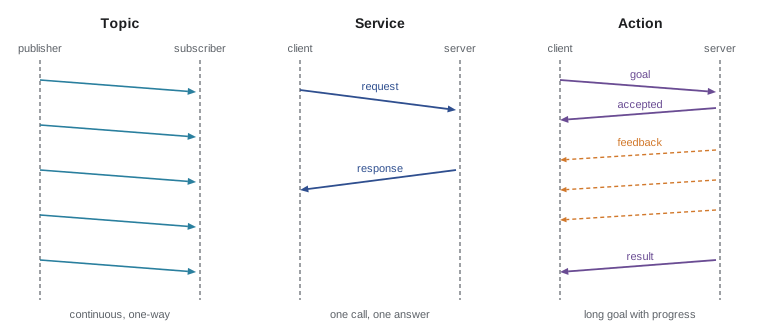
A topic is one-way and continuous: publishers send messages whenever they like, subscribers receive them, and nobody replies. A service is a two-way call: a client sends a request, a server does some work and sends back a response, much like calling a function on another computer. Services suit quick operations that finish in well under a second. An action is for goals that take time. A client sends a goal; the server accepts or rejects it, sends regular feedback while working, and finally returns a result; and the client may cancel the goal at any time. Under the hood an action is built from services and topics, but rclpy hides the details.
| Topic | Service | Action | |
|---|---|---|---|
| Pattern | Publish and subscribe | Request and response | Goal, feedback, result |
| Direction | One-way | Two-way | Two-way with progress |
| Duration | Continuous stream | Short (well under a second) | Long (seconds to minutes) |
| Can be canceled? | Not applicable | No | Yes |
| Examples | Laser scans, velocity commands, odometry | Enable motors, reset odometry, get a map | Navigate to a pose, follow a trajectory, dock |
Worked problem
Choosing the pattern
Choose a topic, service or action for each: (a) a battery monitor reporting charge every second; (b) a request to save the current map to a file; (c) commanding a robot arm to move to a pose, which takes 4 s; (d) asking a camera node for its calibration.
Show solution
- (a) A continuous stream that anyone may want: a topic.
- (b) A quick operation with a success or failure answer: a service.
- (c) A long task where progress and cancellation matter: an action.
- (d) A quick question with an answer: a service, or a topic with transient-local durability if many nodes need it.
Answer: Topic, service, action and service.
Services
A service type is defined in a .srv file with two parts separated by three dashes: the request fields above and the response fields below. The standard std_srvs package provides common types. SetBool has a boolean request field called data and a response with a boolean success and a string message; Trigger has an empty request and the same response. Use these where they fit rather than defining your own.
A service server is created with create_service, giving the type, the service name and a callback. The callback receives the request and an empty response object, fills in the response and returns it. The node below lets other nodes switch a robot's motors on and off.
from std_srvs.srv import SetBool


class MotorSwitch(Node):
    def __init__(self):
        super().__init__('motor_switch')
        self.enabled = False
        self.srv = self.create_service(
            SetBool, 'enable_motors', self.on_request)

    def on_request(self, request, response):
        self.enabled = request.data
        response.success = True
        response.message = 'motors on' if self.enabled else 'motors off'
        return response
You can call any service from the command line, which is the quickest way to test a server: ros2 service list shows the available services, ros2 service type shows a service's type and ros2 service call sends a request, for example ros2 service call /enable_motors std_srvs/srv/SetBool "{data: true}". In code, a client is created with create_client. It should wait until the server is available, then send the request with call_async, which returns a future, an object that will hold the response when it arrives. Attach a callback to the future to handle the response without blocking.
class Enabler(Node):
    def __init__(self):
        super().__init__('enabler')
        self.client = self.create_client(SetBool, 'enable_motors')
        while not self.client.wait_for_service(timeout_sec=1.0):
            self.get_logger().info('waiting for enable_motors...')
        request = SetBool.Request()
        request.data = True
        future = self.client.call_async(request)
        future.add_done_callback(self.on_response)

    def on_response(self, future):
        self.get_logger().info(future.result().message)
There is a trap here that catches almost everyone once. rclpy also offers call, a synchronous version that blocks until the response arrives, and spin_until_future_complete, which spins until a future is done. Both are fine in a simple script's main function. But if you call either from inside a callback of a node spun by a single-threaded executor, the executor is busy running your callback and cannot process the response, so the program waits forever: a deadlock. Inside callbacks, use call_async with a done callback, or run the node in a multi-threaded executor with an appropriate callback group.
Actions
An action type is defined in a .action file with three parts separated by dashes: the goal, the result and the feedback. Lesson 8 shows how to create a package of custom interfaces; here we use one called robot_interfaces that defines a DriveDistance action, whose goal is a distance in meters, whose result is the distance actually driven and whose feedback is the distance remaining.
# robot_interfaces/action/DriveDistance.action
float32 distance          # goal: distance to drive (m)
---
float32 distance_driven   # result
---
float32 remaining         # feedback
The server below drives the robot forward until odometry shows it has traveled the requested distance, publishing feedback as it goes and stopping early if the goal is canceled. Because execute runs for seconds while the odometry callback must keep updating self.x and self.y, the node uses a reentrant callback group and a multi-threaded executor so both can run at once. In the single-threaded executor, the odometry callback would never run during execute and the loop would never end.
import math
import time
import rclpy
from rclpy.action import ActionServer, CancelResponse
from rclpy.callback_groups import ReentrantCallbackGroup
from rclpy.executors import MultiThreadedExecutor
from rclpy.node import Node
from geometry_msgs.msg import Twist
from nav_msgs.msg import Odometry
from robot_interfaces.action import DriveDistance


class DriveServer(Node):
    def __init__(self):
        super().__init__('drive_server')
        group = ReentrantCallbackGroup()
        self.x = self.y = 0.0
        self.create_subscription(Odometry, 'odom', self.on_odom, 10,
                                 callback_group=group)
        self.pub = self.create_publisher(Twist, 'cmd_vel', 10)
        self.server = ActionServer(
            self, DriveDistance, 'drive_distance', self.execute,
            cancel_callback=lambda goal: CancelResponse.ACCEPT,
            callback_group=group)

    def on_odom(self, msg):
        self.x = msg.pose.pose.position.x
        self.y = msg.pose.pose.position.y

    def execute(self, goal_handle):
        x0, y0 = self.x, self.y
        target = goal_handle.request.distance
        driven = lambda: math.hypot(self.x - x0, self.y - y0)
        cmd, feedback = Twist(), DriveDistance.Feedback()
        while driven() < target:
            if goal_handle.is_cancel_requested:
                self.pub.publish(Twist())
                goal_handle.canceled()
                return DriveDistance.Result(distance_driven=driven())
            cmd.linear.x = 0.2
            self.pub.publish(cmd)
            feedback.remaining = target - driven()
            goal_handle.publish_feedback(feedback)
            time.sleep(0.05)
        self.pub.publish(Twist())
        goal_handle.succeed()
        return DriveDistance.Result(distance_driven=driven())


def main(args=None):
    rclpy.init(args=args)
    rclpy.spin(DriveServer(), executor=MultiThreadedExecutor())
The goal handle is the server's view of one goal. The server reads the request from it, calls publish_feedback, checks is_cancel_requested and finishes by calling succeed or canceled before returning a result. A client sends a goal from the command line with ros2 action send_goal /drive_distance robot_interfaces/action/DriveDistance "{distance: 1.0}" --feedback, which prints feedback as it arrives. In code, an ActionClient sends goals asynchronously with send_goal_async and receives feedback through a callback, following the same future-based pattern as service clients.
Before trusting a server on a real robot, it helps to check its logic in plain Python. The function below simulates the server's loop with perfect odometry and counts how many feedback messages it would send.
def drive_distance(target, speed=0.2, dt=0.05, cancel_at=None):
    """Simulate the action server loop with perfect odometry."""
    driven, t, feedback = 0.0, 0.0, 0
    while driven < target:
        if cancel_at is not None and t >= cancel_at:
            return "cancel accepted", round(driven, 2), feedback
        driven += speed * dt          # odometry update
        t += dt
        feedback += 1                 # one feedback message per step
    return "succeeded", round(driven, 2), feedback


print(drive_distance(1.0))
print(drive_distance(1.0, cancel_at=2.0))('succeeded', 1.0, 100)
('cancel accepted', 0.4, 40)Worked problem
Feedback rate and duration
The server drives at 0.2 m/s and loops every 0.05 s. How long does a 1.0 m goal take, how many feedback messages does it send, and how far has the robot gone if the client cancels after 2 s?
Show solution
- Duration: \( 1.0 / 0.2 = 5 \) s.
- Loop rate: \( 1/0.05 = 20 \) Hz, so about \( 5 \times 20 = 100 \) feedback messages.
- After 2 s: \( 0.2 \times 2 = 0.4 \) m, with 40 feedback messages sent.
Answer: About 5 s and 100 feedback messages; a cancel at 2 s stops it after 0.4 m. The simulation agrees.
Real servers add details this simple one omits: checking whether a goal is acceptable before accepting it (a goal callback can reject a negative distance), handling a new goal arriving while one is active, slowing down near the end so the robot does not overshoot, and aborting if odometry stops updating. Nav2's navigate_to_pose action, which you will use in ROB-340, handles all of these and is a good model of a robust action server.
Parameters
A parameter is a named setting that belongs to a node, such as stop_distance or serial_port. Parameters let one piece of code serve many robots and situations: the same obstacle_stop node can use 0.4 m on a small robot and 1.2 m on a large one without any change to its code. A node must declare each parameter with a default value, after which its value can be set when the node starts, from a launch file or a YAML file, or changed while it runs. The listing adds a stop_distance parameter to the obstacle_stop node from lesson 6 and rejects unsafe values.
from rcl_interfaces.msg import SetParametersResult


class ObstacleStop(Node):
    def __init__(self):
        super().__init__('obstacle_stop')
        self.declare_parameter('stop_distance', 0.4)
        self.stop_distance = self.get_parameter('stop_distance').value
        self.add_on_set_parameters_callback(self.on_params)
        # ... subscriptions and publisher as in lesson 6 ...

    def on_params(self, params):
        for p in params:
            if p.name == 'stop_distance':
                if not 0.1 <= p.value <= 2.0:
                    return SetParametersResult(
                        successful=False,
                        reason='stop_distance must be 0.1 to 2.0 m')
                self.stop_distance = p.value
        return SetParametersResult(successful=True)
declare_parameter registers the parameter and its default, get_parameter reads the current value, and add_on_set_parameters_callback registers a function that runs whenever someone tries to change a parameter. The callback can accept the change or reject it with a reason, which is how a node protects itself from a nonsensical setting such as a negative stopping distance. A parameter descriptor can also record a description, a type and a numeric range, which tools display to users. The validation logic itself is easy to test separately:
def validate(name, value, limits):
    """Accept a parameter change only if it is within limits."""
    low, high = limits[name]
    if not low <= value <= high:
        return False, f"{name} must be between {low} and {high}"
    return True, "ok"


limits = {"stop_distance": (0.1, 2.0), "max_speed": (0.0, 1.0)}
for name, value in [("stop_distance", 0.6),
                    ("stop_distance", -0.2),
                    ("max_speed", 1.5)]:
    ok, reason = validate(name, value, limits)
print(f"{name} = {value}: {'accepted' if ok else 'rejected'} ({reason})")stop_distance = 0.6: accepted (ok) stop_distance = -0.2: rejected (stop_distance must be between 0.1 and 2.0) max_speed = 1.5: rejected (max_speed must be between 0.0 and 1.0)
From the command line, ros2 param list shows every node's parameters, ros2 param get and ros2 param set read and change one, and ros2 param dump writes all of a node's parameters to a YAML file. That file can then be loaded at start-up, so a carefully tuned set of values becomes part of your package. In the YAML file, each node's settings sit under its name and a key called ros__parameters, with two underscores.
obstacle_stop:
  ros__parameters:
    stop_distance: 0.6

base_driver:
  ros__parameters:
    serial_port: /dev/robot_base
    max_speed: 0.8
Run a node with this file using ros2 run my_robot obstacle_stop --ros-args --params-file params.yaml, or load it from a launch file as lesson 9 shows. One parameter is built into every node: use_sim_time, which switches the node's clock to simulated time. Changing parameters on a moving robot is powerful for tuning but needs care: a node that reads a parameter only at start-up will ignore later changes, while one with a callback will apply them immediately, perhaps in the middle of a maneuver.
Common mistakes
MistakeUsing a service for a task that takes many seconds, leaving the client blocked with no progress.
InsteadUse an action, which reports feedback and can be canceled.
MistakeCalling a service synchronously, or spinning until a future completes, inside a callback of a single-threaded node.
InsteadUse call_async with a done callback, or a multi-threaded executor with suitable callback groups.
MistakeWriting an action server whose execute loop waits for odometry that can never arrive because callbacks cannot run.
InsteadPut the subscription and server in a reentrant callback group and spin with a MultiThreadedExecutor.
MistakeHard-coding speeds, distances and device names in node code.
InsteadDeclare parameters with sensible defaults and load tuned values from YAML.
MistakeAccepting any parameter value, including ones that make the robot unsafe.
InsteadValidate changes in a parameter callback and reject values outside safe limits.
Summary and key terms
- Topics carry continuous one-way streams, services carry short request-and-response calls, and actions carry long goals with feedback, results and cancellation.
- A .srv file defines a request and a response; std_srvs provides common types such as SetBool and Trigger.
- Service clients should wait for the server and use call_async; blocking calls inside callbacks deadlock a single-threaded node.
- A .action file defines a goal, result and feedback; the server's goal handle publishes feedback, checks for cancellation and reports success.
- Long-running action servers that need other callbacks use a reentrant callback group and a multi-threaded executor.
- Parameters are declared with defaults, can be set at start-up from YAML or changed at run time, and can be validated in a callback.
- The ros2 service, ros2 action and ros2 param commands test servers and settings from the command line.
- Service
- A request-and-response communication between a client and a server.
- Service server
- The node that receives service requests and returns responses.
- Future
- An object that will hold the result of an asynchronous operation when it completes.
- Deadlock
- A state in which a program waits forever for something it is itself preventing.
- Action
- A communication pattern for long-running goals with feedback, a result and cancellation.
- Goal handle
- The server-side object representing one action goal.
- Feedback
- Progress messages an action server sends while working on a goal.
- Parameter
- A named, typed setting that belongs to a node.
- ros__parameters
- The key under each node name in a ROS 2 parameter YAML file.
- SetParametersResult
- The message a parameter callback returns to accept or reject a change.
Practice problems
Work each problem on paper first, then reveal the answer to check.
Topic, service or action: a robot reports its battery voltage 10 times a second.
Show answer
Topic.
Topic, service or action: docking with a charger, which takes about 20 s.
Show answer
Action.
Write the command that calls a Trigger service named /reset_odometry.
Show answer
ros2 service call /reset_odometry std_srvs/srv/Trigger
Why does the service client use call_async rather than call inside a node?
Show answer
call blocks; inside a callback of a single-threaded executor it would deadlock because the response could never be processed.
What are the three sections of a .action file, in order?
Show answer
Goal, result and feedback, separated by ---.
An action server drives at 0.25 m/s with feedback at 10 Hz. How many feedback messages for a 2 m goal?
Show answer
2 / 0.25 = 8 s, so about 80 messages.
Why does drive_server use a MultiThreadedExecutor?
Show answer
So the odometry callback can keep updating the position while execute runs its loop.
Write YAML that sets max_speed to 0.5 for a node called base_driver.
Show answer
base_driver: then ros__parameters: then max_speed: 0.5, indented.
A node reads its speed parameter only in its constructor. What happens if you change the parameter with ros2 param set while it runs?
Show answer
The stored parameter changes but the node keeps using the old value unless it re-reads it or has a callback.
Give two things a robust action server should check that the simple drive_server does not.
Show answer
Reject invalid goals (such as negative distances), slow down to avoid overshoot, abort if odometry stops, handle a second goal arriving.
Lesson quiz · 5 questions
Score 60% or more to complete this lesson.
Create a free account to save your progress, take quizzes and earn a certificate.