
PYTH-290 · Lesson 7 of 12 · 26 min
Building the user interface or API
▶ Video coming soon A video version of this lesson is on the way.
A domain layer full of well-tested rules is useless until people can reach it. In the third sprint the team built the ways in: a small JSON API that the existing web shop and a future subscriber page could call, a few server-rendered pages for staff, and a command-line interface for the morning renewal job and for maintenance. All three are adapters in the outer layer. They translate between the outside world, with its HTTP requests, HTML forms and command-line arguments, and the application services, which know nothing about any of them.
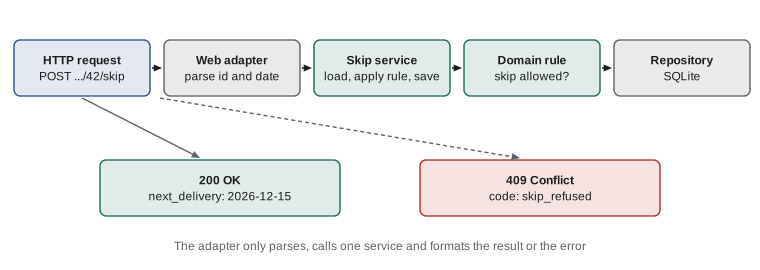
This lesson shows how the team designed and built those adapters so that they stayed thin. The rule they followed was simple: an adapter may parse input, call one application service and format the result. Anything that looks like a business decision belongs further in.
Designing the API before building it
The team wrote the API design as a short table in the repository before writing any code, and reviewed it with Lena and with the developer who maintains Ridgeline's web shop, since the shop would be its first client. Designing on paper is cheap; changing an API after another system depends on it is not. The table listed each endpoint, its method, what it accepts and what it returns, following the REST conventions from PYTH-220: resources are nouns in the path, methods say what happens to them, and status codes say how it went.
A few decisions in the table deserve comment. The version number is in the path, v1, so a future incompatible change can live at v2 while the shop keeps working. Skip and pause are POST requests to sub-resources, because they are actions with rules, not simple field updates; letting clients PATCH the next delivery date directly would bypass the skip rule entirely. Money is returned in integer cents with a currency code, and dates as ISO strings, matching the rest of the system.
Errors follow one consistent shape, the error object from PYTH-220: every failure returns JSON with a machine-readable code, a human-readable message and, for validation errors, the field that was wrong. Clients can show the message to users and branch on the code without parsing English. The mapping from domain exceptions to HTTP status codes lives in one place: validation problems become 422, a missing subscription 404, and a refused skip 409 Conflict, because the request is valid but conflicts with the current state of the subscription.
Two more decisions completed the design. First, who may call the API: the web shop authenticates with an API key sent in a header, the same scheme the shop's own API used in PYTH-240, and each key is tied to a client with a list of allowed actions, so the shop's key can create and skip subscriptions but cannot read the daily report. Staff pages use normal signed-in sessions instead. Second, what happens when a client retries. Networks fail, and a shop that does not hear back after creating a subscription will try again. To stop a retry creating a second subscription, the create endpoint accepts an idempotency key, a unique value the client sends with the request. If the same key arrives twice, the API returns the subscription created the first time instead of making another. The team kept the keys for a day, which covers any sensible retry.
Neither decision was in the original backlog. Both came from the half-hour review with the shop developer, who had been burned by duplicate orders from a payment provider and asked for idempotency before anyone else thought of it. Reviewing an interface with the people who will call it is one of the cheapest ways to find missing requirements.
Routing
PYTH-220 showed how a web framework turns a method and a path into a call to the right function, and the team used Flask's routing in the real application. Understanding how routing works still pays off when debugging, and the team wrote a small router of their own for the command-line test harness that replays recorded API calls. A route pattern such as /api/v1/subscriptions/{id}/skip is compiled into a regular expression with a named group for each parameter, and the router tries each pattern until one matches the whole path.
Two details matter. A path that matches no pattern returns 404 Not Found, but a path that matches a pattern registered for a different method returns 405 Method Not Allowed, with an Allow header listing the methods that would work. The difference helps the person calling the API: 404 means the address is wrong, 405 means the address is right and the method is wrong.
Try it yourself
Route requests
Complete the Router class. add(method, pattern, handler) registers a route whose pattern may contain parameters in braces, such as /api/v1/subscriptions/{id}/skip; parameters match one path segment (no slashes). dispatch(method, path) returns handler(**params) for the first route whose pattern matches the whole path and whose method matches.
If no pattern matches the path, return (404, "not found"). If a pattern matches but only for other methods, return (405, "method not allowed: " + allowed) where allowed is the matching routes' methods sorted and joined with ", ".
class Router:
    def __init__(self):
        self.routes = []

    def add(self, method, pattern, handler):
        self.routes.append((method, pattern, handler))

    def dispatch(self, method, path):
        for m, pattern, handler in self.routes:
            if pattern == path and m == method:
                return handler()
        return (404, "not found")

r = Router()
r.add("GET", "/api/v1/subscriptions/{id}", lambda id: (200, f"subscription {id}"))
print(r.dispatch("GET", "/api/v1/subscriptions/7"))
Validating input at the edge
Everything that arrives from outside is untrusted: it may be missing fields, have the wrong types, contain values out of range or be deliberately malicious. The adapter's job is to check the shape of the input and convert it into proper Python values before calling the application, so that the inner layers can assume they receive a real date, a real integer and a known coffee code. Business rules, such as whether a skip is allowed, stay in the domain; the adapter only checks that the request makes sense as data.
The team collected every problem with a request rather than stopping at the first, so a form or a client could show all the errors at once. Each error names the field and says what was wrong in plain words. A request with errors returns 422 and the list; a valid request is converted and passed on.
from datetime import date

COFFEES = {"RC-101", "RC-102", "RC-103", "RC-104", "RC-105", "RC-106"}

def parse_new_subscription(body):
    errors = []
    sku = body.get("sku")
    if sku not in COFFEES:
        errors.append({"field": "sku", "message": "choose a coffee from the list"})
    bags = body.get("bags")
    if not isinstance(bags, int) or isinstance(bags, bool) or not 1 <= bags <= 10:
        errors.append({"field": "bags", "message": "bags must be a whole number from 1 to 10"})
    if body.get("interval_weeks") not in (2, 4):
        errors.append({"field": "interval_weeks", "message": "deliveries are every 2 or 4 weeks"})
    try:
        first = date.fromisoformat(body.get("first_delivery", ""))
    except (TypeError, ValueError):
        errors.append({"field": "first_delivery", "message": "use a date like 2026-12-01"})
        first = None
    if errors:
        return 422, {"code": "invalid_request", "errors": errors}
    return 200, {"sku": sku, "bags": bags, "interval_weeks": body["interval_weeks"], "first_delivery": first}

print(parse_new_subscription({"sku": "RC-102", "bags": 1, "interval_weeks": 2, "first_delivery": "2026-12-01"}))
status, payload = parse_new_subscription({"sku": "RC-999", "bags": "two", "interval_weeks": 3})
print(status, [e["field"] for e in payload["errors"]])(200, {'sku': 'RC-102', 'bags': 1, 'interval_weeks': 2, 'first_delivery': datetime.date(2026, 12, 1)})
422 ['sku', 'bags', 'interval_weeks', 'first_delivery']Try it yourself
Turn domain errors into responses
Write handle_skip(service, sub_id_text, today_text), the adapter for the skip endpoint. Convert sub_id_text to an int and today_text to a date; if either fails, return (422, {"code": "invalid_request", "message": ...}). Then call service.skip(sub_id, today), which returns the new delivery date.
Map the result to (200, {"next_delivery": the date as ISO text}). Map NotFound to 404 with code "not_found", SkipRefused to 409 with code "skip_refused" and PauseSuggested to 409 with code "pause_suggested". Every error body has "code" and "message" (use str(exception) as the message for domain errors).
def handle_skip(service, sub_id_text, today_text):
    new_date = service.skip(int(sub_id_text), today_text)
    return 200, {"next_delivery": new_date}
Pages for staff
Staff did not need a single-page application. Theo needed the packing list, Kai the roast plan, Anita the daily report, and Mei a form to sign up regulars at the till. The team built them as server-rendered pages with Flask and Jinja templates, reusing the base template and styles from the PYTH-220 web shop so that staff saw a familiar look. Each page calls the same application services as the API. The packing list page and the packing-list endpoint are two adapters over one service, so they can never disagree.
Usability and accessibility were part of the definition of done, not an extra. Every form field has a visible label, errors appear next to the field and in a summary at the top, buttons say what they do (Skip next delivery, not Submit), and the pages work with the keyboard alone. Theo packs orders in a room with gloves on and a tablet on a shelf, so the packing list uses large text and a single big Mark packed button per order. Nia tested every page with the browser zoomed to 200 and with a screen reader, following the checklist the college program uses, which is based on the Web Content Accessibility Guidelines.
The staff pages handle one more concern the API does not: forms submitted from a browser need protection against cross-site request forgery, the CSRF tokens from PYTH-220, and they follow the post, redirect, get pattern so that refreshing a page never submits a form twice. Lesson 9 returns to these during the security review.
A command-line interface
Some jobs have no user at a screen. The renewal job runs every morning from a scheduler; maintenance tasks such as importing old subscriptions or replacing a discontinued coffee are run by a developer. For these the team built a command-line interface with argparse and sub-commands, as PYTH-240 showed: ridgeline-ops renew --date 2026-12-01 --dry-run, ridgeline-ops packing-list --date 2026-12-01, ridgeline-ops replace-coffee RC-103 RC-106.
The CLI follows the same thin-adapter rule. It parses arguments, builds the application through the composition root, calls one service and prints the summary. A --dry-run flag runs the renewal job inside a transaction that is always rolled back and prints what it would have done, which Theo and Jordan used for a week before trusting the job with real orders. Exit codes tell the scheduler what happened: 0 for success, 1 for an error, and 2 when renewals succeeded but some subscriptions were short of stock, so the monitoring from lesson 10 can alert Kai.
Try it yourself
Parse the command line
Write parse(argv) using argparse with two sub-commands. renew takes --date (required, converted to a date) and an optional --dry-run flag. packing-list takes --date (required) and --format with the choices "text" or "csv", defaulting to "text".
Return the parsed namespace. The command name must be available as args.command, and the dry-run flag as args.dry_run. Bad input should make argparse raise SystemExit, which the tests expect.
import argparse

def parse(argv):
    parser = argparse.ArgumentParser(prog="ridgeline-ops")
    parser.add_argument("command")
    parser.add_argument("--date")
    return parser.parse_args(argv)
Keeping adapters thin
At the end of the sprint Lena reviewed the adapters with one question per function: is there an if statement here that a business person would recognize? She found two. The packing list page sorted orders by delivery before pickup, a rule Theo had asked for, written directly in the template code; and the API refused subscriptions of more than ten bags, duplicating the database constraint with a different error message. Both moved inward: the sort order into the packing list service, where the API now shares it, and the bag limit into a single domain constant used by the validation, the service and the error message.
Thin adapters are not only tidy. They are why the team could add the command-line interface in a day: every operation it needed already existed as an application service with tests. And when the web shop developer asked for a webhook that fires when a subscription is created, it took one new adapter subscribing to the event the service already published.
Common mistakes
MistakeBuilding the API first and documenting it afterwards.
InsteadWrite the endpoint table first and review it with the client's developers before coding.
MistakeLetting clients update fields such as the next delivery date directly.
InsteadExpose actions with rules, such as skip and pause, as their own endpoints so the rules cannot be bypassed.
MistakeReturning 404 for every routing failure.
InsteadReturn 404 when no route matches the path and 405 with an Allow list when only the method is wrong.
MistakeStopping at the first validation error.
InsteadCollect every problem and return them together with the field names.
MistakePutting business rules in templates or route handlers.
InsteadKeep adapters to parsing, one service call and formatting; move rules inward.
MistakeTreating accessibility as a later improvement.
InsteadMake labels, keyboard use, clear errors and readable text part of the definition of done.
Summary and key terms
- Web pages, APIs and command-line interfaces are adapters in the outer layer.
- A thin adapter parses input, calls one application service and formats the result.
- Design the API on paper first and review it with the systems that will use it.
- Use nouns in paths, versioned URLs, action endpoints for rules, and one consistent error shape.
- Map domain exceptions to status codes in one place, such as 422, 404 and 409.
- Validate input at the edge, collecting every error, and pass real Python values inward.
- Server-rendered staff pages reuse the same services as the API and build in accessibility.
- Command-line tools use sub-commands, dry runs and meaningful exit codes for scheduled jobs.
- API
- An application programming interface: a defined way for programs to talk to a system.
- endpoint
- One method and path in a web API, such as POST /api/v1/subscriptions.
- API versioning
- Including a version, such as v1, so incompatible changes do not break existing clients.
- status code
- A number in an HTTP response that says how the request went, such as 200 or 404.
- 409 Conflict
- A status meaning the request is valid but conflicts with the current state of the resource.
- 422 Unprocessable Content
- A status meaning the request was understood but its data failed validation.
- router
- Code that chooses which handler runs for a given method and path.
- accessibility
- Designing so that people with disabilities can use the software, including with assistive technology.
- exit code
- A number a program returns to the operating system to report success or failure.
Practice problems
Work each problem on paper first, then reveal the answer to check.
Why is skip an endpoint of its own instead of a PATCH to next_delivery?
Show answer
Skipping has rules, and a direct field update would let clients bypass them.
A client sends PUT to /api/v1/subscriptions/3, which only supports GET and DELETE. What should it receive?
Show answer
405 Method Not Allowed, listing DELETE and GET as allowed.
Which status code fits a refused skip, and why?
Show answer
409 Conflict: the request is well formed but conflicts with the subscription's current state.
Why does the API return all validation errors at once?
Show answer
So the client or form can show every problem together instead of one at a time.
The renewal job finished but three subscriptions were short of stock. Which exit code did the team choose?
Show answer
2, so monitoring can tell partial success from success (0) and failure (1).
Give one sign that an adapter has become too thick.
Show answer
It contains an if statement expressing a business rule that a business person would recognize.
Lesson quiz · 5 questions
Score 60% or more to complete this lesson.
Create a free account to save your progress, take quizzes and earn a certificate.