
PYTH-290 · Lesson 5 of 12 · 25 min
Building the data layer
▶ Video coming soon A video version of this lesson is on the way.
The first build sprint started where most applications start: with the data. Every feature in the backlog reads or writes subscriptions, customers, coffees, stock or orders, so the shape of that data affects everything built on top of it. A clumsy schema makes every later feature harder; a careful one makes many features almost trivial. Jordan and Nia took the data layer as their first task while Sam set up continuous integration.
This lesson follows that work: designing the tables, protecting the data with constraints, evolving the schema with migrations, hiding the database behind a repository, and making sure that a renewal run either completes fully or not at all. Most of the techniques come from PYTH-215 and PYTH-270; the capstone shows how they fit together in a real application.
Designing the schema
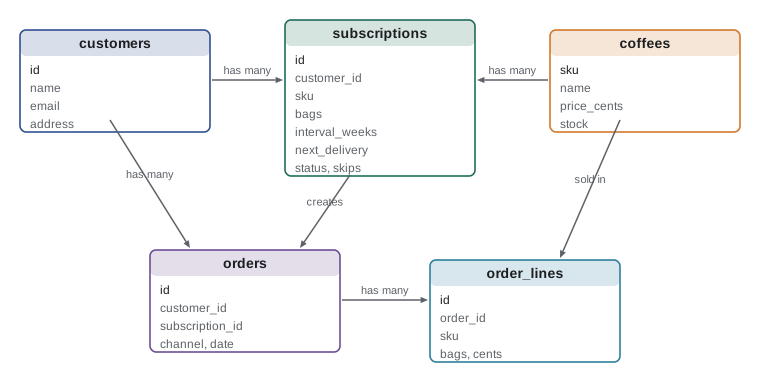
The team started from the nouns in the user stories: subscriber, subscription, coffee, delivery, order, roast. Some nouns became tables, some became columns, and some turned out to be the same thing. A subscriber is just a customer with an active subscription, so customers stayed one table, carried over from the PYTH-215 database. A delivery is an order created by a subscription, so orders gained an optional subscription_id column rather than a separate deliveries table.
The core of the new schema has four tables. Customers holds names, email addresses and delivery addresses. Coffees holds the coffee list with prices in integer cents and the number of bags in stock. Subscriptions links a customer to a coffee, with the number of bags, the interval in weeks, the date of the next delivery, the status (active, paused or canceled) and a count of consecutive skips. Orders records each sale, whether from the cafe, the web shop or a subscription, with lines in a separate order_lines table.
Three design rules from earlier courses shaped the columns. Money is stored as integer cents, never as floating-point dollars, so that 18.50 plus 22.00 is always exactly 4050 cents. Dates are stored as ISO text such as 2026-12-01, which SQLite sorts and compares correctly and Python converts with date.fromisoformat. And every table has a single-column integer primary key, which keeps joins and foreign keys simple.
Letting the database protect the data
Application code has bugs. A good schema refuses bad data even when the code tries to write it. SQLite supports several kinds of constraint, and the team used all of them. NOT NULL stops a required column from being left empty. UNIQUE stops two customers sharing an email address. CHECK constraints enforce simple rules: bags must be between 1 and 10, the interval must be 2 or 4 weeks, the status must be one of three words, and prices and stock can never be negative. FOREIGN KEY constraints stop a subscription pointing at a coffee that does not exist, once foreign keys are switched on for the connection with PRAGMA foreign_keys = ON.
The team also declared the tables STRICT, a SQLite feature that makes the database refuse values of the wrong type, such as text in an integer column, instead of quietly storing them. Strict tables catch a class of bugs, especially from data imported from spreadsheets, that would otherwise surface weeks later as a confusing report.
import sqlite3

SCHEMA = """
CREATE TABLE coffees (
    sku TEXT PRIMARY KEY,
    name TEXT NOT NULL,
    price_cents INTEGER NOT NULL CHECK (price_cents >= 0),
    stock INTEGER NOT NULL CHECK (stock >= 0)
) STRICT;
CREATE TABLE subscriptions (
    id INTEGER PRIMARY KEY,
    customer_id INTEGER NOT NULL,
    sku TEXT NOT NULL REFERENCES coffees(sku),
    bags INTEGER NOT NULL CHECK (bags BETWEEN 1 AND 10),
    interval_weeks INTEGER NOT NULL CHECK (interval_weeks IN (2, 4)),
    next_delivery TEXT NOT NULL,
    status TEXT NOT NULL DEFAULT 'active' CHECK (status IN ('active', 'paused', 'cancelled'))
) STRICT;
"""

con = sqlite3.connect(":memory:")
con.execute("PRAGMA foreign_keys = ON")
con.executescript(SCHEMA)
con.execute("INSERT INTO coffees VALUES ('RC-102', 'Ethiopia Guji', 2200, 15)")

attempts = [
    ("good row", (1, "RC-102", 1, 2, "2026-12-01")),
    ("bad interval", (1, "RC-102", 1, 3, "2026-12-01")),
    ("unknown coffee", (1, "RC-999", 1, 2, "2026-12-01")),
    ("too many bags", (1, "RC-102", 12, 2, "2026-12-01")),
]
for label, row in attempts:
    try:
        con.execute("INSERT INTO subscriptions (customer_id, sku, bags, interval_weeks, next_delivery) "
                    "VALUES (?, ?, ?, ?, ?)", row)
        print(f"{label:15} stored")
    except sqlite3.IntegrityError as e:
print(f"{label:15} refused: {e}")good row stored bad interval refused: CHECK constraint failed: interval_weeks IN (2, 4) unknown coffee refused: FOREIGN KEY constraint failed too many bags refused: CHECK constraint failed: bags BETWEEN 1 AND 10
Every bad row was refused with a clear error, and the database stayed correct. The constraints also document the rules: anyone reading the schema learns that intervals are two or four weeks without searching the code.
Migrations
Schemas change. In the second sprint the team added a skips column to subscriptions for the repeated-skip rule, and in the third a pickup flag for customers who collect at the cafe. The production database by then held real subscriptions, so dropping and recreating tables was not an option. Changes to a live schema are made with migrations: small, numbered scripts that each move the database from one version to the next, applied in order and never edited after they have run anywhere real.
PYTH-215 introduced a simple way to track the version inside SQLite itself: the user_version pragma, an integer stored in the database file that SQLite never touches on its own. The migration runner reads the current version, applies every migration with a higher number in order, and sets the version after each one, inside a transaction so that a failure leaves the database at the last good version. Running the migrator twice is harmless, because the second run finds nothing to do. Larger projects use tools such as Alembic, but the idea is the same.
Try it yourself
Write the migration runner
Write migrate(con, migrations) where migrations is a list of SQL scripts; the first script moves the database to version 1, the second to version 2, and so on. Read the current version with PRAGMA user_version, run each script the database has not seen yet with executescript, set PRAGMA user_version to its number after it runs, and return the final version.
Running migrate again must change nothing and return the same version. The test also checks that a database already at version 1 only receives migration 2 and later.
import sqlite3

def migrate(con, migrations):
    for script in migrations:
        con.executescript(script)
    return len(migrations)

MIGRATIONS = [
    "CREATE TABLE subscriptions (id INTEGER PRIMARY KEY, sku TEXT NOT NULL, interval_weeks INTEGER NOT NULL);",
    "ALTER TABLE subscriptions ADD COLUMN skips INTEGER NOT NULL DEFAULT 0;",
    "ALTER TABLE subscriptions ADD COLUMN pickup INTEGER NOT NULL DEFAULT 0;",
]
con = sqlite3.connect(":memory:")
print(migrate(con, MIGRATIONS))
Repositories
The application layer never writes SQL. It talks to repositories: objects with methods named after what the application needs, such as add, get, due_on and save, and an implementation hidden behind them. The application defines the repository's interface as a Protocol, the port from lesson 3, and the SQLite adapter implements it. Tests use an in-memory fake that implements the same Protocol with a dictionary.
The method names come from the use cases, not from the tables. The renewal job needs every active subscription whose next delivery is on or before a given date, so the repository has a due_on(date) method that does exactly that with one query. Pushing the filter into SQL rather than loading every subscription and filtering in Python keeps the job fast as the business grows, and keeps the query in one tested place.
from dataclasses import dataclass
from datetime import date
from typing import Protocol

@dataclass
class Subscription:
    id: int
    customer_id: int
    sku: str
    bags: int
    interval_weeks: int
    next_delivery: date
    status: str = "active"
    skips: int = 0

class SubscriptionRepository(Protocol):
    def add(self, sub: Subscription) -> int: ...
    def get(self, sub_id: int) -> Subscription | None: ...
    def due_on(self, day: date) -> list[Subscription]: ...
    def save(self, sub: Subscription) -> None: ...

class InMemorySubscriptions:
    """The fake used in fast tests: same methods, a dictionary inside."""
    def __init__(self):
        self.rows = {}
    def add(self, sub):
        sub.id = len(self.rows) + 1
        self.rows[sub.id] = sub
        return sub.id
    def get(self, sub_id):
        return self.rows.get(sub_id)
    def due_on(self, day):
        due = [s for s in self.rows.values() if s.status == "active" and s.next_delivery <= day]
        return sorted(due, key=lambda s: (s.next_delivery, s.id))
    def save(self, sub):
        self.rows[sub.id] = sub

repo: SubscriptionRepository = InMemorySubscriptions()
repo.add(Subscription(0, 1, "RC-102", 1, 2, date(2026, 12, 1)))
repo.add(Subscription(0, 3, "RC-101", 2, 4, date(2026, 12, 8)))
repo.add(Subscription(0, 5, "RC-105", 1, 2, date(2026, 11, 30), status="paused"))
print([s.id for s in repo.due_on(date(2026, 12, 1))])[1]
Try it yourself
Build the SQLite repository
Complete SqliteSubscriptions, which stores the Subscription dataclass from the setup in the subscriptions table already created on the connection. add(sub) inserts a row and returns the new id (also setting sub.id); get(sub_id) returns a Subscription or None; due_on(day) returns the active subscriptions whose next delivery is on or before day, ordered by next delivery then id; save(sub) updates every column of an existing row.
Dates are stored as ISO text and must come back as date objects. Use ? parameters for every value.
class SqliteSubscriptions:
    def __init__(self, con):
        self.con = con

    def add(self, sub):
        self.con.execute("INSERT INTO subscriptions VALUES (NULL, ?, ?, ?, ?, ?, ?, ?)",
                         (sub.customer_id, sub.sku, sub.bags, sub.interval_weeks,
                          sub.next_delivery, sub.status, sub.skips))
        return 1

    def get(self, sub_id):
        return None

    def due_on(self, day):
        return []

    def save(self, sub):
        pass
Transactions and the unit of work
The renewal job changes several things at once for each subscription: it creates an order with its lines, reduces the coffee's stock and moves the subscription's next delivery date forward. If the program stopped halfway, for example because the server restarted, the database could be left with an order but no stock reduction, or stock reduced with no order. Either is a real bug that someone would have to untangle by hand.
A database transaction makes a group of changes atomic: either all of them are saved or none are. In Python's sqlite3 module, using the connection as a context manager commits the transaction if the block finishes and rolls it back if an exception escapes. The team wrapped each subscription's renewal in its own transaction, so one bad subscription could not stop the others, and a crash part way through lost no work except the renewal in progress.
The application layer should not know about SQLite connections, so the team used the unit of work pattern from PYTH-270: an object that represents one business transaction, gives access to the repositories, and commits or rolls back as a whole. The SQLite version wraps a connection; the in-memory version used in tests simply copies its dictionaries before the work and restores them if something fails. The renewal service writes with uow: and never sees which kind it has.
import sqlite3

con = sqlite3.connect(":memory:")
con.executescript("""
CREATE TABLE coffees (sku TEXT PRIMARY KEY, stock INTEGER NOT NULL CHECK (stock >= 0));
CREATE TABLE orders (id INTEGER PRIMARY KEY, sku TEXT NOT NULL, bags INTEGER NOT NULL);
INSERT INTO coffees VALUES ('RC-104', 3);
""")

def renew(con, sku, bags):
    with con:   # commit if the block finishes, roll back if it raises
        con.execute("INSERT INTO orders (sku, bags) VALUES (?, ?)", (sku, bags))
        con.execute("UPDATE coffees SET stock = stock - ? WHERE sku = ?", (bags, sku))

for bags in (2, 2):
    try:
        renew(con, "RC-104", bags)
        print(f"renewed {bags} bag(s)")
    except sqlite3.IntegrityError as e:
        print(f"refused {bags} bag(s): {e}")

print("orders:", con.execute("SELECT COUNT(*) FROM orders").fetchone()[0],
"stock:", con.execute("SELECT stock FROM coffees").fetchone()[0])renewed 2 bag(s) refused 2 bag(s): CHECK constraint failed: stock >= 0 orders: 1 stock: 1
The second renewal would have pushed stock below zero, so the CHECK constraint refused the update and the transaction rolled back the order inserted a moment earlier. The database ends with one order and one bag of stock, which is consistent. Without the transaction, it would have kept an order for coffee that did not exist. The real renewal job checks stock before trying, as lesson 6 shows, but the constraint and the transaction are the safety net underneath.
Seed data and backups
Developers need realistic data to work with, and the team needed the same data on every laptop so that a bug could be reproduced by anyone. They wrote a seed script that builds a fresh database with the six coffees from PYTH-101, the five customers from PYTH-215 and a dozen subscriptions covering every interesting case: due today, due tomorrow, paused, canceled, skipped twice, and for a coffee that is almost sold out. The same script feeds the automated tests, so tests and manual testing use one story.
Backups were designed in the first sprint, not after the first accident. The decision record from lesson 3 chose continuous backup of the SQLite file to storage in the same country, plus a nightly copy kept for thirty days. A backup that has never been restored is only a hope, so the team added a weekly job that restores the latest backup into a scratch location and runs a few sanity queries against it. Lesson 10 shows how that fits into deployment.
Common mistakes
MistakeStoring money as floating-point dollars.
InsteadStore integer cents and convert only when displaying.
MistakeRelying only on application code to keep data valid.
InsteadAdd NOT NULL, UNIQUE, CHECK and foreign key constraints, and use STRICT tables.
MistakeForgetting PRAGMA foreign_keys = ON.
InsteadSwitch foreign keys on for every connection; SQLite leaves them off by default.
MistakeEditing a migration that has already run on a real database.
InsteadAdd a new migration instead; migrations are append-only once applied.
MistakeWriting SQL inside application services.
InsteadPut queries in repositories with methods named after what the use cases need.
MistakeMaking several related changes without a transaction.
InsteadGroup them in a transaction or unit of work so they succeed or fail together.
Summary and key terms
- Start the schema from the nouns in the stories, merging nouns that are really the same thing.
- Store money as integer cents, dates as ISO text, and give each table an integer primary key.
- Constraints and STRICT tables make the database refuse bad data from buggy code.
- Migrations move a live schema forward one numbered step at a time, tracked with user_version.
- Repositories hide SQL behind methods named for use cases; a Protocol lets tests use a fake.
- Transactions make related changes atomic; a unit of work keeps that idea out of the application layer.
- One seed script gives every developer and every test the same realistic data.
- Backups are designed early and tested by restoring them regularly.
- schema
- The structure of a database: its tables, columns, types and constraints.
- constraint
- A rule declared in the database that rejects data breaking it.
- STRICT table
- A SQLite table that refuses values whose type does not match the column.
- foreign key
- A column whose values must match a key in another table.
- migration
- A numbered script that moves a database schema from one version to the next.
- repository
- An object that stores and retrieves domain objects, hiding the database.
- transaction
- A group of database changes that are saved together or not at all.
- unit of work
- An object representing one business transaction that commits or rolls back as a whole.
- seed data
- A known set of sample records loaded into a fresh database for development and tests.
Practice problems
Work each problem on paper first, then reveal the answer to check.
Why did deliveries not get their own table?
Show answer
A delivery is an order created by a subscription, so an optional subscription_id on orders represents it without duplicating data.
Write a CHECK constraint that allows only intervals of 2 or 4 weeks.
Show answer
CHECK (interval_weeks IN (2, 4)).
A database is at user_version 2 and there are four migrations. Which ones does the runner apply?
Show answer
Migrations 3 and 4, setting the version to 3 and then 4.
Why does due_on filter in SQL rather than in Python?
Show answer
One indexed query stays fast as the number of subscriptions grows and keeps the rule in one tested place.
What happens to an INSERT made earlier in a with con: block if a later statement raises?
Show answer
It is rolled back with the rest of the transaction.
Why should a backup be restored regularly?
Show answer
Only a successful restore proves the backup works; an untested backup may be incomplete or unreadable.
Lesson quiz · 5 questions
Score 60% or more to complete this lesson.
Create a free account to save your progress, take quizzes and earn a certificate.