
PHOT-350 · Lesson 7 of 12 · 35 min
Aerial photo and video techniques
A drone camera is a small camera on a moving platform in changing light and wind. Getting clean, sharp, well-exposed stills and smooth, cinematic video from it takes technique beyond simply pressing the shutter. Most small drone cameras have fixed apertures, small sensors and wide lenses, so exposure is controlled mainly by shutter speed, ISO and neutral density filters. The drone itself becomes the dolly, crane and tripod, so camera movement is as much a skill as framing. This lesson covers exposure on a drone, RAW capture and bracketing, panoramas, time-lapse and hyperlapse, video settings and log profiles, the standard aerial camera moves, and how to avoid blur, jello, banding and other common faults.
Exposure on a drone
Many consumer and prosumer drone cameras have a fixed aperture, often between f/1.7 and f/2.8, though some larger cameras offer adjustable apertures. With the aperture fixed, the photographer controls exposure with shutter speed and ISO, plus ND filters that reduce the light reaching the sensor. Small sensors produce more noise at high ISO than full-frame cameras, so drone photographers keep ISO low, usually at the camera's base ISO of 100, whenever light allows.
For stills, a fast enough shutter speed is needed to freeze the drone's own movement and vibration. In a stable hover, modern gimbals allow surprisingly slow shutter speeds, sometimes a full second or more in calm air, which makes blue-hour and night images possible. In wind, or while the drone moves, faster speeds are safer. The histogram and highlight warnings (zebras) on the controller screen are more reliable than judging brightness on a phone in bright sun.
Aerial scenes often contain a very bright sky and much darker ground. Exposing for the ground blows out the sky; exposing for the sky makes the ground too dark. Options include tilting the camera down to reduce the sky, shooting at a time of day when the sky and ground are closer in brightness, using a graduated ND filter (rare on drones), or bracketing exposures to blend later.
RAW, JPEG and bracketing
Shooting RAW (often DNG on drones) keeps the full sensor data, giving much more room to recover highlights and shadows, correct white balance and reduce noise in post-production. JPEGs are smaller and ready to share but processed in the camera, with less latitude. Most professionals shoot RAW, or RAW plus JPEG for quick previews.
Automatic exposure bracketing (AEB) takes a sequence of frames at different exposures, typically three or five frames spaced one to two stops apart. Blended later into a high dynamic range image, the frames record detail in both bright skies and dark shadows. Because the drone may move slightly between frames, bracketing works best in a steady hover with a fast burst and alignment in software.
Worked problem
How much dynamic range does a bracket cover?
A drone brackets five frames at ±0.7 EV spacing, and another setting allows three frames at ±2 EV. Which covers more range, and by how much?
Show solution
- Five frames at 0.7 EV: (5 − 1) × 0.7 = 2.8 EV of extra range.
- Three frames at 2 EV: (3 − 1) × 2 = 4 EV of extra range.
- Difference: 4 − 2.8 = 1.2 EV.
Answer: Three frames at 2 EV cover about 1.2 stops more range, with fewer frames to align, but larger gaps between them.
ND filters and shutter speed for video
Video looks most natural when motion blur matches what viewers expect from cinema. The 180-degree shutter rule sets the shutter speed to about one over twice the frame rate: 1/50 s at 25 frames per second, 1/60 s at 30, 1/120 s at 60. In daylight, with a fixed aperture and ISO 100, such slow shutter speeds overexpose badly, so drone videographers use ND filters that cut the light by a known number of stops. ND filters are labeled by their light reduction: ND4 cuts two stops, ND8 three, ND16 four, ND32 five and ND64 six.
Worked problem
Choosing an ND filter
On a bright day at ISO 100 and f/2.8, the correct exposure is 1/1,600 s. The videographer is shooting 25 fps and wants a 1/50 s shutter. Which ND filter is needed?
Show solution
- From 1/1,600 to 1/50 is a factor of 1,600 ÷ 50 = 32.
- log₂(32) = 5 stops.
- An ND32 filter reduces light by 5 stops.
Answer: An ND32 filter. If only an ND16 is available, use 1/100 s, which still looks acceptable.
For fast-moving shots, some videographers use a slightly faster shutter than the 180-degree rule suggests, because a lot of motion blur from a fast fly-over can look smeary on large screens. For stills, ND filters are used deliberately to create long exposures of water, clouds and traffic from a stable hover.
Video settings and log profiles
Drone cameras offer a range of resolutions, frame rates, codecs and color profiles. Common choices are 4K at 24, 25 or 30 frames per second for cinematic footage, and 50 or 60 frames per second or higher for slow motion. Higher bitrates and 10-bit color hold up better in grading. Log profiles record a flat, low-contrast image that preserves more highlight and shadow detail for color grading, at the cost of needing more careful exposure and post-production (see the color courses). Standard profiles look good straight from the camera and suit quick turnarounds.
Worked problem
How much storage does a day of aerial video need?
A drone records 4K video at 150 Mb/s. The plan is about 20 minutes of footage per battery and 6 batteries. How much card space is needed?
Show solution
- Total minutes: 20 × 6 = 120 minutes = 7,200 s.
- File size = 150 × 7,200 ÷ 8,000 = 135 GB.
- Add margin for retakes and stills: about 180 GB.
Answer: About 135 GB of video, so a 256 GB card or two 128 GB cards with margin.
Standard aerial camera moves
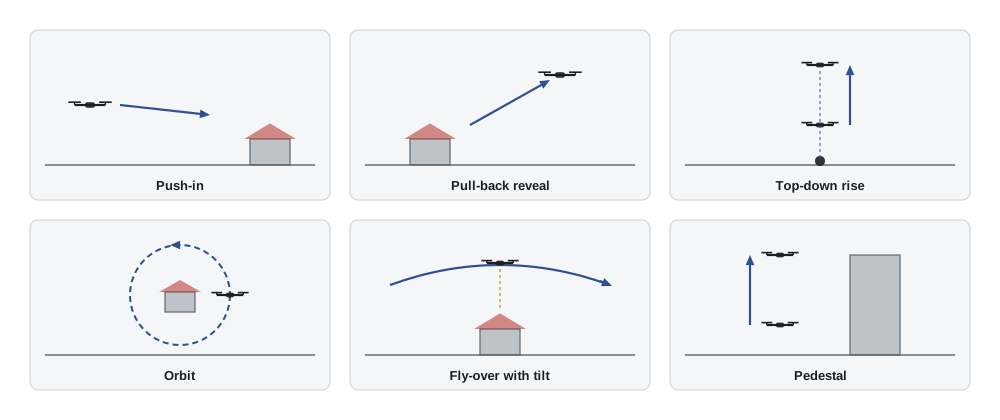
Aerial video has a vocabulary of moves that viewers recognize. Each tells the audience something. Combining drone movement with gimbal tilt and yaw gives smooth, purposeful shots.
- Fly-forward (push-in): the drone flies toward the subject, building anticipation.
- Pull-back (reveal): the drone flies backward and up, revealing the subject's surroundings, a classic opening or closing shot.
- Top-down rise: the camera points straight down while the drone climbs, turning a person or object into part of a growing pattern.
- Orbit: the drone circles the subject while keeping it centered, showing it from all sides. Many drones automate this.
- Fly-over with tilt: the drone flies over the subject while the camera tilts down to follow it, then reveals what lies beyond.
- Pedestal: the drone rises or descends vertically while facing the subject, like a crane shot.
- Tracking: the drone follows a moving subject, such as a car, cyclist or boat, from behind, beside or above.
Smoothness comes from slow, steady stick inputs, cine mode, adjusted exponential curves that soften the response near the center of the sticks, and planning each move with a clear start and end frame. A good aerial clip usually has a few seconds of steady movement before and after the key moment, so editors have room to cut. Automated flight modes such as waypoints, orbits and tracking can repeat moves precisely, but they need open space and attention, because obstacle sensing may not see everything.
Motion blur, vibration and rolling shutter
Even with a gimbal, aerial images can suffer from blur, vibration and distortion. Motion blur in stills happens when the drone moves during the exposure. For mapping and inspection, where every pixel must be sharp, the blur during an exposure should be less than about half a pixel of ground size.
Worked problem
Is the shutter fast enough?
A mapping drone flies at 8 m/s with a ground sample distance (GSD) of 2 cm per pixel. At 1/500 s, how many pixels of blur does it produce, and what shutter speed would keep blur below half a pixel?
Show solution
- Distance moved: 8 × (1/500) = 0.016 m = 1.6 cm.
- Blur = 1.6 ÷ 2 = 0.8 pixels.
- For 0.5 pixel: t = 0.5 × 0.02 ÷ 8 = 0.00125 s = 1/800 s.
Answer: 0.8 pixels at 1/500 s; a shutter of about 1/800 s or faster, or a slower flight speed, keeps blur under half a pixel.
Vibration from damaged propellers or loose gimbal dampers shows up as jitter or a wobbling "jello" effect in video. Rolling shutter, common on drone cameras, reads the sensor line by line, so fast pans, vibration or fast-moving subjects can skew vertical lines or make propellers look bent. Mechanical shutters, available on some mapping and professional drones, avoid rolling shutter distortion in stills. Balanced propellers, slower pans and appropriate shutter speeds reduce these problems.
Panoramas
Most drones can shoot panoramas automatically: a horizontal pan of several frames, a vertical panorama, a wide-angle composite, or a full spherical (360°) panorama that covers everything around and below the drone, used in virtual tours. For manual panoramas, the photographer keeps the drone hovering in one place, locks exposure and white balance, overlaps frames by about 30 to 50 percent and shoots in RAW. Software then stitches the frames. Spherical panoramas often leave a hole straight up where the drone cannot point the camera; software fills the sky or the photographer adds a logo or patch.
Worked problem
How many frames for a horizontal panorama?
A drone camera has a 74° horizontal angle of view in landscape orientation. The photographer wants a 180° panorama with 40 percent overlap between frames. How many frames are needed?
Show solution
- Each new frame adds 60 percent of 74° = 44.4° of new view.
- The first frame covers 74°; the remaining 180 − 74 = 106° needs 106 ÷ 44.4 ≈ 2.4 more frames.
- Round up: 1 + 3 = 4 frames.
Answer: Four frames, or five for safety with a little extra on each end.
Time-lapse and hyperlapse
A time-lapse from a hovering drone shows clouds moving, tides flowing or traffic streaming, compressed into seconds. Because a drone can hover only for one battery, aerial time-lapses are short in real time, often 10 to 20 minutes producing a few seconds of video. A hyperlapse moves the drone slowly along a path while shooting at intervals, combining movement and time compression. Many drones automate hyperlapses with circling, course-lock or waypoint paths, and stabilize the result in the camera.
Worked problem
Planning a cloud time-lapse
A photographer can hover for 18 minutes and wants a 6-second clip at 25 frames per second. What interval should the camera use?
Show solution
- Frames needed: 6 × 25 = 150.
- Shooting time: 18 × 60 = 1,080 s.
- Interval: 1,080 ÷ 150 = 7.2 s.
Answer: An interval of about 7 seconds gives 150 frames, or 6 seconds of video, in one battery.
Reviewing and backing up in the field
Before leaving a site, the photographer should review key images at 100 percent on a laptop or tablet where possible, checking focus, exposure, blur and that the shot list is complete. Coming back for a missed shot can cost a whole day, a new permit or a second airspace authorization. Files should be copied from cards to at least two places, such as a laptop and an external drive, before the cards are reused (see the workflow lessons in earlier courses).
Common mistakes
MistakeRaising ISO to get a fast shutter in good light.
InsteadKeep ISO at base and use shutter speed and ND filters to control exposure.
MistakeShooting video at 1/2,000 s in daylight without ND filters.
InsteadUse an ND filter to reach roughly a 180-degree shutter for natural motion blur.
MistakeJerky stick movements during video.
InsteadUse cine mode, softer exponential curves and planned start and end frames.
MistakeFlying a mapping mission with a shutter too slow for the speed.
InsteadCheck blur against GSD and slow the drone or raise the shutter speed.
MistakeLeaving the site without reviewing images at full size.
InsteadCheck focus, exposure and the shot list before packing up.
Summary and key terms
- Fixed-aperture drone cameras control exposure with shutter speed, ISO and ND filters; keep ISO low.
- RAW gives the most latitude; bracketing covers bright skies and dark ground.
- The 180-degree shutter rule and ND filters give natural motion blur in video.
- File size equals bitrate times seconds divided by 8,000 for gigabytes.
- Push-ins, pull-backs, top-down rises, orbits, fly-overs, pedestals and tracking shots form the aerial vocabulary.
- Blur in pixels equals ground speed times shutter time divided by GSD.
- Panoramas, time-lapses and hyperlapses need overlap, locked exposure and planned intervals.
Practice problems
Work each problem on paper first, then reveal the answer to check.
What shutter speed follows the 180-degree rule at 30 fps?
Show answer
About 1/60 s.
How many stops does an ND16 filter cut?
Show answer
Four stops.
Correct exposure is 1/800 s; the target is 1/50 s. Which ND?
Show answer
800 ÷ 50 = 16, so ND16 (4 stops).
How large is 10 minutes of 4K video at 100 Mb/s?
Show answer
100 × 600 ÷ 8,000 = 7.5 GB.
Name the move in which the drone flies backward and up to show the surroundings.
Show answer
A pull-back or reveal.
A drone at 6 m/s with GSD 3 cm uses 1/250 s. How much blur?
Show answer
6 × 0.004 = 2.4 cm, so 0.8 pixels.
Why shoot RAW on a drone?
Show answer
More latitude for highlights, shadows, white balance and noise.
What overlap is recommended for manual panoramas?
Show answer
About 30 to 50 percent.
A 12-minute hover should give a 5-second clip at 25 fps. What interval?
Show answer
125 frames; 720 ÷ 125 ≈ 5.8 s.
What causes the jello effect?
Show answer
Vibration, often from damaged propellers or loose dampers, combined with rolling shutter.
Lesson quiz · 5 questions
Score 60% or more to complete this lesson.
Create a free account to save your progress, take quizzes and earn a certificate.