
MSBA-360 · Lesson 5 of 12 · 18 min
Dependency graph
▶ Video coming soon A video version of this lesson is on the way.
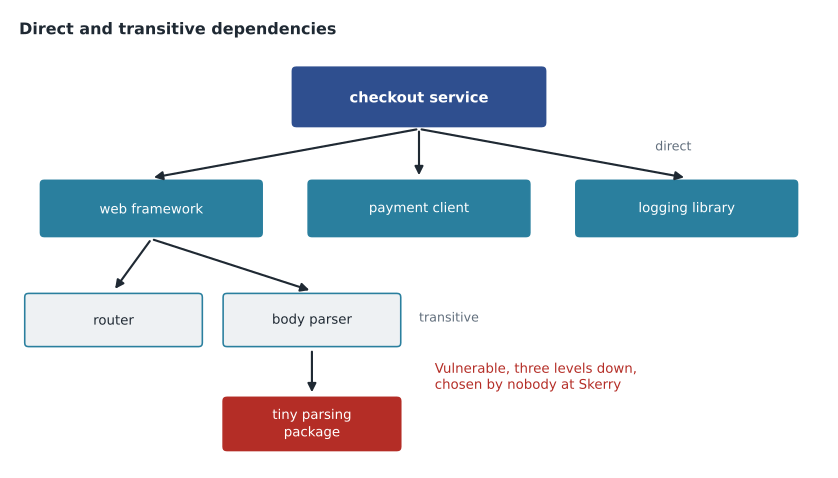
With the secret work under way, the sessions turned to the larger half of the course: software supply chain security. Wilhelmus Moravec-Oduro, who ran Skerry's release engineering, opened the fifth session with an exercise. He asked each team lead to write down how many open source packages their main service depended on. The guesses ranged from 30 to 200. Then he showed them the dependency graph for the checkout service: 41 direct dependencies and 1,287 packages in total once everything those 41 depended on was counted.
"You did not choose most of what you run," Wilhelmus said. "Your dependencies chose it for you. Supply chain security starts with seeing that."
What the dependency graph is
The dependency graph is GitHub's record of the packages a repository depends on. GitHub builds it by reading the manifest and lock files in the repository: files such as package.json and package-lock.json for npm, requirements.txt or poetry.lock for Python, pom.xml for Maven, Gemfile.lock for Ruby, go.mod for Go and the project files for .NET. For each dependency it records the package name, the ecosystem, the version or version range and whether the dependency is direct, named in a manifest, or transitive, pulled in by another dependency.
The graph also records GitHub Actions used in workflows, treating each action as a dependency of the repository. That matters because a compromised or vulnerable action runs with the workflow's permissions. Dependabot can alert on vulnerable actions and propose updates to them, and MSBA-291 showed how lockfiles and SHA pinning tie actions to specific commits.
Lock files matter
A manifest usually lists version ranges, such as any version of a library from 4.2 upward within the 4 series. A lock file records the exact version that was actually resolved. When a lock file is present, the dependency graph can report exact versions and complete transitive dependencies. When only a manifest is present, the graph may know only the range and only the direct dependencies, and it cannot be sure which version is in use.
Wilhelmus found that 70 of Skerry's Python repositories had a requirements file with unpinned ranges and no lock file. Their dependency graphs showed direct dependencies only. That meant Dependabot could not alert reliably on vulnerabilities in their transitive dependencies. Adding lock files became part of the baseline standard.
| Ecosystem | Typical manifest | Typical lock file | Graph detail without the lock file |
|---|---|---|---|
| npm | package.json | package-lock.json or yarn.lock | Direct dependencies and ranges only |
| Python (pip, Poetry) | requirements.txt or pyproject.toml | poetry.lock or a fully pinned requirements file | Direct dependencies and ranges only |
| Maven | pom.xml | Resolved at build time | Direct and some declared transitive dependencies |
| Go | go.mod | go.sum | Module requirements |
| Ruby | Gemfile | Gemfile.lock | Direct dependencies only |
Static parsing and build-time resolution
Reading manifest files is static analysis: GitHub looks at the files without running a build. For some ecosystems that cannot give a complete picture. Maven and Gradle resolve many transitive dependencies only when a build runs, and some projects generate their manifests during the build. For these cases GitHub offers two ways to add dependencies that a build discovers.
Automatic dependency submission runs a GitHub-managed workflow after builds for supported ecosystems, such as Maven, Gradle and some others, and submits the resolved dependency list to the graph. It is turned on in the repository's code security settings and uses GitHub Actions minutes. The dependency submission API lets any build system, including one outside GitHub, send a snapshot of the dependencies it resolved. Several build tools publish actions that call the API. Submitted dependencies appear in the graph alongside parsed ones and receive Dependabot alerts in the same way.
name: Submit Gradle dependencies
on:
  push:
    branches: [main]
permissions:
  contents: write
jobs:
  submit:
    runs-on: ubuntu-latest
    steps:
      - uses: actions/checkout@v4
      - uses: actions/setup-java@v4
        with:
          distribution: temurin
          java-version: "21"
      - uses: gradle/actions/dependency-submission@v4
Turning the graph on and viewing it
The dependency graph is on by default for public repositories. For private and internal repositories it must be enabled, by the repository administrator or, better, through a security configuration; enabling it is free. Skerry's baseline configuration turned it on everywhere, so every repository had a graph from the day it was migrated.
In a repository, the graph appears under Insights, on the Dependency graph page. Its Dependencies tab lists every package by ecosystem with its version and any known vulnerabilities, and can be filtered and searched. For public repositories, a Dependents tab shows other public repositories and packages that depend on this one, which matters for open source maintainers deciding how widely a fix needs to be announced. The same page offers an export of a software bill of materials, covered in lesson 9.
Across many repositories, the organization's dependency insights view in the security overview shows which packages are used where, with their licenses and vulnerabilities. Wilhelmus used it to answer a question that had come up repeatedly in incidents: which of our repositories use this package, and at which version? Before the migration, answering that had taken a week of messages; now it took a search.
Worked problem
Finding every use of a package
A security bulletin warns about a logging library. Freya wants to know which Skerry repositories use it, directly or transitively, and at which versions, within the hour. How does Wilhelmus answer?
Show solution
- He opens the organization's dependency view in the security overview and searches for the package name.
- The results list 46 repositories, with the version each one resolves and whether the dependency is direct or transitive.
- He filters by the data-classification custom property to find the 9 confidential repositories first.
- He exports the list for the incident channel and notes the 5 Python repositories without lock files, where the graph shows only direct dependencies and a transitive use could be missing.
Limits of the graph
The dependency graph shows what GitHub can see. It does not see dependencies that are copied into a repository as source files, a practice called vendoring, unless the vendored package also has a manifest the graph understands. It does not see binaries downloaded during a build from a URL, packages installed by a container base image, or system libraries installed by a script. It also knows nothing about whether a dependency is actually used at run time; a package listed for development tooling is shown just like one that ships to production, although the graph does mark development dependencies where the ecosystem records them.
These gaps are why release engineering teams also scan container images and build outputs with other tools and feed the results back through the dependency submission API or SARIF, and why attestations, in lesson 10, record exactly what went into a build. For most application code, though, the manifest-based graph is complete enough to drive alerts and updates.
Who can see the graph
Anyone with read access to a repository can see its dependency graph, because knowing what a project depends on is part of working on it. Vulnerability information shown alongside the graph follows the same visibility as Dependabot alerts, which by default are visible to people with write, maintain or admin access and to security managers. That distinction surprised some Skerry developers: they could see that a repository used a package, but not, without the right role, the list of alerts against it.
The graph as the foundation
Every feature in the next five lessons depends on the graph. Dependabot alerts compare the graph with the GitHub Advisory Database. Security updates and version updates change the manifests and lock files the graph reads. Dependency review compares the graph before and after a pull request. The SBOM is an export of the graph. If the graph is incomplete, all of those are incomplete too, which is why Wilhelmus made a complete graph the first item on his checklist for every repository.
By the end of the session the team had a short standard: every repository has the dependency graph enabled through the baseline configuration; every package-managed project commits a lock file; projects whose dependencies are resolved at build time use automatic dependency submission or a submission action; and container images are scanned separately. Wilhelmus estimated that the lock file work alone would take three weeks across the Python repositories.
The graph during a migration
Skerry's migration from the old organizations had a side effect on the dependency graph that Wilhelmus had not expected. Repositories arrived with their full history, but the graph is built from the current default branch, so a repository whose default branch was an abandoned stub showed almost no dependencies, while its real code lived on a long-running branch. The platform team found 26 such repositories by comparing graph sizes before and after migration and asked their owners to fix the default branch. A graph that looks too small is as much a warning sign as one that looks too large.
Monorepos and multiple manifests
Many of Skerry's repositories contained more than one project. The store-systems monorepo held a point-of-sale application, three shared libraries and a set of command-line tools, each with its own manifest. The dependency graph handles this by reading every supported manifest it finds and recording which manifest each dependency came from. In the graph's view, dependencies are grouped by manifest path, and Dependabot alerts name the manifest, so a vulnerability in one tool's dependencies does not appear to affect the whole repository.
That helps triage, but it also means that the configuration for Dependabot updates, covered in lesson 7, has to list each directory that contains a manifest. Wilhelmus found that the store-systems monorepo's update configuration covered only the root directory, so the three libraries had never received version updates. Listing all four directories was a one-line change with a large effect.
Dependency graph data in other tools
Because the graph is available through the REST and GraphQL APIs, other tools can use it. Skerry's internal developer portal, which listed every service with its owner, began showing each service's direct dependencies and any open high-severity alerts, pulled nightly from the API. That made the information visible to engineering managers who rarely opened GitHub's security pages. Wilhelmus also used the API to build a small report for the architecture board showing how many different versions of each major framework were in use. The answer, eleven versions of one web framework across 300 services, started a conversation about standardization that the security alerts alone had never started.
The graph and private packages
Skerry published a number of internal packages to GitHub Packages and to its own npm scope. Those packages appear in the dependency graph like any other dependency, but because they are private, the GitHub Advisory Database knows nothing about them. A vulnerability in an internal library will not produce a Dependabot alert unless the team that owns it publishes a repository security advisory for it. Wilhelmus asked the owners of the ten most widely used internal packages to treat security fixes in them the way open source maintainers do: publish an advisory, so that every consuming repository is told.
Checking graph health
Wilhelmus ended the session with a short health check that every team could run on its own repositories: does the dependency graph list roughly the number of packages you expect, does it include transitive dependencies, does every directory with a manifest appear, and do the versions match what is deployed? A team that answers no to any of those has found a gap before an incident does. The check took most teams under ten minutes per repository, and the platform team turned the first three questions into an automated report that ran every week.
Common mistakes
MistakeAssuming the dependency graph shows every package a service runs.
InsteadIt shows what manifests, lock files and submissions describe; vendored code, base images and downloaded binaries need other tools.
MistakeCommitting manifests without lock files.
InsteadCommit lock files so the graph has exact versions and transitive dependencies.
MistakeRelying on static parsing for Maven or Gradle projects.
InsteadUse automatic dependency submission or the dependency submission API for build-time resolution.
MistakeForgetting that GitHub Actions are dependencies.
InsteadTreat actions like packages: track, pin and update them.
Summary and key terms
- The dependency graph records a repository's direct and transitive dependencies from manifests, lock files and submitted snapshots.
- Lock files give exact versions and complete transitive dependencies; manifests alone give ranges and direct dependencies.
- Automatic dependency submission and the dependency submission API add dependencies resolved at build time.
- The graph is on by default for public repositories and free to enable for private ones; GitHub Actions are included.
- Dependabot alerts, updates, dependency review and SBOM export all depend on a complete graph.
- Dependency graph
- GitHub's record of the packages and actions a repository depends on.
- Manifest
- A file declaring a project's dependencies, often with version ranges.
- Lock file
- A file recording the exact resolved versions of all dependencies.
- Direct dependency
- A package named in a project's manifest.
- Transitive dependency
- A package pulled in by another dependency.
- Dependency submission API
- An API for sending a build's resolved dependencies to the graph.
- Automatic dependency submission
- A GitHub-managed workflow that submits build-resolved dependencies for supported ecosystems.
- Vendoring
- Copying a dependency's source code into a repository.
Practice problems
Work each problem on paper first, then reveal the answer to check.
Why can a manifest alone give an incomplete dependency graph?
Show answer
It often lists ranges and only direct dependencies; the lock file gives exact versions and transitive dependencies.
How can a Gradle project get its build-resolved dependencies into the graph?
Show answer
Through automatic dependency submission or an action that uses the dependency submission API.
Where in a repository is the dependency graph shown?
Show answer
Under Insights, on the Dependency graph page.
Lesson quiz · 5 questions
Score 60% or more to complete this lesson.
Create a free account to save your progress, take quizzes and earn a certificate.