
MSBA-360 · Lesson 2 of 12 · 18 min
Secret scanning and alerts
▶ Video coming soon A video version of this lesson is on the way.
The second session started with one of the 214 active credentials from Freya's slide. It was a cloud storage access key, committed in 2021 to a repository that built product images for Skerry's web shop. The developer who committed it had left the company. The repository had been on the old Enterprise Server appliance until October, when it was migrated with its full history, and secret scanning had found the key within an hour of the migration finishing.
"This is what secret scanning is good at," Seraphine said. "It reads everything, including history nobody has looked at in years. What it cannot do is decide what to do next. That part is ours." The rest of the session worked through how secret scanning finds secrets, what an alert contains, and how an alert moves from open to closed.
What secret scanning looks for
Secret scanning examines the contents of a repository for strings that look like credentials: API keys, tokens, private keys, passwords and connection strings. It scans the entire Git history on every branch when it is first turned on, and then scans every new push. It also scans places outside the code where secrets often end up: issue and pull request titles, descriptions and comments, discussions, wikis, and, on GitHub.com, the contents of GitHub Actions logs and gists in some cases. The exact list of scanned locations grows over time, so check GitHub's documentation for the current set.
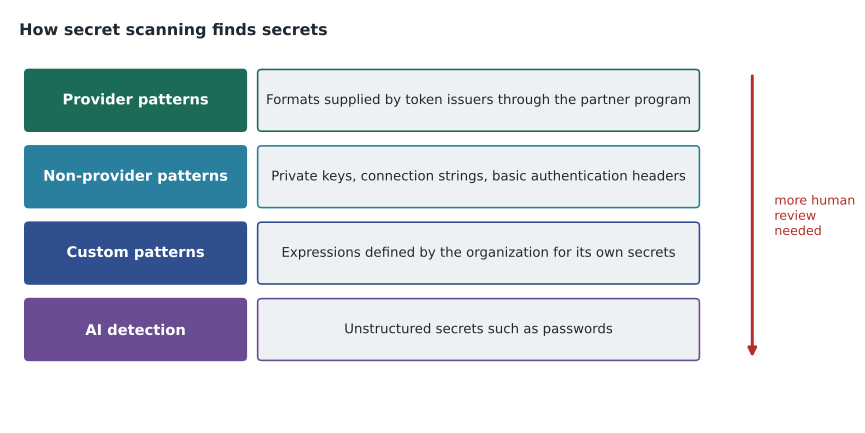
Detection works through patterns. Most are provider patterns, maintained with the companies that issue the secrets. Through the secret scanning partner program, a provider such as a cloud platform or payment service gives GitHub the format of its tokens. When a token in that format appears in a public repository, GitHub notifies the provider, who can revoke it automatically. Many providers revoke leaked tokens within minutes, which is why a key pushed to a public repository by mistake often stops working before anyone at the company notices.
Beyond provider patterns, GitHub detects non-provider patterns: generic credentials such as private keys, HTTP basic authentication headers, database connection strings and generic API keys whose format is not tied to one provider. Because they are less distinctive, non-provider patterns produce more false positives, and they are shown separately so teams can triage them separately. GitHub also uses Copilot secret scanning, an AI model that finds unstructured secrets such as passwords that follow no fixed format. Finally, organizations can define their own custom patterns for credentials unique to their systems; lesson 4 covers those.
Public and private repositories behave differently
The GH-500 outline asks candidates to contrast secret scanning behavior for public and for private or internal repositories, and the difference is easy to state. In public repositories, secret scanning runs automatically for free. Secrets that match partner patterns are reported to the partner, and alerts are created for the repository's administrators. Push protection for users protects pushes from personal accounts by default.
In private and internal repositories, secret scanning runs only when the repository has Secret Protection enabled. Alerts go to the repository's security managers and administrators, not to the provider, because the provider has no reason to learn about secrets inside a private repository. Validity checks, custom patterns and the other premium features are available only with the license.
| Behavior | Public repository | Private or internal repository with Secret Protection |
|---|---|---|
| Who pays | Free | Licensed per active committer |
| Partner notification | Partner patterns are reported to the provider, which may revoke | Not reported to the provider |
| Alerts in the repository | Yes, for administrators | Yes, for administrators, security managers and configured recipients |
| Custom patterns and validity checks | Not available for free | Available |
| Push protection | Push protection for users by default; repository push protection can be enabled | Enabled through Secret Protection |
Inside an alert
Every detected secret becomes a secret scanning alert. The alert shows the secret type, the location of every occurrence (file, line and commit, or the issue or comment), the first commit where it appeared and who pushed it. For supported types it shows the result of a validity check: active, inactive or unknown. Some types also show extended metadata, such as the owner or scope of the token, when the provider makes it available. An alert covers a single secret value. If the same key appears in 30 files, there is one alert with 30 locations, not 30 alerts.
The alert lifecycle
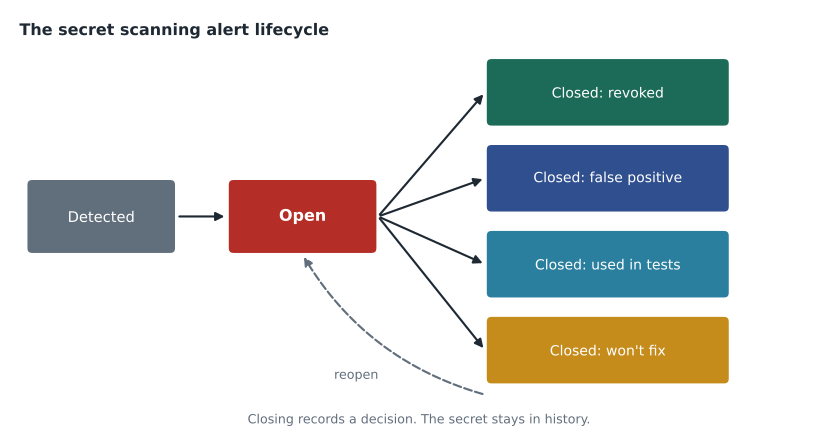
An alert is open until someone closes it. Closing requires choosing a reason, and the reasons matter for reporting later. The current reasons are revoked, meaning the secret no longer works; false positive, meaning the string is not a real secret; used in tests, meaning it is a deliberately fake or test-only value; and won't fix, meaning the team accepts the risk. A comment can be added to explain the decision. Closed alerts can be reopened if the decision turns out to be wrong.
Organizations can require approval before alerts are dismissed. With delegated alert dismissal, a developer who wants to close an alert must submit a dismissal request, and a reviewer from a designated team or role approves or denies it. This stops alerts from being closed as false positives just to make a dashboard look clean, which Freya had seen happen at a previous employer.
Two points about the lifecycle catch out newcomers. First, closing an alert does not remove the secret from the repository or its history; the string is still there, and anyone with read access can still find it. Second, closing an alert as revoked does not revoke anything. It records that someone has already revoked the secret with its provider. The order is always: revoke first, then close the alert.
Worked problem
Choosing the right closing reason
Seraphine works through four alerts with the web shop team. One is the 2021 cloud storage key, now rotated. One is a string in a unit test file that only looks like an API key because the test checks that the format is validated. One is a database password for a decommissioned server. The last is a token for a partner sandbox that the team says it will rotate next quarter.
Show solution
- The rotated cloud key: revoked, because the secret no longer works.
- The test string: used in tests, because it was never a working credential. If it matched a provider pattern exactly, the team should change the fixture to an obviously fake value.
- The decommissioned database password: revoked only if the account no longer exists anywhere. Seraphine checked; a replica still accepted it, so the alert stayed open until the replica account was removed.
- The sandbox token: it is still active, so closing it as won't fix is a risk decision for Freya, not for the developer. With delegated dismissal turned on, the request goes to her team.
Responding to an alert
The response to a real, active secret follows the same steps every time. Revoke or rotate the secret with the system that issued it, so that the leaked value stops working. Investigate whether it was used by anyone who should not have had it, using the provider's access logs. Replace the hard-coded value with a reference to a secret store, such as GitHub Actions secrets, a cloud key vault or an environment variable injected at run time. Close the alert with the right reason. Only then consider whether to remove the secret from history.
Removing a secret from Git history is expensive and usually unnecessary once the secret is revoked. Rewriting history changes every later commit identifier, breaks open pull requests and every clone, and does nothing about copies that already exist in forks, caches and people's laptops. GitHub's guidance is that revocation is the remedy; history rewriting is only worth it when the content itself must not remain, for example personal data. Lesson 12 returns to this decision.
| Step | Owner at Skerry | Evidence kept |
|---|---|---|
| Revoke or rotate | Team that owns the system the secret belongs to | Provider record of the rotation |
| Investigate use | Application security with the owning team | Provider access logs for the exposure period |
| Replace with a secret reference | Owning team | Pull request that removes the hard-coded value |
| Close the alert | Owning team, approved by security for won't fix | Alert closing reason and comment |
Who sees alerts and who is notified
Secret scanning alerts are visible to repository administrators, organization owners, people with the security manager role, and anyone given the specific fine-grained permissions to view or manage secret scanning alerts in a custom role. Others with write access do not see secret alerts by default, which is deliberate: a list of a company's leaked credentials is itself sensitive.
Notifications go to the people who can see alerts and who are watching the repository for security alerts, and to the person who committed the secret. Alerts can be assigned to a person, which became easier in December 2025 when GitHub let anyone who can dismiss or reopen an alert also manage its assignees. Organizations usually route alerts into a ticketing or chat system through webhooks or the REST API rather than relying on email; lesson 11 shows how Skerry did that.
# List open secret scanning alerts for an organization, newest first
gh api --paginate \
  "/orgs/skerry/secret-scanning/alerts?state=open&sort=created&direction=desc" \
  --jq '.[] | [.number, .repository.full_name, .secret_type_display_name, .validity] | @tsv'
Scanning outside the main code
Secrets leak into places developers do not think of as code. A developer pastes a failing command into an issue, complete with a token. A support engineer attaches a configuration file to a pull request comment. A workflow prints an environment variable into its log. Secret scanning's coverage of issues, pull request text, discussions and wikis exists because these are common routes.
Seraphine's team found that 9 of Skerry's active alerts were in issue comments, not code. Those were harder to clean up because the comment history keeps the original text even after editing. The fix was the same: revoke first. For comments, an administrator can delete the comment, and GitHub support can purge edit history in serious cases.
Reading the numbers
By the end of the session the web shop team had closed 61 of its 88 alerts. Freya asked them to report three numbers each week from then on: active secrets still open, median days from alert to revocation, and alerts dismissed as won't fix. The first number should fall to zero; the second should shrink; the third should stay small and every entry should have a named approver. Those measures, and how to prioritize when there are hundreds of alerts at once, are the subject of lesson 11.
Secrets that are not in Git
Seraphine closed the session by reminding the team that secret scanning sees only what is in GitHub. A credential that is mentioned in a chat channel, a ticketing tool or a shared document is just as exposed and will never raise an alert here. Skerry's security team asked its chat provider to turn on its own secret detection, and added a line to the onboarding guide: if you paste a credential anywhere other than a vault, treat it as leaked and rotate it. Developers found that rule easier to follow than any list of approved places, because it left no room for argument about whether a particular channel was private enough.
Priya took one more idea home to Tidewater. Even on a small team, someone should be named as the person who reads secret scanning alerts each week, because an alert that everyone can see is easy for everyone to assume someone else has handled. At Tidewater she gave the job to herself and to Dmitri on alternate weeks.
Common mistakes
MistakeClosing an alert as revoked before the secret has been rotated.
InsteadRevoke with the issuer first, then close the alert with the revoked reason.
MistakeRewriting Git history as the first response to a leaked key.
InsteadRevoke the key; consider history rewriting only when the content itself must not remain.
MistakeAssuming providers are told about secrets in private repositories.
InsteadPartner notification applies to public repositories; private alerts stay with the organization.
MistakeTreating one alert per file.
InsteadAn alert represents one secret value and lists all of its locations.
Summary and key terms
- Secret scanning examines the full history and every new push, plus issues, pull requests, discussions and wikis.
- Detection uses provider patterns, non-provider patterns, custom patterns and AI detection of passwords.
- In public repositories partner patterns are reported to providers, who may revoke them; private alerts stay inside the organization.
- Alerts are closed as revoked, false positive, used in tests or won't fix; closing does not change the repository.
- The response is revoke, investigate, replace, close; history rewriting is rarely needed once a secret is revoked.
- Secret scanning
- Detection of credentials in repository contents, history and related text.
- Provider pattern
- A pattern for a specific provider's tokens, maintained with that provider.
- Secret scanning partner program
- The arrangement under which providers receive reports of their tokens found in public repositories.
- Non-provider pattern
- A generic credential pattern, such as a private key or connection string.
- Validity check
- A check with the provider that reports whether a detected secret is still active.
- Delegated alert dismissal
- A setting that requires reviewer approval before secret alerts can be dismissed.
- Revocation
- Making a leaked secret stop working at the system that issued it.
Practice problems
Work each problem on paper first, then reveal the answer to check.
A key appears in five files. How many secret scanning alerts are created?
Show answer
One alert with five locations.
What is the first step when an alert shows an active cloud key?
Show answer
Revoke or rotate the key with the cloud provider.
Who receives reports of partner-pattern secrets found in public repositories?
Show answer
The provider that issued the secret.
Lesson quiz · 5 questions
Score 60% or more to complete this lesson.
Create a free account to save your progress, take quizzes and earn a certificate.