
MSBA-260 · Lesson 9 of 12 · 18 min
Dataflows and shared queries
▶ Video coming soon A video version of this lesson is on the way.
By November, three other analysts at Lumenvale were building reports, and Rupert noticed something worrying. Each of them had written their own Program query, each with slightly different cleaning, and their program counts did not agree. Kwabena's model said 34 active programs; the advancement office's said 35; the continuing studies report said 33. "We've solved the spelling problem four times and got four answers," Rupert said. "The cleaning needs to happen once, in one place, and everyone needs to use the result."
This lesson is about reusing Power Query work across models and people. It covers the load settings inside a single file, which match the PL-300 objective *configure data loading for queries*, and then the shared options: dataflows, which run Power Query in the cloud and store the results for many models to use, and shared semantic models, which share finished tables and measures.
Load settings inside one file
Not every query in a Power BI Desktop file should become a table in the model. Helper queries such as a base query referenced by others (lesson 5), the folder-combine helpers (lesson 7) and parameters exist only to feed other queries. Right-click a query in the Queries pane to see two settings:
| Setting | When on | When off |
|---|---|---|
| Enable load | The query is loaded as a table in the model | The query is evaluated only when another query needs it; it is not a model table |
| Include in report refresh | Refreshed when the report or model is refreshed | Kept at its last loaded data; skipped during refresh |
A query with Enable load off is shown in italics in the Queries pane. Kwabena turned it off for Enrollment Base and the Sample File helpers, which kept them out of the model's field list and saved memory. He turned off Include in report refresh for one table only: a historical mapping of program codes from the old student system that had not changed in years and came from a slow archive server. Turning that setting off has a risk: the table only changes when someone refreshes it deliberately, so it must be documented.
Queries can also be organized into groups in the Queries pane, which has no effect on the model but makes large files readable: Kwabena used groups called Parameters, Functions, Staging, Facts and Dimensions.
Why share Power Query work
Load settings tidy one file. They do nothing about four analysts cleaning the same data four times. For that, the cleaning must move out of individual files and into something everyone can connect to. Power BI and Fabric offer two levels of sharing:
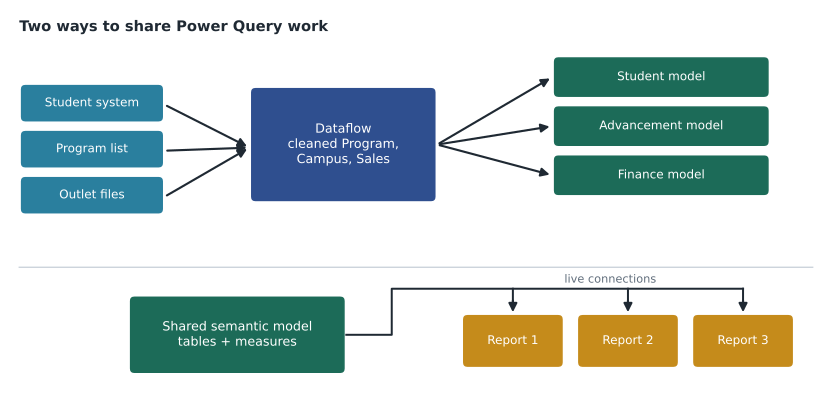
A dataflow shares prepared tables. Each model that uses them still has its own relationships and measures. A shared semantic model shares a finished model: tables, relationships and DAX measures, with reports connecting live. The two work together. Lumenvale's design became: dataflows for cleaned dimensions and shared facts, and one certified enrollment model built on them for the reports most people use.
Dataflows: Power Query in the cloud
A dataflow is a set of Power Query queries authored in Power Query Online, in a browser, and stored in a workspace. When it refreshes, it runs the queries in the cloud and stores the results. Semantic models then connect to those results with a dataflow connector, as if to any other source, so the cleaning happens once and every model receives the same tables.
There are two generations, and the exam and real projects both meet them:
| Dataflow Gen1 (Power BI dataflows) | Dataflow Gen2 (Fabric) | |
|---|---|---|
| Where results are stored | Internal storage managed by Power BI, or an organization's Azure Data Lake Storage | Data destinations such as a lakehouse, warehouse or SQL database, plus staging storage |
| Typical consumer | Power BI semantic models via the dataflows connector | Lakehouse or warehouse tables used by Direct Lake, SQL or Import models |
| Status | Legacy: no new features planned, existing dataflows keep working | Recommended by Microsoft for new projects |
| Requires | Power BI workspace; some features need Premium or capacity | A Fabric capacity |
Microsoft has announced that Dataflow Gen1 has reached the end of active innovation and is moving to a legacy state: existing Gen1 dataflows continue to work, Microsoft recommends Gen2 for all new projects, and it has committed to give Premium capacity customers at least 12 months' notice before Gen1 is retired. It provides a Save as Dataflow Gen2 option for individual dataflows and an API for bulk migration. Lumenvale built its new dataflows in Gen2 because the college already had a Fabric capacity for its lakehouse.
Dataflow Gen2 adds data destinations: each query can write its result to a table in a Fabric lakehouse, warehouse or other supported store, choosing whether to append or replace data on each refresh. That is what connects Power Query to Direct Lake (lesson 2): a Gen2 dataflow cleans the data and writes Delta tables to a lakehouse, and a Direct Lake model reads them without any Power Query of its own.
Designing a shared dataflow
Kwabena and Rupert designed the shared layer in stages, a pattern common enough to have names. A staging query lands raw data with minimal changes. A transformation query, which references staging, does the cleaning, typing and merging. Only transformation queries are loaded for consumers. Splitting the two makes failures easier to locate and lets the expensive source read happen once.
Worked problem
Moving a shared query into a dataflow
Kwabena's Program query in Power BI Desktop cleans program names, merges Maribeth's official list and flags inactive programs. Four models need it. How does he move it to a dataflow without rewriting it?
Show solution
- Open the Advanced Editor in Desktop and copy the query's M, or copy the query from the Queries pane.
- In the workspace, create a Dataflow Gen2, open Power Query Online and paste the query; recreate any parameters it uses.
- Set credentials for each source in the dataflow and, for the SharePoint list, sign in with an organizational account.
- Set a data destination, such as a lakehouse table named dim_program, and schedule the refresh.
- In each model, replace the local query with a connection to the lakehouse table, and endorse the dataflow so others can find it.
Answer: The M moves almost unchanged, because Power Query Online and Desktop share the same language. The work is in credentials, refresh scheduling and switching each model to the shared table.
Copying and pasting M between Desktop and dataflows works because both use the same Power Query engine and language. A few connectors and features differ between the two, so test after moving. Power Query Online can also export a query set as a Power Query template file (.pqt) to import elsewhere, a convenient way to move a set of queries between dataflows.
Refresh order and freshness
Sharing introduces a dependency: a model built on a dataflow is only as fresh as the dataflow's last refresh. If the dataflow refreshes at 6 a.m. and the model at 5 a.m., the model always shows yesterday's programs. Kwabena scheduled the dataflow first and the models after it, with a margin. In Fabric, a pipeline can run the dataflow and then refresh the semantic model in sequence, which avoids guessing at timings.
Endorsement: helping people find the right source
Sharing only works if people use the shared items instead of building their own. Power BI and Fabric support endorsement: owners can mark an item as Promoted to say it is ready for others to use, and people authorized by the tenant administrator can mark it Certified to say it meets the organization's quality standards. Endorsed items rise to the top of search in the OneLake catalog and in Get data. Rupert certified the Program dataflow and the enrollment semantic model, and asked the other analysts to remove their own Program queries. Their counts agreed the following week.
Sharing a semantic model
The highest level of reuse is a shared semantic model: one model, many reports. A report author connects to it with a live connection and builds visuals without any Power Query or model work, or uses DirectQuery for Power BI semantic models to extend it with local tables (lesson 2). To build a report on a shared model, a user needs Build permission on it. The model's owner remains responsible for its Power Query, refresh and quality, which keeps the cleaning in one place.
Linked and computed tables
Within dataflows, one query can use another's result. In Gen1, a linked table reads a table from another dataflow, and a computed table performs calculations on a table already stored by a dataflow; both need a Premium or Fabric capacity. In Gen2, the equivalent is to reference other queries within the same dataflow and to read tables that other dataflows have written to a lakehouse or warehouse. The design principle is the same as references inside a single file (lesson 5): clean once, build on the clean result.
Who owns the shared layer
Shared data preparation changes who is responsible for what. When Kwabena's Program query lived in his own file, he owned it. Once it became a certified dataflow, four models depended on it, and a careless change could break all of them. Rupert set three rules. The shared dataflows lived in a separate workspace, Lumenvale Data, where only the data team could edit. Changes were made in a development copy, tested, and only then applied to the shared version. And the dataflow's description listed its owner, its sources, its refresh schedule and the models that used it, which Power BI's lineage view also showed as a diagram of sources, dataflows, semantic models and reports.
The lineage view, available from a workspace, became Kwabena's favorite tool for impact analysis. Before changing the Program dataflow, he opened lineage, saw every model and report downstream, and warned their owners. Fabric's impact analysis feature does the same for a single item, listing the workspaces and items that depend on it.
Choosing where to put Power Query
With all these options, a recurring question is where a particular piece of preparation should live. Kwabena summarized it for colleagues in four lines. Preparation that only one report needs stays in that report's semantic model. Preparation that several models need moves to a dataflow. Preparation for large lake-centric solutions goes into Dataflow Gen2, notebooks or pipelines that write Delta tables for Direct Lake. And a finished model that many reports need is shared as a certified semantic model. Most organizations use all four, and the art is keeping each piece of cleaning in exactly one place.
Exam patterns for loading and sharing
Questions on configuring data loading usually describe a query that should not appear in the model, or one that should not refresh, and ask which setting to change: Enable load for the first, Include in report refresh for the second. Questions on sharing describe several teams cleaning the same data differently and ask how to centralize it; the answer is usually a dataflow for shared tables or a shared semantic model for shared measures. If the scenario mentions a lakehouse and Direct Lake, Dataflow Gen2 with a data destination is the likely fit.
A worked example of load settings
Kwabena's enrollment model file had fourteen queries by the end of the term, and only six were loaded. The two parameters, ServerName and DatabaseName, are never loaded. The Enrollment Base query, referenced by three others, had Enable load off. The three folder-combine helpers were not loaded. The historical code mapping was loaded but had Include in report refresh off, documented in its description. That left Enrollment, Registration, Program, Student, Section and Data Quality as the model's tables, which is what users saw in the Fields pane. A tidy field list is not just cosmetic: every unnecessary table is something a report author may use by mistake.
Common mistakes
MistakeLeaving helper and base queries loaded as model tables.
InsteadTurn off Enable load for queries that only feed other queries.
MistakeTurning off Include in report refresh without telling anyone.
InsteadUse it only for static tables, and document that the table refreshes manually.
MistakeStarting new projects on Dataflow Gen1.
InsteadGen1 is legacy; Microsoft recommends Dataflow Gen2 for new work.
MistakeScheduling the model refresh before its dataflow.
InsteadRefresh the dataflow first, or chain them in a pipeline.
Summary and key terms
- Enable load decides whether a query becomes a model table; Include in report refresh decides whether it refreshes.
- Dataflows share cleaned tables with many models; shared semantic models share tables and measures with many reports.
- Dataflow Gen1 is now legacy; Dataflow Gen2 in Fabric is recommended for new projects and writes to data destinations.
- Gen2 dataflows can write Delta tables to a lakehouse for Direct Lake models.
- Endorse shared items as Promoted or Certified so people find and trust them.
- Enable load
- The query setting that decides whether a query is loaded into the model.
- Include in report refresh
- The query setting that decides whether a query refreshes with the model.
- Dataflow
- A set of Power Query queries run in the cloud whose results other items can use.
- Data destination
- In Dataflow Gen2, the table a query's result is written to.
- Endorsement
- Marking an item as Promoted or Certified so others can find and trust it.
- Build permission
- The permission needed to create reports on a shared semantic model.
Practice problems
Work each problem on paper first, then reveal the answer to check.
A base query feeds three others and should not appear in the field list. What do you change?
Show answer
Turn off Enable load for the base query.
Why did Lumenvale build new dataflows in Gen2?
Show answer
Gen1 is legacy with no new features, Gen2 is recommended for new projects, and the college had a Fabric capacity.
What permission does a report author need to connect to a shared model?
Show answer
Build permission on the semantic model.
Lesson quiz · 5 questions
Score 60% or more to complete this lesson.
Create a free account to save your progress, take quizzes and earn a certificate.